1. પરિચય
This manual provides detailed instructions for the installation, operation, and maintenance of the FERMAX Marine Panel Duox Plus ST1 AP101. This outdoor security panel is designed for reliable communication and access control in various environments. Please read this manual thoroughly before installation and use to ensure proper functionality and safety.
2. સલામતી માહિતી
ઉપકરણને નુકસાન ન થાય અથવા કર્મચારીઓને ઇજા ન થાય તે માટે નીચેની સલામતી સાવચેતીઓનું પાલન કરો:
- ઇલેક્ટ્રિકલ સલામતી: Installation must be performed by qualified personnel in accordance with local electrical codes. Disconnect power before performing any wiring or maintenance.
- પર્યાવરણીય પરિસ્થિતિઓ: The panel has an IP54 International Protection Rating, indicating protection against dust ingress and splashing water. Avoid direct high-pressure water jets.
- હેન્ડલિંગ: Handle the panel with care to avoid physical damage. Do not expose to extreme temperatures or corrosive substances.
- ફેરફારો: Do not attempt to modify or repair the unit yourself. Refer all servicing to authorized FERMAX technicians.
3. પેકેજ સામગ્રી
ખાતરી કરો કે બધી વસ્તુઓ પેકેજમાં હાજર છે:
- FERMAX Marine Panel Duox Plus ST1 AP101
- માઉન્ટિંગ સ્ક્રૂ અને એન્કર
- વાયરિંગ કનેક્ટર્સ
- ઝડપી શરૂઆત માર્ગદર્શિકા (જો લાગુ હોય તો)
- વોરંટી કાર્ડ (જો લાગુ હોય તો)
4. સેટઅપ અને ઇન્સ્ટોલેશન
The FERMAX Marine Panel Duox Plus ST1 AP101 is designed for surface mounting and wired connectivity. Ensure the installation location is suitable for outdoor use and provides adequate protection from direct impact.
4.1. પેનલ માઉન્ટ કરવાનું
- સ્થાન પસંદ કરો: Choose a flat, stable surface at an appropriate height for user interaction.
- માર્ક ડ્રિલિંગ પોઈન્ટ્સ: Use the panel as a template to mark the positions for the mounting screws.
- ડ્રિલ છિદ્રો: Drill pilot holes suitable for the provided screws and anchors.
- સુરક્ષિત પેનલ: Attach the panel to the wall using the mounting screws. Ensure it is level and securely fastened.
4.2. વાયરિંગ જોડાણો
The panel utilizes Duox Plus technology for simplified wiring. Refer to the system diagram for specific connections.
- પાવર સપ્લાય: Connect the appropriate power supply wires to the designated terminals. Ensure correct polarity.
- Duox Plus Bus: Connect the two-wire Duox Plus bus to the corresponding terminals on the panel and the indoor monitor/central unit.
- Lock Release: If connecting an electric lock, wire the lock release mechanism to the designated terminals.
- ગ્રાઉન્ડિંગ: ઇલેક્ટ્રિકલ સલામતી માટે યોગ્ય ગ્રાઉન્ડિંગની ખાતરી કરો.
મહત્વપૂર્ણ: All wiring should be done with the power supply disconnected. Consult a qualified electrician if you are unsure about any wiring procedures.
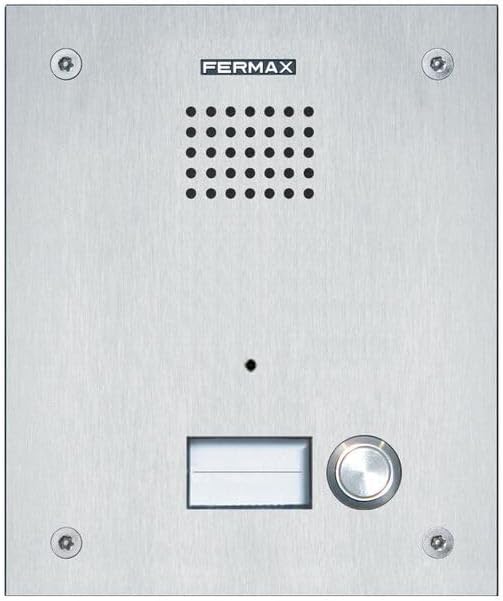
આકૃતિ 1: ફ્રન્ટ view of the FERMAX Marine Panel Duox Plus ST1 AP101, showing the speaker grille, camera lens, nameplate, and call button.
5. ઓપરેટિંગ સૂચનાઓ
Once installed and powered, the FERMAX Marine Panel is ready for operation.
૪.૧. કોલ કરવો
- Identify Recipient: Locate the desired recipient's name on the nameplate.
- Press Call Button: Press the call button corresponding to the recipient. The panel will initiate a call to the indoor monitor.
- સંચાર: Once the call is answered, two-way audio communication will be established. If equipped, video will also be transmitted to the indoor monitor.
5.2. Receiving a Call (Indoor Monitor)
When a visitor presses the call button on the outdoor panel, the indoor monitor will ring and display the visitor's video (if applicable). You can then answer the call and communicate with the visitor.
૪.૪. દરવાજો ખોલવો
During an active call, you can activate the electric lock release from the indoor monitor to grant access to the visitor.
6. જાળવણી
Regular maintenance ensures the longevity and optimal performance of your FERMAX Marine Panel.
- સફાઈ: Clean the stainless steel and steel surfaces with a soft, damp કાપડ. ઘર્ષક ક્લીનર્સ અથવા સોલવન્ટ્સ ટાળો જે ફિનિશ અથવા ઇલેક્ટ્રોનિક ઘટકોને નુકસાન પહોંચાડી શકે છે.
- કેમેરા લેન્સ: Gently wipe the camera lens with a microfiber cloth to remove dust or smudges.
- નિરીક્ષણ: Periodically check for any loose connections or signs of wear and tear. Ensure the mounting screws are tight.
- પર્યાવરણીય સંરક્ષણ: While the panel is IP54 rated, extreme weather conditions may require additional protective measures.
7. મુશ્કેલીનિવારણ
If you encounter issues with your FERMAX Marine Panel, refer to the following common problems and solutions:
| સમસ્યા | સંભવિત કારણ | ઉકેલ |
|---|---|---|
| No power to the panel. | Disconnected power supply, faulty wiring, power outage. | Check power connections, verify power supply, ensure circuit breaker is on. |
| No audio during a call. | Loose Duox Plus bus connection, faulty speaker/microphone. | Inspect Duox Plus wiring, ensure connections are secure. |
| No video on indoor monitor. | Camera lens obstructed, faulty camera, wiring issue. | Clean camera lens, check Duox Plus bus wiring. |
| Door lock not releasing. | Incorrect lock wiring, faulty lock mechanism, insufficient power. | Verify lock wiring, test lock mechanism independently, check power supply. |
If the problem persists after attempting these solutions, contact FERMAX technical support.
8. સ્પષ્ટીકરણો
| લક્ષણ | વિગત |
|---|---|
| મોડલ | એપી101 |
| બ્રાન્ડ | FERMAX |
| કનેક્ટિવિટી ટેકનોલોજી | વાયર્ડ (ડ્યુઓક્સ પ્લસ) |
| વાયરલેસ કોમ્યુનિકેશન ટેકનોલોજી | Wi-Fi (for potential integration with smart home systems, check specific model features) |
| સામગ્રી | સ્ટેનલેસ સ્ટીલ, સ્ટીલ |
| ઇન્ડોર/આઉટડોર વપરાશ | આઉટડોર |
| માઉન્ટિંગ પ્રકાર | સપાટી માઉન્ટ |
| આંતરરાષ્ટ્રીય સુરક્ષા રેટિંગ | IP54 |
| વિડિઓ કેપ્ચર ફોર્મેટ | MPEG-4 |
| પેકેજ પરિમાણો | 8.27 x 6.22 x 3.07 ઇંચ |
| ભલામણ કરેલ ઉપયોગો | આઉટડોર સુરક્ષા |
9. વોરંટી અને સપોર્ટ
9.1. વોરંટી માહિતી
FERMAX products are covered by a manufacturer's warranty. Please refer to the warranty card included in your package or visit the official FERMAX webવિગતવાર વોરંટી નિયમો અને શરતો માટે સાઇટ. વોરંટી દાવાઓ માટે ખરીદીનો પુરાવો રાખો.
9.2. ટેકનિકલ સપોર્ટ
For technical assistance, troubleshooting beyond this manual, or service requests, please contact FERMAX customer support:
- Webસાઇટ: www.fermax.com
- સંપર્ક માહિતી: સત્તાવાર વેબસાઇટ પર "અમારો સંપર્ક કરો" વિભાગનો સંદર્ભ લો. website for regional phone numbers and email addresses.


