પરિચય
This manual provides essential information for the safe and efficient operation of your TECNO Pova 5 Pro 5G smartphone. Please read it thoroughly before using your device to ensure optimal performance and longevity.

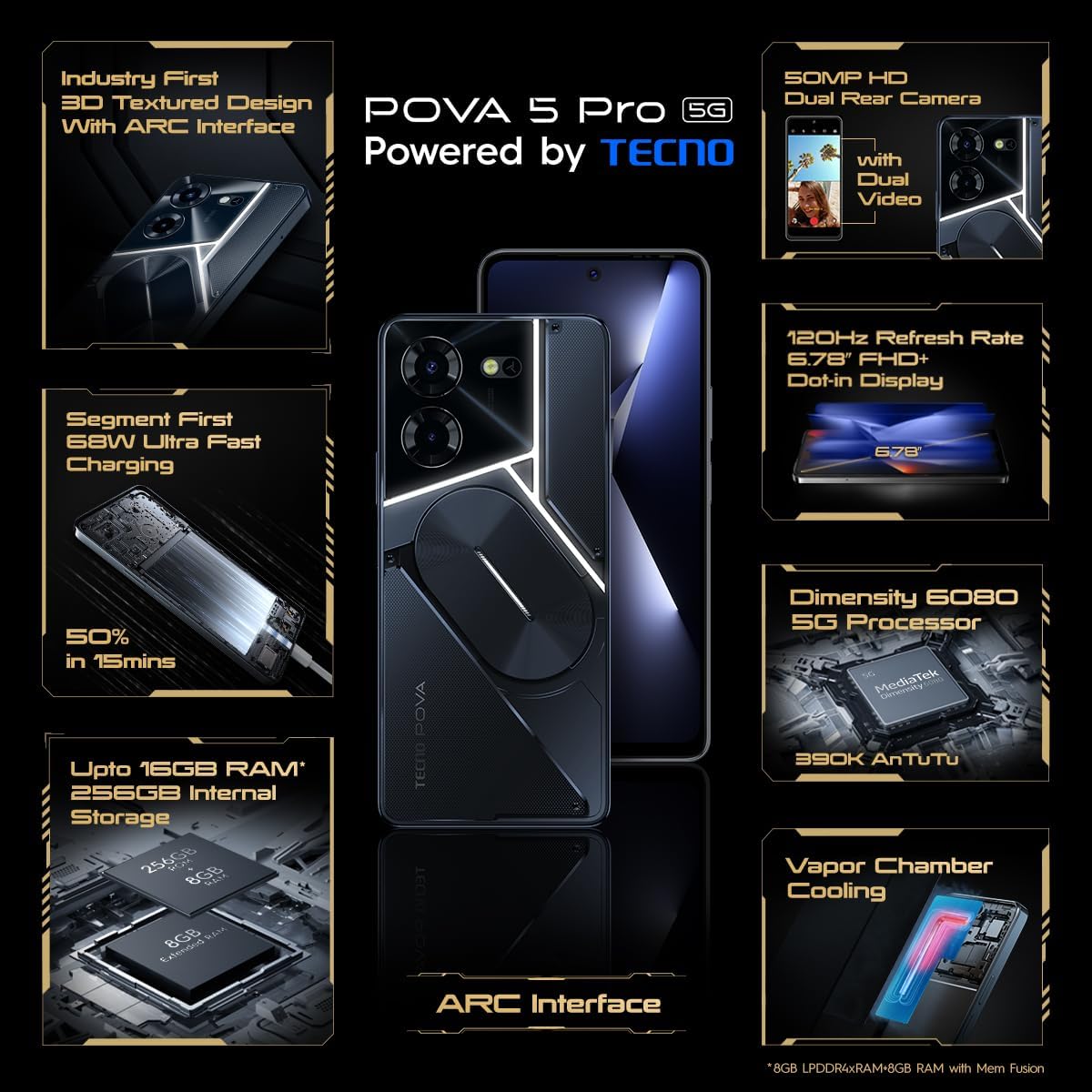
Image: The TECNO Pova 5 Pro 5G smartphone, showcasing its design and key feature of 68W Ultra Fast Charging.
બૉક્સમાં શું છે
ખાતરી કરો કે બધી વસ્તુઓ પેકેજિંગમાં હાજર છે:
- સ્માર્ટફોન
- 68 ડબલ્યુ પાવર એડેપ્ટર
- ટાઇપ-સી કેબલ
- TPU કવર
- સિમ ઇજેક્ટર ટૂલ

Image: A flat lay of the TECNO Pova 5 Pro 5G packaging contents, showing the smartphone, 68W power adapter, USB-C cable, TPU protective cover, and the SIM ejector tool.
સેટઅપ
પ્રારંભિક સેટઅપ
- સિમ/એસડી કાર્ડ દાખલ કરો: Locate the SIM tray on the side of the device. Use the provided SIM ejector tool to open the tray. Insert your Nano-SIM card(s) and/or microSD card into the designated slots. Ensure the tray is fully reinserted.
- પાવર ચાલુ: Press and hold the Power button (located on the right side) until the TECNO logo appears.
- ઓન-સ્ક્રીન પ્રોમ્પ્ટ્સને અનુસરો: The device will guide you through initial setup, including language selection, Wi-Fi connection, Google account setup, and security settings.
ઉપકરણ ચાર્જ કરી રહ્યું છે
The TECNO Pova 5 Pro 5G supports 68W Ultra Fast Charging.
- ફોનના તળિયે આવેલા ચાર્જિંગ પોર્ટ સાથે ટાઇપ-સી કેબલ કનેક્ટ કરો.
- કેબલના બીજા છેડાને 68W પાવર એડેપ્ટર સાથે જોડો.
- પાવર એડેપ્ટરને વોલ આઉટલેટમાં પ્લગ કરો.
- A full charge typically takes approximately 45 minutes, with 50% charge achievable in about 15 minutes.
છબી: એક સ્પષ્ટ મોરચો view of the TECNO Pova 5 Pro 5G smartphone, highlighting its display and front camera.
ઉપકરણનું સંચાલન
મૂળભૂત નેવિગેશન
- ટચસ્ક્રીન: પસંદ કરવા માટે ટેપ કરો, સ્ક્રોલ કરવા માટે સ્વાઇપ કરો, ઝૂમ કરવા માટે પિંચ કરો.
- પાવર બટન: Press to wake/sleep the screen. Press and hold to power off or restart.
- વોલ્યુમ બટનો: Adjust media volume, call volume, or ringtone volume.
કેમેરા વપરાશ
The device features a 50MP AI Dual Rear Camera and a 16MP Selfie Camera.
- હોમ સ્ક્રીન અથવા એપ ડ્રોઅરમાંથી કેમેરા એપ ખોલો.
- Select desired mode (Photo, Video, Portrait, etc.).
- ફોટા કેપ્ચર કરવા અથવા વિડિયો રેકોર્ડિંગ શરૂ/બંધ કરવા માટે શટર બટન દબાવો.
- Utilize AI enhancements for optimized scene recognition and image quality.
ARC Interface and Notifications
The TECNO Pova 5 Pro 5G features a unique multi-color ARC interface with backlighting.
- The ARC interface provides customizable light effects for notifications, incoming calls, gaming, and music playback.
- Access settings to personalize the light patterns and colors for different alerts.

છબી: પાછળનો ભાગ view of the TECNO Pova 5 Pro 5G, showcasing its distinctive 3D textured design and the illuminated ARC interface.

છબી: વિગતવાર view of the TECNO Pova 5 Pro 5G's ARC interface, illustrating the multi-color backlighting feature.
જાળવણી
- બેટરી સંભાળ: To prolong battery life, avoid exposing the device to extreme temperatures. Do not fully discharge the battery regularly.
- સફાઈ: સ્ક્રીન અને બોડી સાફ કરવા માટે નરમ, લિન્ટ-ફ્રી કાપડનો ઉપયોગ કરો. કઠોર રસાયણો અથવા ઘર્ષક સામગ્રીનો ઉપયોગ કરવાનું ટાળો.
- સૉફ્ટવેર અપડેટ્સ: Regularly check for and install system updates to ensure optimal performance, security, and access to new features. Navigate to Settings > System > System update.
- સંગ્રહ વ્યવસ્થાપન: સમયાંતરે બિનજરૂરી સાફ કરો fileપૂરતી સ્ટોરેજ સ્પેસ અને ડિવાઇસ સ્પીડ જાળવવા માટે, વપરાશકર્તાઓ અને એપ્લિકેશનો.
મુશ્કેલીનિવારણ
- ઉપકરણ ચાલુ નથી: Ensure the battery is charged. Connect the device to the charger for at least 15 minutes before attempting to power on again. If the issue persists, perform a forced restart by holding the Power button for 10-15 seconds.
- ચાર્જિંગ સમસ્યાઓ: Verify that the charging cable and adapter are securely connected and undamaged. Try using a different outlet.
- એપ ક્રેશ/ફ્રીઝિંગ: Close the problematic app and reopen it. If the issue continues, clear the app's cache and data in Settings > Apps. As a last resort, uninstall and reinstall the app.
- નબળી નેટવર્ક કનેક્ટિવિટી: Check if Airplane Mode is off. Restart the device. If using mobile data, ensure your SIM card is properly inserted and your data plan is active.
- ઓવરહિટીંગ: Avoid using the device in direct sunlight or during intensive tasks for extended periods. Close background applications.
વિશિષ્ટતાઓ
| લક્ષણ | સ્પષ્ટીકરણ |
|---|---|
| મોડેલનું નામ | Pova 5 Pro 5G |
| ઓપરેટિંગ સિસ્ટમ | એન્ડ્રોઇડ 13.0 |
| પ્રોસેસર | Dimensity 6080 (2.4 GHz Octa-Core) |
| રેમ | 8 GB (expandable up to 16 GB with Memory Fusion) |
| આંતરિક સંગ્રહ | 256 GB (UMCP) |
| ડિસ્પ્લે | 6.78-inch FHD+ Dot-in Display |
| તાજું દર | 120 હર્ટ્ઝ |
| રીઅર કેમેરા | 50 MP AI Dual Camera |
| ફ્રન્ટ કેમેરા | 16 MP Selfie Camera |
| બેટરી | 5000 mAh લિથિયમ-પોલિમર |
| ચાર્જિંગ | 68W Ultra Fast Charging |
| પરિમાણો | 16.9 x 7.7 x 16.9 સેમી |
| વજન | 214 ગ્રામ |
| કનેક્ટિવિટી | 5G (10 bands supported), NFC, Bluetooth 5.1 |

Image: An internal diagram or view of the TECNO Pova 5 Pro 5G, illustrating its vapor chamber cooling system for efficient heat dissipation.
વોરંટી અને આધાર
Your TECNO Pova 5 Pro 5G comes with a manufacturer's warranty. Please refer to the warranty card included in your product packaging for specific terms and conditions.
For technical support, service, or warranty claims, please contact TECNO customer service. TECNO maintains a large service network with over 1200 service centers in India.
You can find more information and support resources by visiting the official Tecno store on Amazon: Tecno Store


