1. પરિચય
This manual provides detailed instructions for the proper use and maintenance of your Arlec Remote SS3136. This remote control is specifically designed to operate the Arlec Wall Fan AWDC001HA, offering convenient and effortless control over your fan's functions. Please read this manual thoroughly before first use to ensure optimal performance and longevity of your device.
2. ઉત્પાદન સુવિધાઓ
- સરળ નિયંત્રણ: Utilizes Infrared technology for seamless communication with your Arlec Wall Fan AWDC001HA from up to 10 meters away.
- લાંબા સમય સુધી ચાલતી શક્તિ: Requires 3 alkaline batteries for extended use.
- આકર્ષક ડિઝાઇન: Finished in a sophisticated black color.
- બહુમુખી સુસંગતતા: Designed to control Arlec Wall Fans, specifically model AWDC001HA.
- સરળ કામગીરી: Features 3 intuitive buttons for easy fan control.
3. પેકેજ સામગ્રી
ખાતરી કરો કે બધી વસ્તુઓ પેકેજમાં હાજર છે:
- 1 x Arlec Remote SS3136
- 1 x Wall Mount Holder
- 2 x માઉન્ટિંગ સ્ક્રૂ
- 2 x વોલ પ્લગ
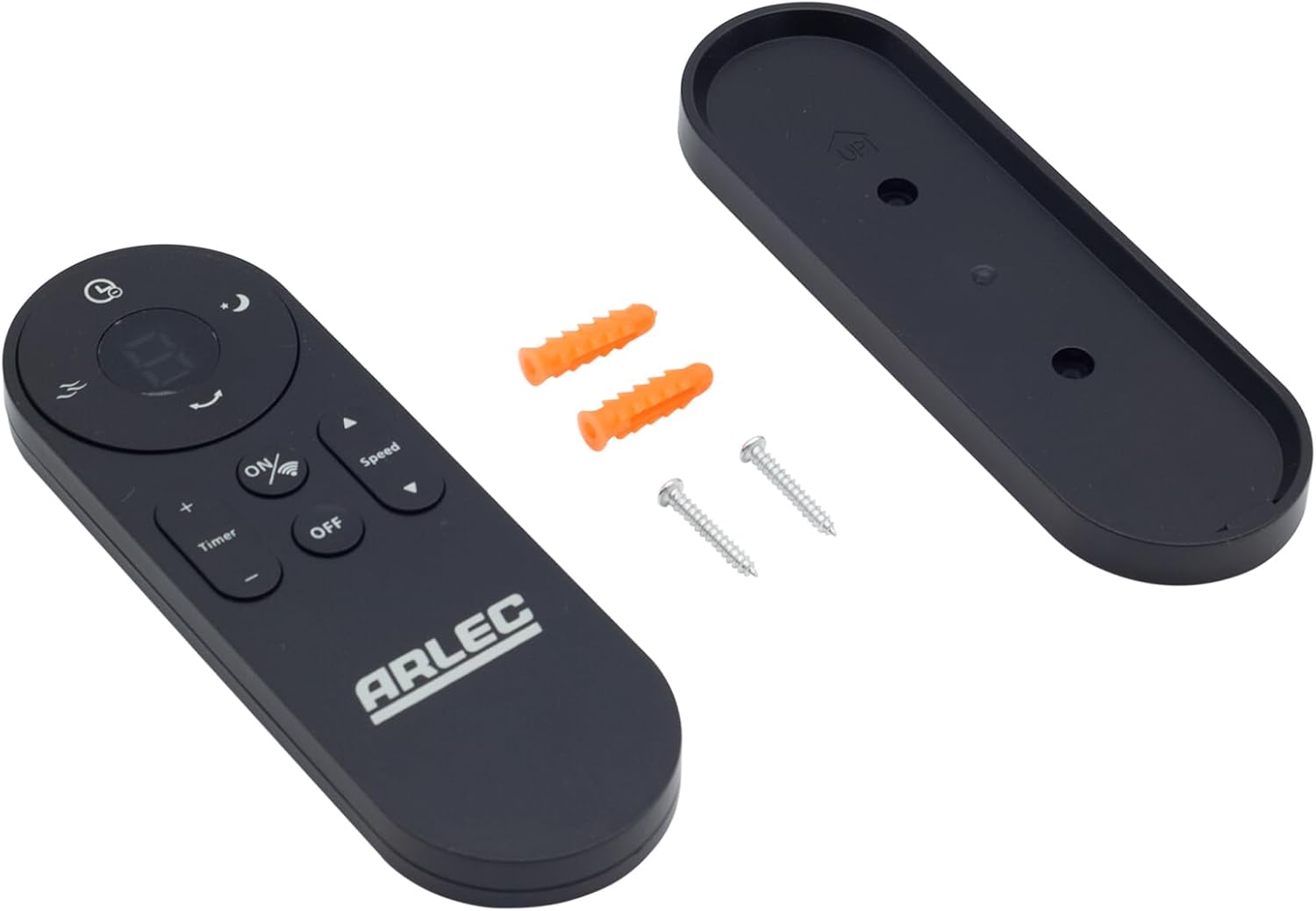
Image: Arlec Remote SS3136 shown with its included wall mount holder, two mounting screws, and two wall plugs, indicating the complete package contents.
4. સેટઅપ
4.1 બેટરી ઇન્સ્ટોલેશન
- રિમોટ કંટ્રોલની પાછળના ભાગમાં બેટરીનો ડબ્બો શોધો.
- બેટરી કમ્પાર્ટમેન્ટ કવર ખોલો.
- Insert 3 Alkaline batteries (not included) into the compartment, ensuring the correct polarity (+ and -) as indicated inside the compartment. The remote requires 3 Volts (DC).
- બેટરી કમ્પાર્ટમેન્ટ કવર સુરક્ષિત રીતે બંધ કરો.
૩.૩ વોલ માઉન્ટ ઇન્સ્ટોલેશન (વૈકલ્પિક)
- Choose a suitable location on a wall for the remote holder.
- Mark the positions for the two mounting screws using the holder as a template.
- Drill pilot holes at the marked positions. Insert the wall plugs if drilling into drywall or masonry.
- Secure the wall mount holder to the wall using the provided screws.
- Place the remote control into the installed holder for convenient storage.
5. ઓપરેટિંગ સૂચનાઓ
The Arlec Remote SS3136 features a simple 3-button layout for controlling your Arlec Wall Fan AWDC001HA. Ensure there is a clear line of sight between the remote and the fan's infrared receiver for optimal performance.

છબી: ક્લોઝ-અપ view of the Arlec Remote SS3136, highlighting its three main control buttons: ON/OFF, Speed, and Timer.
- ચાલુ/બંધ બટન: પંખો ચાલુ કે બંધ કરવા માટે આ બટન દબાવો.
- સ્પીડ બટન: Use this button to cycle through the available fan speed settings (e.g., Low, Medium, High).
- ટાઈમર બટન: Press this button to set or adjust the fan's timer function. Refer to your Arlec Wall Fan AWDC001HA manual for specific timer intervals.
The remote operates using Infrared (IR) technology. Point the remote directly towards the fan's IR receiver. The effective operating range is up to 10 meters (approximately 33 feet).
6. જાળવણી
- સફાઈ: રિમોટ કંટ્રોલને નરમ, સૂકા કપડાથી સાફ કરો. ઘર્ષક ક્લીનર્સ અથવા સોલવન્ટનો ઉપયોગ કરશો નહીં.
- બેટરી રિપ્લેસમેન્ટ: Replace batteries when the remote's performance degrades or it stops responding. Always replace all 3 batteries at the same time with new alkaline batteries.
- સંગ્રહ: જો રિમોટનો લાંબા સમય સુધી ઉપયોગ ન થાય, તો લીકેજ અટકાવવા માટે બેટરીઓ દૂર કરો. ઠંડી, સૂકી જગ્યાએ સ્ટોર કરો.
7. મુશ્કેલીનિવારણ
| સમસ્યા | સંભવિત કારણ | ઉકેલ |
|---|---|---|
| Remote not responding to fan. |
|
|
| Buttons are sticky or unresponsive. | બટનો નીચે ગંદકી અથવા કચરો. | Clean the remote surface with a soft, dry cloth. Avoid liquids. |
8. સ્પષ્ટીકરણો
| વિશેષતા | વિગત |
|---|---|
| મોડલ | SS3136 |
| ઉત્પાદક | Arlec |
| સુસંગત ઉપકરણો | Arlec Wall Fan AWDC001HA |
| કનેક્ટિવિટી ટેકનોલોજી | ઇન્ફ્રારેડ (IR) |
| બટનોની સંખ્યા | 3 |
| નિયંત્રક પ્રકાર | બટન નિયંત્રણ |
| બેટરીનો પ્રકાર | Alkaline (3 required) |
| ભાગtage | 3 વોલ્ટ (DC) |
| ઓપરેટિંગ રેન્જ | 10 મીટર સુધી |
9. વોરંટી અને સપોર્ટ
For warranty information and technical support, please refer to the documentation provided with your Arlec Wall Fan AWDC001HA or contact Arlec customer service directly. Keep your purchase receipt as proof of purchase.
વધુ સહાય માટે, કૃપા કરીને ઉત્પાદકના અધિકારીની મુલાકાત લો webસાઇટ પર જાઓ અથવા તેમની ગ્રાહક સપોર્ટ લાઇનનો સંપર્ક કરો.


