પરિચય
ખરીદી બદલ આભારasing the KWANWA KW668 Green LED Alarm Clock. This manual provides detailed instructions for setting up, operating, and maintaining your new alarm clock. Please read it carefully before use and retain it for future reference.
1. સેટઅપ
1.1 Powering the Clock
The KWANWA KW668 alarm clock offers dual power options: battery power for portability and backup, and corded power for continuous, brighter display.
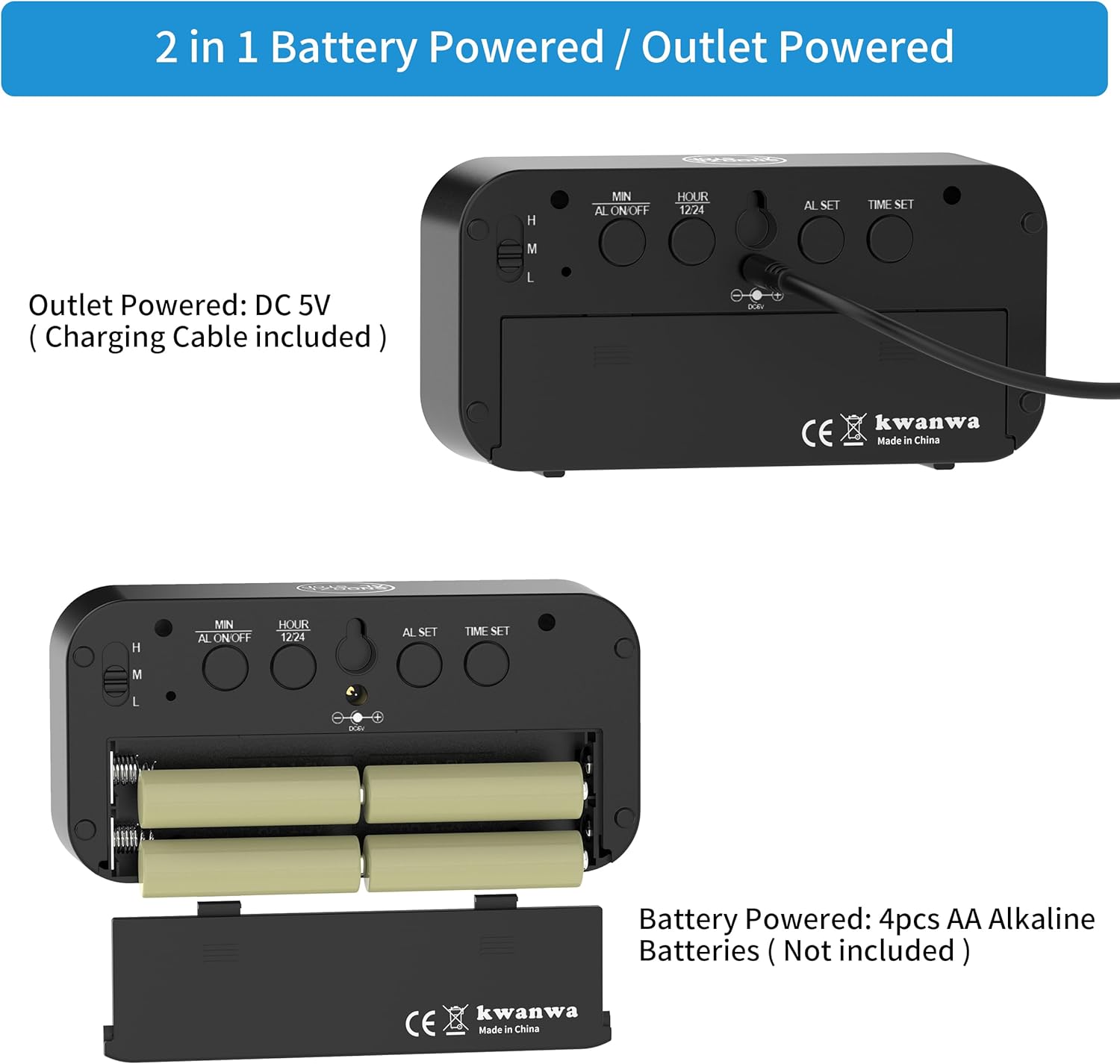
છબી: પાછળનો ભાગ view of the KWANWA KW668 alarm clock showing the USB power input and the battery compartment. The USB cable is shown separately. This image illustrates the dual power options.
Corded Power (Recommended for daily use):
- Connect the included USB cable to the DC 5V port on the back of the clock.
- Plug the other end of the USB cable into a USB power adapter (not included) and then into a wall outlet.
- This mode provides maximum LED brightness.
Battery Power (Backup/Portable use):
- ઘડિયાળની પાછળના ભાગમાં બેટરી કમ્પાર્ટમેન્ટ કવર ખોલો.
- Insert 4 AA alkaline batteries (not included), ensuring correct polarity (+/-).
- બેટરી કમ્પાર્ટમેન્ટ કવર બંધ કરો.
- In battery mode, the LED display will be less bright to conserve power and will automatically dim from 8 PM to 6 AM.
Video: This video demonstrates the power source options for the KWANWA KW668 alarm clock, showing both battery installation and USB cord connection for operation.
2. ઓપરેટિંગ સૂચનાઓ
૪.૧ બટન ફંક્શન્સ ઓવરview

છબી: પાછળનો ભાગ view of the KWANWA KW668 alarm clock with labels for each button: MIN, AL ON/OFF, HOUR/12/24, AL SET, TIME SET, and the H/M/L brightness switch.
- MIN: Adjusts minutes during time/alarm setting.
- AL ON/OFF: Turns the alarm on or off.
- HOUR/12/24: Adjusts hours during time/alarm setting; toggles between 12-hour and 24-hour format.
- AL SET: એલાર્મ સેટિંગ મોડમાં પ્રવેશ કરે છે.
- સમય સેટ: સમય સેટિંગ મોડમાં પ્રવેશ કરે છે.
- H/M/L Switch: Adjusts LED display brightness (High, Medium, Low).
- SNOOZE/AL STOP Button (Top): Activates snooze function or stops the alarm.
2.2 સમય નક્કી કરવો
- દબાવો ટાઇમ સેટ બટન કલાકના અંકો ફ્લેશ થશે.
- દબાવો HOUR/12/24 કલાક સમાયોજિત કરવા માટે બટન.
- દબાવો MIN મિનિટ સમાયોજિત કરવા માટે બટન.
- દબાવો ટાઇમ સેટ again to confirm, or wait 30 seconds for the setting to save automatically.
12/24 કલાકનું ફોર્મેટ:
- સામાન્ય સમય પ્રદર્શન મોડમાં, દબાવો HOUR/12/24 button to switch between 12-hour and 24-hour formats.
2.3 એલાર્મ સેટ કરવું
- દબાવો AL સેટ બટન. એલાર્મ કલાકના અંકો ફ્લેશ થશે.
- દબાવો HOUR/12/24 અલાર્મ કલાકને સમાયોજિત કરવા માટે બટન.
- દબાવો MIN એલાર્મ મિનિટ ગોઠવવા માટેનું બટન.
- દબાવો AL સેટ again to confirm, or wait 30 seconds for the setting to save automatically.
Turning Alarm On/Off:
- સામાન્ય સમય પ્રદર્શન મોડમાં, દબાવો AL ચાલુ/બંધ button to activate or deactivate the alarm. An alarm icon will appear on the display when active.
2.4 સ્નૂઝ ફંક્શન
- જ્યારે એલાર્મ વાગે, ત્યારે મોટું દબાવો SNOOZE/AL STOP button on top of the clock. The alarm will pause for 7 minutes.
- સ્નૂઝ ફંક્શનને 3 વખત સુધી પુનરાવર્તિત કરી શકાય છે.
- To stop the alarm completely, press any other button on the back of the clock.

Image: The KWANWA KW668 alarm clock displaying 6:00, with a hand pressing the top SNOOZE/AL STOP button, indicating the snooze function.
૫.૨ ડિસ્પ્લે બ્રાઇટનેસ એડજસ્ટ કરવી
The clock features a 3-level brightness adjustment and an automatic dimming function when powered by batteries.
- નો ઉપયોગ કરો H/M/L switch on the back of the clock to select High (H), Medium (M), or Low (L) brightness.
- When operating on battery power, the display automatically dims from 8:00 PM to 6:00 AM to conserve energy and reduce light disturbance.

છબી: ત્રણ views of the KWANWA KW668 alarm clock demonstrating High, Medium, and Dim brightness settings in a bedroom environment.
3. લક્ષણો
- ડ્યુઅલ પાવર વિકલ્પો: Operates on 4 AA batteries (not included) or via USB cord (adapter not included).
- 1.2" LED Display: Large, clear digits for easy readability.
- 3-સ્તરની તેજ: Adjustable display brightness (High, Medium, Low).
- Auto-Night Dim: Automatic dimming from 8 PM to 6 AM when running on battery power.
- સ્નૂઝ ફંક્શન: 7-minute snooze, repeatable up to 3 times.
- 12/24 કલાકનું ફોર્મેટ: Easily switch between standard and military time.
- બહુમુખી પ્લેસમેન્ટ: Suitable for desktop use or wall mounting.
- કોમ્પેક્ટ ડિઝાઇન: Dimensions of 5.1"W x 2.6"H x 1.5"D for easy placement and travel.
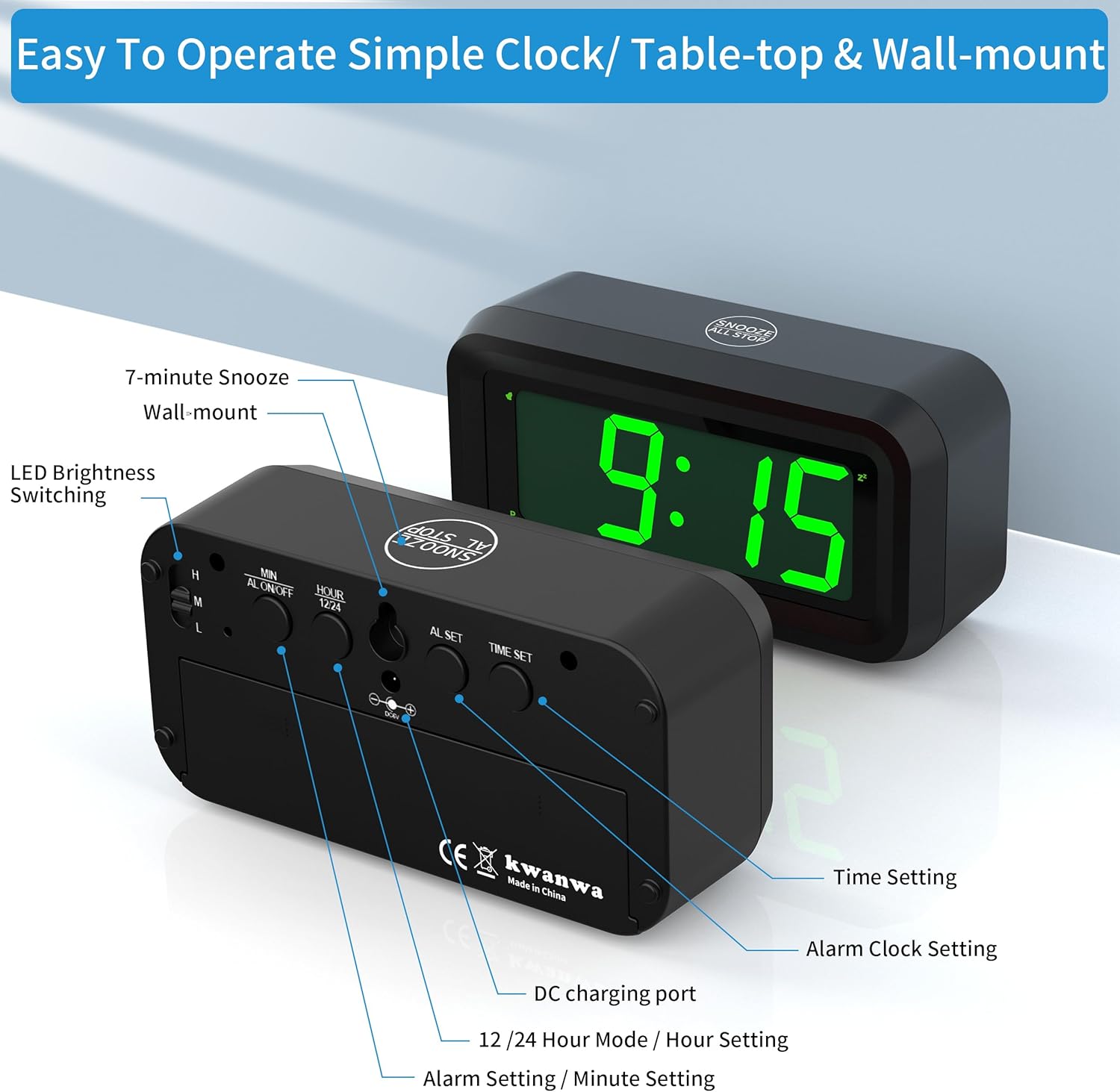
Image: The KWANWA KW668 alarm clock with its dimensions (5.1 inches wide, 2.5 inches high, 1.6 inches deep) and icons representing key features like battery power, daily alarm, 12/24 hour mode, snooze, wall-mount capability, and adjustable LED brightness.

Image: A collage showing the KWANWA KW668 alarm clock in different environments: on a nightstand, in a kitchen, on a desk next to a laptop, on a TV stand, and packed in luggage, highlighting its versatility.
4. જાળવણી
- સફાઈ: ઘડિયાળને નરમ, સૂકા કપડાથી સાફ કરો. ઘર્ષક ક્લીનર્સ અથવા સોલવન્ટનો ઉપયોગ કરશો નહીં.
- બેટરી રિપ્લેસમેન્ટ: If using battery power, replace all 4 AA batteries when the display becomes dim or the clock stops functioning correctly. Do not mix old and new batteries, or different types of batteries.
- સંગ્રહ: જો ઘડિયાળને લાંબા સમય સુધી સંગ્રહિત કરી રહ્યા હોવ, તો લીકેજ અટકાવવા માટે બેટરીઓ દૂર કરો.
- પર્યાવરણ: Avoid placing the clock in direct sunlight, extreme temperatures, or high humidity.
5. મુશ્કેલીનિવારણ
| સમસ્યા | સંભવિત કારણ | ઉકેલ |
|---|---|---|
| ડિસ્પ્લે ઝાંખો અથવા બંધ છે. |
|
|
| એલાર્મ વાગતો નથી. |
|
|
| સમય ખોટો છે. |
|
|
6. સ્પષ્ટીકરણો
- મોડલ: KW668
- ડિસ્પ્લે પ્રકાર: ડિજિટલ એલઇડી
- ડિસ્પ્લે રંગ: લીલા
- પરિમાણો: ૧૦.૫" (પ) x ૩.૫" (ક) x ૭.૨૫" (ઘ)
- પાવર સ્ત્રોત: 4 x AA batteries (not included) or DC 5V via USB cable (adapter not included)
- સામગ્રી: એક્રેલોનિટ્રિલ બ્યુટાડીન સ્ટાયરીન (ABS)
- ખાસ લક્ષણો: Dual Power, 3-Level Brightness, Auto-Night Dim (battery mode), Snooze Function, 12/24H Format, Wall Mountable.
7. વોરંટી અને સપોર્ટ
For warranty information or technical support, please contact KWANWA customer service through the retailer where the product was purchased or visit the official KWANWA website. Please have your model number (KW668) and purchase details ready when contacting support.
ઉત્પાદક: Guangkehua


