1. પરિચય
This manual provides detailed instructions for the installation, operation, and maintenance of your EverBrite 88LED Under Cabinet Lighting. This versatile lighting solution features a motion sensor, remote control, adjustable color temperatures, and dimmable brightness, designed to enhance visibility in various indoor spaces.
2. પેકેજ સામગ્રી
કૃપા કરીને ખાતરી કરો કે નીચે સૂચિબદ્ધ બધી વસ્તુઓ તમારા પેકેજમાં શામેલ છે:
- EverBrite 88LED Under Cabinet Light Bar
- રીમોટ કંટ્રોલ
- યુએસબી ચાર્જિંગ કેબલ
- Magnetic Mounting Bracket(s)
- એડહેસિવ પેડ્સ
- સ્ક્રૂ અને વોલ એન્કર
- વપરાશકર્તા માર્ગદર્શિકા

3. ઉત્પાદન સુવિધાઓ
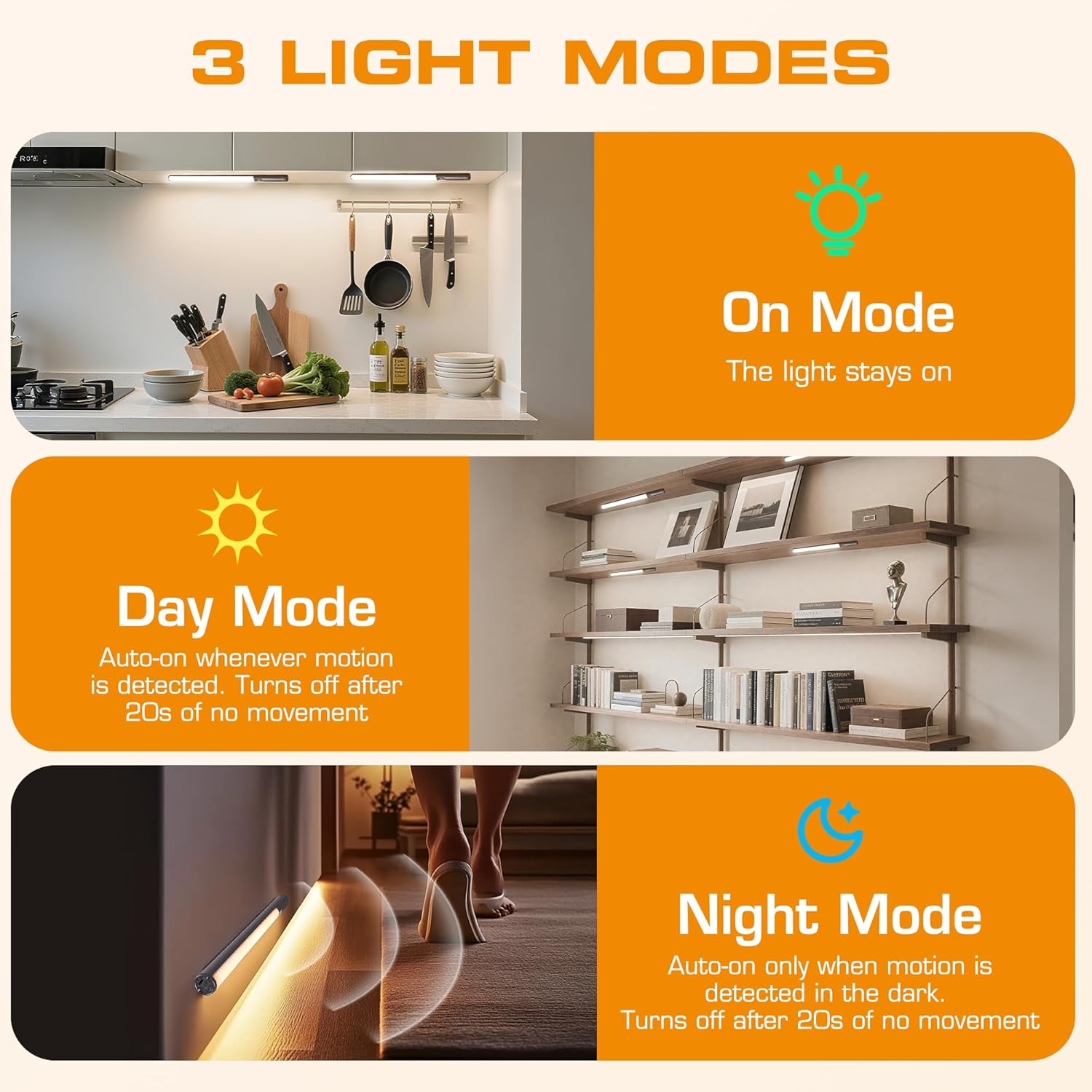
- 3 લાઇટિંગ મોડ્સ: On Mode (light stays on), Day Mode (motion-activated regardless of ambient light), Night Mode (motion-activated only in dark).
- 3 રંગ તાપમાન: Warm Light (3000K), Natural Light (4000K), Cold Light (6500K).
- ડિમેબલ: 10 brightness levels with short press, stepless dimming with long press.
- દ્વિ નિયંત્રણ: Operable via remote control or direct touch on the light bar.
- સરળ સ્થાપન: Multiple mounting options including magnetic, adhesive, and screw-in.
- રિચાર્જેબલ બેટરી: લાંબા સમય સુધી ઉપયોગ માટે 2600mAh ક્ષમતા.
- વ્યાપક એપ્લિકેશન: Suitable for kitchens, closets, wardrobes, garages, stairwells, and more.
4. સેટઅપ અને ઇન્સ્ટોલેશન
The EverBrite Under Cabinet Light offers flexible installation to suit various surfaces and needs.
- Choose Your Mounting Method:
- ચુંબકીય જોડાણ: For iron surfaces, simply attach the light bar directly. The light has built-in magnets.
- એડહેસિવ માઉન્ટિંગ: For non-iron surfaces, peel the backing from the adhesive pads and attach them to the magnetic mounting bracket. Then, adhere the bracket to your desired surface. The light bar can then be magnetically attached to this bracket.
- સ્ક્રુ માઉન્ટિંગ: For a more permanent installation, use the provided screws and wall anchors. Determine the mounting location, drill two holes, insert anchors, and fasten the magnetic mounting bracket with screws. Attach the light bar magnetically.
- સ્થિતિ: Ensure the motion sensor is facing the area where movement is expected for optimal detection. The light bar can be rotated up to 90 degrees on its magnetic mount to direct illumination.


5. ચાર્જિંગ
The EverBrite light is equipped with a 2600mAh rechargeable Lithium-Ion battery.
- Locate the USB-C charging port on the end of the light bar.
- Connect the provided USB charging cable to the light bar and a compatible USB power source (e.g., wall adapter, computer USB port).
- The indicator light will show charging status (refer to product for specific indicator behavior).
- A full charge provides approximately 25 hours of continuous light or up to 25 days in motion sensor mode (based on 1 hour of activation per day).


6. ઓપરેટિંગ સૂચનાઓ
Your EverBrite light can be operated using either the manual touch controls on the device or the included remote control.
6.1. Manual Control (On-Device)
The light bar features a switch and a touch sensor on one end for direct control.
- મોડ સ્વિચ: Slide the switch to select between 'Off', 'Day Mode' (motion sensor always active), 'Night Mode' (motion sensor active only in dark), or 'On Mode' (light stays on continuously).
- રંગ તાપમાન: In 'On Mode', short press the touch sensor to cycle through the 3 color temperatures: Warm White (3000K), Natural White (4000K), and Cold White (6500K).
- બ્રાઇટનેસ એડજસ્ટમેન્ટ: In 'On Mode', long press the touch sensor to activate stepless dimming. Release at your desired brightness level.

6.2. રીમોટ કંટ્રોલ
The remote control provides convenient access to all light functions from a distance.
- પાવર ચાલુ/બંધ: દબાવો બંધ button to turn the light off. Press the ON તેને ચાલુ કરવા માટે બટન.
- લાઇટિંગ મોડ્સ: Use the dedicated buttons for ON (continuous light), DAY (motion sensor always active), or રાત્રિ (motion sensor active only in dark).
- રંગ તાપમાન: પસંદ કરો WW (Warm White), NW (Natural White), or CW (Cold White) to change the light color.
- બ્રાઇટનેસ એડજસ્ટમેન્ટ: Short press the brightness buttons (sun icons) to cycle through 10 preset brightness levels. Long press for stepless dimming.
- ટાઈમર સેટિંગ્સ: દબાવો 15 મિનિટ, 30 મિનિટ, અથવા 60 મિનિટ to set an automatic shut-off timer. Press the ટાઈમર બંધ button to cancel any active timer.

6.3. Motion Sensor Modes
The integrated motion sensor provides hands-free illumination.
- દિવસ મોડ: The light will turn on automatically when motion is detected, regardless of the ambient light level. It will turn off after 20 seconds of no movement.
- નાઇટ મોડ: The light will turn on automatically only when motion is detected in dark conditions. It will turn off after 20 seconds of no movement.

7. સ્પષ્ટીકરણો
| લક્ષણ | સ્પષ્ટીકરણ |
|---|---|
| બ્રાન્ડ | એવરબ્રાઈટ |
| મોડલ નંબર | E101115A |
| પાવર સ્ત્રોત | બેટરી સંચાલિત (1 લિથિયમ આયન બેટરી શામેલ છે) |
| બેટરી ક્ષમતા | 2600mAh |
| પ્રકાશ સ્ત્રોત પ્રકાર | એલઇડી |
| રંગ તાપમાન | 3000K (Warm Light), 4000K (Natural Light), 6500K (Cold Light) |
| નિયંત્રણ પદ્ધતિ | ટચ, રિમોટ કંટ્રોલ |
| ખાસ લક્ષણ | Cordless, Motion Sensor, Dimmable |
| ઇન્સ્ટોલેશનનો પ્રકાર | Surface Mount (Magnetic, Adhesive, Screws) |
| સામગ્રી | એલ્યુમિનિયમ |
| વસ્તુનું વજન | 9.9 ઔંસ |
| પેકેજ પરિમાણો | 16.3 x 1.97 x 1.65 ઇંચ |
| ઇન્ડોર/આઉટડોર વપરાશ | ઇન્ડોર |
8. જાળવણી
To ensure the longevity and optimal performance of your EverBrite Under Cabinet Light, follow these simple maintenance guidelines:
- સફાઈ: Wipe the light bar and remote control with a soft, dry cloth. Avoid using abrasive cleaners or solvents, as these may damage the finish or electronic components.
- બેટરી સંભાળ: Recharge the battery when the light output diminishes. Avoid fully depleting the battery frequently to prolong its lifespan. Store the device in a cool, dry place if not in use for extended periods.
- સેન્સર જાળવણી: Keep the motion sensor lens clean and free from obstructions to ensure accurate detection.
9. મુશ્કેલીનિવારણ
If you encounter any issues with your EverBrite Under Cabinet Light, please refer to the following common problems and solutions:
- લાઇટ ચાલુ થતી નથી:
- ખાતરી કરો કે બેટરી ચાર્જ થઈ છે.
- Check the mode switch on the light bar; it should be set to 'On', 'Day Mode', or 'Night Mode'.
- If using the remote, ensure the light bar's main switch is in an active mode (not 'Off').
- મોશન સેન્સર કામ કરતું નથી:
- Verify the light is set to 'Day Mode' or 'Night Mode'.
- In 'Night Mode', ensure the environment is sufficiently dark.
- Check for any obstructions blocking the sensor lens.
- Ensure the motion is within the 9.8ft (3m) detection range and 120-degree angle.
- રિમોટ કંટ્રોલ જવાબ આપી રહ્યું નથી:
- Ensure the light bar's main switch is in an active mode (not 'Off').
- રિમોટ કંટ્રોલ બેટરી તપાસો.
- ખાતરી કરો કે રિમોટ અને લાઇટ બાર વચ્ચે કોઈ અવરોધો નથી.
- Light is not charging:
- Ensure the USB cable is securely connected to both the light bar and the power source.
- એક અલગ USB કેબલ અથવા પાવર એડેપ્ટર અજમાવો.
10. વોરંટી અને સપોર્ટ
For warranty information, technical support, or further assistance, please refer to the manufacturer's official webસાઇટ પર જાઓ અથવા તેમની ગ્રાહક સેવાનો સીધો સંપર્ક કરો. વોરંટી દાવાઓ માટે તમારી ખરીદી રસીદ રાખો.


