પરિચય
Thank you for choosing the HyperGear Stealth2 ANC Wireless Headphones. This manual provides detailed instructions for setting up, operating, and maintaining your headphones to ensure optimal performance and longevity. Please read this manual thoroughly before use.

Image: HyperGear Stealth2 ANC Wireless Headphones, Bone color, showcasing key features like Active Noise Cancelling, 40mm Neodymium Drivers, Deep HD Stereo Sound, up to 24-hour playing time, rapid charge, and lightweight foldable design.
પેકેજ સામગ્રી
ખાતરી કરો કે બધી વસ્તુઓ પેકેજમાં હાજર છે:
- HyperGear Stealth2 ANC Wireless Headphones
- USB-C ચાર્જિંગ કેબલ
- વપરાશકર્તા માર્ગદર્શિકા (આ દસ્તાવેજ)
ઉત્પાદન ઓવરview
Familiarize yourself with the various components and controls of your headphones.

Image: Detailed diagram of the HyperGear Stealth2 ANC Wireless Headphones, highlighting the on-ear controls. Labels include Power On/Off, Enter Pairing Mode, Volume Up/Next Track, Play/Pause/Answer/End Call, Reject Call, Activate Voice Assistant, Gaming Mode On/Off, Volume Down/Previous Track, and Active Noise Cancellation On/Off. Also shows Quick Pairing and Auto Reconnection features.
કાન પર નિયંત્રણો:
- પાવર બટન: Press and hold to power on/off. Press and hold to enter pairing mode.
- વોલ્યુમ વધારો / આગલો ટ્રેક બટન: Press to increase volume. Press and hold to skip to the next track.
- મલ્ટી-ફંક્શન બટન (પ્લે/પોઝ): Press to play/pause audio. Press to answer/end calls. Press and hold to reject calls. Double-press to activate voice assistant. Triple-press to toggle Gaming Mode.
- વૉલ્યૂમ ડાઉન / પાછલું ટ્રેક બટન: વોલ્યુમ ઘટાડવા માટે દબાવો. પાછલા ટ્રેક પર જવા માટે દબાવો અને પકડી રાખો.
- ANC બટન: Press to toggle Active Noise Cancellation on/off.
સેટઅપ
1. હેડફોન ચાર્જ કરવા
પ્રથમ ઉપયોગ કરતા પહેલા, તમારા હેડફોનને સંપૂર્ણપણે ચાર્જ કરો.
- આપેલા USB-C ચાર્જિંગ કેબલને હેડફોન પરના ચાર્જિંગ પોર્ટ સાથે કનેક્ટ કરો.
- કેબલના બીજા છેડાને USB પાવર સ્ત્રોત (દા.ત., વોલ એડેપ્ટર, કમ્પ્યુટર USB પોર્ટ) સાથે જોડો.
- The LED indicator will show charging status. It typically takes about 2 hours for a full charge.
- A 10-minute rapid charge can provide approximately 3 hours of playback.
Image: A person wearing HyperGear Stealth2 ANC Wireless Headphones on an airplane, illustrating battery life: 18 hours with ANC on, 24 hours with ANC off. Also highlights rapid charge: 10 minutes of charging provides 3 hours of playback.
2. બ્લૂટૂથ જોડી
Pair your headphones with your device for wireless audio.
- ખાતરી કરો કે હેડફોન ચાર્જ થયેલ છે અને બંધ છે.
- પાવર બટન દબાવો અને પકડી રાખો જ્યાં સુધી LED સૂચક વાદળી અને લાલ રંગમાં ચમકતો નથી, જે પેરિંગ મોડ સૂચવે છે.
- તમારા ઉપકરણ (સ્માર્ટફોન, ટેબ્લેટ, કમ્પ્યુટર) પર, બ્લૂટૂથ સક્ષમ કરો અને ઉપલબ્ધ ઉપકરણો શોધો.
- Select "HyperGear Stealth2" from the list of found devices.
- Once connected, the LED indicator will show a solid blue light or flash slowly.
ઝડપી જોડી: The headphones are designed for instant connection with your device in seconds after initial pairing.
સ્વતon જોડાણ: The headphones will remember and automatically reconnect to the last paired device when powered on and within range.
ઓપરેટિંગ સૂચનાઓ
પાવર ચાલુ/બંધ
- પાવર ચાલુ કરવા માટે, LED સૂચક પ્રકાશિત ન થાય ત્યાં સુધી પાવર બટન દબાવો અને પકડી રાખો.
- પાવર બંધ કરવા માટે, LED સૂચક બંધ ન થાય ત્યાં સુધી પાવર બટન દબાવી રાખો.
સક્રિય અવાજ રદ (એએનસી)
- Press the dedicated ANC button to toggle Active Noise Cancellation on or off.
- When ANC is active, ambient noise is significantly reduced, providing a quieter listening experience.
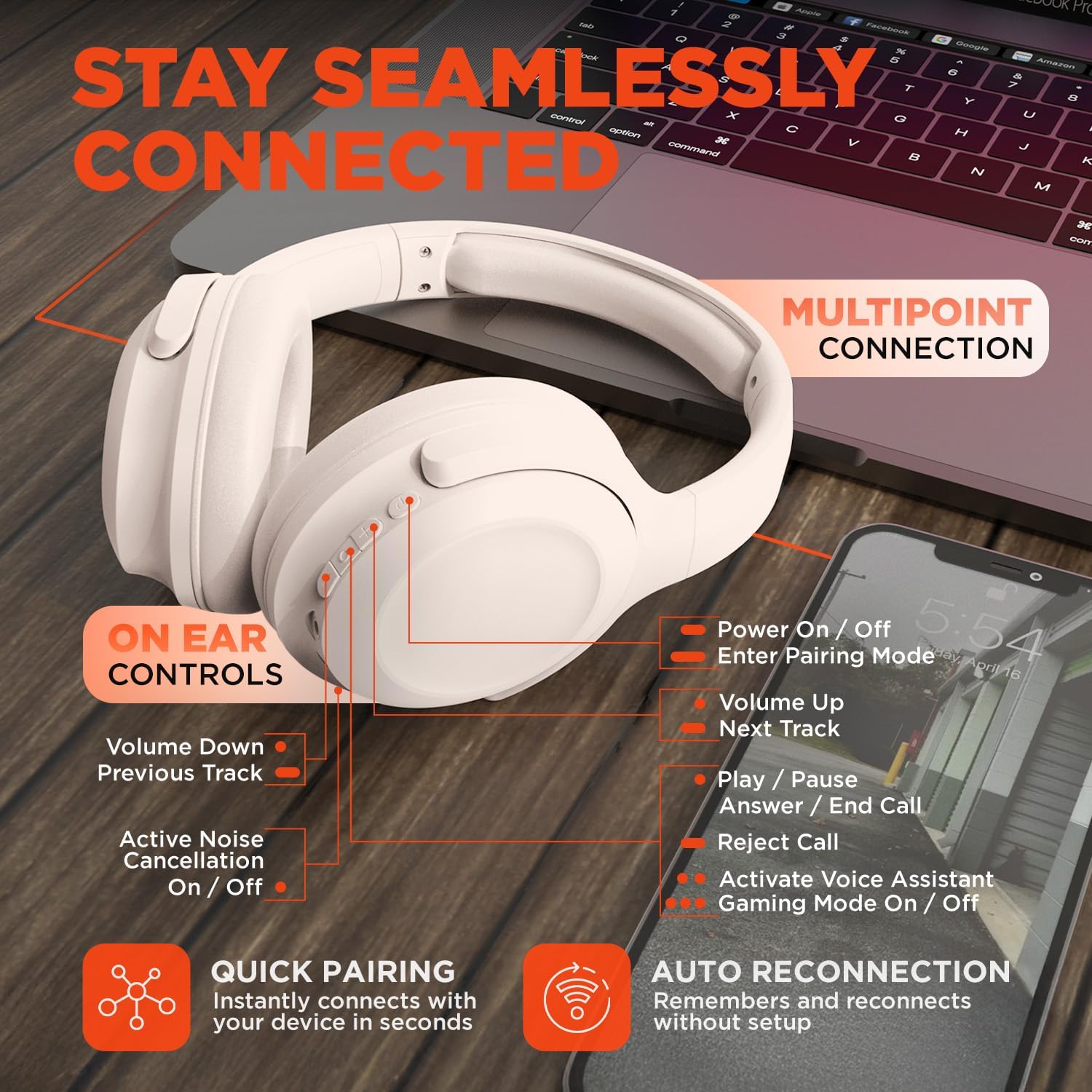
Image: HyperGear Stealth2 ANC Wireless Headphones highlighting "Pure Sound Anywhere" with Dual ANC Microphones for blocking unwanted noise and Adaptive Sound Control for real-time environment adjustment. Also shows compatibility with Siri and Google Assistant, and use cases for exercise, gaming, and travel.
ઑડિયો પ્લેબેક અને કૉલ્સ
- ચલાવો/થોભો: એકવાર મલ્ટિ-ફંક્શન બટન દબાવો.
- આગળનો ટ્રેક: વોલ્યુમ અપ બટન દબાવો અને પકડી રાખો.
- પાછલો ટ્રેક: વોલ્યુમ ડાઉન બટન દબાવો અને પકડી રાખો.
- વોલ્યુમ નિયંત્રણ: વોલ્યુમ અપ અથવા વોલ્યુમ ડાઉન બટનો દબાવો.
- જવાબ/કૉલ સમાપ્ત કરો: એકવાર મલ્ટિ-ફંક્શન બટન દબાવો.
- કૉલ નકારો: મલ્ટી-ફંક્શન બટન દબાવો અને પકડી રાખો.
વૉઇસ સહાયક
- Double-press the Multi-function button to activate your device's voice assistant (Siri, Google Assistant, etc.).
ગેમિંગ મોડ
- Triple-press the Multi-function button to toggle the no-lag Gaming Mode. This mode optimizes audio synchronization for enhanced gameplay.
મલ્ટિપોઇન્ટ કનેક્શન
The headphones support multipoint connection, allowing them to be connected to two Bluetooth devices simultaneously.
- Pair the headphones with the first device as described in the "Bluetooth Pairing" section.
- પહેલા ડિવાઇસ પર બ્લૂટૂથ બંધ કરો.
- Put the headphones back into pairing mode and pair them with the second device.
- Re-enable Bluetooth on the first device. The headphones should now be connected to both devices.
- Audio will play from the device that is actively playing content.

Image: HyperGear Stealth2 ANC Wireless Headphones positioned between a laptop and a smartphone, demonstrating the multipoint connection feature. This allows the headphones to stay seamlessly connected to multiple devices.
જાળવણી
Proper care ensures the longevity and performance of your headphones.
- Keep the headphones dry. Do not expose them to water or excessive moisture. They are not water resistant.
- ઇયરકપ અને હેડબેન્ડને નરમ, સૂકા કપડાથી સાફ કરો. કઠોર રસાયણો અથવા ઘર્ષક પદાર્થોનો ઉપયોગ કરવાનું ટાળો.
- ઉપયોગમાં ન હોય ત્યારે હેડફોનને ઠંડી, સૂકી જગ્યાએ રાખો. ફોલ્ડેબલ ડિઝાઇન કોમ્પેક્ટ સ્ટોરેજ માટે પરવાનગી આપે છે.
- અતિશય તાપમાન ટાળો.
- હેડફોન્સને ડિસએસેમ્બલ કરવાનો કે સુધારવાનો પ્રયાસ કરશો નહીં, કારણ કે આ વોરંટી રદ કરશે.
મુશ્કેલીનિવારણ
If you encounter issues, refer to the following common solutions.
| સમસ્યા | ઉકેલ |
|---|---|
| Headphones will not power on. | ખાતરી કરો કે હેડફોન સંપૂર્ણપણે ચાર્જ થયેલ છે. USB-C કેબલનો ઉપયોગ કરીને પાવર સ્ત્રોત સાથે કનેક્ટ કરો. |
| ઉપકરણ સાથે જોડી બનાવી શકાતી નથી. |
|
| કોઈ અવાજ નથી કે ઓછો અવાજ નથી. |
|
| ANC is not effective. |
|
વિશિષ્ટતાઓ
| લક્ષણ | વિગત |
|---|---|
| મોડેલનું નામ | HyperGear Stealth2 ANC Headphones |
| મોડલ નંબર | 15860 |
| કનેક્ટિવિટી ટેકનોલોજી | વાયરલેસ (બ્લુટુથ) |
| બ્લૂટૂથ સંસ્કરણ | 5.2 |
| બ્લૂટૂથ રેન્જ | 10 મીટર |
| ઑડિઓ ડ્રાઇવરનું કદ | 40 મીમી |
| આવર્તન શ્રેણી | ૨૦ હર્ટ્ઝ - ૨૦,૦૦૦ હર્ટ્ઝ |
| અવાજ નિયંત્રણ | સક્રિય અવાજ રદ |
| બેટરી જીવન | ૩૧ કલાક સુધી (ANC બંધ) |
| ચાર્જિંગ સમય | 2 કલાક |
| ચાર્જિંગ પોર્ટ | યુએસબી-સી |
| સામગ્રી | પ્લાસ્ટિક |
| વસ્તુનું વજન | 0.38 કિલોગ્રામ (13.3 ઔંસ) |
| ઉત્પાદન પરિમાણો | 7.88 x 2.25 x 10.51 ઇંચ |
| પાણી પ્રતિકાર સ્તર | પાણી પ્રતિરોધક નથી |
| યુપીસી | 633755158605 |
વોરંટી અને આધાર
HyperGear products are designed for reliability and performance. For warranty information and customer support, please refer to the warranty card included with your purchase or visit the official HyperGear webસાઇટ
રીટર્ન પોલિસી: This product typically includes a 30-day return policy for refunds or replacements. Please check your purchase details for specific terms.
ઉત્પાદક: હાઇપરગીર


