પરિચય
This manual provides detailed instructions for the operation and maintenance of your RadioShack Portable Bluetooth Speaker. This versatile audio device offers multiple connectivity options and features to enhance your listening experience.

આકૃતિ 1: ફ્રન્ટ view of the RadioShack Portable Bluetooth Speaker, showcasing its black fabric grille and red accent symbols.
પેકેજ સામગ્રી
Before proceeding, please ensure all items are present in the package:
- RadioShack Portable Bluetooth Speaker
- યુએસબી ટાઇપ-સી ચાર્જિંગ કેબલ
- Auxiliary 3.5mm Cable (Note: Some packages may not include this cable, as per customer feedback.)
- વહન પટ્ટા

Figure 2: The speaker shown with its included USB Type-C charging cable and an auxiliary cable.
સેટઅપ
1. સ્પીકરને ચાર્જ કરવો
Before first use, fully charge the speaker. The speaker is equipped with a 3000 mAh battery, providing up to 6 hours of playback on a full charge. A complete charge typically takes approximately 3 hours.
- Locate the USB Type-C charging port on the speaker. This is usually found on the top panel near the control buttons.
- આપેલા USB Type-C કેબલને સ્પીકરના ચાર્જિંગ પોર્ટ સાથે કનેક્ટ કરો.
- USB કેબલના બીજા છેડાને સુસંગત USB પાવર એડેપ્ટર (શામેલ નથી) અથવા કમ્પ્યુટરના USB પોર્ટ સાથે કનેક્ટ કરો.
- ચાર્જિંગ સૂચક લાઇટ ચાર્જિંગ દરમિયાન પ્રકાશિત થશે અને સંપૂર્ણ ચાર્જ થવા પર બંધ થશે અથવા રંગ બદલાશે.
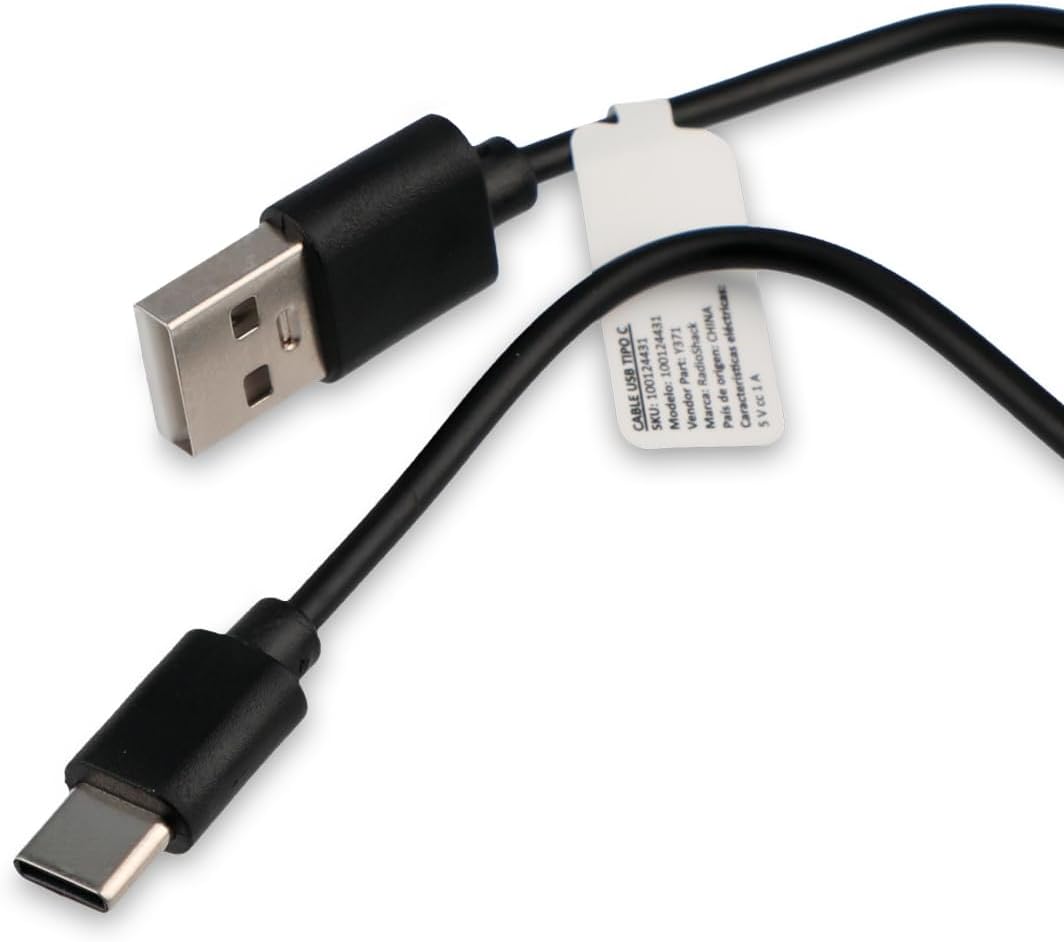
Figure 3: Close-up of the USB Type-C charging cable included with the speaker.
2. પ્રારંભિક પાવર ચાલુ
Press and hold the Power button (usually marked with a power symbol) on the speaker's control panel until you hear an audible prompt or see an indicator light illuminate.
ઓપરેટિંગ સૂચનાઓ
નિયંત્રણ પેનલ ઓવરview

Figure 4: Top panel of the speaker, displaying the control buttons and various input ports (AUX, TF, USB, Type-C).
The control panel on the top of the speaker features several buttons and ports for various functions:
- પાવર બટન: સ્પીકરને ચાલુ/બંધ કરે છે.
- મોડ બટન: Cycles through input modes (Bluetooth, USB, SD, AUX, FM Radio).
- પ્લે/પોઝ બટન: ઓડિયો પ્લેબેક ચલાવે છે અથવા થોભાવે છે.
- વોલ્યુમ વધારો/આગલો ટ્રેક બટન: Increases volume (short press) or skips to the next track (long press).
- વોલ્યુમ ડાઉન/પાછલું ટ્રેક બટન: Decreases volume (short press) or goes to the previous track (long press).
- લાઇટ મોડ બટન: Changes or turns off the RGB LED lighting effects.
- AUક્સ પોર્ટ: For 3.5mm auxiliary cable connection.
- TF (માઇક્રો SD) કાર્ડ સ્લોટ: માઇક્રો SD કાર્ડમાંથી ઓડિયો ચલાવવા માટે.
- યુએસબી પોર્ટ: USB ફ્લેશ ડ્રાઇવમાંથી ઓડિયો ચલાવવા માટે.
- ટાઇપ-સી પોર્ટ: સ્પીકર ચાર્જ કરવા માટે.
1. બ્લૂટૂથ કનેક્શન
This speaker supports wireless audio streaming via Bluetooth, compatible with smartphones, tablets, and computers.
- Turn on the speaker. It will automatically enter Bluetooth pairing mode, indicated by a flashing LED light or an audible prompt.
- તમારા ઉપકરણ પર, બ્લૂટૂથ સક્ષમ કરો અને ઉપલબ્ધ ઉપકરણો માટે શોધો.
- Select "RadioShack Speaker" (or similar name) from the list of found devices.
- Once paired, the speaker will confirm with an audible sound, and the LED indicator will become solid.
2. યુએસબી પ્લેબેક
ઑડિયો ધરાવતી USB ફ્લેશ ડ્રાઇવ દાખલ કરો files (MP3, WAV, etc.) into the USB port. The speaker will automatically switch to USB mode and begin playback.
૫.૪.૨. SD કાર્ડ પ્લેબેક
ઑડિઓ સાથે માઇક્રો SD (TF) કાર્ડ દાખલ કરો files into the TF card slot. The speaker will automatically switch to SD card mode and begin playback.
4. સહાયક (AUX) કનેક્શન
For devices without Bluetooth, use the 3.5mm auxiliary input.
- Connect one end of a 3.5mm audio cable (not always included) to the AUX port on the speaker.
- બીજા છેડાને તમારા ઉપકરણના હેડફોન જેક અથવા ઓડિયો આઉટપુટ સાથે જોડો.
- Press the Mode button on the speaker until it switches to AUX mode.
5. એફએમ રેડિયો ફંક્શન
બિલ્ટ-ઇન FM રેડિયોનો ઉપયોગ કરવા માટે:
- Press the Mode button until you hear the FM radio mode activated.
- ઉપલબ્ધ રેડિયો સ્ટેશનોને ઓટો-સ્કેન કરવા અને સાચવવા માટે પ્લે/પોઝ બટન દબાવો.
- Use the Volume Up/Down buttons (long press) to navigate between saved stations.
6. RGB LED Lighting
The speaker features an RGB LED light panel that adds visual ambiance. The light panel is located on one side of the speaker.

આકૃતિ 5: બાજુ view of the speaker, highlighting the transparent panel designed for RGB lighting effects.
Press the Light Mode button (often indicated by a sun or lightbulb icon) on the control panel to cycle through different lighting modes or to turn the lights off.
જાળવણી
સફાઈ
તમારા સ્પીકરના દેખાવ અને કાર્યક્ષમતાને જાળવી રાખવા માટે:
- નરમ, સૂકા, લિન્ટ-ફ્રી કપડાથી બહારનો ભાગ સાફ કરો.
- ઘર્ષક ક્લીનર્સ, મીણ અથવા દ્રાવકનો ઉપયોગ કરશો નહીં.
- Avoid getting moisture into any openings. The speaker is not waterproof.
સંગ્રહ
When not in use for extended periods, store the speaker in a cool, dry place away from direct sunlight and extreme temperatures. It is recommended to charge the battery at least once every three months to preserve its lifespan.
મુશ્કેલીનિવારણ
| સમસ્યા | સંભવિત કારણ | ઉકેલ |
|---|---|---|
| સ્પીકર ચાલુ થતું નથી. | બેટરી ખતમ થઈ ગઈ છે. | Charge the speaker using the provided USB Type-C cable. |
| સ્પીકરમાંથી કોઈ અવાજ નથી. | વૉલ્યૂમ ખૂબ ઓછું અથવા મ્યૂટ છે. ખોટો ઇનપુટ મોડ. | Increase volume on both speaker and connected device. Press the Mode button to select the correct input source (Bluetooth, USB, SD, AUX, FM). |
| બ્લૂટૂથ દ્વારા જોડી બનાવી શકાતી નથી. | સ્પીકર પેરિંગ મોડમાં નથી. ડિવાઇસ ખૂબ દૂર છે. હસ્તક્ષેપ. | Ensure speaker is in Bluetooth pairing mode (flashing LED). Move device closer to speaker (within 10 meters). Turn off other Bluetooth devices. |
| USB/SD કાર્ડ ચાલી રહ્યું નથી. | અસમર્થિત file format. Card/drive not inserted correctly. | ઑડિયોની ખાતરી કરો files are in a supported format (e.g., MP3). Reinsert the USB drive or SD card firmly. |
| એફએમ રેડિયો સ્ટેટિક. | નબળા સંકેત. | સ્પીકરને વધુ સારી રિસેપ્શન ધરાવતી જગ્યાએ ખસેડો. |
વિશિષ્ટતાઓ
| લક્ષણ | વિગત |
|---|---|
| મોડલ નંબર | 100124431 (Y371) |
| પરિમાણો (L x W x H) | 9.6 સેમી x 22.7 સેમી x 8.2 સેમી |
| વજન | 500 ગ્રામ |
| સામગ્રી | ધાતુ, સિલિકોન |
| કનેક્ટિવિટી ટેકનોલોજી | Bluetooth, USB, SD Card, 3.5mm Auxiliary |
| બ્લૂટૂથ રેન્જ | 10 મીટર સુધી |
| સ્પીકર આઉટપુટ પાવર | 10 વોટ્સ |
| આવર્તન પ્રતિભાવ | 80 KHz |
| બેટરી ક્ષમતા | 3000 mAh લિથિયમ આયન |
| બેટરી જીવન | 6 કલાક સુધી |
| ચાર્જિંગ સમય | લગભગ 3 કલાક |
| ઇનપુટ વોલ્યુમtage | 5 વોલ્ટ |
| ખાસ લક્ષણો | Portable, RGB LED Light, FM Radio |
| વોટરપ્રૂફ | ના |
વોરંટી માહિતી
This RadioShack product comes with a limited warranty. For specific terms and conditions, including warranty duration and coverage details, please refer to the warranty card included with your product packaging or contact RadioShack customer support. Keep your purchase receipt as proof of purchase for warranty claims.
ગ્રાહક આધાર
For further assistance, technical support, or warranty inquiries, please contact RadioShack customer service. Contact information can typically be found on the product packaging, the official RadioShack webસાઇટ, અથવા તમારા ખરીદી બિંદુ દ્વારા.
ભાવિ સંદર્ભ માટે કૃપા કરીને આ માર્ગદર્શિકા જાળવી રાખો.


