1. પરિચય
The Qolsys IQ Lock-PG Push Button Deadbolt provides enhanced security and convenient access to your property. This smart motorized deadbolt integrates PowerG wireless communication for reliable and stable connectivity, compatible with IQ Panel 4, IQ4 Hub, and IQ4 NS systems. It offers multiple access methods, including a pushbutton keypad, traditional key, thumb-turn, and remote control via the Alarm.com app.
Designed for durability, the IQ Lock-PG meets ANSI Grade 2 certifications and features an attractive oil-rubbed bronze finish to complement various door styles.
2. મુખ્ય લક્ષણો
- Motorized Deadbolt: Push button operation with an attractive finish.
- બહુવિધ ઍક્સેસ પદ્ધતિઓ: Lock/unlock via PowerG wireless communication (App and Panel), user code, thumb-turn, or physical key.
- User Code Capacity: Supports up to 250 user codes (4 to 8 digits) for family, friends, or temporary guests.
- રીમોટ મેનેજમેન્ટ: Create or remove individual codes remotely via the Alarm.com app.
- સરળ સ્થાપન: Battery-powered (AA batteries, not included), requiring no complex wiring.
- ટકાઉ બાંધકામ: ANSI/BHMA Grade 2 certified for strong, reliable security.
3. પેકેજ સામગ્રી
ઇન્સ્ટોલેશન શરૂ કરતા પહેલા ખાતરી કરો કે બધી વસ્તુઓ પેકેજમાં હાજર છે:
- Qolsys IQ Lock-PG Deadbolt Assembly
- (2) Turnkeys
- માઉન્ટ કરવાનું હાર્ડવેર
- સૂચના માર્ગદર્શિકા (આ દસ્તાવેજ)
4. સેટઅપ અને ઇન્સ્ટોલેશન
The Qolsys IQ Lock-PG motorized deadbolt is designed for straightforward installation. All necessary hardware and detailed instructions are included. Please read these instructions carefully before proceeding.
4.1 Compatibility and Requirements
- દરવાજાની જાડાઈ: Installs on standard doors measuring 1-3/8 inches to 2-1/4 inches (35-58mm) thick.
- બેકસેટ: Adjustable latch fits existing backsets of either 2-3/8 inches or 2-3/4 inches (60/70mm).
- ડોર હેન્ડિંગ: Suitable for both right-handed and left-handed door operations.
- સિસ્ટમ એકીકરણ: Requires an IQ Panel 4, IQ4 Hub, or IQ4 NS (sold separately) and an active Internet connection for smart features.
- શક્તિ: Requires four (4) AA alkaline batteries (not included).
૩.૨ સ્થાપન પગલાં (ઉપરview)
While detailed steps are provided in the included physical manual, here is a general overview:
- Prepare the door: Ensure the door bore holes and backset are compatible with the lock.
- લેચ અને સ્ટ્રાઇક પ્લેટ ઇન્સ્ટોલ કરો.
- બાહ્ય કીપેડ એસેમ્બલી ઇન્સ્ટોલ કરો.
- આંતરિક માઉન્ટિંગ પ્લેટ ઇન્સ્ટોલ કરો.
- કેબલને બાહ્ય એસેમ્બલીથી આંતરિક એસેમ્બલી સુધી કનેક્ટ કરો.
- આંતરિક વિધાનસભા સ્થાપિત કરો.
- Insert four (4) AA alkaline batteries into the battery compartment.
- Perform the door handing process (automatic adjustment).
- Test the lock's functionality with the keypad and thumb-turn.
- Pair the lock with your IQ Panel system and Alarm.com app for smart features.

આકૃતિ 4.1: ફ્રન્ટ view of the Qolsys IQ Lock-PG Deadbolt, showcasinકીપેડ અને કીહોલનો જી.
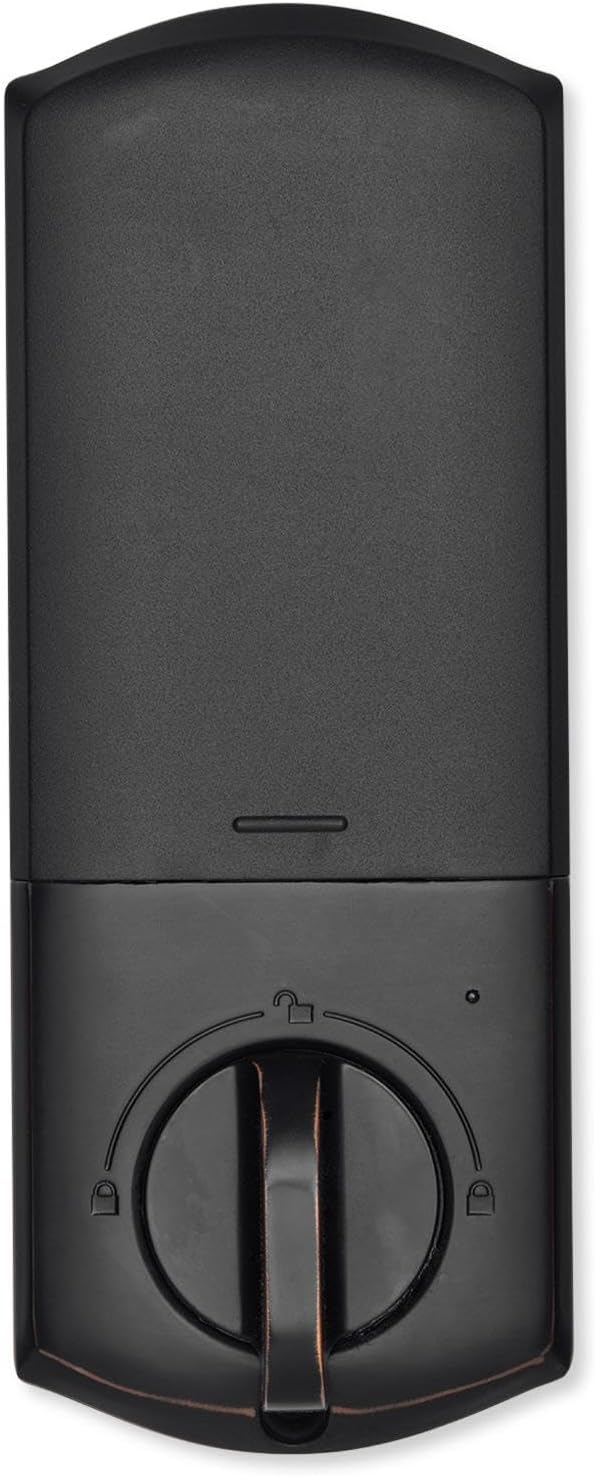
આકૃતિ 4.2: આંતરિક view of the Qolsys IQ Lock-PG Deadbolt, highlighting the thumb-turn and battery cover.

Figure 4.3: Qolsys IQ Lock-PG Deadbolt installed on a door, illustrating its appearance in a real-world setting.
5. ઓપરેટિંગ સૂચનાઓ
The Qolsys IQ Lock-PG offers multiple convenient ways to lock and unlock your door.
૫.૧ ઍક્સેસ પદ્ધતિઓ
- Pushbutton Keypad: Enter a valid 4-to-8 digit user code on the exterior keypad to unlock the deadbolt. The lock will automatically engage when closed.
- ભૌતિક ચાવી: Use one of the provided turnkeys in the exterior key cylinder for manual unlocking and locking.
- Thumb-Turn: From the interior, rotate the thumb-turn to manually lock or unlock the deadbolt.
- PowerG Wireless Communication (Alarm.com App/Panel):
The Alarm.com mobile app allows for remote monitoring and control of your Qolsys devices. Once paired with your IQ Panel, you can:
- Lock or unlock your smart doors from anywhere.
- Create, modify, or delete up to 250 individual user codes. User codes are managed through the Alarm.com app and sent to the lock.
- Receive notifications regarding lock status and activity.
The Alarm.com app is available for Android, iOS, Windows, and Blackberry devices.
6. જાળવણી
Regular maintenance ensures the longevity and optimal performance of your Qolsys IQ Lock-PG deadbolt.
6.1 બેટરી રિપ્લેસમેન્ટ
The deadbolt is powered by four (4) AA alkaline batteries. Battery life is approximately 12 months, based on typical usage (6 user code unlock events and 10 locking/unlocking cycles per day). The lock features a low battery alarm to notify you when replacement is needed.
- When the low battery alarm sounds or is indicated, replace all four AA batteries simultaneously.
- Remove the interior cover to access the battery compartment.
- Remove old batteries and dispose of them according to local regulations.
- Insert new AA alkaline batteries, ensuring correct polarity.
- Replace the interior cover.
6.2 સફાઈ
Clean the exterior and interior surfaces of the lock with a soft, damp કાપડ. ઘર્ષક ક્લીનર્સ અથવા સોલવન્ટ્સનો ઉપયોગ કરવાનું ટાળો, કારણ કે આ ફિનિશને નુકસાન પહોંચાડી શકે છે.
7. મુશ્કેલીનિવારણ
This section addresses common issues you might encounter with your Qolsys IQ Lock-PG deadbolt.
7.1 કીપેડ લોકઆઉટ
If 10 consecutive invalid user codes are entered, the keypad will enter a lockout mode for 3 minutes. During this time, no codes can be entered. Wait for the lockout period to expire before attempting to enter a valid code again.
૫.૨ તાળું જવાબ ન આપતું
- Check the batteries: Ensure they are correctly installed and not depleted. Replace all four AA batteries if necessary.
- Verify connection to IQ Panel: Ensure the lock is properly paired with your IQ Panel 4, IQ4 Hub, or IQ4 NS. Check the panel's status for the lock.
- Check door alignment: Ensure the door and frame are properly aligned and there is no obstruction preventing the deadbolt from extending or retracting smoothly.
7.3 Issues with Alarm.com App Control
- Ensure your IQ Panel has an active Internet connection.
- Verify your smartphone or tablet has a stable internet connection.
- Log out and log back into the Alarm.com app.
- Ensure the lock is properly enrolled in your Alarm.com account.
8. ટેકનિકલ વિશિષ્ટતાઓ
| લક્ષણ | સ્પષ્ટીકરણ |
|---|---|
| ઉત્પાદક ભાગ # | IQ Lock-PGK-ORB |
| યુપીસી | 7290109986104 |
| સમાપ્ત કરો | તેલ ઘસવામાં કાંસ્ય |
| Self-Handing | આધારભૂત |
| બોલ્ટ પ્રકાર | Motorized/Standard deadbolt |
| બેકસેટ | 2-3/8" / 2-3/4" Adjustable (60/70mm) |
| દરવાજાની તૈયારી | 1-1/2" / 2-1/8" (38/54mm) |
| દરવાજાની જાડાઈ | 1-3/8" to 2-1/4" (35-58mm) automatic adjustment |
| અનલોકીંગ પદ્ધતિ | PowerG wireless communication (App and Panel), Button keypad, key, thumb-turn |
| કોડ ક્ષમતા | User code x 250 |
| કોડ લંબાઈ | 4-8 અંકો |
| Override Key Cylinder | હા |
| સિલિન્ડર | KW1 keyway |
| કાર્ય ભાગtage | ડીસી 6 વી |
| બેટરી (શામેલ નથી) | એએ x 4 |
| Working Temperature Exterior | -31°F થી 150°F (-35°C થી 65°C) |
| Working Temperature Interior | 32°F થી 140°F (0°C થી 60°C) |
| IP Rating Exterior assembly | IP54 |
| Lockout Mode (Wrong entry limit) | Keypad lockout for 3 minutes after 10 entries of invalid user code |
| ઓછી બેટરી એલાર્મ | હા |
| બેટરી જીવન | Min. 12 months (6 user code unlock events, and 10 unlocking and locking cycles for each day) |
| પ્રમાણપત્રો | FCC, IC, ANSI BHMA A156.36 Grade 2, UL10C (20min Fire Rating) |
| આઇઓટી કનેક્શન | પાવરજી |
| ઉત્પાદન વજન | 1.6KG (3.6 LB) |
| Operating Humidity Exterior | 100% ઘનીકરણ |
| Operating Humidity Interior | 20% ~ 95% બિન-ઘનીકરણ |
9. વોરંટી અને સપોર્ટ
9.1 વોરંટી માહિતી
The Qolsys IQ Lock-PG Push Button Deadbolt comes with a warranty of Twelve months from the date of purchase. વોરંટી દાવાઓ માટે કૃપા કરીને તમારી ખરીદીનો પુરાવો રાખો.
9.2 ગ્રાહક સપોર્ટ
For technical assistance, troubleshooting beyond this manual, or warranty inquiries, please contact Qolsys customer support. Refer to the Qolsys official webસૌથી અદ્યતન સંપર્ક માહિતી માટે સાઇટ અથવા તમારા ઉત્પાદન પેકેજિંગ પર સંપર્ક કરો.


