1. પરિચય
Thank you for choosing the GAMEMAX RGB850 850W 80 Plus Gold Power Supply. This manual provides essential information for the proper installation, operation, and maintenance of your power supply unit (PSU). Please read this manual thoroughly before installation to ensure safe and efficient use.
1.1 સલામતી માહિતી
- Always disconnect the AC power cord from the wall outlet before installing or removing the PSU or any other components.
- PSU c ખોલશો નહીંasing. ઉચ્ચ વોલ્યુમtagઅંદર es હાજર છે, અને યુનિટ ખોલવાથી વોરંટી રદ થશે.
- Ensure the PSU is installed in a well-ventilated area.
- Use only the modular cables provided with this power supply. Using incompatible cables may damage the PSU and connected components.
- This product is designed for use in computer systems only.
2. પેકેજ સામગ્રી
ખાતરી કરો કે નીચે સૂચિબદ્ધ બધી વસ્તુઓ તમારા પેકેજમાં શામેલ છે:
- GAMEMAX RGB850 850W 80 Plus Gold Power Supply
- Modular Cable Set (various types for motherboard, CPU, PCIe, SATA, PATA/FDD, ARGB SYNC)
- એસી પાવર કોર્ડ
- માઉન્ટિંગ સ્ક્રૂ
- વપરાશકર્તા માર્ગદર્શિકા

Image: The GAMEMAX RGB850 850W Power Supply, showcasing its white chassis and RGB fan, as typically found in its retail packaging.
3. મુખ્ય લક્ષણો
The GAMEMAX RGB850 Power Supply offers advanced features for reliable and efficient performance:
- 80 Plus Gold Certified: Delivers 90% or higher efficiency under typical loads, reducing heat and energy consumption.
- ATX 3.0 અને PCIe 5.0 તૈયાર: Supports up to 200% total power excursion and 300% GPU power excursion, ensuring compatibility with high-performance NVIDIA 40 series graphics cards.
- 100% Japanese Capacitors: Utilizes premium Japanese capacitors for enhanced reliability and stable output with 5V/3.3V DC-DC conversion.
- ARGB SYNC: Integrated ARGB lighting effects can be synchronized with compatible motherboard A-RGB software.
- Whisper-Quiet Fan: Equipped with a 140mm ultra-quiet fan for efficient heat dissipation with minimal noise.
- સંપૂર્ણપણે મોડ્યુલર ડિઝાઇન: Allows for clean cable management by connecting only the necessary cables.

છબી: એક ઓવરview of the GAMEMAX RGB850 Power Supply highlighting its 80 Plus Gold certification, 100% Japanese capacitors, ARGB Addressable lighting, ATX 3.0 compatibility, 12VHPWR connector, and DC-DC conversion.

Image: A close-up of the GAMEMAX RGB850 Power Supply's modular connectors, emphasizing its PCIe 5.0 readiness and various protection mechanisms (OPP, OCP, OVP, UVP, SCP, OTP).

છબી: વિગતવાર view of a 100% Japanese capacitor, illustrating the high-quality components used for durability and stability within the power supply.

Image: The GAMEMAX RGB850 Power Supply positioned next to a PC case, demonstrating its ARGB SYNC compatibility with major motherboard brands like ASUS Aura Sync, GIGABYTE RGB Fusion, MSI Mystic Light Sync, and ASRock Polychrome RGB.

Image: A close-up of the 140mm fan of the GAMEMAX RGB850 Power Supply, highlighting its features: PWM temperature control, quiet operation, 50,000 hours lifespan, hydraulic bearing, and large air volume from 9 blades.
4. સેટઅપ અને ઇન્સ્ટોલેશન
4.1 પ્રી-ઇન્સ્ટોલેશન ચેકલિસ્ટ
- Ensure your computer case is compatible with ATX form factor power supplies.
- Gather all necessary tools, including a screwdriver.
- Unplug the computer from the wall outlet and discharge any residual power by pressing the power button for a few seconds.
4.2 ભૌતિક સ્થાપન
- Open your computer case according to its manufacturer's instructions.
- Locate the PSU mounting area, typically at the bottom or top rear of the case.
- Carefully slide the GAMEMAX RGB850 PSU into the designated slot.
- આપેલા માઉન્ટિંગ સ્ક્રૂનો ઉપયોગ કરીને PSU ને કેસમાં સુરક્ષિત કરો.
4.3 Modular Cable Connections
Connect only the cables required for your system components. This improves airflow and cable management.
- મેઇનબોર્ડ: Connect the 24-pin ATX cable to the mainboard connector on the PSU and your motherboard.
- CPU: Connect the ATX 12V (4+4-pin) cable(s) to the CPU connector(s) on the PSU and your motherboard.
- GPU (PCIe): Connect the PCIe (6+2-pin) cable(s) or the 12VHPWR cable (for compatible GPUs) to the PSU and your graphics card(s).
- Storage (SATA/PATA): Connect SATA (4 in 1) or PATA/FDD cables as needed for your hard drives, SSDs, and optical drives.
- ARGB SYNC: Connect the ARGB SYNC cable from the PSU to a compatible 3-pin 5V ARGB header on your motherboard for synchronized lighting control.
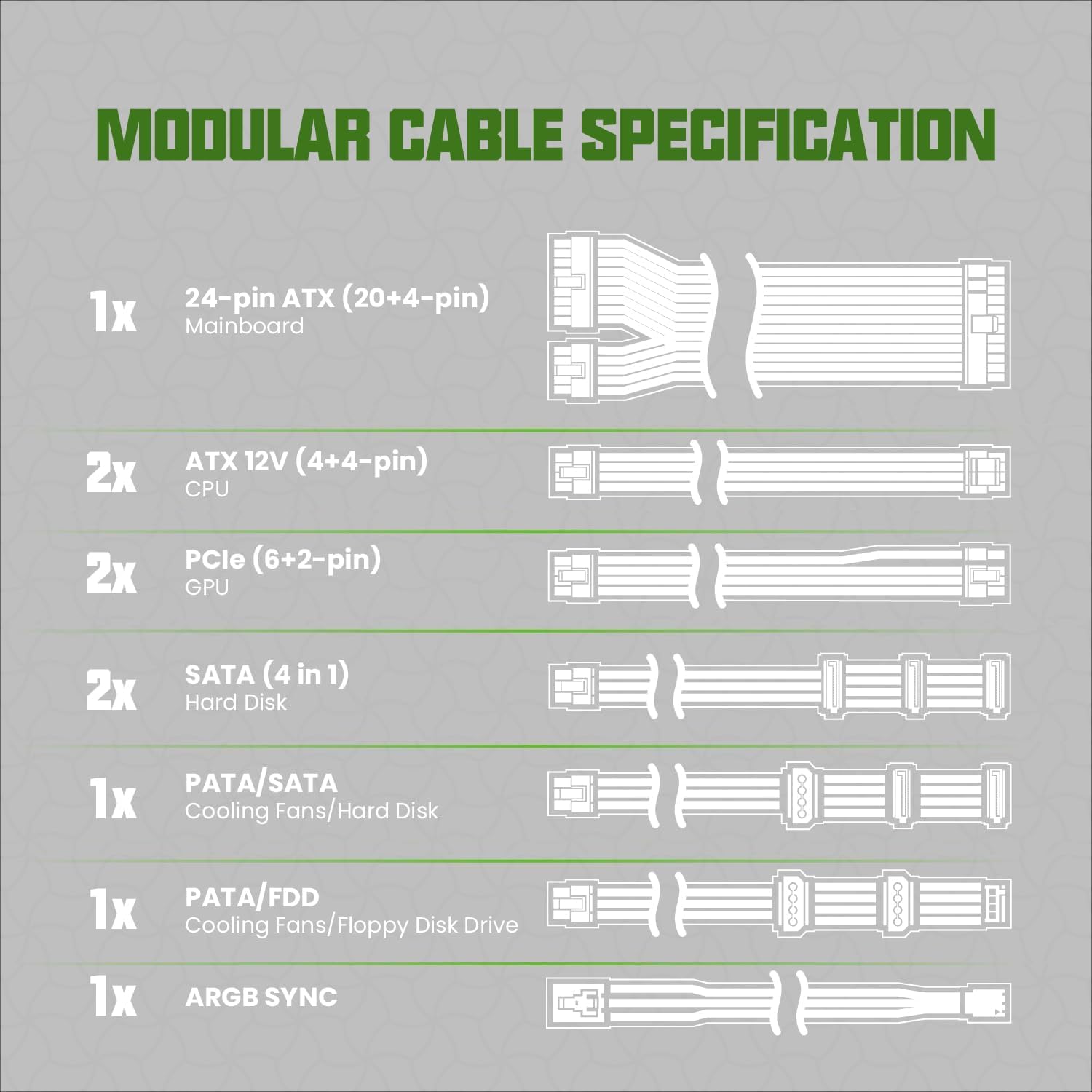
Image: A diagram illustrating the various modular cable types and quantities included with the GAMEMAX RGB850 Power Supply, including 24-pin ATX, ATX 12V (4+4-pin), PCIe (6+2-pin), SATA, PATA/FDD, and ARGB SYNC cables.
૫.૧ પ્રારંભિક પાવર-અપ
- બધા કેબલ કનેક્શન સુરક્ષિત છે તેની ખાતરી કરવા માટે બે વાર તપાસો.
- Connect the AC power cord to the PSU and then to a wall outlet.
- Flip the power switch on the back of the PSU to the 'ON' position.
- તમારા કમ્પ્યુટર પર પાવર કરો.
5. ઓપરેશન
5.1 મૂળભૂત કામગીરી
Once installed and connected, the GAMEMAX RGB850 Power Supply will provide stable power to your system. The 140mm fan operates quietly, adjusting its speed based on load to maintain optimal temperatures.
૩.૨ ARGB લાઇટિંગ કંટ્રોલ
The integrated ARGB lighting can be controlled via your motherboard's A-RGB software (e.g., ASUS Aura Sync, GIGABYTE RGB Fusion, MSI Mystic Light Sync, ASRock Polychrome RGB). Refer to your motherboard manual for specific instructions on controlling ARGB devices.
6. જાળવણી
To ensure the longevity and optimal performance of your GAMEMAX RGB850 Power Supply, follow these maintenance guidelines:
- સફાઈ: Periodically clean the fan and ventilation grilles to prevent dust buildup. Use compressed air to gently remove dust. Ensure the PSU is powered off and unplugged before cleaning.
- પર્યાવરણ: PSU ને સ્વચ્છ, સૂકા અને સારી રીતે હવાની અવરજવરવાળા વાતાવરણમાં ચલાવો. અતિશય તાપમાન અને ભેજ ટાળો.
- કેબલ મેનેજમેન્ટ: Ensure cables are neatly routed and do not obstruct airflow within the computer case.
7. મુશ્કેલીનિવારણ
If you encounter issues with your GAMEMAX RGB850 Power Supply, refer to the following common problems and solutions:
- કોઈ શક્તિ નથી:
- તપાસો કે AC પાવર કોર્ડ PSU અને વોલ આઉટલેટ બંને સાથે સુરક્ષિત રીતે જોડાયેલ છે કે નહીં.
- Ensure the power switch on the back of the PSU is in the 'ON' position.
- Verify that the 24-pin ATX and ATX 12V (CPU) cables are correctly connected to the motherboard.
- વોલ આઉટલેટમાં પાવર છે કે નહીં તેની ખાતરી કરવા માટે તેને બીજા ઉપકરણથી ચકાસો.
- સિસ્ટમ અસ્થિરતા/ક્રેશ:
- Ensure all modular cables are fully seated into both the PSU and the components.
- Confirm that your system's power requirements do not exceed the PSU's 850W capacity.
- Check for proper ventilation within the case to prevent overheating.
- ચાહકનો અવાજ:
- A certain level of fan noise is normal under heavy load.
- If the noise is excessive or unusual, ensure the fan is free from obstructions and dust.
- If the noise persists and is abnormal, contact customer support.
- ARGB લાઇટિંગ કામ કરી રહી નથી:
- Verify the ARGB SYNC cable is correctly connected to a compatible 3-pin 5V ARGB header on your motherboard.
- Ensure your motherboard's ARGB software is installed and configured correctly.
If these steps do not resolve the issue, please contact GAMEMAX customer support for further assistance.
8. સ્પષ્ટીકરણો
Below are the technical specifications for the GAMEMAX RGB850 850W 80 Plus Gold Power Supply:
| સ્પષ્ટીકરણ | મૂલ્ય |
|---|---|
| બ્રાન્ડ | ગેમમેક્સ |
| મોડલ | RGB850-WHITE |
| વાટtage | 850W |
| કાર્યક્ષમતા પ્રમાણપત્ર | 80 પ્લસ ગોલ્ડ |
| ATX સ્ટાન્ડર્ડ | ATX 3.0 |
| PCIe સ્ટાન્ડર્ડ | PCIe 5.0 Ready |
| કેપેસિટર્સ | ૧૦૦% જાપાનીઝ કેપેસિટર્સ |
| મોડ્યુલારિટી | સંપૂર્ણ મોડ્યુલર |
| ઠંડક પદ્ધતિ | Air (140mm fan) |
| ફોર્મ ફેક્ટર | એટીએક્સ |
| ઉત્પાદનના પરિમાણો (L x W x H) | 11.41 x 10.28 x 5.24 ઇંચ |
| વસ્તુનું વજન | 6.3 પાઉન્ડ (2.86 કિલોગ્રામ) |
| સુસંગત ઉપકરણો | ગેમિંગ પીસી |
| તારીખ પ્રથમ ઉપલબ્ધ | 20 ઓક્ટોબર, 2023 |
9. વોરંટી અને સપોર્ટ
9.1 વોરંટી માહિતી
The GAMEMAX RGB850 Power Supply comes with a 5 વર્ષની વોરંટી, providing peace of mind regarding its long-lasting reliability. Please retain your proof of purchase for warranty claims.
9.2 ગ્રાહક સપોર્ટ
For technical assistance, warranty inquiries, or any other questions regarding your GAMEMAX product, please visit the official GAMEMAX website or contact their customer support channels. Refer to the product packaging or the GAMEMAX webસૌથી અદ્યતન સંપર્ક માહિતી માટે સાઇટ.


