1. પરિચય
The RadioShack FT C10U Multimedia Bluetooth Speaker is the perfect combination of design, functionality, and sound quality. Designed to offer an immersive audio experience, this speaker features adjustable bass and a master volume that enhances every note, bringing your music to life.
Thanks to its versatile connectivity, you can play your favorite music from multiple sources, including Bluetooth, USB, SD, and auxiliary cable. This makes it an ideal choice for any occasion, from a family gathering to a karaoke night with friends.
The included remote control adds an unparalleled level of convenience, allowing you to manage all essential functions from a distance. Change tracks, adjust volume, or configure sound without having to approach the speakers. Manufactured with high-quality materials such as ABS, HIPS, PVC, and iron, this speaker not only ensures durability but also an elegant design that adapts to any space. Its solid construction ensures superior and reliable audio performance. Additionally, its compact and lightweight design makes it easy to transport, so you can enjoy your music wherever you go. With practical adjustment buttons and powerful sound, this speaker is the perfect companion for any music lover.
2. ઉત્પાદન સુવિધાઓ
- Exceptional and Immersive Sound: Enjoy a unique auditory experience with adjustable bass and master volume for personalized sound.
- બહુમુખી કનેક્ટિવિટી: Compatible with Bluetooth, USB, SD, and auxiliary cable for music playback from multiple devices.
- અનુકૂળ રીમોટ કંટ્રોલ: Adjust volume, change tracks, and configure sound from a distance.
- Durable and Elegant Construction: Made with high-quality ABS, HIPS, PVC, and iron for resistance and modern design.
- Portability and Ease of Use: Compact and lightweight design, perfect for transport, with physical volume adjustment keys for easy handling.
3. પેકેજ સામગ્રી
બધી વસ્તુઓ હાજર છે અને સારી સ્થિતિમાં છે તેની ખાતરી કરવા માટે કૃપા કરીને પેકેજ કાળજીપૂર્વક તપાસો.
- 1 x RadioShack Multimedia Bluetooth Speaker System (1 Subwoofer, 2 Satellite Speakers)
- 1 x રીમોટ કંટ્રોલ
- 1 x પાવર કેબલ
- 1 x AUX/USB Cable
- ૧ x વપરાશકર્તા માર્ગદર્શિકા (આ દસ્તાવેજ)
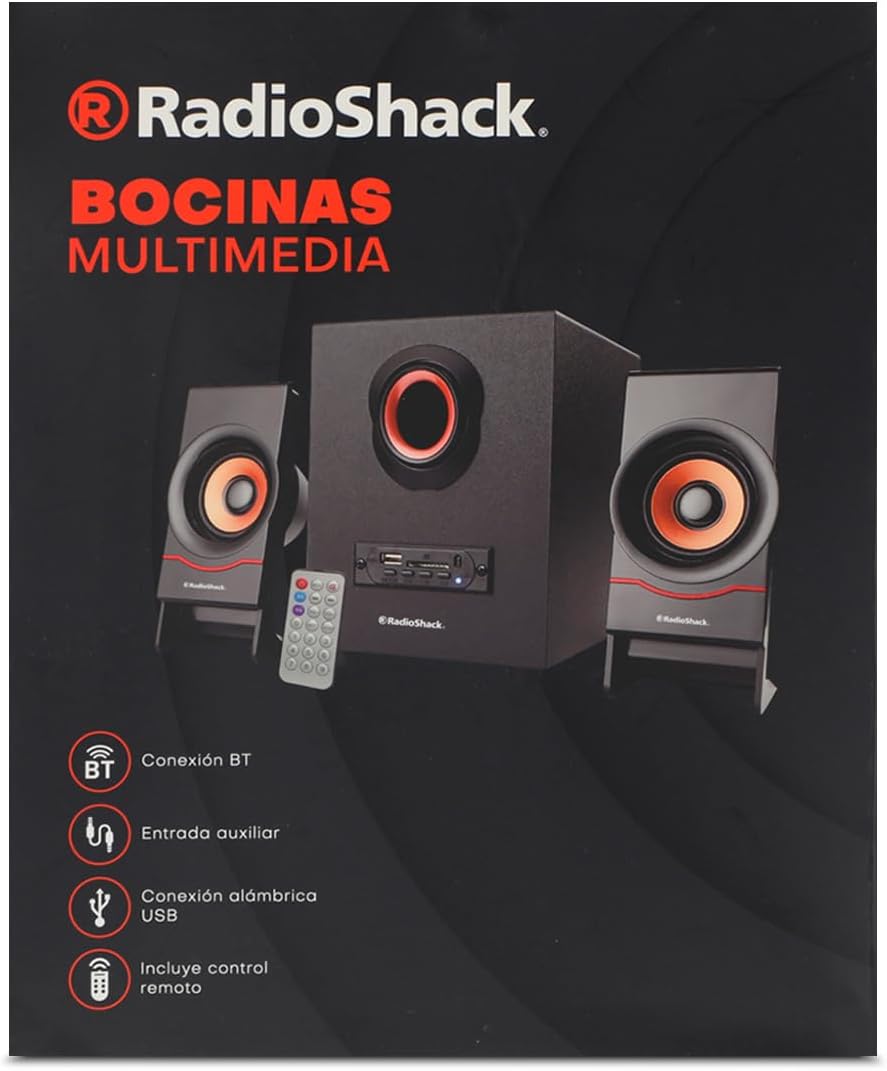
Image: The product packaging box, showing the speaker system, remote, and connectivity icons.
4. ઉત્પાદન ઓવરview

Image: The complete speaker system, including the central subwoofer, two satellite speakers, and the remote control.

Image: Front panel of the subwoofer, showing the USB port, SD card slot, and various control buttons.

છબી: બાજુ view of the subwoofer, highlighting the control panel with input ports.

છબી: આગળ view of the two compact satellite speakers, each with a single driver.

Image: The included AUX and USB cable, used for wired audio input and potentially power or data transfer.
5. સેટઅપ માર્ગદર્શિકા
- સિસ્ટમ અનપેક કરો: Carefully remove all components from the packaging. Place the subwoofer on a stable, flat surface.
- સેટેલાઇટ સ્પીકર્સ કનેક્ટ કરો: Plug the audio cables from the two satellite speakers into the corresponding output jacks on the back of the subwoofer. Ensure a secure connection.
- પાવર કનેક્ટ કરો: Insert the power cable into the power input port on the subwoofer, then plug the other end into a standard electrical outlet (AC 100-240V, 50/60Hz).
- પાવર ચાલુ: Press the power button on the front panel of the subwoofer or on the remote control to turn on the speaker system. The LED indicator will light up.
6. ઓપરેટિંગ સૂચનાઓ
6.1. પાવર ચાલુ/બંધ
દબાવો પાવર button on the front panel of the subwoofer or the પાવર યુનિટ ચાલુ અથવા બંધ કરવા માટે રિમોટ કંટ્રોલ પરનું બટન.
6.2. મોડ પસંદગી
દબાવો મોડ button on the front panel or the remote control to cycle through available input modes: Bluetooth (BT), USB, SD, and AUX.
6.3. બ્લૂટૂથ કનેક્શન
- સ્પીકર ચાલુ કરો અને બ્લૂટૂથ મોડ પસંદ કરો મોડ button. The speaker will emit a pairing tone, and the Bluetooth indicator will flash.
- તમારા ઉપકરણ (સ્માર્ટફોન, ટેબ્લેટ, લેપટોપ) પર બ્લૂટૂથ સક્ષમ કરો.
- માટે શોધો "RadioShack FT C10U" or similar in your device's Bluetooth list.
- Select the speaker to pair. Once connected, the speaker will emit a confirmation tone, and the Bluetooth indicator will stop flashing and remain solid.
- હવે તમે સ્પીકર દ્વારા તમારા ઉપકરણમાંથી ઓડિયો ચલાવી શકો છો.
6.4. USB/SD Playback
- Insert a USB flash drive or SD card (with MP3/WMA audio files) into the corresponding slot on the subwoofer's front panel.
- The speaker will automatically switch to USB or SD mode and begin playing the first compatible audio file. જો નહીં, તો દબાવો મોડ સાચો ઇનપુટ પસંદ કરવા માટે બટન.
- નો ઉપયોગ કરો રમો/થોભો, અગાઉના, અને આગળ buttons on the speaker or remote to control playback.
6.5. AUX કનેક્શન
- Connect one end of the included AUX cable (3.5mm jack) to the AUX input port on the subwoofer.
- Connect the other end of the AUX cable to the headphone jack or audio output of your external device (e.g., MP3 player, computer).
- દબાવો મોડ button to select AUX input.
- તમારા બાહ્ય ઉપકરણથી પ્લેબેક અને વોલ્યુમ નિયંત્રિત કરો.
6.6. દૂરસ્થ નિયંત્રણ કાર્યો
The remote control provides convenient access to all speaker functions:
- પાવર બટન: સ્પીકરને ચાલુ/બંધ કરે છે.
- મોડ બટન: Switches between Bluetooth, USB, SD, and AUX modes.
- પ્લે/પોઝ બટન: ઓડિયો પ્લેબેક ચલાવે છે અથવા થોભાવે છે.
- પાછલા/આગલા બટનો: પાછલા કે આગામી ટ્રેક પર જાય છે.
- ઉપર / ડાઉન બટનો વોલ્યુમ: માસ્ટર વોલ્યુમ સમાયોજિત કરે છે.
- EQ બટન: ઇક્વેલાઇઝર પ્રીસેટ્સ (જો ઉપલબ્ધ હોય તો) દ્વારા ચક્ર.
- નંબર બટનો (0-9): For direct track selection on USB/SD (if supported).
- RPT (Repeat) Button: વર્તમાન ટ્રેક અથવા બધા ટ્રેકનું પુનરાવર્તન કરે છે.
- DISC બટન: (Function may vary, typically related to disc playback or specific mode).
7. જાળવણી
- સફાઈ: Use a soft, dry cloth to clean the speaker's surface. Do not use liquid cleaners or abrasive materials.
- સંગ્રહ: જ્યારે લાંબા સમય સુધી ઉપયોગમાં ન હોય, ત્યારે સ્પીકરને ઠંડી, સૂકી જગ્યાએ, સીધા સૂર્યપ્રકાશ અને અતિશય તાપમાનથી દૂર રાખો.
- હેન્ડલિંગ: Avoid dropping the speaker or subjecting it to strong impacts. Do not expose it to water or high humidity.
- વેન્ટિલેશન: Ensure proper ventilation around the subwoofer to prevent overheating. Do not block any ventilation openings.
8. મુશ્કેલીનિવારણ
| સમસ્યા | સંભવિત કારણ | ઉકેલ |
|---|---|---|
| કોઈ શક્તિ નથી | Power cable not connected; Power outlet not working; Speaker is off. | Ensure power cable is securely plugged in. Test the outlet with another device. Press the power button on the speaker or remote. |
| કોઈ અવાજ નથી | Volume is too low; Incorrect input mode selected; Device not playing audio; Cables not connected properly. | Increase volume on speaker and connected device. Press MODE button to select correct input. Ensure audio is playing on your device. Check all cable connections. |
| બ્લૂટૂથ કનેક્ટ થઈ રહ્યું નથી | Speaker not in pairing mode; Device Bluetooth is off; Speaker is already connected to another device; Interference. | Ensure speaker is in Bluetooth mode and flashing. Turn on Bluetooth on your device. Disconnect from other devices. Move speaker closer to device, away from other electronics. |
| USB/SD ચાલી રહ્યું નથી | અયોગ્ય file format; USB/SD card corrupted; Incorrect mode selected. | ખાતરી કરો files are MP3/WMA format. Try another USB/SD card. Press MODE button to select USB/SD mode. |
| વિકૃત અવાજ | Volume too high; Audio source quality is poor; Speaker placed too close to interference. | Lower the volume. Try a different audio source. Move speaker away from other electronic devices. |
9. સ્પષ્ટીકરણો
| લક્ષણ | વિગત |
|---|---|
| સ્પીકરનો પ્રકાર | મલ્ટીમીડિયા |
| ખાસ લક્ષણ | બ્લૂટૂથ |
| સુસંગત ઉપકરણો | લેપટોપ, ટેબ્લેટ, સ્માર્ટફોન |
| નિયંત્રક પ્રકાર | રીમોટ કંટ્રોલ |
| સમાવાયેલ ઘટકો | પાવર કેબલ |
| ઉત્પાદનના પરિમાણો (D x W x H) | 25 x 22 x 30 સેમી |
| ઉત્પાદક | રેડિયોશેક |
| મોડલ નંબર | 100124617 |
| ઉત્પાદનોની સંખ્યા | 1 |
| વક્તા Ampલિફિકેશનનો પ્રકાર | નિષ્ક્રિય |
| વાટtage | 5 વોટ |
| પાવર સ્ત્રોત | ઇલેક્ટ્રિક કેબલ |
| બેટરી જરૂરી છે | ના |
| મહત્તમ સ્પીકર આઉટપુટ પાવર | 5 વોટ્સ |
| કનેક્ટિવિટી ટેકનોલોજી | બ્લૂટૂથ |
| ઓડિયો આઉટપુટ મોડ | સ્ટીરિયો |
10. વોરંટી અને સપોર્ટ
For warranty information and technical support, please refer to the warranty card included with your product or visit the official RadioShack webસાઇટ. કોઈપણ વોરંટી દાવા માટે ખરીદીના પુરાવા તરીકે તમારી ખરીદી રસીદ રાખો.
If you encounter issues not covered in this manual, please contact RadioShack customer service for assistance.


