પરિચય
The UltraPro One Touch Replacement Remote is designed to provide immediate control for your television without complex programming. This remote is pre-programmed for popular TV brands including Samsung, LG, Sony, Vizio, and Roku TVs, and also offers universal control for other audio/video equipment. It features dedicated buttons for common streaming applications and an AUX button for an additional device.

Figure 1: UltraPro One Touch Replacement Remote and its packaging.

Figure 2: The UltraPro One Touch Replacement Remote, ready for use.
સેટઅપ માર્ગદર્શિકા
1. બેટરી ઇન્સ્ટોલેશન
The remote requires two (2) AA batteries (not included). To install:
- રિમોટની પાછળના ભાગમાં બેટરીનો ડબ્બો શોધો.
- બેટરી કવર નીચે તરફ સ્લાઇડ કરો અને તેને દૂર કરો.
- બે AA બેટરી દાખલ કરો, ખાતરી કરો કે ધન (+) અને ઋણ (-) ટર્મિનલ્સ કમ્પાર્ટમેન્ટની અંદરના નિશાનો સાથે સંરેખિત થાય છે.
- બેટરી કવરને ફરીથી સ્થાને સ્લાઇડ કરીને બદલો જ્યાં સુધી તે સુરક્ષિત રીતે ક્લિક ન થાય.
2. Initial TV Pairing (One Touch)
The UltraPro One Touch remote is designed for instant pairing with supported TV brands:
- ખાતરી કરો કે તમારું ટીવી ચાલુ છે.
- Point the remote at your TV.
- Press and hold the dedicated TV device button that matches your TV's brand (e.g., સેમસંગ, LG, સોની, VIZIO, અથવા આરકયુ ટીવી).
- Release the button once your TV responds. The remote is now paired and ready for use.

Figure 3: Tap your TV brand button for instant setup.
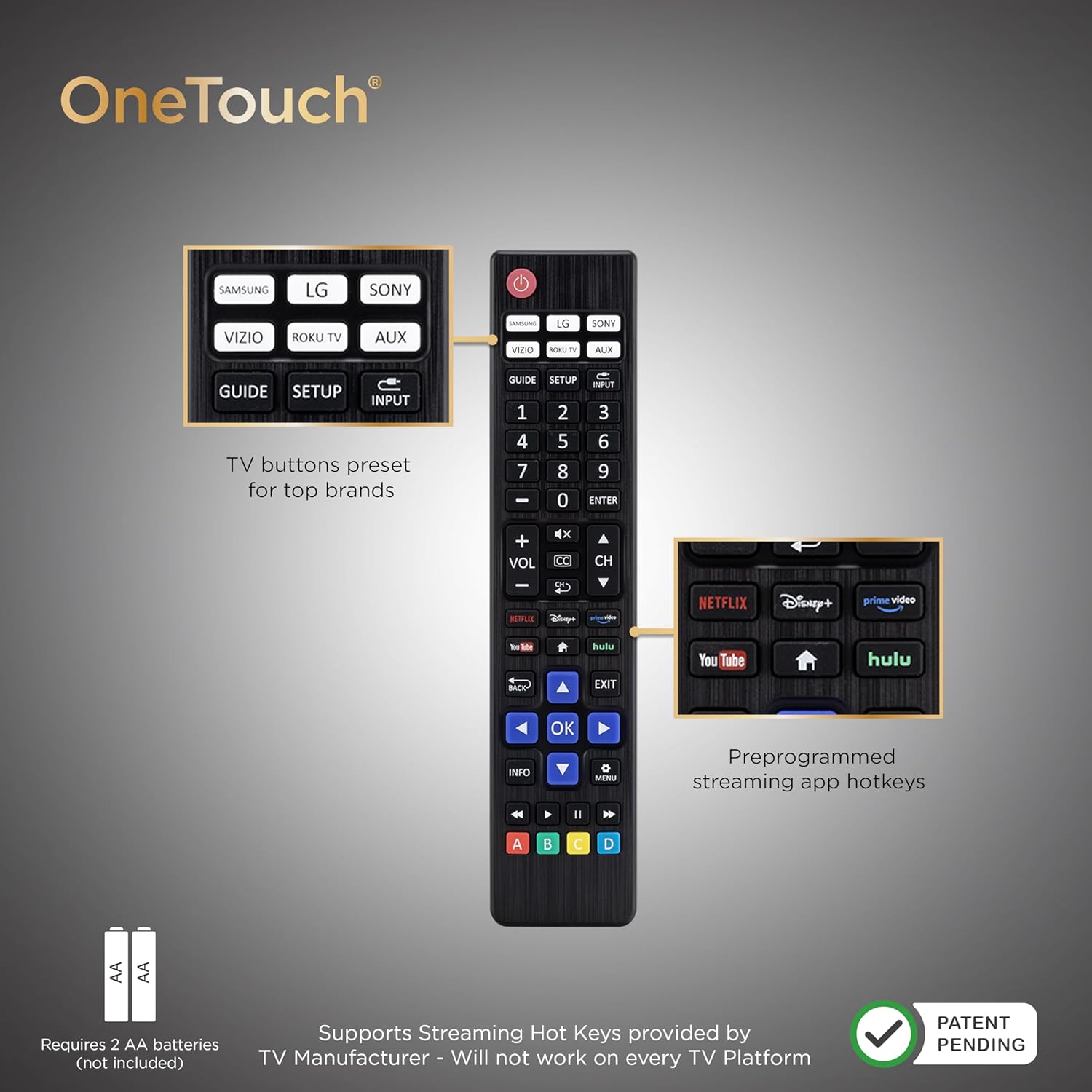
Figure 4: Remote layout highlighting key features and battery requirement.
Operating Your Remote
This remote allows control of your TV and one additional device (AUX).

Figure 5: The remote supports controlling two devices: your TV and one other device.
1. TV Control
After initial pairing, the remote's standard buttons (Power, Volume, Channel, Mute, Navigation, OK, Back, Exit, Menu, Info, Guide, Input) will control your TV's functions.
2. Streaming App Hotkeys
The remote includes pre-programmed hotkeys for direct access to popular streaming applications:
- નેટફ્લિક્સ
- ડિઝની+
- પ્રાઇમ વિડિયો
- હુલુ
- YouTube
Simply press the corresponding button to launch the app. Note that functionality may vary based on your TV's operating system and manufacturer support.
3. AUX Device Control
આ AUX button is pre-programmed for use with Roku boxes. It can be reprogrammed to control a different audio/video device (e.g., Blu-ray/DVD player, cable/satellite receiver, soundbar) using auto code search or direct code entry programming methods. Refer to the online step-by-step programming videos for detailed instructions.
4. Master Volume Feature
The master volume feature allows you to adjust the volume regardless of which device is currently being controlled by the remote. This is particularly useful when controlling an AUX device but wanting to adjust the TV's volume.

આકૃતિ 6: વિગતવાર view of the remote's preprogrammed TV buttons, AUX button, and streaming app hotkeys.
ઉપકરણ સુસંગતતા
સમર્થિત ઉપકરણો
- Roku boxes
- રોકુ ટીવી
- સેમસંગ ટીવી
- એલજી ટીવી
- સોની ટીવી
- Vizio TVs
- Most major TV brands (universal control)
મર્યાદાઓ
This remote is generally not compatible with:
- Roku streaming sticks
- Amazon Fire TV streaming sticks
Additionally, specific app hotkey functionality (e.g., YouTube, Disney+) may not work on all TV platforms or models, even for supported brands, due to manufacturer software variations. Roku's operating system does not support number buttons for channel selection.

આકૃતિ 7: સુસંગતતા સમાપ્તview for the UltraPro One Touch Remote.
મુશ્કેલીનિવારણ
રિમોટ પ્રતિસાદ આપતું નથી
- બેટરી તપાસો: Ensure fresh AA batteries are correctly installed with proper polarity.
- દૃષ્ટિની રેખા: Make sure there are no obstructions between the remote and the device you are trying to control. The remote uses infrared (IR) signals.
- Re-pair TV: If the remote stops controlling your TV, try the initial TV pairing process again by pressing and holding your TV's brand button.
Streaming App Hotkeys Not Working
- ટીવી સુસંગતતા: App hotkey functionality depends on your TV manufacturer's support. Not all apps may launch on every TV platform, even if the brand is supported.
- LG TV YouTube Button: Some LG TV models may not support the YouTube hotkey directly from this remote.
- Roku Number Buttons: Roku OS generally does not support number buttons for direct channel entry.
AUX Device Not Responding
- Reprogram AUX: If the AUX button is not controlling your desired device, it may need to be reprogrammed using auto code search or direct code entry. Refer to online resources for programming instructions.
ઉત્પાદન સ્પષ્ટીકરણો
| લક્ષણ | સ્પષ્ટીકરણ |
|---|---|
| બ્રાન્ડ | અલ્ટ્રાપ્રો |
| મોડલ નંબર | 80829 |
| સુસંગત ઉપકરણો | ટેલિવિઝન, સ્ટ્રીમિંગ ઉપકરણ |
| મહત્તમ સપોર્ટેડ ડિવાઇસીસ | 2 (TV + 1 AUX device) |
| ખાસ લક્ષણો | Lightweight, No Programming Required (for main TV brands), Pre-Programmed, Universal |
| કનેક્ટર પ્રકાર | ઇન્ફ્રારેડ |
| બેટરી જરૂરી છે | 2 x AA (શામેલ નથી) |
| ઉત્પાદન પરિમાણો | ૧૦ x ૧૦ x ૧૦ સેમી (આશરે ૩.૯૪ x ૩.૯૪ x ૩.૯૪ ઇંચ) |
| વસ્તુનું વજન | ૧૩૮ ગ્રામ (આશરે ૪.૮૭ ઔંસ) |

Figure 8: Physical dimensions of the remote control.
ટેકનિકલ સપોર્ટ
For further assistance or questions regarding your UltraPro One Touch Replacement Remote, please contact our U.S.-based technical support team.
- ઉપલબ્ધતા: Monday-Friday, 7 AM - 8 PM Central Time.
- ઑનલાઇન સંસાધનો: Step-by-step programming videos and additional support materials are available online.
કૃપા કરીને ઉત્પાદન પેકેજિંગ અથવા ઉત્પાદકના અધિકારીનો સંદર્ભ લો webચોક્કસ સંપર્ક વિગતો માટે સાઇટ.


