પરિચય
This manual provides detailed instructions for the assembly, operation, and maintenance of your Andonstar AD249S-Max 10.1-inch HDMI Digital Microscope. Designed for precision tasks such as electronics repair, soldering, and detailed observation of various specimens, this device offers high-resolution imaging and a versatile working environment. Please read this manual thoroughly before using the product to ensure proper function and longevity.
બૉક્સમાં શું છે
Carefully unpack all components and verify that all items listed below are present. If any items are missing or damaged, please contact customer support.
- 10.1'' Microscope Monitor with Lens A (pre-installed)
- Lens L (for soldering and repairing)
- Lens D (for biological slides)
- Column and Metal Base
- Beam for stand assembly
- સાધન ધારક
- Soldering Helping Hands with rotatable clamps
- Soldering Mat
- Bottom Light Stage
- Slides Kit
- Observation Box
- ટ્વીઝર
- રીમોટ કંટ્રોલ
- 32GB માઈક્રો એસડી કાર્ડ
- પાવર એડેપ્ટર
- કેબલ સ્વિચ કરો
- યુએસબી કેબલ
- HDMI કેબલ
- વપરાશકર્તા માર્ગદર્શિકા

Image: All components included with the Andonstar AD249S-Max digital microscope, laid out for inspection.
ઉત્પાદન લક્ષણો
Versatile 3-Lens System
- Lens L (60-240x): Optimized for soldering and repair work, providing a suitable working distance.
- Lens A (18-720x): Ideal for observing larger objects such as coins, plants, and stones.
- Lens D (1560-2040x): Designed for high-magnification viewing of biological slides.
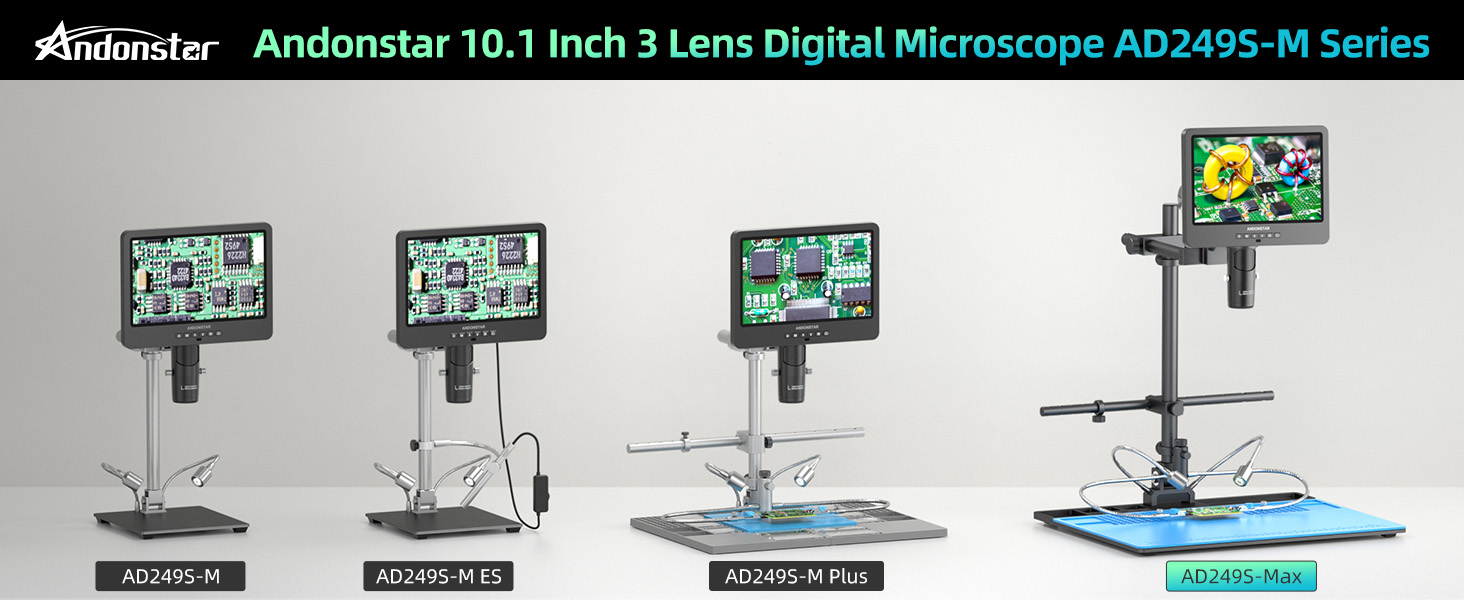
Image: An illustration of the three distinct lenses (L, A, D) and their recommended uses for various observation tasks.

Image: Visual comparison of 30x magnification (showing a coin) and 2000x magnification (showing a biological slide) as displayed on the microscope screen.
UHD 2160P Display and Output
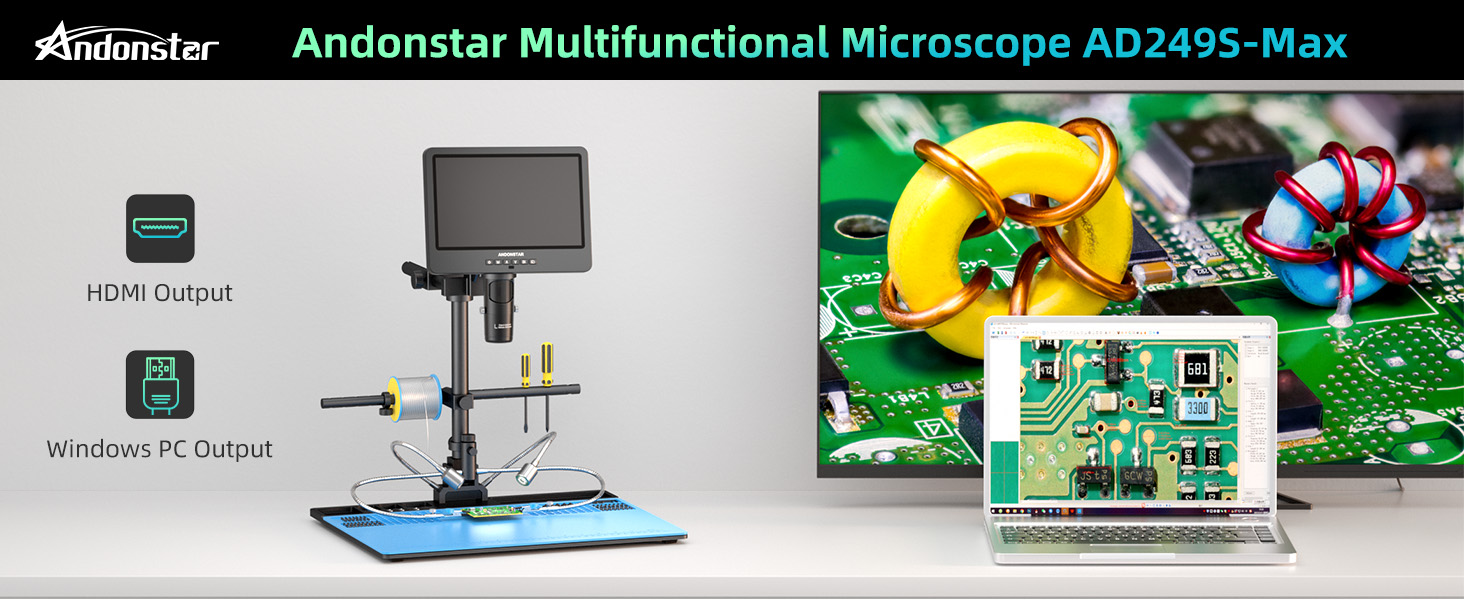
માઇક્રોસ્કોપમાં ડાયરેક્ટ માટે 10.1-ઇંચનો LCD ડિસ્પ્લે છે viewing. It supports ultra-high-definition 2160P video recording and offers HDMI output for seamless viewing on larger external screens, as well as USB output for PC connection.

Image: The microscope demonstrating its HDMI output to a large monitor and USB output to a laptop for PC software use.
Super Max Soldering Station
The AD249S-Max includes an upgraded oversized Max station, providing a significantly larger working area (370% increase compared to previous models). This station is equipped with a tool holder and flexible soldering helping hands with rotatable clamps, enhancing efficiency for professional soldering and repair tasks.
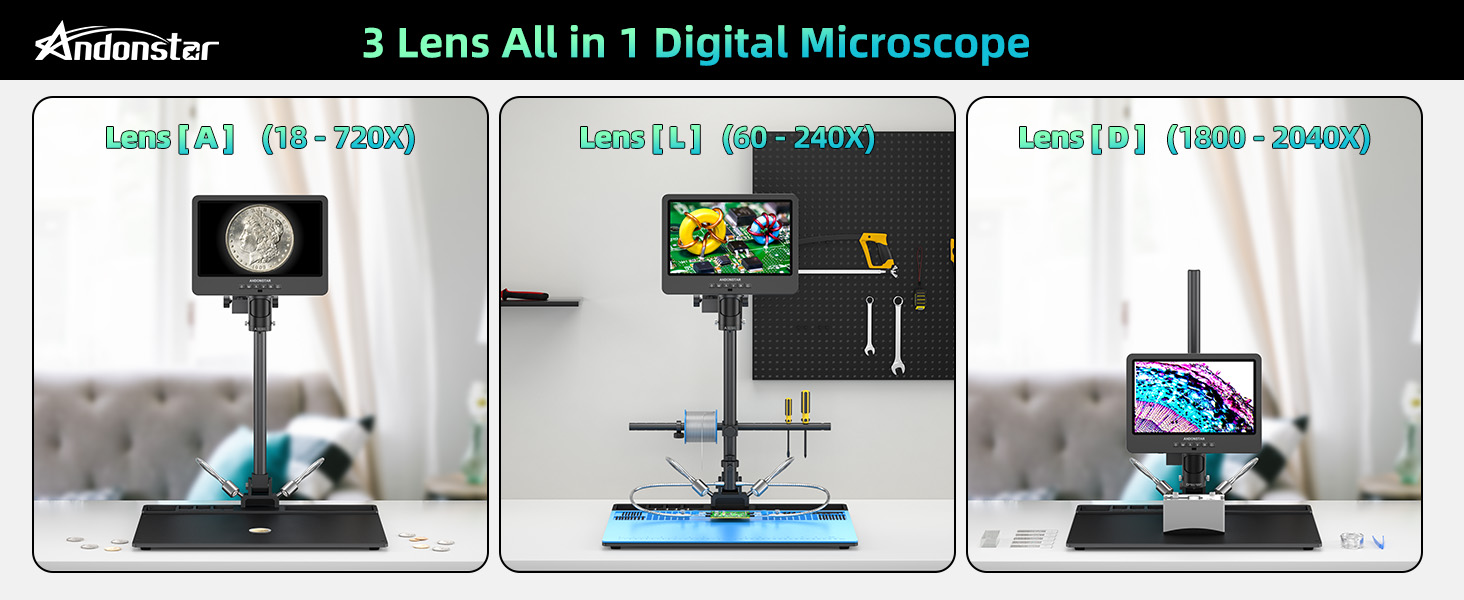
Image: A visual comparison illustrating the larger metal base area of the AD249S-Max soldering station compared to the standard AD249S-M.
છબી: વિગતવાર view of the integrated tool holder for easy access to tools and the flexible soldering helping hands with 360-degree rotatable clamps.
એડજસ્ટેબલ એલઇડી લાઇટ્સ
Eight intensity levels of LED lighting are available to meet various image brightness requirements, ensuring optimal illumination for your observations.
Photo and Video Recording
Capture and store images and videos of your micro-world observations directly onto the provided 32GB Micro SD card.
સેટઅપ
એસેમ્બલી
- Attach the column to the metal base using the provided screws.
- Mount the microscope monitor assembly onto the column.
- Install the beam, tool holder, and soldering helping hands onto the column as desired for your workspace.
- Select the appropriate lens (L, A, or D) and screw it onto the microscope camera.
- Place the soldering mat onto the metal base.

છબી: એક ઓવરview of the assembled microscope, highlighting its dimensions and the placement of components like the tool holder and soldering helping hands.
Adjusting the Boom Arm Stand
The innovative Max boom arm stand allows for 360-degree rotation and flexible adjustments in height and horizontal position. Use the bracket knob and thumb screws to secure the desired position for optimal viewing and working distance.

Image: Visual guide demonstrating the flexibility of the boom arm stand, including height, horizontal, and rotational adjustments.
પાવર કનેક્શન
Connect the power adapter to the microscope and plug it into a suitable power outlet. Use the switch cable to power the device on or off.
ઓપરેટિંગ સૂચનાઓ
મૂળભૂત કામગીરી
- પાવર ચાલુ/બંધ: Press the power button (1) on the monitor to turn the device on or off.
- મેનુ નેવિગેશન: Use the Mode/Menu button (2) to access settings and navigate through options.
- ધ્યાન કેન્દ્રિત: Rotate the focusing wheel on the microscope body to achieve a clear image.
- Dબ્જેક્ટનું અંતર: Rotate the bracket knob to adjust the distance between the lens and the object.
- ડિજિટલ ઝૂમ: Use the Up/Down buttons (3, 4) to apply digital zoom to the image.
- એલઇડી લાઇટને સમાયોજિત કરવી: Use the controls on the switch cable or remote to adjust the intensity of the LED lights.

છબી: આગળ અને પાછળ views of the microscope monitor, detailing the function of each button and port, including power, menu, zoom, SD card slot, USB, and HDMI.
Lens Exchange
To change lenses, carefully unscrew the currently installed lens from the microscope camera. Select the desired lens (L, A, or D) and screw it firmly into place. Ensure the lens is securely attached before operation.
ફોટા અને વિડિયો લેવા
Insert the provided 32GB Micro SD card into the SD card slot (10). Use the 'Take pictures' button (6) for still images or the 'OK/Start recording' button (5) to begin and end video recording. Captured media will be saved to the SD card.
દૂરસ્થ નિયંત્રણ કાર્યો
The remote control allows for convenient operation from a distance. Functions include image discoloration, digital zoom, and other menu navigations. Point the remote towards the remote signal receiver (7) on the monitor.
PC Connection and Measurement Software
To connect the microscope to a Windows PC and utilize the professional measurement software:
- Download and install the 'Microscope Measure' software from the official Andonstar website according to the provided instructions.
- Connect the microscope to your computer using the separate USB cable (not the one with the dimmer).
- On the microscope screen, when the mode box pops up, press the 'Down' and 'OK' buttons to select 'PC Camera'.
- Open the 'Microscope Measure' software on your PC, select 'Device', and then choose 'USB Camera' to display the image and access measurement, photo, and video capture functions.

Image: Step-by-step instructions for connecting the microscope to a Windows PC and using the 'Microscope Measure' software.
HDMI આઉટપુટ
Connect the provided HDMI cable from the microscope's HDMI port (12) to an HDMI input on a larger monitor or TV for an expanded view of your observations.
જાળવણી
- Keep the lenses clean using a soft, lint-free cloth specifically designed for optical surfaces. Avoid abrasive materials.
- નિયમિતપણે મોનિટર સ્ક્રીનને નરમ, સૂકા કપડાથી સાફ કરો.
- Store the microscope in a dry, dust-free environment when not in use.
- Ensure all connections are secure but do not overtighten screws.
મુશ્કેલીનિવારણ
- કોઈ શક્તિ નથી: Check if the power adapter is securely connected and the switch cable is turned on. Ensure the power outlet is functional.
- સ્ક્રીન પર કોઈ છબી નથી: Verify that the lens is correctly installed and the microscope is powered on. Adjust focus and object distance.
- અસ્પષ્ટ છબી: Rotate the focusing wheel and adjust the bracket knob to find the optimal focus and working distance for the selected lens. Ensure the lens is clean.
- PC Software Connection Issues: Ensure you are using the correct USB cable (not the dimmer cable). Confirm 'PC Camera' mode is selected on the microscope. If installation issues arise, check your PC's security settings or firewall, as some systems may block executable fileઅજ્ઞાત સ્ત્રોતોમાંથી એસ.
- રીમોટ કંટ્રોલ પ્રતિસાદ આપતું નથી: Check the battery in the remote control. Ensure there are no obstructions between the remote and the microscope's IR receiver.
વિશિષ્ટતાઓ
| લક્ષણ | વિગત |
|---|---|
| મોડેલનું નામ | AD249S-Max |
| ડિસ્પ્લે માપ | 10.1 ઇંચ |
| વિડિઓ રિઝોલ્યુશન | 2160P UHD |
| Magnification (on 28-inch HDMI monitor) | Lens A: 18-720x, Lens D: 1800-2040x, Lens L: 60-240x |
| આઉટપુટ વિકલ્પો | HDMI, USB (PC) |
| પ્રકાશ સ્ત્રોત પ્રકાર | LED (8 intensity levels) |
| સંગ્રહ | Micro SD Card (up to 32GB included) |
| ઉત્પાદન પરિમાણો | ૧૧"લિ x ૪"પગ x ૧૩"કલો |
| વસ્તુનું વજન | 1.13 ounces (microscope unit) |
| સામગ્રી | Metal stand, various components |
વોરંટી અને આધાર
Andonstar provides professional after-sales service. For any inquiries, technical assistance, or support needs, please contact our customer service team. While specific warranty details are not provided in this manual, please refer to your purchase documentation or the official Andonstar webવોરંટી માહિતી માટે સાઇટ.


