પરિચય
This manual provides detailed instructions for the safe and effective use of your ION Audio PA Ultimate 650 Watt Bluetooth Speaker Sound System. The PA Ultimate is a powerful, bi-amplified sound system designed for various audio applications, featuring Bluetooth connectivity, a multi-channel mixer, and integrated lighting effects. Please read this manual thoroughly before operating the device and retain it for future reference.
પેકેજ સામગ્રી
- ION Audio PA Ultimate Speaker
- પાવર કેબલ
- સ્પીકર સ્ટેન્ડ
- માઇક્રોફોન
- માઇક્રોફોન કેબલ
- Quickstart Guide (not included in this digital manual)
- Safety & Warranty Manual (not included in this digital manual)
સલામતી માહિતી
આ ઉત્પાદનનો ઉપયોગ કરતી વખતે હંમેશા મૂળભૂત સલામતી સાવચેતીઓનું પાલન કરો જેથી આગ, ઇલેક્ટ્રિક આંચકો અને વ્યક્તિઓને ઇજા થવાનું જોખમ ઓછું થાય. ભવિષ્યના સંદર્ભ માટે આ માર્ગદર્શિકા રાખો.
- પાવર સ્ત્રોત: Connect the unit to a power supply only of the type described in the operating instructions or as marked on the appliance.
- પાણી અને ભેજ: પાણીની નજીક આ ઉપકરણનો ઉપયોગ કરશો નહીં.
- ઉષ્મા: રેડિએટર્સ, હીટ રજિસ્ટર, સ્ટોવ અથવા અન્ય ઉપકરણો જેવા કોઈપણ હીટ સ્ત્રોતોની નજીક ઇન્સ્ટોલ કરશો નહીં (સહિત ampલિફાયર) જે ગરમી ઉત્પન્ન કરે છે.
- વેન્ટિલેશન: કોઈપણ વેન્ટિલેશન છિદ્રોને અવરોધિત કરશો નહીં. ઉત્પાદકની સૂચનાઓ અનુસાર ઇન્સ્ટોલ કરો.
- ગ્રાઉન્ડિંગ: આ ઉત્પાદન ગ્રાઉન્ડેડ હોવું જ જોઈએ.
- સફાઈ: માત્ર સૂકા કપડાથી સાફ કરો.
- સર્વિસિંગ: તમામ સેવાનો સંદર્ભ લાયક સેવા કર્મચારીઓને આપો. જ્યારે ઉપકરણને કોઈપણ રીતે નુકસાન થયું હોય ત્યારે સર્વિસિંગ જરૂરી છે.
સેટઅપ
1. અનપેકિંગ
Carefully remove all components from the packaging. Inspect the unit for any damage that may have occurred during shipping. If any damage is found, contact your retailer immediately.
૪.૧. સ્પીકર સ્ટેન્ડ એસેમ્બલી
The included speaker stand provides optimal height for sound projection. Extend the legs of the stand to form a stable base. Adjust the height to your desired level and secure it using the locking pin and knob. Carefully lift the PA Ultimate speaker and place it onto the stand's pole mount.

Figure 1: PA Ultimate speaker on its stand, ready for use.
3. પાવર કનેક્શન
Connect the included power cable to the power input on the rear panel of the PA Ultimate speaker. Plug the other end into a grounded electrical outlet. Ensure the power switch is in the OFF position before connecting to power.
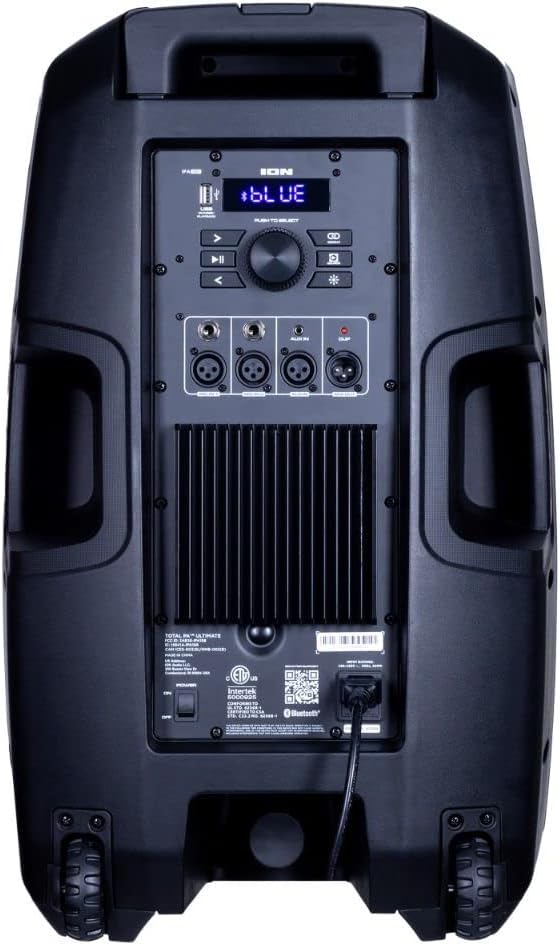
Figure 2: Rear panel with power input and control interface.
4. માઇક્રોફોન કનેક્શન
Connect the included microphone to one of the XLR or 1/4-inch microphone inputs on the rear panel. The PA Ultimate features two such inputs. Adjust the microphone volume using the dedicated controls on the mixer.
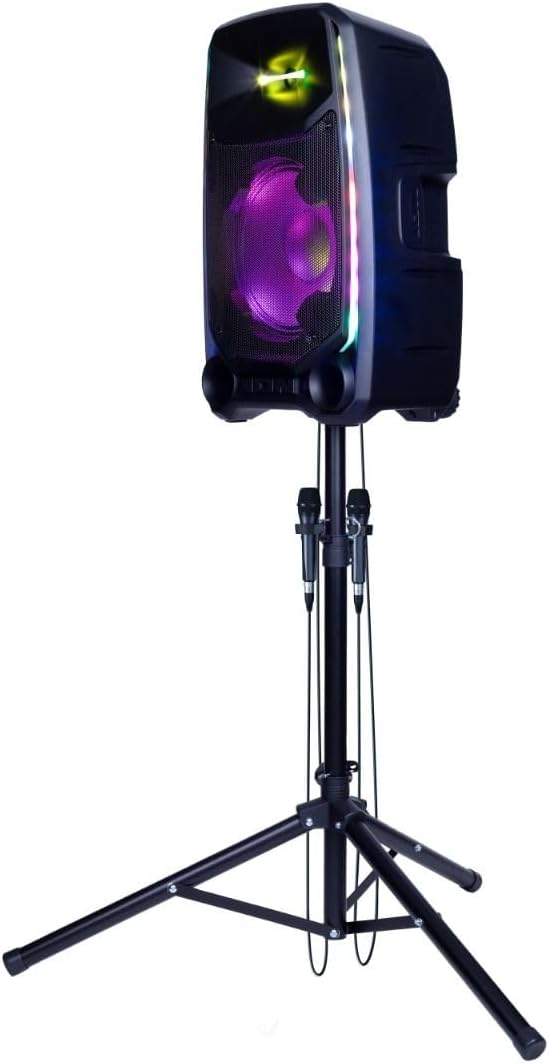
Figure 3: Microphones connected to the PA Ultimate speaker.
ઓપરેટિંગ સૂચનાઓ
1. પાવર ચાલુ/બંધ
Locate the power switch on the rear panel. Flip the switch to the 'ON' position to power on the unit. The display and lights will illuminate. To power off, flip the switch back to 'OFF'.
2. બ્લૂટૂથ જોડી
- Ensure the PA Ultimate is powered on.
- Press the Bluetooth button on the rear panel or control interface to enter pairing mode. The Bluetooth indicator will flash.
- On your Bluetooth-enabled device (smartphone, tablet, etc.), navigate to the Bluetooth settings and select 'ION Audio PA Ultimate' from the list of available devices.
- Once paired, the Bluetooth indicator will glow solid, and you can stream audio wirelessly.
3. ઑડિઓ ઇનપુટ કનેક્શન્સ
The PA Ultimate supports multiple audio input sources:
- XLR / 1/4-inch Inputs: For microphones or line-level instruments.
- 3.5mm AUX ઇનપુટ: For connecting non-Bluetooth devices using a standard audio cable.
- યુએસબી પ્લેબેક: ઑડિઓ ધરાવતી USB ડ્રાઇવ દાખલ કરો files into the USB port. Use the control interface to navigate and play tracks.
4. Multi-Channel Mixer
The integrated multi-channel mixer allows for independent volume control of various inputs, including microphones and auxiliary sources. Use the master volume knob to adjust the overall output level.
5. Echo Effects
Activate and adjust the echo effect for microphone inputs using the dedicated controls on the mixer. This feature enhances vocal performances.
6. Sonic Wide Audio
The PA Ultimate features Sonic Wide Audio technology, designed to provide premium sound distribution to the front, left, and right of the speaker, ensuring a broad soundstage.
7. Edge-Glow Lighting
The Edge-Glow lighting system offers 10 distinct light modes, producing unique lighting effects in multiple colors that can dance in sync with your music. Use the light mode button on the control panel to cycle through the available options.

Figure 4: PA Ultimate speaker showcasing its Edge-Glow lighting effects.
8. Wireless Stereo-Link
To achieve a wider stereo sound, you can wirelessly connect a second ION Audio PA Ultimate speaker using the Stereo-Link technology. Refer to the specific instructions for activating Stereo-Link mode on both units.

Figure 5: Wireless Stereo-Link connection between two PA Ultimate speakers.
જાળવણી
1. સફાઈ
Disconnect the unit from the power source before cleaning. Use a soft, dry cloth to wipe the exterior surfaces. Do not use abrasive cleaners, waxes, or solvents as they may damage the finish. Avoid spraying liquids directly onto the unit.
2. સંગ્રહ
When not in use for extended periods, store the PA Ultimate in a cool, dry place, away from direct sunlight and extreme temperatures. It is recommended to store it in its original packaging or a protective cover to prevent dust accumulation and damage.
મુશ્કેલીનિવારણ
If you encounter issues with your ION Audio PA Ultimate, refer to the following common problems and solutions:
- કોઈ શક્તિ નથી: Ensure the power cable is securely connected to both the unit and a working electrical outlet. Check the power switch position.
- કોઈ અવાજ નથી: Verify that the master volume and individual input volumes are turned up. Check all audio cable connections. Ensure your Bluetooth device is paired and playing audio.
- બ્લૂટૂથ પેરિંગ સમસ્યાઓ: Make sure the PA Ultimate is in pairing mode. Disable and re-enable Bluetooth on your device. Move your device closer to the speaker.
- વિકૃત અવાજ: Reduce the volume of the input source or the master volume. Check for damaged cables.
- માઇક્રોફોન કામ કરતું નથી: Ensure the microphone is properly connected and its volume knob is adjusted. Check the microphone cable for damage.
જો આ ઉકેલો અજમાવવા પછી પણ સમસ્યા ચાલુ રહે, તો ગ્રાહક સપોર્ટનો સંપર્ક કરો.
વિશિષ્ટતાઓ
| મોડેલનું નામ | PA Ultimate |
| પાવર આઉટપુટ | 650 Watts (Bi-ampમૂર્ખ) |
| વૂફરનું કદ | 12 ઇંચ (304.8mm) |
| ટ્વીટરનું કદ | 1 ઇંચ (25.4 મીમી) |
| કનેક્ટિવિટી | Bluetooth, AUX (3.5mm), USB, XLR, 1/4 inch |
| Audioડિઓ ઇનપુટ્સ | XLR, 1/4 inch (for microphones), 3.5mm aux |
| ચેનલોની સંખ્યા | 2 |
| પાવર સ્ત્રોત | કોર્ડેડ ઇલેક્ટ્રિક |
| ખાસ લક્ષણો | Edge-Glow Lighting, Sonic Wide Audio, Wireless Stereo-Link, Echo Effects |
| માઉન્ટિંગ પ્રકાર | સ્પીકર સ્ટેન્ડ |
| યુપીસી | 657768966996 |
| ASIN | B0CT626L8T |
વોરંટી અને આધાર
This product is offered as an Amazon Renewed item. Please refer to the specific warranty terms provided at the time of purchase for Amazon Renewed products. Typically, Amazon Renewed products come with a 90-day Amazon Renewed Guarantee.
For technical support, troubleshooting assistance, or warranty claims, please contact the seller or Amazon Renewed customer service directly. Contact information for ION Audio may also be available on their official website for product-specific inquiries.


