પરિચય
ખરીદી બદલ આભારasing the SHARP XL-B530 Micro Component System. This system is designed to provide high-quality audio playback from various sources, including Bluetooth wireless streaming, CD, USB, AM/FM radio, and auxiliary input. This manual provides detailed instructions for setting up, operating, and maintaining your new audio system to ensure optimal performance and longevity.
મહત્વપૂર્ણ સલામતી માહિતી
- ઉપયોગ કરતા પહેલા બધી સૂચનાઓ કાળજીપૂર્વક વાંચો.
- ભવિષ્યના સંદર્ભ માટે આ માર્ગદર્શિકા રાખો.
- એકમને વરસાદ અથવા ભેજ માટે ખુલ્લા કરશો નહીં.
- યુનિટની આસપાસ યોગ્ય વેન્ટિલેશનની ખાતરી કરો. વેન્ટિલેશનના છિદ્રોને અવરોધશો નહીં.
- રેડિએટર્સ, હીટ રજિસ્ટર, સ્ટોવ અથવા અન્ય ઉપકરણો (જેમાં શામેલ છે) જેવા ગરમીના સ્ત્રોતોની નજીક યુનિટ ન મૂકો. ampલિફાયર) જે ગરમી ઉત્પન્ન કરે છે.
- પાવર કોર્ડને ચાલવા અથવા પિંચ થવાથી સુરક્ષિત કરો.
- માત્ર ઉત્પાદક દ્વારા ઉલ્લેખિત જોડાણો/એસેસરીઝનો ઉપયોગ કરો.
- વીજળીના વાવાઝોડા દરમિયાન અથવા લાંબા સમય સુધી ઉપયોગ ન થાય ત્યારે આ ઉપકરણને અનપ્લગ કરો.
- તમામ સેવાનો સંદર્ભ લાયક સેવા કર્મચારીઓને આપો.
પેકેજ સામગ્રી
કૃપા કરીને ખાતરી કરો કે નીચેની બધી વસ્તુઓ તમારા પેકેજમાં શામેલ છે:
- મુખ્ય એકમ (માઈક્રો કમ્પોનન્ટ સિસ્ટમ)
- Speaker Units (x2)
- રીમોટ કંટ્રોલ
- પાવર કોર્ડ
- એફએમ એન્ટેના
- AM લૂપ એન્ટેના
- વપરાશકર્તા માર્ગદર્શિકા (આ દસ્તાવેજ)
ઉત્પાદન ઓવરview
Familiarize yourself with the components and controls of your SHARP XL-B530 system.
Main Unit and Speakers

એકંદરે view of the SHARP XL-B530 Micro Component System, including the main unit, two speakers, and the remote control.
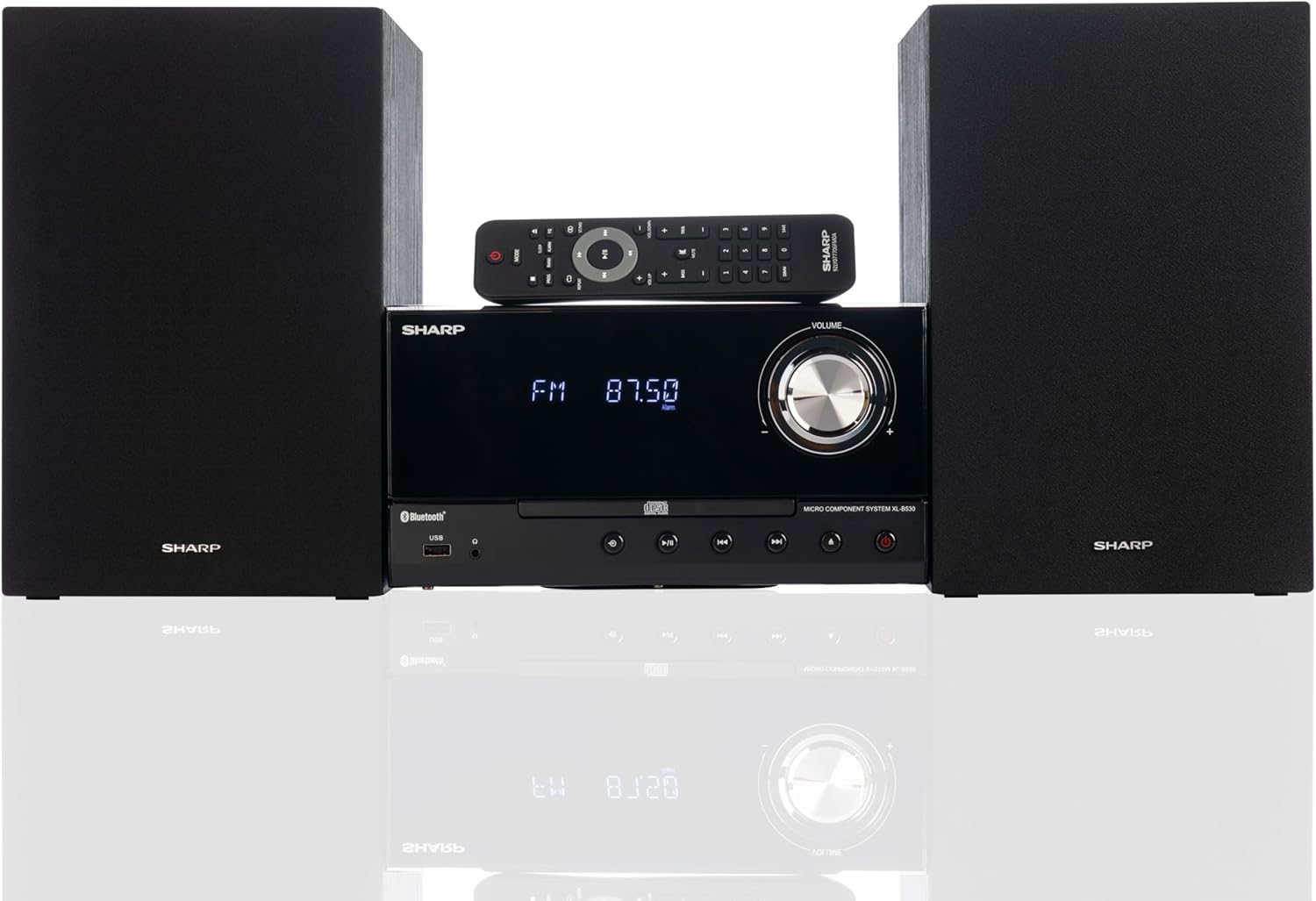
Front panel of the main unit, showing the LCD display, volume knob, CD tray, and control buttons.
રીઅર પેનલ કનેક્શન્સ

The rear panel of the main unit, featuring speaker terminals, FM antenna input, AM antenna input, and auxiliary input ports.
રીમોટ કંટ્રોલ
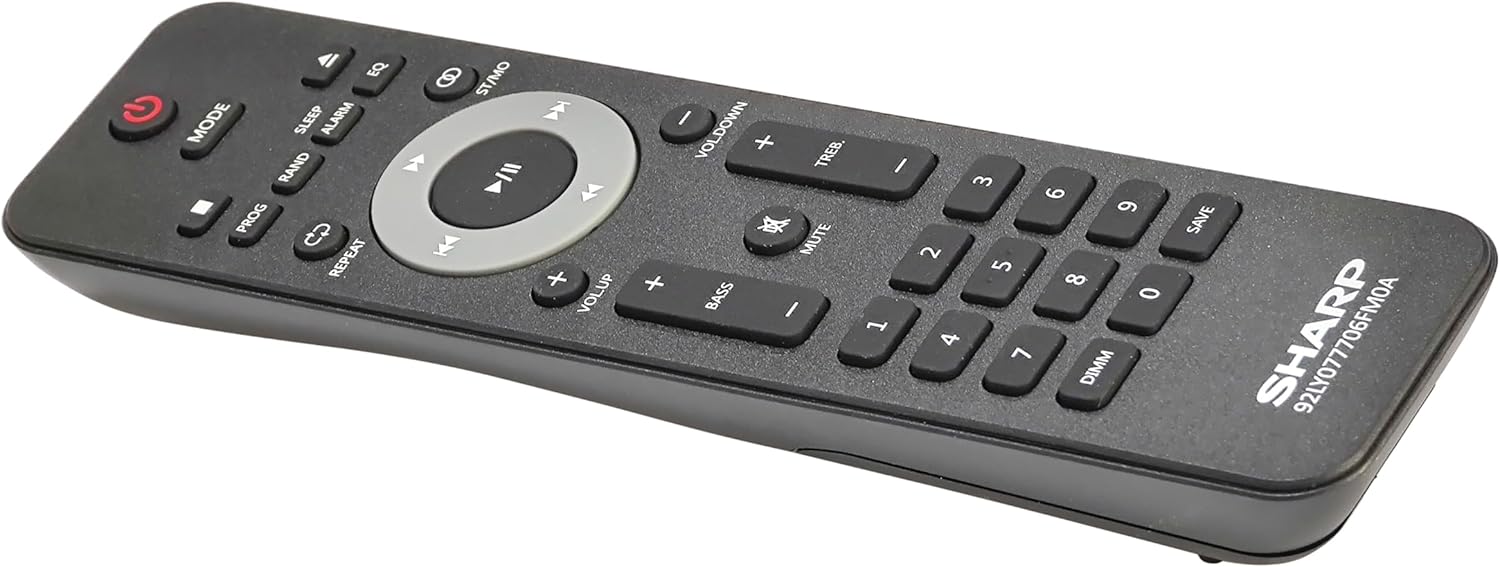
વિગતવાર view of the remote control, showing various function buttons for power, mode, playback, volume, and sound adjustments.
સેટઅપ
Follow these steps to set up your micro component system.
1. સ્પીકર કનેક્શન
- Identify the left and right speaker cables.
- Connect the red (+) wire from each speaker to the red (+) terminal on the main unit's rear panel.
- Connect the black (-) wire from each speaker to the black (-) terminal on the main unit's rear panel.
- Ensure a secure connection for both speakers.
2. એન્ટેના કનેક્શન
- એફએમ એન્ટેના: Connect the supplied FM wire antenna to the FM antenna jack on the rear panel. Extend the wire fully for best reception.
- AM એન્ટેના: Assemble the AM loop antenna and connect its wires to the AM antenna terminals on the rear panel. Rotate the antenna for optimal AM reception.
3. પાવર કનેક્શન
- Ensure all other connections are made.
- Plug the power cord into the AC IN jack on the rear of the main unit.
- Insert the other end of the power cord into a wall outlet.
ઓપરેટિંગ સૂચનાઓ
This section details how to use the various functions of your SHARP XL-B530 system.
પાવર ચાલુ/બંધ
- દબાવો પાવર સિસ્ટમ ચાલુ અથવા બંધ કરવા માટે મુખ્ય યુનિટ અથવા રિમોટ કંટ્રોલ પરનું બટન.
સ્ત્રોત પસંદગી
- દબાવો મોડ button on the main unit or remote control repeatedly to cycle through available sources: CD, Bluetooth, USB, FM, AM, AUX.
સીડી પ્લેબેક
- દબાવો મોડ 'CD' મોડ પસંદ કરવા માટે બટન.
- દબાવો ખોલો/બંધ કરો સીડી ટ્રે ખોલવા માટેનું બટન.
- Place a CD (CD/MP3/WMA/CD-R/CD-RW) with the label side up into the tray.
- દબાવો ખોલો/બંધ કરો button again to close the tray. Playback will start automatically.
- ઉપયોગ કરો રમો/થોભો, રોકો, છોડો (forward/backward), and શોધો નિયંત્રણ માટે બટનો.
બ્લૂટૂથ જોડી
- દબાવો મોડ 'બ્લુટુથ' મોડ પસંદ કરવા માટે બટન દબાવો. ડિસ્પ્લે 'BT' અને ફ્લેશ બતાવશે, જે દર્શાવે છે કે તે જોડી બનાવવા માટે તૈયાર છે.
- તમારા બ્લૂટૂથ ડિવાઇસ (સ્માર્ટફોન, ટેબ્લેટ, વગેરે) પર, બ્લૂટૂથ સક્ષમ કરો અને ઉપલબ્ધ ડિવાઇસ શોધો.
- Select 'SHARP XL-B530' from the list.
- Once paired, the display will stop flashing and show 'BT CONNECTED'. You can now stream audio from your device.
યુએસબી પ્લેબેક
- ફ્રન્ટ પેનલ પરના USB પોર્ટમાં USB ફ્લેશ ડ્રાઇવ દાખલ કરો.
- દબાવો મોડ 'USB' મોડ પસંદ કરવા માટે બટન.
- The system will automatically detect and begin playing compatible audio files (MP3/WMA).
- Use playback controls similar to CD mode.
AM/FM રેડિયો

The SHARP XL-B530 system displaying an FM radio frequency, highlighting its digital tuner capabilities.
- દબાવો મોડ button to select 'FM' or 'AM' mode.
- ઓટો સ્કેન: દબાવો અને પકડી રાખો રમો/થોભો button to automatically scan and save available stations.
- મેન્યુઅલ ટ્યુનિંગ: નો ઉપયોગ કરો છોડો buttons to manually tune to desired frequencies.
- પ્રીસેટ સ્ટેશનો: Use the number buttons on the remote to directly select saved preset stations.
Volume and Sound Adjustment

A close-up of one of the SHARP XL-B530 speakers, illustrating the adjustable bass and treble sound output.
- વોલ્યુમ: ફેરવો વોલ્યુમ મુખ્ય એકમ પર નોબ અથવા ઉપયોગ કરો VOL + / VOL- રીમોટ કંટ્રોલ પરના બટનો.
- બાસ/ટ્રેબલ: નો ઉપયોગ કરો BASS+ / BASS- અને TREB+ / TREB- buttons on the remote control to adjust sound characteristics.
- જોર: દબાવો લાઉડનેસ button on the remote to enhance bass and treble at low volumes.
- ઇક્યૂ: દબાવો EQ button on the remote to cycle through preset equalizer modes.
જાળવણી
Proper care will ensure the longevity of your system.
- સફાઈ: Use a soft, dry cloth to clean the exterior of the unit. For stubborn stains, dampen the cloth lightly with water. Do not use abrasive cleaners or solvents.
- સીડી કેર: સીડીઓને તેમની ધારથી પકડો. ગંદા સીડીઓને નરમ, લિન્ટ-ફ્રી કપડાથી સાફ કરો, વચ્ચેથી બહારની તરફ સાફ કરો.
- વેન્ટિલેશન: ખાતરી કરો કે વેન્ટિલેશનના છિદ્રો ધૂળ અથવા કાટમાળથી અવરોધિત ન હોય.
- સંગ્રહ: જો યુનિટને લાંબા સમય સુધી સ્ટોર કરી રહ્યા હોવ, તો તેને પાવર આઉટલેટમાંથી અનપ્લગ કરો અને તેને ઠંડી, સૂકી જગ્યાએ સ્ટોર કરો.
મુશ્કેલીનિવારણ
જો તમને તમારી સિસ્ટમમાં સમસ્યાઓ આવે, તો નીચેની સામાન્ય સમસ્યાઓ અને ઉકેલોનો સંદર્ભ લો.
| સમસ્યા | સંભવિત કારણ | ઉકેલ |
|---|---|---|
| કોઈ શક્તિ નથી | પાવર કોર્ડ જોડાયેલ નથી; પાવર આઉટલેટ સક્રિય નથી | ખાતરી કરો કે પાવર કોર્ડ સુરક્ષિત રીતે પ્લગ ઇન થયેલ છે; એક અલગ આઉટલેટ અજમાવો |
| કોઈ અવાજ નથી | Volume too low; Speakers not connected; Incorrect source selected | Increase volume; Check speaker connections; Select correct input source |
| સીડી ચાલી રહી નથી | CD inserted incorrectly; CD is dirty or scratched; Incorrect mode | Insert CD correctly (label side up); Clean or replace CD; Select CD mode |
| બ્લૂટૂથ જોડી રહ્યું નથી | Bluetooth mode not selected; Device too far; Device already paired to another unit | Select Bluetooth mode; Move device closer; Disconnect from other devices and try again |
| નબળું રેડિયો રિસેપ્શન | Antenna not connected or positioned poorly; Interference | Connect and adjust antenna position; Move unit away from other electronic devices |
| રીમોટ કંટ્રોલ કામ કરતું નથી | Batteries are dead or inserted incorrectly; Obstruction between remote and unit | Replace batteries, check polarity; Remove any obstructions; Ensure remote is pointed at the unit's sensor |
વિશિષ્ટતાઓ
| લક્ષણ | સ્પષ્ટીકરણ |
|---|---|
| મોડલ નંબર | XL-B530(BK) નો પરિચય |
| આઉટપુટ પાવર | 200W મેક્સ (100W RMS) |
| કનેક્ટિવિટી | Bluetooth, USB, Aux Input |
| ડિસ્ક સુસંગતતા | સીડી, સીડી-આર/આરડબ્લ્યુ, એમપી3, ડબલ્યુએમએ |
| ટ્યુનર | AM/FM Stereo Digital Tuner (50 station presets) |
| સ્પીકરનો પ્રકાર | સ્ટીરિયો |
| ઉત્પાદનના પરિમાણો (L x W x H) | 25 x 11 x 9.6 ઇંચ |
| વસ્તુનું વજન | 18 પાઉન્ડ |
| રંગ | બ્લેક ઓક |
વોરંટી અને આધાર
વોરંટી માહિતી અને ટેકનિકલ સપોર્ટ માટે, કૃપા કરીને તમારા ઉત્પાદન સાથે સમાવિષ્ટ વોરંટી કાર્ડનો સંદર્ભ લો અથવા સત્તાવાર SHARP ની મુલાકાત લો. webસાઇટ. કોઈપણ વોરંટી દાવા માટે ખરીદીના પુરાવા તરીકે તમારી ખરીદી રસીદ રાખો.
For further assistance, you may contact SHARP customer service through their official channels.


