પરિચય
This manual provides comprehensive instructions for the setup, operation, maintenance, and troubleshooting of your LANCOM 1803VA VoIP SD-WAN Gateway. The LANCOM 1803VA is designed for reliable and secure site networking, featuring an integrated VDSL modem for high-performance internet connectivity and robust VPN capabilities. It integrates seamlessly with the LANCOM Management Cloud (LMC) for simplified network management and automated deployment.
સેટઅપ માર્ગદર્શિકા
Follow these steps to set up your LANCOM 1803VA Gateway.
૨.૧. અનપેકિંગ અને પ્રારંભિક નિરીક્ષણ
Carefully remove all components from the packaging. Verify that all items listed in the packing contents are present and undamaged. If any items are missing or damaged, contact your vendor immediately.
2. ઉપકરણ ઓવરview
Familiarize yourself with the front and rear panels of the device.

આગળ view of the LANCOM 1803VA Gateway, showing the LANCOM SYSTEMS logo on the left, LANCOM 1803VA on the right, and a row of LED indicators for Power, Online, WAN, SFP, DSL, Analog 1, Analog 2, ISDN 1, ISDN 2, ETH 1-4, VoIP, and VPN.
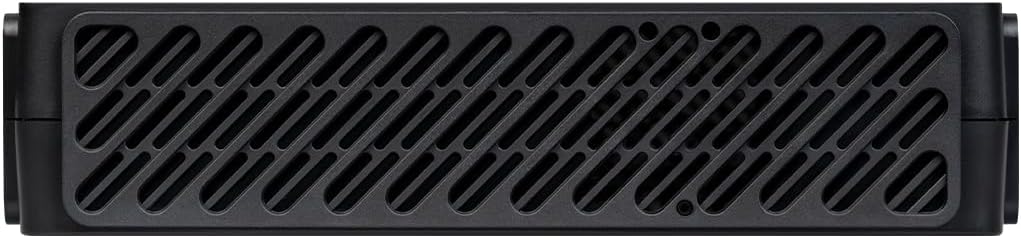
ટોચ view of the LANCOM 1803VA Gateway, featuring a large ventilation grille pattern across its surface for heat dissipation.
૨.૨. ગેટવેને જોડવું
- પાવર કનેક્શન: Connect the provided power adapter to the 'POWER' port on the rear of the gateway and then to a power outlet.
- VDSL/DSL Connection: Connect your VDSL/DSL line to the 'DSL' port.
- ઈથરનેટ જોડાણો: Connect your local network devices (computers, switches) to the 'ETH 1-4' ports using Ethernet cables.
- VoIP/Analog/ISDN Connections: If utilizing VoIP or traditional telephony features, connect your analog phones, fax machines, or ISDN devices to the respective 'ANALOG' or 'ISDN' ports.
- WAN/Fiber Optic (Optional): For external modems or fiber optic connections (with separate modules), use the 'WAN' or 'SFP' ports.
4. પ્રારંભિક રૂપરેખાંકન
Once powered on, the device will perform a self-test. Refer to the LANCOM Management Cloud (LMC) documentation for zero-touch deployment or access the device's web interface via a connected computer for manual configuration. The default IP address and login credentials can be found on the label at the bottom of the device.
ઓપરેટિંગ સૂચનાઓ
This section covers the basic operation and key features of your LANCOM 1803VA Gateway.
એલઇડી સૂચકાંકો
Monitor the LED indicators on the front panel for device status:
- પાવર: પાવર સ્થિતિ દર્શાવે છે.
- ઓનલાઈન: ઇન્ટરનેટ કનેક્શન સ્થિતિ દર્શાવે છે.
- WAN/DSL: Indicates activity on WAN or DSL ports.
- ETH 1-4: Indicate link status and activity for Ethernet ports.
- VoIP/VPN: Indicate status of VoIP services and VPN connections.
મુખ્ય લક્ષણો
- Integrated VDSL Supervectoring Modem: Supports speeds up to 300 Mbit/s for high-speed internet access.
- SD-WAN Capabilities: Facilitates zero-touch deployment and automatic VPN setup via the LANCOM Management Cloud.
- IPSec VPN: Includes 5 integrated IPSec VPN channels (expandable to 25) for secure site-to-site and remote access connections.
- Professional Telephony Functions: Features LANCOM VCM (Voice Call Manager) and SBC (Session Border Controller) for advanced VoIP services.
- Legacy Telephony Support: Provides 2 x ISDN S0 (NT) and 2 x analog ports for continuous operation of existing ISDN and analog components.
- Network Virtualization (ARF): Supports up to 16 virtual networks on a single device.
જાળવણી
Regular maintenance ensures optimal performance and longevity of your LANCOM 1803VA Gateway.
સફાઈ
Periodically clean the device's exterior with a soft, dry cloth. Ensure ventilation grilles are free from dust and debris to prevent overheating. Do not use liquid cleaners or aerosols.
ફર્મવેર અપડેટ્સ
It is recommended to keep your device's firmware updated to the latest version. Firmware updates often include performance improvements, security patches, and new features. You can manage firmware updates through the LANCOM Management Cloud or the device's web interface. Always back up your configuration before performing a firmware update.
મુશ્કેલીનિવારણ
આ વિભાગ તમને આવી શકે તેવી સામાન્ય સમસ્યાઓનું નિરાકરણ લાવે છે અને તેના ઉકેલો પૂરા પાડે છે.
નો પાવર
- ખાતરી કરો કે પાવર એડેપ્ટર ઉપકરણ અને કાર્યરત પાવર આઉટલેટ સાથે સુરક્ષિત રીતે જોડાયેલ છે.
- બીજા ઉપકરણને પ્લગ ઇન કરીને પાવર આઉટલેટ કાર્યરત છે કે નહીં તેની ખાતરી કરો.
ઇન્ટરનેટ કનેક્શન નથી
- Check the 'ONLINE' and 'DSL' LEDs. If they are off or blinking irregularly, verify your DSL line connection.
- સેવાની સ્થિતિની પુષ્ટિ કરવા માટે તમારા ઇન્ટરનેટ સેવા પ્રદાતા (ISP) નો સંપર્ક કરો.
- Ensure the gateway's internet settings (VDSL/WAN configuration) are correct.
ઍક્સેસ કરી શકાતું નથી Web ઈન્ટરફેસ
- Ensure your computer is connected to one of the 'ETH' ports and is configured to obtain an IP address automatically (DHCP).
- Verify you are using the correct IP address for the gateway (default is usually printed on the device label).
- તમારા બ્રાઉઝરની કેશ સાફ કરવાનો અથવા બીજા બ્રાઉઝરનો ઉપયોગ કરવાનો પ્રયાસ કરો.
VoIP Issues
- Check the 'VoIP' LED indicator.
- Verify your VoIP account settings and ensure they are correctly configured in the gateway.
- Ensure sufficient bandwidth for voice traffic.
If problems persist, consult the detailed troubleshooting guide available on the LANCOM support website or contact LANCOM technical support.
ટેકનિકલ વિશિષ્ટતાઓ
| લક્ષણ | વર્ણન |
|---|---|
| બ્રાન્ડ | Lancom |
| મોડેલનું નામ | 1803VA |
| મોડલ નંબર | 62153 |
| રંગ | કાળો |
| ઓપરેટિંગ સિસ્ટમ | એલસીઓએસ |
| કનેક્ટિવિટી ટેકનોલોજી | ઈથરનેટ |
| ખાસ લક્ષણો | Supervectoring VDSL, SD-WAN |
| સુસંગત ઉપકરણો | Personal computer, laptop, tablet, smartphone, game console |
| ભલામણ કરેલ ઉપયોગો | Business, Home Office |
| સમાવાયેલ ઘટકો | રાઉટર |
| વાયરલેસ કમ્યુનિકેશન માનક | 802.11 મેક્સ |
| આવર્તન બેન્ડ વર્ગ | ડ્યુઅલ બેન્ડ |
| ASIN | B0CV5JTD76 |
| તારીખ પ્રથમ ઉપલબ્ધ | 7 ફેબ્રુઆરી, 2024 |
વોરંટી માહિતી
LANCOM products are engineered in Germany for maximum durability, reliability, and security. For specific warranty terms and conditions, please refer to the warranty card included with your product or visit the official LANCOM webસાઇટ. વોરંટી દાવાઓ માટે તમારી ખરીદીનો પુરાવો રાખો.
આધાર
For technical assistance, product documentation, and software updates, please visit the official LANCOM Systems support portal. You can find FAQs, downloads, and contact information for customer service there.
LANCOM Systems Official Webસાઇટ: www.lancom-systems.com


