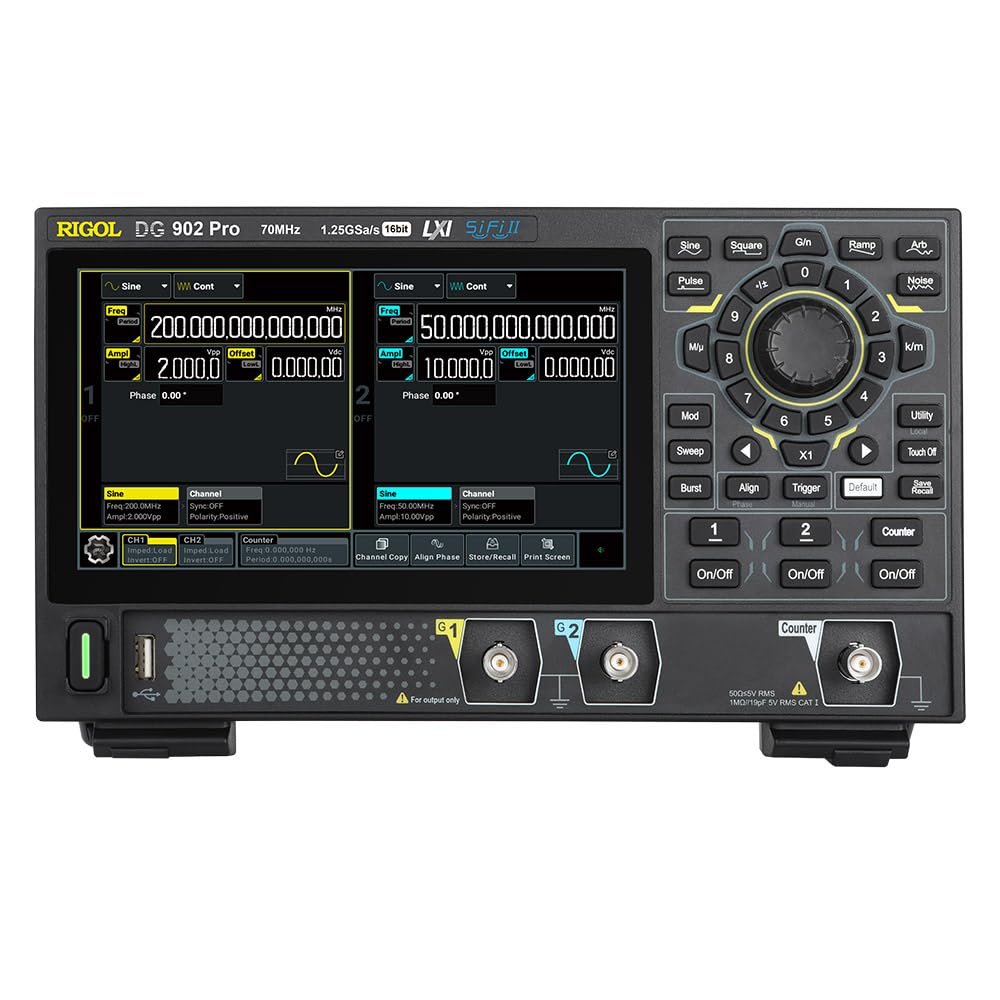
Rigol DG902 Pro

RIGOL DG902 Pro Waveform Generator User Manual

Model: DG902 Pro

બ્રાન્ડ: રિગોલ

1. ઉત્પાદન ઓવરview

The RIGOL DG902 Pro is a high-performance waveform generator designed for a wide range of applications requiring precise signal generation. It features a 16-bit vertical resolution, a maximum sample rate of 1.25 GSa/s, and a 70 MHz output frequency. This device is capable of generating various waveforms and offers advanced modulation capabilities.

મુખ્ય લાક્ષણિકતાઓમાં શામેલ છે:

આગળ view of the RIGOL DG902 Pro Waveform Generator

આકૃતિ 1.1: ફ્રન્ટ view of the RIGOL DG902 Pro Waveform Generator, showing the display, control panel, and output channels.

2. સેટઅપ અને જોડાણો

2.1 અનપેકિંગ અને નિરીક્ષણ

Carefully unpack the DG902 Pro waveform generator and all accessories from the shipping carton. Inspect the instrument for any signs of damage that may have occurred during transit. If any damage is found, contact your supplier immediately.

2.2 પાવર કનેક્શન

Connect the provided power adapter to the DC input port on the rear panel of the instrument. Plug the power adapter into a suitable AC power outlet. The DG902 Pro can also be operated via a USB-C power bank for portable use.

RIGOL DG902 Pro connected to a USB-C power bank

Figure 2.1: The DG902 Pro connected to an external USB-C power bank, demonstrating its portable power capability.

2.3 ઇનપુટ/આઉટપુટ જોડાણો

The rear panel of the DG902 Pro provides various input and output ports for signal generation and external synchronization.

પાછળ view of the RIGOL DG902 Pro Waveform Generator showing connection ports

આકૃતિ 2.2: પાછળ view of the DG902 Pro, highlighting the 10MHz REF IN/OUT, AUX IN/OUT, LAN, USB DEVICE, and USB-C ports.

  • Channel Outputs (CH1, CH2): Located on the front panel, these BNC connectors provide the main waveform outputs.
  • 10MHz REF IN/OUT: Used for external reference clock synchronization.
  • AUX ઇન/આઉટ: Auxiliary input/output ports for additional signal routing.
  • LAN પોર્ટ: For network connectivity and remote control.
  • USB DEVICE Port: For connecting to a computer for data transfer and control.

3. ઓપરેટિંગ સૂચનાઓ

3.1 User Interface and Display

The DG902 Pro features a 7.0-inch color display with a resolution of 1024x600 pixels, providing a clear and intuitive interface for operation. Navigation is primarily done through the rotary knob, directional buttons, and dedicated function keys.

Close-up of the RIGOL DG902 Pro's 7.0-inch display

આકૃતિ ૩: ક્લોઝ-અપ view of the DG902 Pro's 7.0-inch display, highlighting its size and resolution.

RIGOL DG902 Pro screen showing channel 1 and channel 2 settings

Figure 3.2: The DG902 Pro display showing detailed settings for Channel 1 and Channel 2, including frequency, amplitude, and offset.

3.2 Basic Waveform Generation

  1. પાવર ચાલુ: Press the power button located on the front panel to turn on the instrument.
  2. ચેનલ પસંદ કરો: Use the CH1 or CH2 buttons to select the desired output channel.
  3. Select Waveform Type: દબાવો વેવફોર્મ button (e.g., Sine, Square, Pulse, Ramp, Arb, Noise) to choose the desired waveform.
  4. પરિમાણો સેટ કરો: Use the rotary knob and numeric keypad to adjust parameters such as frequency, amplitude, and offset. The display will show the current settings.
  5. Enable Output: દબાવો ચાલુ/બંધ button for the selected channel to enable the waveform output.

3.3 Advanced Modulation Functions

The DG902 Pro supports various modulation types to meet complex signal generation requirements. These include Amplitude Modulation (AM), Frequency Modulation (FM), Phase Modulation (PM), Amplitude Shift Keying (ASK), Frequency Shift Keying (FSK), Pulse Width Modulation (PWM), and Sum modulation.

RIGOL DG902 Pro with various modulation types illustrated around it

Figure 3.3: An illustration showing the DG902 Pro's support for various modulation types, including AM, FM, PM, ASK, FSK, PWM, and SUM.

To access modulation settings, press the મોડ button and navigate through the options using the display and control knob.

4. જાળવણી

4.1 સાધનની સફાઈ

To maintain the performance and appearance of your DG902 Pro, regularly clean its exterior. Use a soft, damp cloth with a mild detergent to wipe down the casing. Avoid using abrasive cleaners or solvents that could damage the plastic components or screen.

  • સફાઈ કરતા પહેલા હંમેશા પાવરને ડિસ્કનેક્ટ કરો.
  • Do not allow any liquids to enter the instrument.
  • Clean the display screen gently with a soft, lint-free cloth.

4.2 સંગ્રહ

When not in use for extended periods, store the DG902 Pro in a dry, dust-free environment, away from direct sunlight and extreme temperatures. It is recommended to store the instrument in its original packaging or a protective case to prevent damage.

5. મુશ્કેલીનિવારણ

This section provides solutions to common issues you might encounter with your DG902 Pro Waveform Generator. If the problem persists after trying these steps, please contact Rigol customer support.

સમસ્યાસંભવિત કારણઉકેલ
સાધન ચાલુ થતું નથી.Power cable not connected properly; power outlet issue; power adapter fault.Check power cable connection. Try a different power outlet. Ensure power adapter is functioning correctly.
No waveform output.Output channel not enabled; amplitude set to zero; incorrect cable connection.દબાવો ચાલુ/બંધ button for the channel. Increase amplitude. Verify BNC cable connections.
ડિસ્પ્લે ખાલી અથવા સ્થિર છે.Software error; temporary glitch.Restart the instrument by powering it off and on again. If the issue persists, contact support.

6. સ્પષ્ટીકરણો

The following table outlines the key technical specifications of the RIGOL DG902 Pro Waveform Generator.

પરિમાણમૂલ્ય
મોડલ નંબરDG902 પ્રો
મહત્તમ એસampલે દર૨.૫ જીએસએ/સેકન્ડ
આઉટપુટ આવર્તન70 MHz સુધી
ચેનલો2
Verભી ઠરાવ16 બીટ
Arb Length16 Mpts/CH (32 Mpts/CH optional)
રાઇઝ ટાઇમAs low as 3 ns
Waveform JitterAs low as 200 ps
Counter Bandwidth1 GHz
ઉત્પાદન પરિમાણો10.47 x 6.5 x 3.15 ઇંચ
વજન3.92 પાઉન્ડ
ઉત્પાદકરિગોલ

7. વોરંટી અને સપોર્ટ

7.1 વોરંટી માહિતી

RIGOL provides a standard warranty for its products, covering defects in materials and workmanship under normal use. For specific warranty terms and duration, please refer to the warranty card included with your product or visit the official RIGOL webસાઇટ. વોરંટી દાવાઓ માટે ખરીદીના પુરાવા તરીકે તમારી ખરીદી રસીદ રાખો.

7.2 ગ્રાહક સપોર્ટ

For technical assistance, troubleshooting, or service requests, please contact RIGOL customer support. You can find contact information, including phone numbers and email addresses, on the official RIGOL webસાઇટ (www.rigol.com). When contacting support, please have your product model number (DG902 Pro) and serial number ready.

સંબંધિત દસ્તાવેજો - DG902 પ્રો

પ્રિview RIGOL DG800 Pro/DG900 Pro સિરીઝ પ્રોગ્રામિંગ માર્ગદર્શિકા
આ પ્રોગ્રામિંગ માર્ગદર્શિકા USB અને LAN જેવા રિમોટ ઇન્ટરફેસ દ્વારા RIGOL DG800 Pro અને DG900 Pro શ્રેણીના ફંક્શન/આર્બિટરી વેવફોર્મ જનરેટરને નિયંત્રિત કરવા માટે SCPI આદેશોનો ઉપયોગ કરવા અંગે વિગતવાર માહિતી પ્રદાન કરે છે.
પ્રિview RIGOL DG5000 પ્રો સિરીઝ ફંક્શન/આર્બિટરી વેવફોર્મ જનરેટર ક્વિક ગાઇડ
Quick guide for the RIGOL DG5000 Pro Series Function/Arbitrary Waveform Generator, covering safety, setup, operation, parameter setting, troubleshooting, and remote control.
પ્રિview RIGOL DG800 પ્રો સિરીઝ ફંક્શન/આર્બિટરી વેવફોર્મ જનરેટર ક્વિક ગાઇડ
RIGOL DG800 પ્રો સિરીઝ ફંક્શન/આર્બિટરી વેવફોર્મ જનરેટર માટે એક ઝડપી માર્ગદર્શિકા, સલામતી આવશ્યકતાઓ, ઉત્પાદન ઉપર આવરી લે છેview, તૈયારી, કામગીરી, રિમોટ કંટ્રોલ અને મુશ્કેલીનિવારણ.
પ્રિview RIGOL DG5000 પ્રો સિરીઝ ફંક્શન/આર્બિટરી વેવફોર્મ જનરેટર વપરાશકર્તા માર્ગદર્શિકા
RIGOL DG5000 Pro સિરીઝ ફંક્શન/આર્બિટરી વેવફોર્મ જનરેટર માટે વ્યાપક વપરાશકર્તા માર્ગદર્શિકા. આ માર્ગદર્શિકા ઉત્પાદન સુવિધાઓ, સલામતી સૂચનાઓ, ઝડપી શરૂઆત કામગીરી અને મોડ્યુલેશન, સ્વીપ, બર્સ્ટ અને પેટર્ન જનરેશન જેવા અદ્યતન કાર્યોની વિગતો આપે છે. તે DG5508 Pro, DG5252 Pro અને અન્ય જેવા મોડેલોને આવરી લે છે, જે અસરકારક ઉપયોગ અને સેટઅપ માટે આવશ્યક માહિતી પ્રદાન કરે છે.
પ્રિview RIGOL DG5000 પ્રો સિરીઝ ફંક્શન/આર્બિટરી વેવફોર્મ જનરેટર ક્વિક ગાઇડ
આ ઝડપી માર્ગદર્શિકા RIGOL DG5000 પ્રો સિરીઝ ફંક્શન/આર્બિટરી વેવફોર્મ જનરેટર માટે આવશ્યક માહિતી પૂરી પાડે છે, જે સલામતી આવશ્યકતાઓ, ઉત્પાદન ઉપર આવરી લે છે.view, ઉપયોગ માટેની તૈયારી, કામગીરી અને મુશ્કેલીનિવારણ.
પ્રિview DG5000 પ્રો સિરીઝ ફંક્શન/આર્બિટરી વેવફોર્મ જનરેટર પર્ફોર્મન્સ વેરિફિકેશન
આ દસ્તાવેજ RIGOL DG5000 પ્રો સિરીઝ ફંક્શન/આર્બિટરી વેવફોર્મ જનરેટરના પ્રદર્શન ચકાસણી માટે વિગતવાર પ્રક્રિયાઓ પ્રદાન કરે છે, જેમાં ફ્રીક્વન્સી ચોકસાઈનો સમાવેશ થાય છે, ampલાઇટ્યુડ ચોકસાઈ, ડીસી ઓફસેટ ચોકસાઈ, એસી ફ્લેટનેસ, હાર્મોનિક ડિસ્ટોર્શન, બનાવટી સિગ્નલો અને ઓવરશૂટ પરીક્ષણો.