1. પરિચય
The Amino H200 is a high-performance, ruggedized IPTV encoder and media player designed for diverse environments requiring 4K content delivery. Its robust design supports "out of sight" operation, making it suitable for applications ranging from in-room hospitality to public space signage and advertising. Key features include Power over Ethernet (PoE) for simplified installation and advanced AV1 and HEVC processing for efficient, high-quality video streaming.
2. ઉત્પાદન ઓવરview
The H200 unit is engineered for durability and discreet placement. Its compact form factor and VESA mounting capabilities allow for installation behind displays or in other concealed locations. The device integrates essential connectivity for both encoding and media playback functionalities.

આકૃતિ 1: આગળ view of the Amino H200 unit. This image shows the sleek, black casing of the device, designed for discreet installation.
2.1 મુખ્ય લક્ષણો
- 4K રિઝોલ્યુશન સપોર્ટ: Capable of handling and delivering high-definition 4K content.
- પાવર ઓવર ઇથરનેટ (PoE): Simplifies installation by allowing power and data transmission over a single Ethernet cable.
- કઠોર ડિઝાઇન: Built for durability in various operational environments.
- AV1 and HEVC Capability: Efficient video compression for optimized bandwidth usage and high-quality image delivery.
- Graphics Acceleration: Ensures fast rendering of high-quality graphics.
- Out-of-Sight Operation: Features like serial display port, IR extender port, and VESA mounting facilitate discreet installation.
3. સેટઅપ અને ઇન્સ્ટોલેશન
This section provides instructions for setting up your Amino H200 device. Ensure all accessories are present before beginning installation.
૨.૧ અનપેકિંગ અને સામગ્રી
Carefully unpack the Amino H200 unit and its accessories. The box should contain:
- Amino H200 Encoder/Media Player unit
- પાવર એડેપ્ટર (જો PoE વાપરતા ન હોવ તો)
- IR Extender Cable (optional, for remote control)
- Mounting hardware (e.g., VESA mount screws)
- ઝડપી પ્રારંભ માર્ગદર્શિકા
3.2 ઉપકરણને કનેક્ટ કરી રહ્યું છે
Refer to the port diagram below for proper connection of cables.
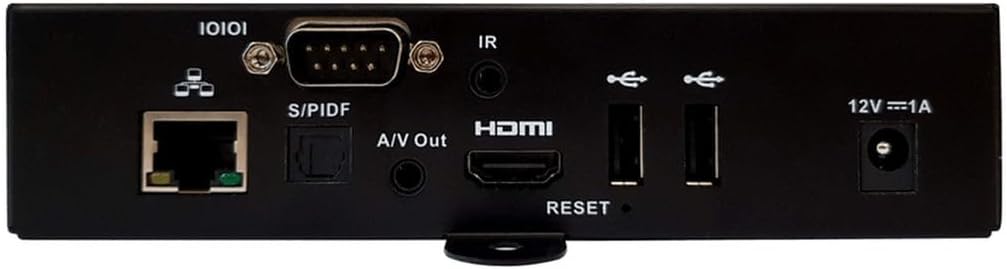
આકૃતિ 2: Rear panel connections of the Amino H200. This image details the various input and output ports available on the device, including Ethernet, S/PDIF, A/V Out, HDMI, USB, IR, and power input.
- નેટવર્ક કનેક્શન:
- Connect an Ethernet cable from your network switch or router to the Ethernet (10/100/1000) port on the H200.
- If your network switch supports Power over Ethernet (PoE), the device will receive power through this cable, eliminating the need for a separate power adapter.
- વિડિઓ આઉટપુટ:
- Connect an HDMI cable from the HDMI પોર્ટ on the H200 to the HDMI input of your display or TV.
- ઓડિયો આઉટપુટ:
- For digital audio, connect an optical cable to the S/PDIF પોર્ટ.
- For analog audio, connect a 3.5mm audio cable to the A/V Out port.
- IR Extender (Optional):
- If the H200 is installed out of sight, connect the IR extender cable to the આઈઆર બંદર. Position the IR receiver in a location where it can receive signals from your remote control.
- યુએસબી ઉપકરણો:
- Connect USB storage devices or peripherals to the available યુએસબી પોર્ટ્સ.
- Power Connection (if not using PoE):
- If not using PoE, connect the provided power adapter to the 12V === 1A power input and then to a wall outlet.

આકૃતિ 3: કોણીય view of the Amino H200, highlighting the rear panel and side mounting brackets. This perspective provides a clearer view of the device's compact size and the arrangement of its various ports and connectors, along with the VESA mounting points.
3.3 VESA માઉન્ટ કરવાનું
The H200 features VESA mounting points for secure installation behind compatible displays or on walls. Use appropriate screws and mounting hardware (not always included) to attach the device securely. Ensure adequate ventilation around the unit.
4. ઓપરેટિંગ સૂચનાઓ
Once the H200 is connected and powered on, it will boot up. The operating system and specific applications will determine the user interface and functionality. The device supports IPTV services and can function as both an encoder and a media player.
4.1 મૂળભૂત કામગીરી
- પાવર ચાલુ/બંધ: The device powers on automatically when connected to a power source (PoE or power adapter). There is no physical power button. To power off, disconnect the power source.
- રીમોટ કંટ્રોલ: Use a compatible remote control (sold separately or provided by your service provider) to navigate the user interface. Ensure the IR extender is properly positioned if the unit is out of sight.
- સામગ્રી પ્લેબેક: Access media content through the installed IPTV applications or from connected USB storage devices. The H200's AV1 and HEVC capabilities ensure smooth 4K video playback.
- Encoding Functionality: For encoding applications, refer to the specific software or platform documentation integrated with the H200.
4.2 સિસ્ટમ રીસેટ
A reset button is located on the rear panel (refer to Figure 2). This button is typically used for system reboots or factory resets, depending on the duration of the press. Consult your service provider or system administrator for specific reset procedures.
5. જાળવણી
The Amino H200 is designed for low maintenance. Follow these guidelines to ensure optimal performance:
- સફાઈ: ઉપકરણના બાહ્ય ભાગને સાફ કરવા માટે નરમ, સૂકા કપડાનો ઉપયોગ કરો. પ્રવાહી ક્લીનર્સ અથવા ઘર્ષક સામગ્રીનો ઉપયોગ કરશો નહીં.
- વેન્ટિલેશન: ખાતરી કરો કે વેન્ટિલેશનના છિદ્રો અવરોધિત ન હોય. ઓવરહિટીંગ અટકાવવા માટે પૂરતો હવા પ્રવાહ ખૂબ જ મહત્વપૂર્ણ છે.
- ફર્મવેર અપડેટ્સ: Periodically check with your service provider or Amino's official support channels for available firmware updates. Updates can improve performance, add features, and enhance security.
- પર્યાવરણીય પરિસ્થિતિઓ: નુકસાન અટકાવવા માટે ઉપકરણને તેના નિર્દિષ્ટ તાપમાન અને ભેજની મર્યાદામાં ચલાવો.
6. મુશ્કેલીનિવારણ
If you encounter issues with your Amino H200, try the following basic troubleshooting steps:
- કોઈ શક્તિ નથી:
- Verify that the Ethernet cable is securely connected and your PoE switch is active, or that the power adapter is correctly plugged into the device and a working power outlet.
- Check the power indicator light on the device (if present).
- કોઈ વિડિઓ આઉટપુટ નથી:
- Ensure the HDMI cable is securely connected to both the H200 and your display.
- Confirm your display is set to the correct HDMI input source.
- Try a different HDMI cable or display if possible.
- નેટવર્ક કનેક્શન નથી:
- બંને છેડે ઇથરનેટ કેબલ કનેક્શન તપાસો.
- Verify that your network router/switch is functioning correctly.
- તમારા નેટવર્ક સાધનોને પુનઃપ્રારંભ કરો.
- રીમોટ કંટ્રોલ પ્રતિસાદ આપતું નથી:
- Ensure the IR extender is properly connected and positioned to receive signals.
- Check the batteries in your remote control.
- સિસ્ટમ પ્રતિભાવવિહીન:
- Perform a soft reboot by disconnecting and reconnecting the power.
- If necessary, use the reset button on the rear panel (consult your service provider for proper procedure).
If these steps do not resolve the issue, please contact Amino technical support or your service provider for further assistance.
7. ટેકનિકલ વિશિષ્ટતાઓ
| લક્ષણ | સ્પષ્ટીકરણ |
|---|---|
| બ્રાન્ડ | એમિનો |
| મોડેલનું નામ | H200 |
| આઇટમ મોડલ નંબર | H200 |
| ઠરાવ | 4K |
| કનેક્ટિવિટી ટેકનોલોજી | Ethernet, HDMI, IR |
| કનેક્ટર પ્રકાર | ઈથરનેટ |
| ખાસ લક્ષણ | Power over Ethernet (PoE) capability |
| સપોર્ટેડ ઈન્ટરનેટ સેવાઓ | આઈપીટીવી |
| નિયંત્રક પ્રકાર | રીમોટ કંટ્રોલ |
| ફોર્મ ફેક્ટર | ટીવી બોક્સ |
| રંગ | Multicolor (Device is primarily black) |
| વસ્તુનું વજન | 2 પાઉન્ડ |
| પ્રથમ ઉપલબ્ધ | 6 ઓગસ્ટ, 2024 |
8. વોરંટી અને સપોર્ટ
For warranty information, please refer to the documentation provided with your purchase or contact your reseller/service provider. Amino products typically come with a standard manufacturer's warranty covering defects in materials and workmanship.
For technical support, product inquiries, or service requests, please contact your authorized Amino reseller or visit the official Amino webસપોર્ટ સંસાધનો અને સંપર્ક માહિતી માટે સાઇટ.
ઉત્પાદક: એમિનો
Note: Warranty terms and support availability may vary by region and reseller.