1. પરિચય
This manual provides essential information for the setup, operation, and maintenance of your Taiahiro Retro Typewriter Wireless Mechanical Gaming Keyboard, Model 981. Please read this manual thoroughly before using the product to ensure proper functionality and longevity.

Image 1.1: The Taiahiro Retro Typewriter Wireless Mechanical Gaming Keyboard, Model 981, in pink. This keyboard features round keycaps and a retro design.
2. પેકેજ સામગ્રી
ખાતરી કરો કે નીચે સૂચિબદ્ધ બધી વસ્તુઓ તમારા પેકેજમાં શામેલ છે:
- Retro Typewriter Backlit Mechanical Gaming Keyboard (Model 981)
- અલગ કરી શકાય તેવી USB-C કેબલ
- કીકેપ પુલર
- Blue Switches (2 extra)
- વપરાશકર્તા માર્ગદર્શિકા
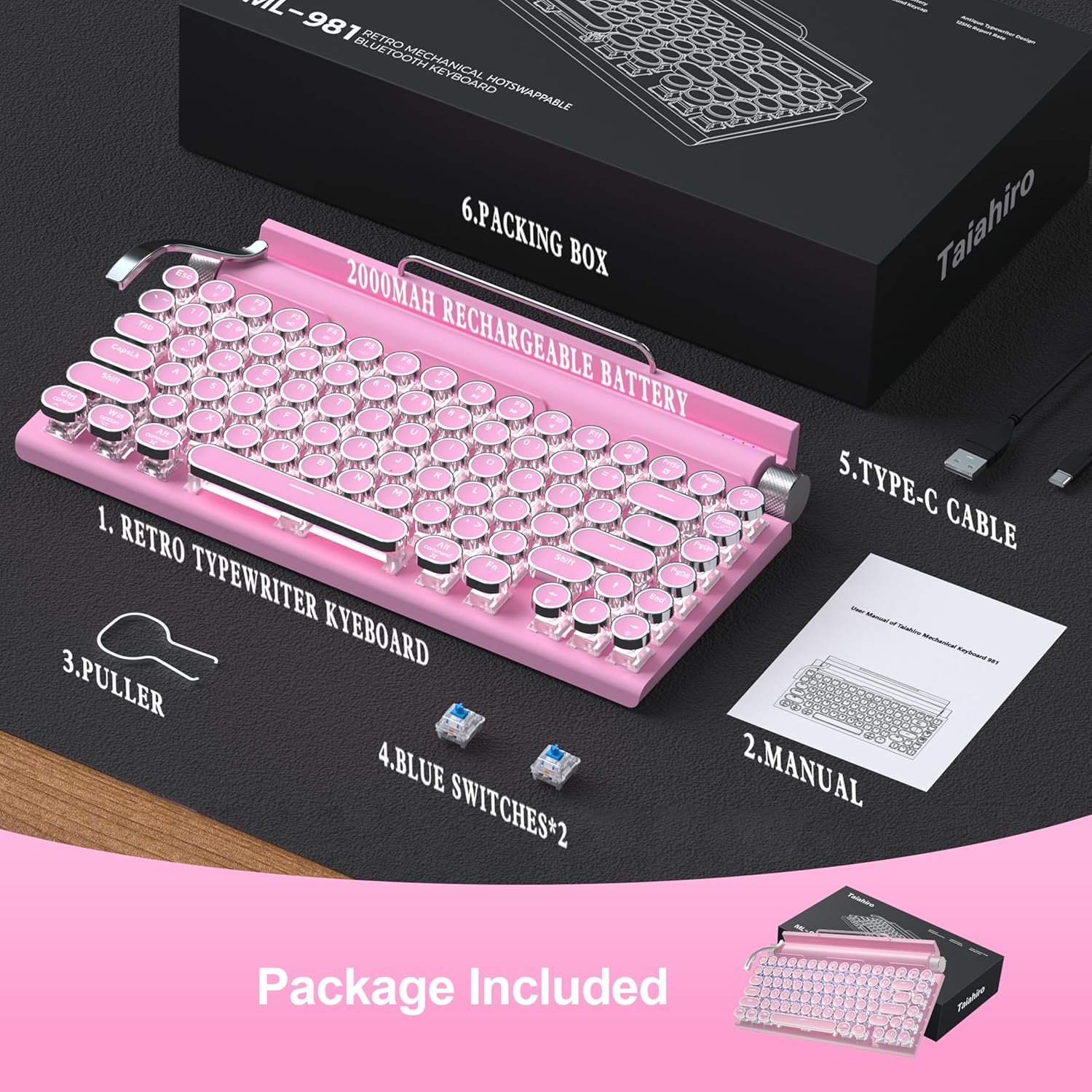
Image 2.1: All components included in the Taiahiro keyboard package.
3. સેટઅપ
3.1 પ્રારંભિક ચાર્જિંગ
Before first use, it is recommended to fully charge the keyboard using the provided USB-C cable. Connect the USB-C end to the keyboard and the USB-A end to a power source (e.g., computer USB port, USB wall adapter).
૨.૧ કનેક્ટિવિટી મોડ્સ
The keyboard supports three connectivity modes: Bluetooth, 2.4G Wireless (via dongle), and Wired (via USB-C cable).
- બ્લૂટૂથ મોડ: Ideal for connecting to up to three different devices (tablet, laptop, phone). Use the switch on the back of the keyboard to select Bluetooth mode. Press Fn+1, Fn+2, or Fn+3 to pair with a specific device slot. The corresponding LED indicator will blink during pairing and become solid once connected.
- 2.4G વાયરલેસ મોડ: For devices with a USB-A port. Insert the 2.4G wireless dongle (located in the keyboard's battery compartment) into your device's USB-A port. Switch the keyboard to 2.4G wireless mode using the switch on the back. The keyboard should connect automatically.
- વાયર્ડ મોડ: Connect the keyboard directly to your computer using the provided USB-C cable. This mode also charges the keyboard.

Image 3.1: The keyboard offers versatile connectivity options for various devices.
૨.૩ સિસ્ટમ સુસંગતતા
The keyboard is compatible with Windows, macOS, Android, and iOS operating systems. Ensure the correct system mode is selected on the keyboard (usually via a switch or Fn key combination) for optimal performance.
4. ઓપરેટિંગ સૂચનાઓ
4.1 Key Functions (Fn Combinations)
Utilize the Function (Fn) key in combination with other keys to access various features:
- Fn + 1/2/3: Switch between paired Bluetooth devices.
- Fn + L: Cycle through 14 different backlight modes.
- Fn + Arrow Up/Down: બેકલાઇટ બ્રાઇટનેસ (5 સ્તરો) સમાયોજિત કરો.
- Fn + Arrow Left/Right: Adjust backlight speed (for dynamic modes).
- Fn + વિન: વિન્ડોઝ કી લોક/અનલોક કરો.
4.2 બેકલાઇટ નિયંત્રણ
The keyboard features a classic white LED backlight with 14 customizable modes. Use the stainless-steel lever on the left side of the keyboard to cycle through these modes. The left knob controls brightness, and the right knob controls volume.

Image 4.1: The keyboard's LED backlight offers 14 different lighting modes.
૩.૨.૧ નોબ ફંક્શન્સ
- ડાબું નોબ: બેકલાઇટની તેજને સમાયોજિત કરે છે.
- જમણો નોબ: Adjusts system volume. Pressing the knob will mute/unmute.
4.4 ઉપકરણ ધારક
The keyboard includes an integrated device holder designed to support tablets and smartphones up to 10.9 inches and a maximum load of 1 lb. This allows for convenient viewing while typing.

Image 4.2: The integrated device holder supports various mobile devices for enhanced productivity.
5. જાળવણી
5.1 સફાઈ
કીબોર્ડ સાફ કરવા માટે, તેને બંધ કરો અને કોઈપણ કેબલ ડિસ્કનેક્ટ કરો. નરમ, લિન્ટ-ફ્રી કાપડનો ઉપયોગ સહેજ ડીampened with water or a mild cleaning solution. Avoid excessive moisture. For keycap cleaning, use the provided keycap puller to remove them and clean separately. Ensure all parts are dry before reassembling and powering on.
૬.૩ હોટ-સ્વેપેબલ સ્વીચો
The keyboard features hot-swappable blue switches. This allows for easy replacement or customization without soldering. Use the provided keycap puller to remove keycaps, then use a switch puller (not included, but often integrated with keycap pullers) to carefully remove the switch. Insert a new compatible 3-pin or 5-pin mechanical switch until it clicks into place. Replace the keycap.

Image 5.1: The hot-swappable design allows for easy customization of switches and keycaps.
6. મુશ્કેલીનિવારણ
| સમસ્યા | ઉકેલ |
|---|---|
| કીબોર્ડ પ્રતિસાદ આપતું નથી | Ensure keyboard is charged. Check connection mode (Bluetooth, 2.4G, Wired). Re-pair Bluetooth or re-insert 2.4G dongle. Try a different USB port/cable. |
| બ્લૂટૂથ પેરિંગ નિષ્ફળ જાય છે | Ensure keyboard is in Bluetooth mode (Fn+1/2/3). Make sure device Bluetooth is on and discoverable. Forget previous pairings on your device and try again. Ensure keyboard is charged. |
| Backlight not working/dim | Adjust brightness using the left knob or Fn+Arrow Up/Down. Cycle through modes with the stainless-steel lever or Fn+L. Ensure keyboard is powered on. |
| Keys not registering/double-typing | Clean under the keycaps. If issue persists, try replacing the affected switch with one of the spare blue switches using the keycap puller. |
7. સ્પષ્ટીકરણો
- મોડલ: 981
- કનેક્ટિવિટી: Bluetooth 5.0, USB-C Wired, 2.4G Wireless
- કી સ્વીચો: Blue Mechanical Switches (Hot-swappable)
- કીકેપ્સ: Round, Punk Style
- લેઆઉટ: 83-Key (Tenkeyless)
- બેકલાઇટ: Classic White LED with 14 modes
- બેટરી: ૧૪૫૦mAh લિથિયમ આયન (શામેલ)
- સામગ્રી: એલ્યુમિનિયમ, ધાતુ, પ્લાસ્ટિક
- વસ્તુનું વજન: 2.18 પાઉન્ડ
- પેકેજ પરિમાણો: 15.16 x 8.19 x 3.19 ઇંચ
- સુસંગત ઉપકરણો: Laptop, Mac, PC, Smartphone, Tablet
૧૦. સત્તાવાર ઉત્પાદન વિડિઓઝ
8.1 Retro Typewriter Mechanical Vintage Keyboard Wireless
વિડિઓ ૧: એક ઓવરview of the Taiahiro Retro Typewriter Mechanical Keyboard, highlighting its vintage design and wireless capabilities.
8.2 Retro Typewriter Wireless Mechanical Gaming Keyboard PINK (Preview)
વિડિઓ ૪: એક ટૂંકી પૂર્વસૂચનview શોકasing the pink version of the Taiahiro Retro Typewriter Wireless Mechanical Gaming Keyboard.
9. વોરંટી અને સપોર્ટ
For warranty information and technical support, please refer to the documentation included in your product package or visit the official Taiahiro webસાઇટ વોરંટી દાવા માટે તમારી ખરીદીની રસીદ રાખો.


