1. પરિચય
Thank you for choosing the Smart Tech 43UV01V 43-inch 4K UHD VIDAA Smart TV. This manual provides essential information for the safe and efficient operation of your television. Please read it thoroughly before using the product and retain it for future reference.

Image 1.1: The Smart Tech 43UV01V TV showcasing its 4K display and integrated VIDAA Smart TV features, including popular streaming services and Dolby Audio support.
2. સલામતી માહિતી
આગ, ઇલેક્ટ્રિક આંચકો અને ઈજાના જોખમને ઘટાડવા માટે આ ટેલિવિઝનનો ઉપયોગ કરતી વખતે હંમેશા મૂળભૂત સલામતી સાવચેતીઓનું પાલન કરો.
- ટીવીને વરસાદ અથવા ભેજ માટે ખુલ્લા ન કરો.
- વેન્ટિલેશનના પ્રારંભને અવરોધિત કરશો નહીં.
- પાવર પ્લગનું યોગ્ય ગ્રાઉન્ડિંગ સુનિશ્ચિત કરો.
- વીજળી પડતાં વાવાઝોડાં દરમિયાન અથવા લાંબા સમય સુધી ટીવીનો ઉપયોગ ન થાય ત્યારે ટીવીને અનપ્લગ કરો.
- તમામ સેવાનો સંદર્ભ લાયક સેવા કર્મચારીઓને આપો.
- બેટરીને બાળકોની પહોંચથી દૂર રાખો.
3. પેકેજ સામગ્રી
Please check that all components are present and undamaged. If any items are missing or damaged, contact your retailer.
- Smart Tech 43UV01V 43-inch 4K UHD VIDAA Smart TV
- રીમોટ કંટ્રોલ
- AAA બેટરી (2x)
- ટીવી સ્ટેન્ડ (બેઝ અને સ્ક્રૂ)
- પાવર કોર્ડ
- સૂચના માર્ગદર્શિકા (આ દસ્તાવેજ)
4. સેટઅપ
૨.૧ સ્ટેન્ડ જોડવું
Place the TV face down on a soft, flat surface to prevent screen damage. Align the stand bases with the mounting holes on the bottom of the TV and secure them with the provided screws.

Image 4.1: Illustration of the TV's underside, indicating where the stand components attach.
૫.૩ બાહ્ય ઉપકરણોને જોડવા
Your Smart Tech TV offers various connection ports for external devices. Ensure the TV is powered off before making any connections.
- HDMI પોર્ટ્સ (3x): For connecting Blu-ray players, game consoles, set-top boxes, etc.
- USB પોર્ટ (2x): For connecting USB storage devices to play media or update firmware.
- AV ઇનપુટ: સંયુક્ત વિડિઓ અને સ્ટીરિયો ઑડિઓનો ઉપયોગ કરતા જૂના ઉપકરણો માટે.
- ઓપ્ટિકલ ઓડિયો આઉટપુટ: સાઉન્ડબાર અથવા હોમ થિયેટર સિસ્ટમ સાથે કનેક્ટ કરવા માટે.
- ઇઅરફોન જેક: ખાનગી સાંભળવા માટે.
- RJ45 (ઇથરનેટ) પોર્ટ: વાયર્ડ ઇન્ટરનેટ કનેક્શન માટે.
- સીઆઈ સ્લોટ: For Conditional Access Modules (CAMs) from your broadcast provider.
- એન્ટેના/કેબલ ઇનપુટ (DVB-T2/DVB-S2): ટેરેસ્ટ્રીયલ અથવા સેટેલાઇટ એન્ટેનાને કનેક્ટ કરવા માટે.
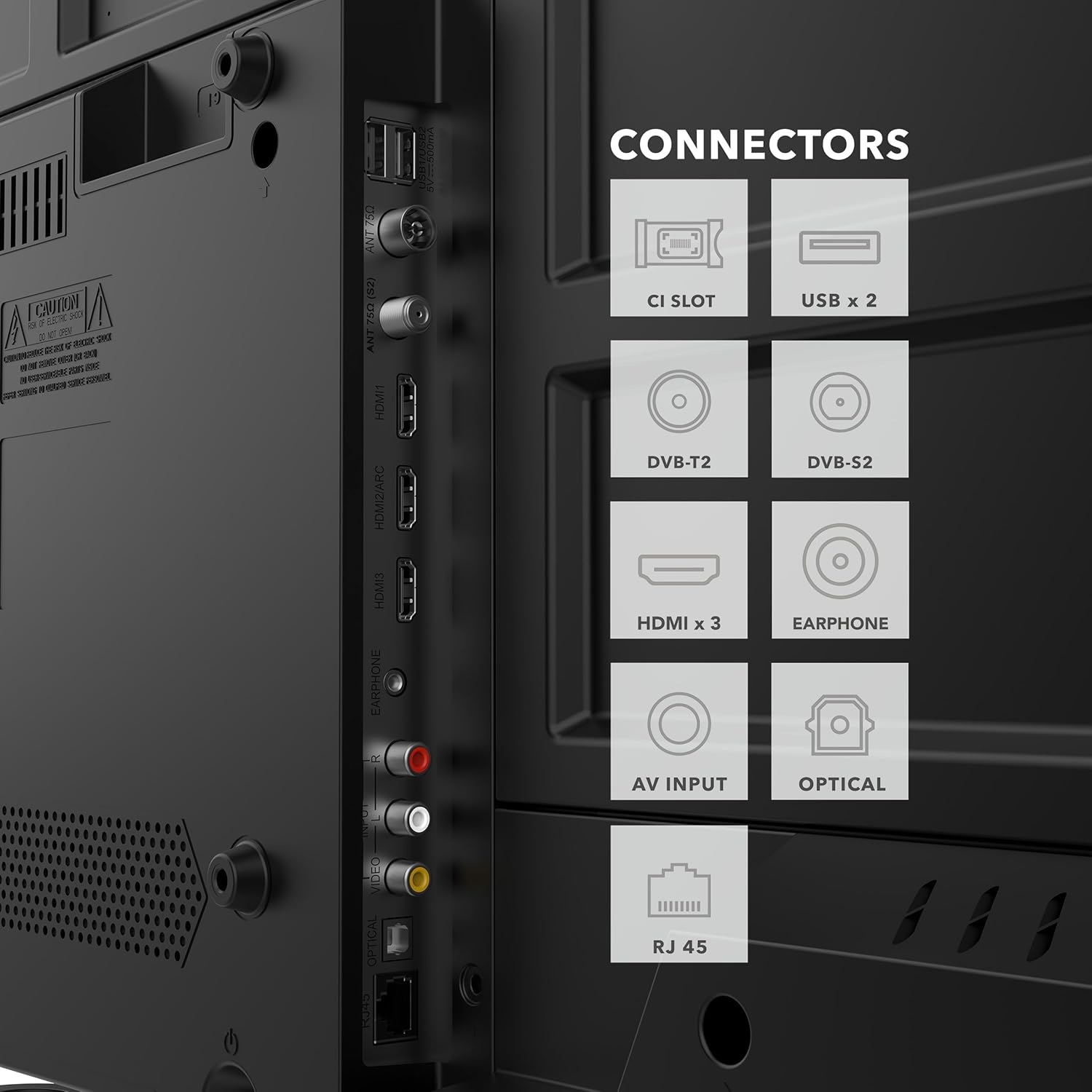
છબી 4.2: વિગતવાર view of the TV's rear panel, highlighting the various input and output connectors for external devices.
૩.૩ પ્રારંભિક પાવર ઓન અને નેટવર્ક સેટઅપ
After connecting all necessary cables, plug the power cord into an electrical outlet. Press the power button on the remote control or the TV. Follow the on-screen instructions to complete the initial setup, including language selection, time zone, and network connection (Wi-Fi or Ethernet).
5. ઓપરેટિંગ સૂચનાઓ
5.1 રીમોટ કંટ્રોલ કાર્યો
The included remote control allows you to navigate the TV's features and settings. Insert the two AAA batteries into the remote, ensuring correct polarity.

Image 5.1: The remote control features dedicated buttons for quick access to popular applications like Netflix, YouTube, Prime Video, and Disney+.
- પાવર બટન: ટીવી ચાલુ કે બંધ કરે છે.
- નેવિગેશન પેડ (ઉપર/નીચે/ડાબે/જમણે/ઓકે): મેનુ નેવિગેશન અને પસંદગી માટે.
- વોલ્યુમ અપ/ડાઉન: સાઉન્ડ લેવલ એડજસ્ટ કરે છે.
- ચેનલ ઉપર/નીચે: ટીવી ચેનલો બદલે છે.
- હોમ બટન: Accesses the VIDAA Smart TV home screen.
- એપ્લિકેશન બટનો: Direct access to Netflix, YouTube, Prime Video, Disney+.
- પાછળ/બહાર નીકળો: પાછલી સ્ક્રીન પર પાછા ફરે છે અથવા મેનૂમાંથી બહાર નીકળે છે.
5.2 VIDAA Smart TV Interface
The VIDAA operating system provides a user-friendly interface for accessing streaming services, live TV, and other smart features.
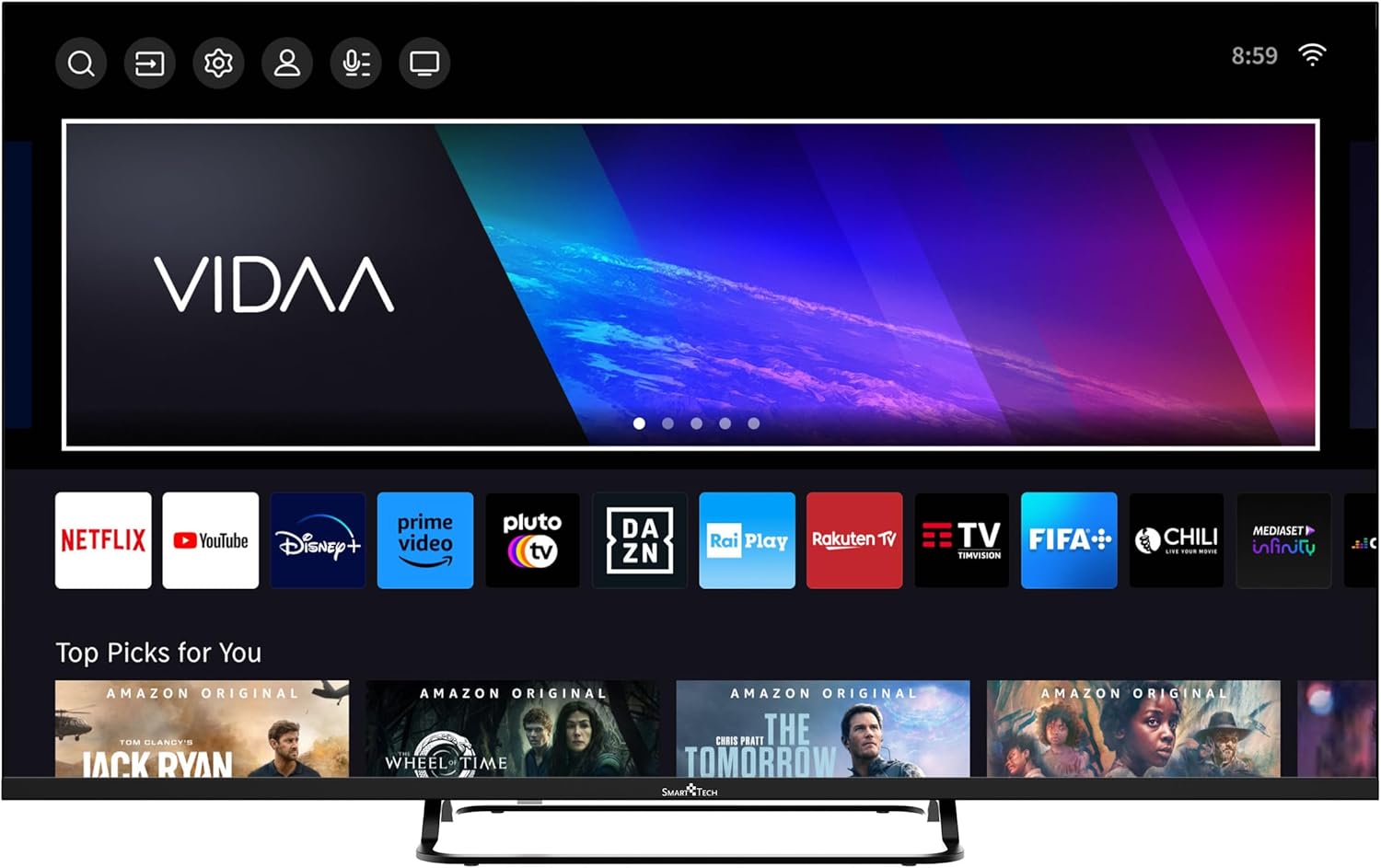
Image 5.2: The VIDAA Smart TV home screen, showing a selection of pre-installed applications and content recommendations.
- એપ્લિકેશન્સ ઍક્સેસ કરી રહ્યા છીએ: Use the navigation buttons on your remote to select and launch applications from the home screen.
- સામગ્રી શોધ: Utilize the search function to find movies, shows, or other content across various platforms.
- સેટિંગ્સ મેનૂ: Access picture, sound, network, and other system settings via the gear icon on the home screen.
૩.૪ ચિત્ર અને ધ્વનિ સેટિંગ્સ
તમારા કસ્ટમાઇઝ કરો viewing experience through the TV's settings menu.
- ચિત્ર મોડ્સ: Select from Standard, Dynamic, Movie, Sport, or User modes to optimize picture quality for different content. Adjust brightness, contrast, color, and sharpness.
- સાઉન્ડ મોડ્સ: Choose from Standard, Music, Movie, Speech, or User modes. The TV supports Dolby Audio for enhanced sound.
- પેરેંટલ કંટ્રોલ: Enable parental control features to restrict access to certain channels or content based on ratings.
૩.૭ હોટેલ મોડ
The Hotel Mode feature allows for advanced control over TV settings, often used in hospitality environments. This mode can restrict certain functions, set default volumes, and manage input sources. Consult the advanced settings menu or contact customer support for detailed instructions on activating and configuring Hotel Mode.

છબી 5.3: ઓવરview of key features, including the Hotel Mode functionality.
6. જાળવણી
- સ્ક્રીનની સફાઈ: નરમ, લિન્ટ-ફ્રી કાપડથી સ્ક્રીનને હળવેથી સાફ કરો. હઠીલા ડાઘ માટે, ખાસ કરીને ટીવી માટે રચાયેલ સ્ક્રીન ક્લીનરનો ઉપયોગ કરો, જે સીધા સ્ક્રીન પર નહીં પણ કાપડ પર લગાવવામાં આવે.
- કેબિનેટની સફાઈ: Use a soft, dry cloth to wipe the TV cabinet. Do not use abrasive cleaners or solvents.
- વેન્ટિલેશન: ઓવરહિટીંગ અટકાવવા માટે ખાતરી કરો કે ટીવીની પાછળના વેન્ટિલેશન ઓપનિંગ્સ બ્લોક ન હોય.
7. મુશ્કેલીનિવારણ
| સમસ્યા | સંભવિત કારણ | ઉકેલ |
|---|---|---|
| કોઈ શક્તિ નથી | પાવર કોર્ડ જોડાયેલ નથી; આઉટલેટમાંથી પાવર નથી. | પાવર કોર્ડ કનેક્શન તપાસો; બીજા ઉપકરણ સાથે આઉટલેટનું પરીક્ષણ કરો. |
| કોઈ ચિત્ર નથી, પણ અવાજ છે. | ખોટો ઇનપુટ સ્રોત પસંદ કરેલ છે; છૂટો વિડિઓ કેબલ. | Press the SOURCE button on the remote; check video cable connections. |
| અવાજ નથી, પણ ચિત્ર હાજર છે. | વૉલ્યૂમ મ્યૂટ અથવા ખૂબ ઓછો છે; ખોટી ઑડિઓ આઉટપુટ સેટિંગ. | Unmute or increase volume; check audio settings in the menu. |
| રીમોટ કંટ્રોલ કામ કરતું નથી | બેટરીઓ મરી ગઈ છે અથવા ખોટી રીતે દાખલ કરવામાં આવી છે; રિમોટ અને ટીવી વચ્ચે અવરોધ. | Replace batteries; ensure clear line of sight to the TV's IR sensor. |
| Wi-Fi થી કનેક્ટ કરી શકાતું નથી | ખોટો પાસવર્ડ; રાઉટરમાં સમસ્યા; ટીવી રાઉટરથી ખૂબ દૂર છે. | Verify password; restart router; move TV closer or use wired connection. |
8. સ્પષ્ટીકરણો
| મોડલ નંબર | 43UV01V |
| બ્રાન્ડ | સ્માર્ટ ટેક |
| સ્ક્રીન માપ | 43 ઇંચ (109 સે.મી.) |
| ડિસ્પ્લે ટેકનોલોજી | એલઇડી |
| ઠરાવ | 4K યુએચડી (3840 x 2160) |
| ઓપરેટિંગ સિસ્ટમ | VIDAA |
| તાજું દર | 60 હર્ટ્ઝ |
| ઓડિયો ટેકનોલોજી | ડોલ્બી ઓડિયો |
| HDMI પોર્ટ્સ | 3 |
| યુએસબી પોર્ટ્સ | 2 |
| કનેક્ટિવિટી | Wi-Fi, Bluetooth, Ethernet (RJ45) |
| ખાસ લક્ષણો | Parental Control, Hotel Mode |
| રંગ | કાળો |
| ઉત્પાદનના પરિમાણો (D x W x H) | 23 સેમી x 95 સેમી x 59 સેમી |

Image 8.1: Dimensional drawing of the Smart Tech 43UV01V TV, illustrating its width, height, and depth.
9. વોરંટી અને સપોર્ટ
Smart Tech products are designed for reliability and performance. For warranty information, please refer to the warranty card included with your purchase or visit the official Smart Tech webસાઇટ
For technical support, troubleshooting assistance, or service inquiries, please contact Smart Tech customer support through their official channels. Keep your purchase receipt and model number (43UV01V) handy when contacting support.
ઉત્પાદક: નસીબ વ્યક્ત કરો
સ્પેર પાર્ટ્સની ઉપલબ્ધતા: 11 Years (as per product data)


