1. પરિચય
This manual provides detailed instructions for the installation, operation, and maintenance of your FINYQBET 10.3-inch Portable Car Stereo. This device is designed to enhance your in-car entertainment and connectivity with features such as a 10.3-inch HD IPS touchscreen, wireless Apple CarPlay, Android Auto, Mirrorlink, FM transmitter, and Bluetooth connectivity.
2. સલામતી માહિતી
- Always operate the device responsibly and ensure it does not distract you from driving.
- Do not attempt to install or service the unit while the vehicle is in motion.
- Ensure all cables are securely connected and do not obstruct driving controls.
- ઉપકરણને અતિશય તાપમાન, લાંબા સમય સુધી સીધો સૂર્યપ્રકાશ અથવા ભેજના સંપર્કમાં રાખવાનું ટાળો.
- નુકસાન કે આગથી બચવા માટે ફક્ત આપેલા પાવર કેબલ અને એસેસરીઝનો જ ઉપયોગ કરો.
3. પેકેજ સામગ્રી
ખાતરી કરો કે બધી વસ્તુઓ પેકેજમાં હાજર છે:
- 1 x 10.3-inch Portable Car Stereo
- 1 x Universal Display Base
- 1 x Installation Sticker
- ૧ x વપરાશકર્તા માર્ગદર્શિકા (આ દસ્તાવેજ)
- 1 x Cigarette Lighter Plug (Power Cable)
- 1 x 3-meter Auxiliary Cable
4. ઉત્પાદન ઓવરview
The FINYQBET 10.3-inch Portable Car Stereo features a high-definition touchscreen and various connectivity options. Below are the general dimensions of the unit and its mounting options.
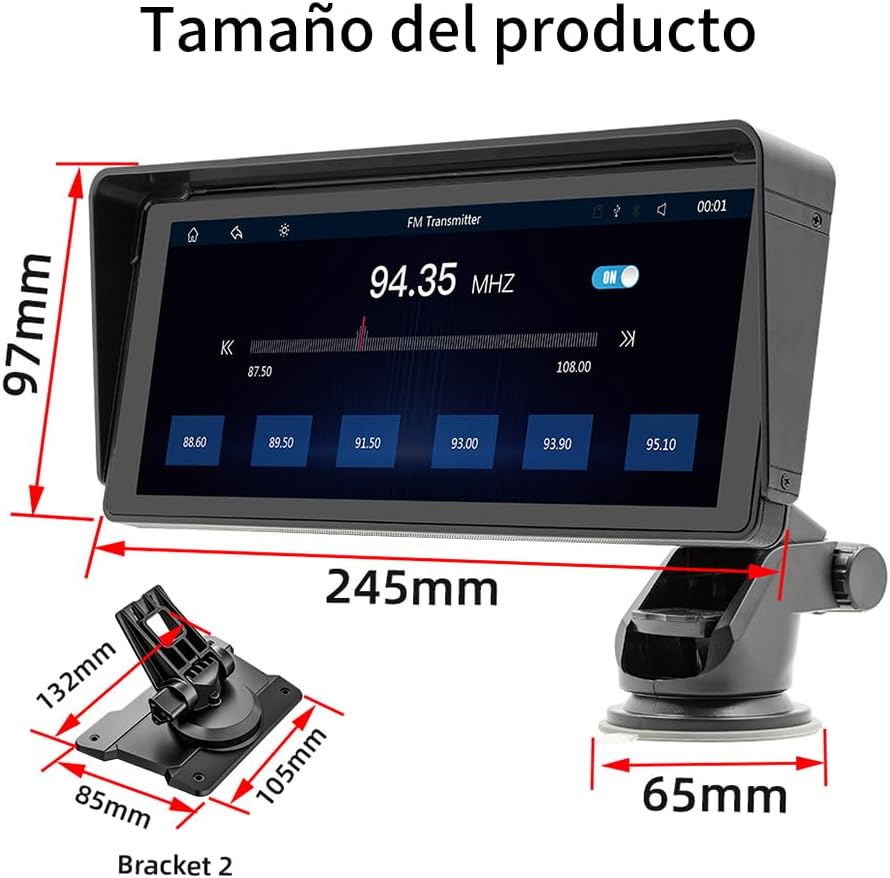
આકૃતિ 4.1: ઉત્પાદનના પરિમાણો. The main unit measures 97mm in height and 245mm in length. The suction cup base has a width of 65mm. Bracket 2 dimensions are 132mm x 85mm x 105mm.
5. સેટઅપ
5.1 ઉપકરણને માઉન્ટ કરવાનું
The car stereo offers flexible mounting options to suit various vehicle interiors. You can choose between a suction cup mount or a base mount, both designed for easy installation and adjustment.

Figure 5.1: Mounting Options. The adjustable suction cup mount allows for free rotation, scalable length, 270-degree swivel, and includes a detachable sun visor. The base mount provides a 90-degree swivel for screen angle adjustment.
- સ્થાન પસંદ કરો: Select a suitable, flat surface on your dashboard or windshield that does not obstruct your view અથવા એરબેગ્સમાં દખલ કરે છે.
- માઉન્ટ જોડો:
- માટે સક્શન કપ માઉન્ટ: Clean the surface thoroughly. Press the suction cup firmly against the surface and engage the locking lever. Adjust the arm and screen angle as desired.
- માટે બેઝ માઉન્ટ: Use the provided installation sticker to secure the base to a clean, flat surface. Ensure it is firmly attached. Adjust the screen angle using the 90-degree swivel.
- Attach the Stereo: Slide the car stereo onto the chosen mount until it clicks securely into place.
5.2 પાવર કનેક્શન
Connect the provided cigarette lighter plug (power cable) to the car stereo and then into your vehicle's 12V power outlet (cigarette lighter socket). The device is compatible with vehicles ranging from 7V to 32V.
5.3 પ્રારંભિક પાવર ચાલુ
Once powered, the device will automatically turn on. Follow any on-screen prompts for initial setup, such as language selection.
6. ઓપરેટિંગ સૂચનાઓ
૧૧ ટચસ્ક્રીન ઇન્ટરફેસ
The device features a responsive 10.3-inch HD IPS touchscreen. Navigate through menus and control functions by tapping, swiping, and pinching gestures similar to a smartphone.
૫.૨ વાયરલેસ એપલ કારપ્લે
Connect your iPhone wirelessly to access CarPlay features.

Figure 6.1: Apple CarPlay. The CarPlay function allows you to use various iPhone applications directly on the car stereo screen, either wirelessly or via a wired connection.
- Ensure Bluetooth and Wi-Fi are enabled on your iPhone.
- On the car stereo, select the CarPlay icon.
- On your iPhone, go to Settings > General > CarPlay and select your car stereo from the available devices.
- Follow the on-screen prompts to complete the connection.
૫.૩ વાયરલેસ એન્ડ્રોઇડ ઓટો
Connect your Android smartphone wirelessly to use Android Auto features.

Figure 6.2: Android Auto. Connect Android Auto to display your Android applications on the car stereo screen, supporting both wireless and wired connections.
- Ensure Bluetooth and Wi-Fi are enabled on your Android phone.
- On the car stereo, select the Android Auto icon.
- On your Android phone, open the Android Auto app (or ensure it's installed and updated).
- Follow the on-screen prompts to connect your phone to the car stereo.
6.4 Mirrorlink (Screen Mirroring)
The Mirrorlink function allows you to mirror your smartphone's screen onto the car stereo display.

Figure 6.3: Mirrorlink. This feature enables mobile screen projection, compatible with both Android and iPhone. For Android, an app may be required, and touch control from the stereo might be limited. iPhones can project screens when connected but do not support two-way touch control.
- Select the Mirrorlink icon on the car stereo.
- Follow the specific instructions displayed on the screen for Android or iPhone connection. Android devices may require a specific app for screen projection. iPhones can project their screen but may not support touch control from the stereo.
6.5 Audio Output Methods
The stereo offers multiple ways to output audio to your vehicle's sound system.

Figure 6.4: Audio Output Methods. Audio can be transmitted via FM (selecting one of 12 preset frequencies), connected via a 3.5mm AUX cable to the car's original speakers, or played through the stereo's built-in speaker.
- એફએમ ટ્રાન્સમીટર: Select the FM Transmitter function on the stereo. Choose an unused FM frequency from the available presets (e.g., 94.35 MHz). Tune your vehicle's original radio to the same FM frequency to hear the stereo's audio through your car speakers.
- Auxiliary (AUX) Cable: Connect the provided 3.5mm auxiliary cable from the stereo's AUX output to your vehicle's AUX input. Select the AUX input on your car's original radio.
- બિલ્ટ-ઇન સ્પીકર: The stereo has a built-in 1W speaker for direct audio playback, suitable for personal listening or when external audio connection is not desired.
૪.૪ મલ્ટીમીડિયા પ્લેબેક
The device supports playback of multimedia files from USB drives and TF (MicroSD) cards.

Figure 6.5: Multimedia Player. The stereo supports playing media from TF cards and USB drives, and features a built-in 1W speaker.
- Insert a USB drive into the USB port or a TF card into the designated slot.
- Select the 'Multimedia' or 'Player' icon on the stereo's screen.
- Browse and select your desired audio or video fileપ્લેબેક માટે.
6.7 રીઅર View કેમેરા સુસંગતતા
The stereo is compatible with external rear-view cameras (not included). When a compatible camera is connected and the vehicle is in reverse gear, the stereo will automatically display the camera feed.

આકૃતિ 6.6: પાછળ View કેમેરા. The system automatically switches to the reverse camera image when reverse gear is engaged, featuring high definition, night vision, waterproof protection, and a 170-degree viewકોણ કોણ.
7. જાળવણી
- સ્ક્રીનની સફાઈ: સ્ક્રીનને હળવા હાથે સાફ કરવા માટે નરમ, લિન્ટ-ફ્રી કાપડનો ઉપયોગ કરો. હઠીલા ડાઘ માટે, સહેજ ડીampen the cloth with water or a screen-cleaning solution. Do not use harsh chemicals or abrasive materials.
- સામાન્ય સંભાળ: Keep the device free from dust and debris. Avoid placing heavy objects on the unit.
- કેબલ મેનેજમેન્ટ: Ensure all cables are neatly routed and not pinched or tangled to prevent damage.
8. મુશ્કેલીનિવારણ
| સમસ્યા | સંભવિત કારણ | ઉકેલ |
|---|---|---|
| કોઈ શક્તિ નથી | Power cable not connected; vehicle's 12V outlet not working; fuse blown. | Check power cable connection. Test 12V outlet with another device. Check vehicle's fuse box. |
| કોઈ અવાજ નથી | Volume too low; incorrect audio output selected; AUX cable loose; FM frequency interference. | Increase volume. Select correct audio output (FM, AUX, built-in speaker). Ensure AUX cable is secure. Try a different FM frequency. |
| CarPlay/Android Auto કનેક્ટ થઈ રહ્યું નથી | Bluetooth/Wi-Fi off on phone; phone not paired; app issues. | Ensure Bluetooth/Wi-Fi are on. Re-pair phone. Restart phone and stereo. Update CarPlay/Android Auto app. |
| સ્ક્રીન પ્રતિભાવવિહીન | Temporary software glitch; extreme temperature. | Restart the device by disconnecting and reconnecting power. Allow device to return to normal operating temperature. |
9. સ્પષ્ટીકરણો
- મોડલ: B5313
- બ્રાન્ડ: FINYQBET
- સ્ક્રીનનું કદ: 10.3 ઇંચ
- સ્ક્રીન રીઝોલ્યુશન: ૩૬૦ x ૩૬૦ એચડી આઇપીએસ
- પરિમાણો (મુખ્ય એકમ): Approximately 10 cm (height) x 24 cm (length)
- કનેક્ટિવિટી ટેકનોલોજી: સહાયક, બ્લૂટૂથ, યુએસબી
- ખાસ લક્ષણો: Apple CarPlay, Android Auto, FM Tuner, Touchscreen, Mirrorlink
- સુસંગત ઉપકરણો: Smartphone, Television (for video input if supported)
- કનેક્ટર પ્રકાર: 3.5 મીમી જેક, યુએસબી
- ઓડિયો આઉટપુટ મોડ: સ્ટીરિયો
- ચેનલોની સંખ્યા: 4 (Implied audio processing/output capability)
- નિયંત્રણ પદ્ધતિ: Touchscreen, Voice (via connected smartphone)
- ઓડિયો આઉટપુટ પ્રકાર: Speakers (Built-in and via vehicle's system)
- GPS: બિલ્ટ-ઇન GPS નથી
- ટીવી કાર્ય: Yes (Requires external tuner/source if not built-in)
- પાવર સુસંગતતા: 7V - 32V
10. વોરંટી અને સપોર્ટ
For warranty information, please refer to the documentation provided at the time of purchase or contact your retailer. For technical support, please visit the manufacturer's official webસાઇટ અથવા તેમના ગ્રાહક સેવા વિભાગનો સંપર્ક કરો.