પરિચય
The EZVIZ H6c 2K WiFi Indoor Security Camera is designed to provide comprehensive indoor surveillance with advanced features. This manual will guide you through the setup, operation, and maintenance of your camera to ensure optimal performance and security.

આકૃતિ 1: EZVIZ H6c 2K WiFi Indoor Security Camera. This image shows the compact, dome-shaped camera in white, featuring a black lens housing and the EZVIZ logo on its base.
પેકેજ સામગ્રી
Before proceeding, please verify that all components are present in your package:
- EZVIZ H6c 2K WiFi Indoor Security Camera
- પાવર એડેપ્ટર
- માઉન્ટિંગ પ્લેટ
- સ્ક્રુ કીટ
- Illાંચો કવાયત
- ઝડપી પ્રારંભ માર્ગદર્શિકા
સેટઅપ માર્ગદર્શિકા
Follow these steps to set up your EZVIZ H6c camera:
- પાવર ચાલુ: Connect the camera to a power outlet using the provided power adapter. The camera will automatically power on.
- EZVIZ એપ ડાઉનલોડ કરો: Download and install the EZVIZ app on your smartphone from the App Store (iOS) or Google Play Store (Android).
- એકાઉન્ટ બનાવો: Open the EZVIZ app and register for an EZVIZ account if you don't already have one.
- કૅમેરો ઉમેરો:
- તમારા EZVIZ એકાઉન્ટમાં લોગ ઇન કરો.
- ઉપકરણ ઉમેરવા માટે હોમ સ્ક્રીન પર "+" ચિહ્નને ટેપ કરો.
- Scan the QR code located on the bottom of your camera or on the quick start guide.
- Follow the in-app instructions to connect the camera to your 2.4GHz or 5GHz Wi-Fi network. Ensure your phone is connected to the same Wi-Fi network during setup.
- માઉન્ટિંગ (વૈકલ્પિક):
- તમારા કેમેરા માટે યોગ્ય સ્થાન પસંદ કરો, ખાતરી કરો કે તેમાં સ્પષ્ટ view and is within Wi-Fi range.
- Use the drill template to mark screw positions on the wall or ceiling.
- જો જરૂરી હોય તો, પાયલોટ છિદ્રો ડ્રિલ કરો અને દિવાલ પર એન્કર લગાવો.
- સ્ક્રૂ સાથે માઉન્ટિંગ પ્લેટને સુરક્ષિત કરો.
- Attach the camera to the mounting plate by twisting it until it locks into place.
ઓપરેટિંગ સૂચનાઓ
Once your camera is set up, you can utilize its various features through the EZVIZ app.
જીવંત View અને પેન અને ટિલ્ટ નિયંત્રણ
Access the live feed from your camera via the EZVIZ app. Use the on-screen controls to remotely pan (horizontal) and tilt (vertical) the camera lens to view different areas of your room. The camera offers 360° horizontal coverage.

આકૃતિ 2: 360-degree Pan and Tilt functionality. This image illustrates the camera's ability to rotate horizontally and vertically, providing full room coverage, with arrows indicating the range of motion.
Smart Motion Detection and Tracking
The H6c camera features intelligent motion detection. When motion is detected, the camera can send instant alerts to your smartphone and automatically track the moving object within its field of view.

આકૃતિ 3: Smart Tracking in action. This image shows a smartphone screen displaying the camera's view, with a red box highlighting a person being tracked by the camera, demonstrating its automatic motion tracking capability.
નાઇટ વિઝન
The camera is equipped with enhanced night vision, allowing it to capture clear images in low-light or complete darkness up to 10 meters. Depending on the model variant, it may offer both black and white and color night vision capabilities.
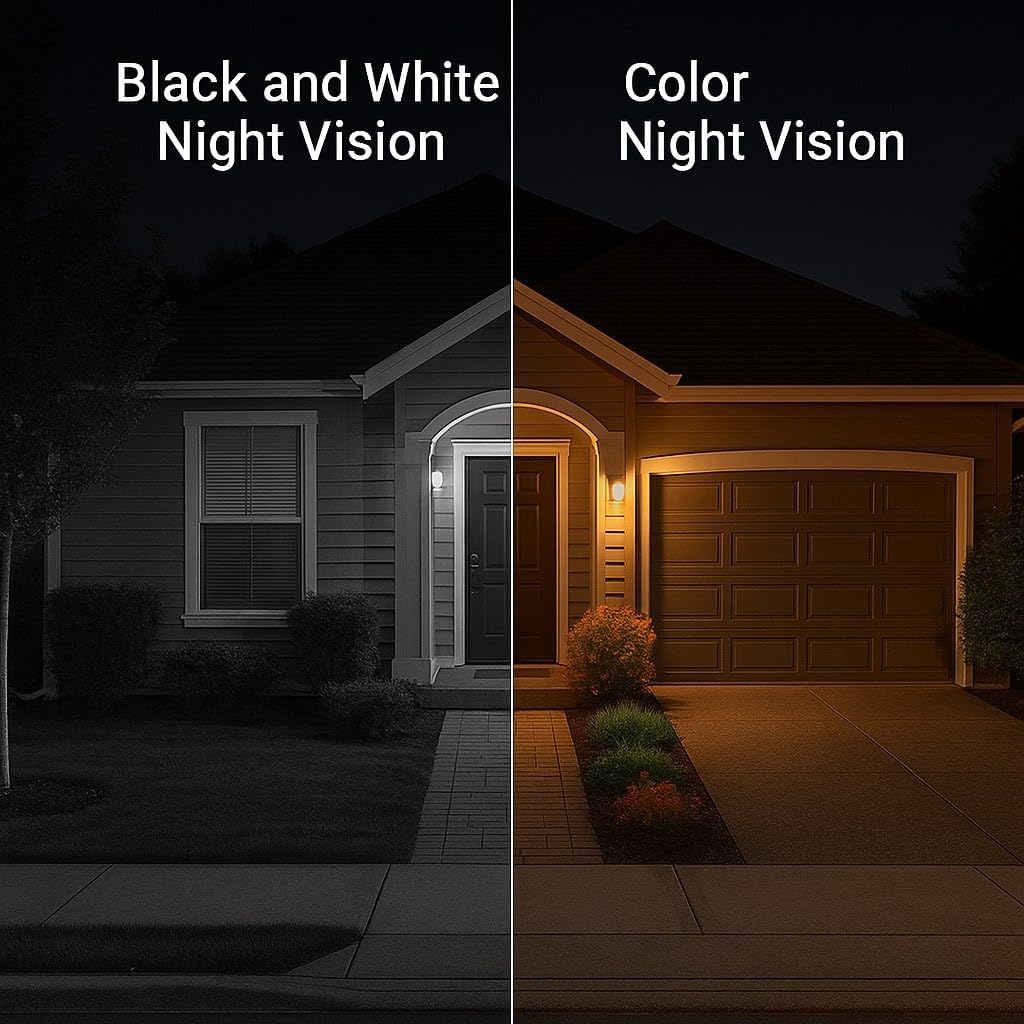
આકૃતિ 4: Night Vision comparison. This image displays a split view of a house at night, showing the difference between traditional black and white night vision and enhanced color night vision, highlighting the camera's low-light performance.
ટુ-વે ટોક
Utilize the built-in microphone and speaker for two-way communication. This allows you to speak to individuals near the camera and hear their responses through the EZVIZ app.

આકૃતિ 5: One-Touch Call Button. This image shows a finger pressing a call button icon on the camera's base, indicating an easy way to initiate two-way communication.
ગોપનીયતા મોડ
For moments when you require privacy, activate the privacy mode through the EZVIZ app. This feature physically covers the camera lens, stopping all recording and live viewing until manually deactivated.
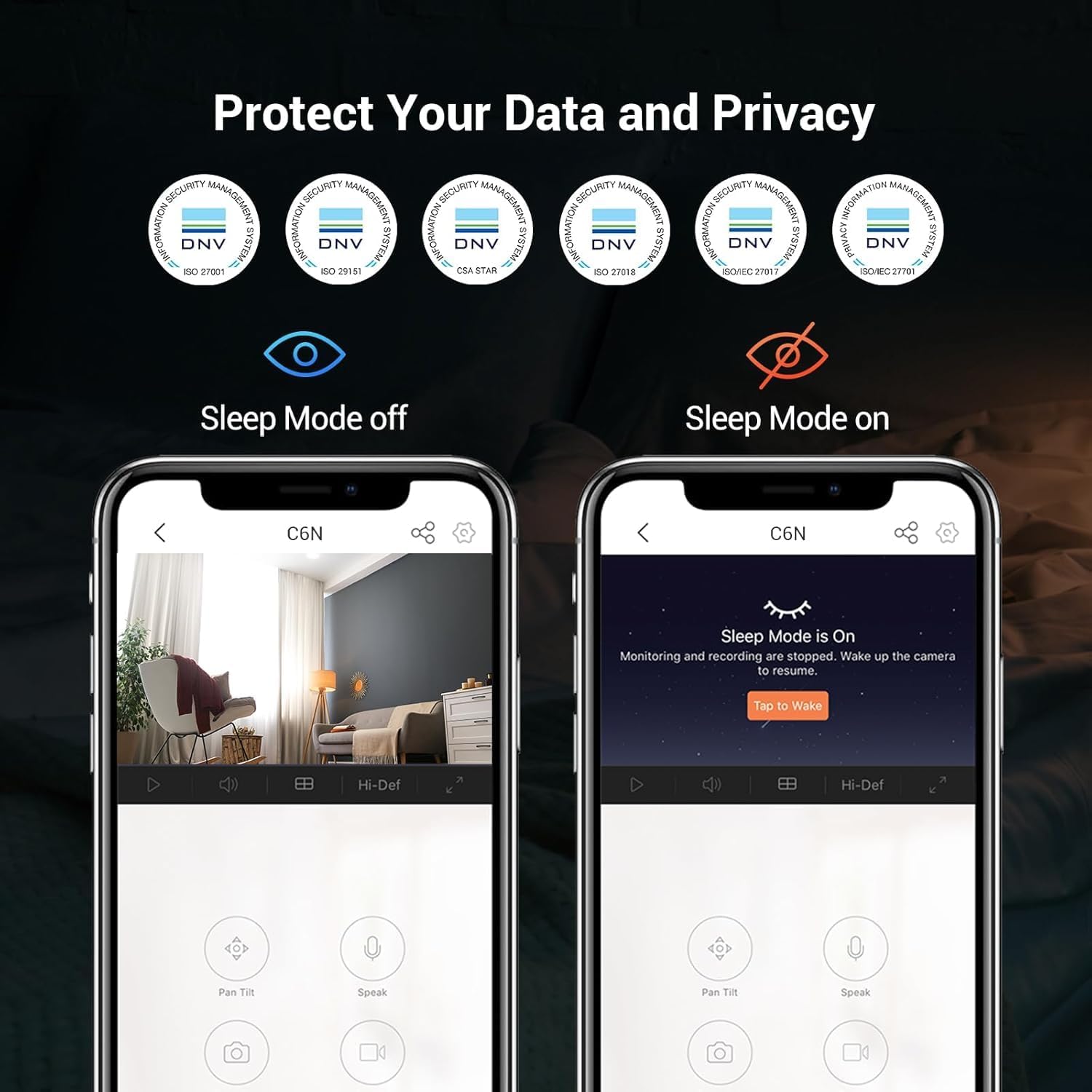
આકૃતિ 6: Privacy Mode activation. This image displays two smartphone screens side-by-side, illustrating the difference between "Sleep Mode off" (live view active) and "Sleep Mode on" (camera lens covered, monitoring stopped), emphasizing data and privacy protection.
એલેક્ઝા સુસંગતતા
The EZVIZ H6c camera is compatible with Amazon Alexa. Link your EZVIZ account to your Alexa account to enable voice control for features like viewસુસંગત એલેક્સા ઉપકરણો પર લાઇવ ફીડ ડાઉનલોડ કરી રહ્યા છીએ.
જાળવણી
To ensure the longevity and optimal performance of your EZVIZ H6c camera, follow these maintenance guidelines:
- સફાઈ: Gently wipe the camera lens and body with a soft, dry, lint-free cloth. Avoid using harsh chemicals or abrasive cleaners.
- ફર્મવેર અપડેટ્સ: Regularly check for and install firmware updates through the EZVIZ app. Updates often include performance improvements and security enhancements.
- પ્લેસમેન્ટ: Ensure the camera is placed in a stable location, away from direct sunlight, extreme temperatures, and high humidity.
- નેટવર્ક સ્થિરતા: Maintain a stable Wi-Fi connection for uninterrupted operation.
મુશ્કેલીનિવારણ
If you encounter issues with your EZVIZ H6c camera, refer to the following common troubleshooting steps:
- કૅમેરા ઑફલાઇન:
- કેમેરા ચાલુ છે કે નહીં અને પાવર એડેપ્ટર સુરક્ષિત રીતે જોડાયેલ છે કે નહીં તે તપાસો.
- ખાતરી કરો કે તમારું Wi-Fi નેટવર્ક સક્રિય અને સ્થિર છે.
- કેમેરાને અનપ્લગ કરીને અને ફરીથી પ્લગ કરીને તેને ફરી શરૂ કરો.
- ખાતરી કરો કે કેમેરા તમારા Wi-Fi રાઉટરની રેન્જમાં છે.
- Wi-Fi થી કનેક્ટ કરવામાં અસમર્થ:
- Confirm you are connecting to a 2.4GHz or 5GHz Wi-Fi network (H6c supports both).
- Wi-Fi પાસવર્ડ બે વાર તપાસો.
- Move the camera closer to the router during setup.
- Reset the camera (refer to the quick start guide for reset button location) and try the setup process again.
- નબળી વિડિઓ ગુણવત્તા:
- ખાતરી કરો કે કેમેરા લેન્સ સ્વચ્છ છે.
- Check your internet connection speed. A stable and fast connection is required for 2K streaming.
- Adjust video quality settings in the EZVIZ app if necessary.
- મોશન ડિટેક્શન કામ કરતું નથી:
- Verify that motion detection is enabled in the EZVIZ app settings.
- ગતિ શોધ સંવેદનશીલતાને સમાયોજિત કરો.
- ખાતરી કરો કે કેમેરા view અવરોધિત નથી.
- દ્વિ-માર્ગી ચર્ચાના મુદ્દાઓ:
- Check the volume settings on your smartphone and in the EZVIZ app.
- ખાતરી કરો કે કેમેરાનો માઇક્રોફોન અને સ્પીકર અવરોધિત નથી.
- નેટવર્ક કનેક્ટિવિટી ચકાસો.
વિશિષ્ટતાઓ
Key technical specifications for the EZVIZ H6c 2K WiFi Indoor Security Camera:
| લક્ષણ | સ્પષ્ટીકરણ |
|---|---|
| મોડેલનું નામ | H6C |
| ઠરાવ | 2K (1296p) |
| પાન અને ટિલ્ટ | 360° Horizontal, Vertical (specific range not provided) |
| નાઇટ વિઝન રેન્જ | 10 મીટર સુધી |
| વાયરલેસ કોમ્યુનિકેશન | વાઇ-ફાઇ (2.4GHz અને 5GHz) |
| ટુ-વે ટોક | Yes (Built-in mic and speaker) |
| સ્માર્ટ ફીચર્સ | Motion Detection, Smart Tracking, Privacy Mode |
| સુસંગતતા | એમેઝોન એલેક્સા |
| ઇન્સ્ટોલેશનનો પ્રકાર | Freestanding, Door Mount (Mounting Plate included) |
| પાવર વપરાશ | 5 વોટ |
| પરિમાણો (L x W x H) | 8.8 x 8.8 x 11.9 સેમી |
| વજન | 218 ગ્રામ |
| આઇટમ મોડલ નંબર | HE-EZVZ-H6C-2K-X1 |
વોરંટી અને આધાર
For detailed warranty information, please refer to the warranty card included with your product or visit the official EZVIZ website. For technical support, product registration, or further assistance, please visit the EZVIZ support portal or contact their customer service directly. Contact information is typically available on the EZVIZ webસાઇટ
Note: Warranty terms and conditions may vary by region. Please consult your local EZVIZ distributor or webચોક્કસ વિગતો માટે સાઇટ.


