1. પરિચય
This manual provides essential information for the proper use and maintenance of your Realme 12 Plus 5G RMX3867 smartphone. Please read this guide thoroughly before operating your device to ensure optimal performance and longevity. Keep this manual for future reference.
2. પેકેજીંગ યાદી
Upon opening the package, verify that all items listed below are present and in good condition. If any items are missing or damaged, please contact your retailer.

Image: Contents of the Realme 12 Plus 5G RMX3867 retail box. Includes the phone, phone case, quick guide, detachable camera decoration replacement guide, safety guide, screwdriver, two screws, USB cable, and SIM card ejector.
- Realme 12 Plus 5G RMX3867 Smartphone
- ફોન કેસ
- ઝડપી માર્ગદર્શિકા
- Detachable Camera Decoration Replacement Guide
- સલામતી માર્ગદર્શિકા
- સ્ક્રુડ્રાઈવર
- સ્ક્રૂ (x2)
- યુએસબી કેબલ
- સિમ કાર્ડ ઇજેક્ટર
Note: Some accessories, such as the detachable camera decoration, may come in a separate package or require assembly. Refer to the specific guides provided.

Image: Contents of the Detachable Camera Decoration Protective Cover Set. Includes a packaging box, detachable deco case (x1), two screws, and a phone case (x1).
3. સેટઅપ
3.1. સિમ કાર્ડ ઇન્સ્ટોલેશન
- તમારા ઉપકરણની બાજુમાં સિમ કાર્ડ ટ્રે શોધો.
- Insert the provided SIM card ejector tool into the small hole next to the tray.
- ટ્રે બહાર ન આવે ત્યાં સુધી ધીમેથી દબાણ કરો.
- Place your Nano-SIM card(s) into the tray with the gold contacts facing down. Ensure the card is correctly oriented according to the tray's diagram.
- ટ્રેને ફોનમાં કાળજીપૂર્વક ફરીથી દાખલ કરો જ્યાં સુધી તે જગ્યાએ ક્લિક ન થાય.

છબી: નીચે view of the Realme 12 Plus 5G RMX3867, showing the USB-C port, speaker grille, microphone, and SIM card tray slot.
3.2. પાવર ચાલુ/બંધ
- પાવર ચાલુ કરવા માટે: Press and hold the Power button (located on the right side of the device) until the realme logo appears.
- પાવર ઓફ કરવા માટે: Press and hold the Power button until the power options menu appears. Tap "Power off" and confirm.
- પુનઃપ્રારંભ કરવા માટે: Press and hold the Power button until the power options menu appears. Tap "Restart" and confirm.

છબી: બાજુ view of the Realme 12 Plus 5G RMX3867, highlighting the power button and volume rocker on the right edge of the device.
3.3. પ્રારંભિક સેટઅપ
The first time you power on your device, you will be guided through the initial setup process. This includes:
- તમારી ભાષા પસંદ કરી રહ્યા છીએ.
- Wi-Fi નેટવર્કથી કનેક્ટ થઈ રહ્યું છે.
- તમારું Google એકાઉન્ટ સેટ કરી રહ્યું છે.
- Configuring screen lock (PIN, pattern, password, fingerprint, face unlock).
- જૂના ઉપકરણમાંથી ડેટા ટ્રાન્સફર કરવો (વૈકલ્પિક).
4. તમારા ઉપકરણનું સંચાલન
4.1. મૂળભૂત નેવિગેશન
- સ્પર્શ સંકેતો: Your device supports various touch gestures for navigation, including tap, swipe, pinch-to-zoom, and long press.
- હોમ સ્ક્રીન: તમારી એપ્લિકેશનો અને વિજેટ્સ માટેનું કેન્દ્રિય કેન્દ્ર. વધારાની સ્ક્રીનો ઍક્સેસ કરવા માટે ડાબે અથવા જમણે સ્વાઇપ કરો.
- સૂચના પેનલ: સૂચનાઓ અને ઝડપી સેટિંગ્સને ઍક્સેસ કરવા માટે સ્ક્રીનની ટોચ પરથી નીચે સ્વાઇપ કરો.
- એપ ડ્રોઅર: સ્ક્રીનના તળિયેથી ઉપર સુધી સ્વાઇપ કરો view બધી ઇન્સ્ટોલ કરેલી એપ્લિકેશનો.

છબી: આગળ view of the Realme 12 Plus 5G RMX3867, displaying its large screen with a punch-hole camera cutout at the top center.
4.2. કેમેરા કાર્યો
The Realme 12 Plus 5G RMX3867 features a powerful 200MP main camera. To access the camera, tap the Camera icon on your home screen or app drawer.
- ફોટો મોડ્સ: Switch between various modes like Photo, Portrait, Night, Pro, and more.
- વિડિઓ રેકોર્ડિંગ: Record high-quality videos. Adjust resolution and frame rate in settings.
- સેટિંગ્સ: Access camera settings to customize features such as HDR, AI enhancements, and grid lines.
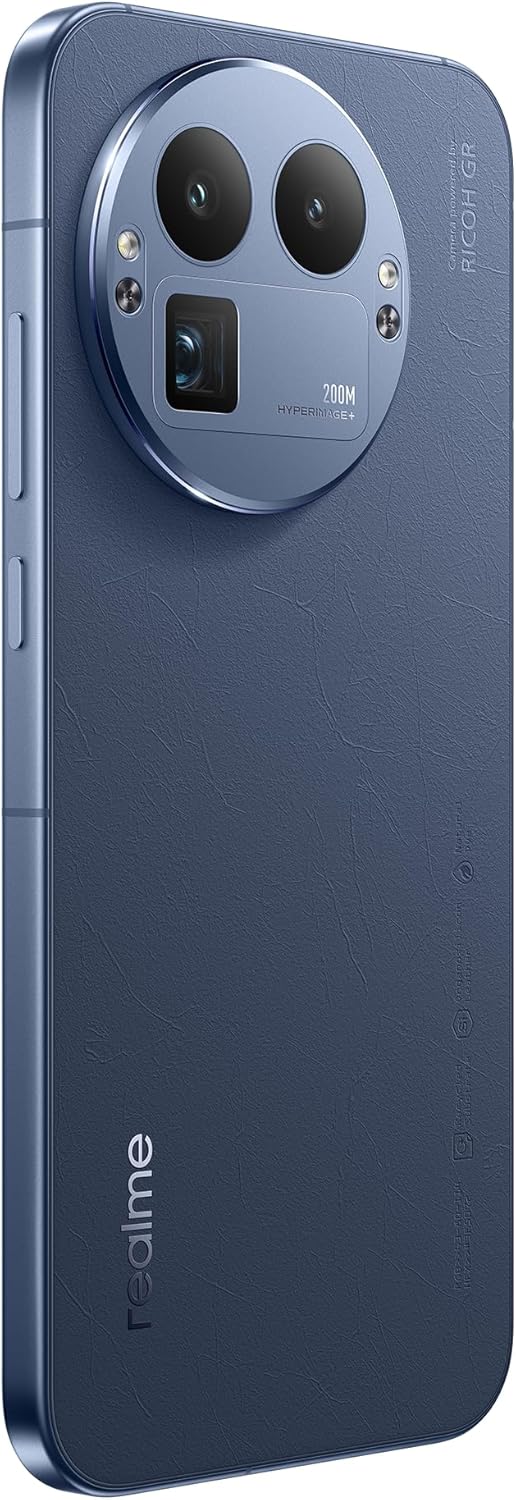
છબી: પાછળનો ભાગ view of the Realme 12 Plus 5G RMX3867, showcasing the prominent circular camera module with multiple lenses and a "200M HYPERIMAGE+" label.
4.3. કનેક્ટિવિટી
- 5G નેટવર્ક: Your device supports 5G connectivity for faster mobile data speeds. Ensure your SIM card and plan support 5G.
- Wi-Fi: ઇન્ટરનેટ ઍક્સેસ માટે વાયરલેસ નેટવર્ક્સ સાથે કનેક્ટ કરો. કનેક્શન્સ મેનેજ કરવા માટે સેટિંગ્સ > Wi-Fi પર જાઓ.
- બ્લૂટૂથ: Pair with Bluetooth devices like headphones, speakers, or car systems. Go to Settings > Bluetooth.
- યુએસબી-સી: ચાર્જિંગ અને ડેટા ટ્રાન્સફર માટે USB-C પોર્ટનો ઉપયોગ કરો.
4.4. સુરક્ષા સુવિધાઓ
- ફિંગરપ્રિન્ટ સેન્સર: Unlock your device quickly and securely using the in-display fingerprint sensor. Register your fingerprints in Settings > Security & Privacy > Fingerprint.
- ફેસ અનલોક: Use facial recognition to unlock your phone. Set up Face Unlock in Settings > Security & Privacy > Face.
- સ્ક્રીન લોક: Choose from PIN, pattern, or password for basic screen security.
5. જાળવણી
5.1. તમારા ઉપકરણને સાફ કરવું
- ફોનની સ્ક્રીન અને બોડી સાફ કરવા માટે નરમ, લિન્ટ-ફ્રી કાપડનો ઉપયોગ કરો.
- કઠોર રસાયણો, ઘર્ષક સામગ્રી અથવા એરોસોલ સ્પ્રેનો ઉપયોગ કરવાનું ટાળો.
- હઠીલા ડાઘ માટે, સહેજ ડીampપાણી અથવા ખાસ ઇલેક્ટ્રોનિક્સ માટે રચાયેલ સ્ક્રીન ક્લીનર સાથે કાપડ.
5.2. સોફ્ટવેર અપડેટ્સ
Regularly check for and install software updates to ensure your device has the latest features, security patches, and performance improvements. Go to Settings > About device > Up to date to check for updates.
5.3. બેટરી કેર
- અતિશય તાપમાન ટાળો, કારણ કે તે બેટરીના જીવનને ઘટાડી શકે છે.
- Use only the original charger and cable or certified compatible accessories.
- Do not let the battery drain completely frequently. It is generally recommended to keep the battery level between 20% and 80%.
6. મુશ્કેલીનિવારણ
૬. સામાન્ય મુદ્દાઓ અને ઉકેલો
| અંક | ઉકેલ |
|---|---|
| ઉપકરણ ચાલુ નથી | ખાતરી કરો કે બેટરી ચાર્જ થઈ ગઈ છે. ઓછામાં ઓછા 10-15 સેકન્ડ માટે પાવર બટન દબાવી રાખો. |
| એપ્લિકેશનો ક્રેશ થઈ રહી છે અથવા થીજી રહી છે | Close the app and reopen it. Clear the app's cache (Settings > Apps > [App Name] > Storage > Clear cache). Restart the device. |
| નબળી બેટરી જીવન | Check background app usage. Reduce screen brightness. Disable unnecessary features like GPS or Bluetooth when not in use. |
| Wi-Fi થી કનેક્ટ કરી શકાતું નથી | Restart your router and phone. Forget the network and reconnect. Ensure Wi-Fi is enabled on your device. |
6.2. ફેક્ટરી રીસેટ
જો તમને સતત સમસ્યાઓનો સામનો કરવો પડે છે, તો ફેક્ટરી રીસેટ તેમને ઉકેલી શકે છે. ચેતવણી: ફેક્ટરી રીસેટ તમારા ફોન પરનો બધો ડેટા ભૂંસી નાખશે. આગળ વધતા પહેલા મહત્વપૂર્ણ ડેટાનો બેકઅપ લો.
- સેટિંગ્સ > સિસ્ટમ > રીસેટ વિકલ્પો પર જાઓ.
- Tap "Erase all data (factory reset)".
- તમારા નિર્ણયની પુષ્ટિ કરો અને જો પૂછવામાં આવે તો તમારો PIN/પાસવર્ડ દાખલ કરો.
- ઉપકરણ ફરીથી શરૂ થશે અને રીસેટ પ્રક્રિયા શરૂ થશે.
7. સ્પષ્ટીકરણો
Below are the key technical specifications for the Realme 12 Plus 5G RMX3867:
| લક્ષણ | વિગત |
|---|---|
| બ્રાન્ડ | realme |
| મોડેલનું નામ | Realme 12 Plus 5G (RMX3867) |
| ઓપરેટિંગ સિસ્ટમ | એન્ડ્રોઇડ |
| મેમરી સ્ટોરેજ ક્ષમતા | 256 જીબી |
| RAM મેમરી ઇન્સ્ટોલ કરેલ કદ | 12 જીબી |
| CPU મોડલ | સ્નેપડ્રેગન |
| CPU ઝડપ | 1200 MHz |
| સ્ક્રીન માપ | 6.4 ઇંચ |
| ડિસ્પ્લે પ્રકાર | AMOLED |
| ઠરાવ | 1440 x 2560 |
| અસરકારક વિડિઓ રિઝોલ્યુશન | 200 MP |
| સેલ્યુલર ટેકનોલોજી | 5G |
| બેટરી ક્ષમતા | 7000 મિલીamp કલાક |
| બેટરી સરેરાશ જીવન | 21 કલાક |
| માનવ ઇન્ટરફેસ ઇનપુટ | ટચસ્ક્રીન |
| આઇટમ મોડલ નંબર | GT 8 Pro (Note: Product title is Realme 12 Plus 5G RMX3867) |
Note: Some specifications may vary slightly based on region or specific product variant. The model number in the product title is RMX3867, while some specifications list 'GT 8 Pro'. Please refer to your device's packaging for the most accurate model information.
8. વોરંટી અને સપોર્ટ
Your Realme 12 Plus 5G RMX3867 device comes with a limited warranty. Please refer to the warranty card included in your product packaging for detailed terms and conditions, including warranty period and coverage.
ટેકનિકલ સપોર્ટ, સેવા અથવા વધુ પૂછપરછ માટે, કૃપા કરીને સત્તાવાર રિયલમી સપોર્ટની મુલાકાત લો. website or contact their customer service. Contact information can typically be found on the realme official website or in the "Safety Guide" included with your device.
વોરંટી દાવા માટે તમારી ખરીદીનો પુરાવો રાખો.