1. પરિચય
This user manual provides comprehensive instructions for the ELECTROPRIME JR-CL16 48W Bluetooth 5.0 Car Wireless FM Transmitter. Please read this manual carefully before using the device to ensure proper operation and to maximize its features. This device allows you to stream audio from your smartphone or other Bluetooth-enabled devices to your car's FM radio, make hands-free calls, and charge your devices rapidly.
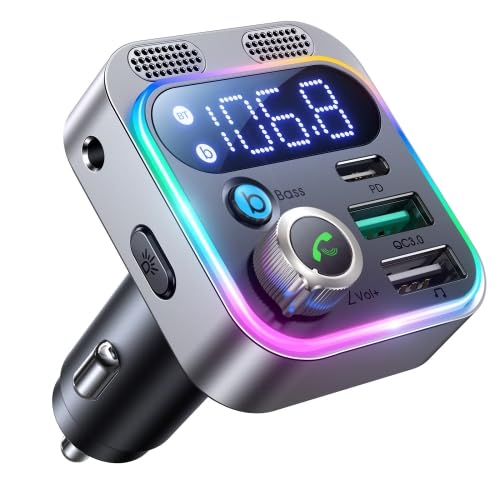
આકૃતિ 1: ફ્રન્ટ view of the ELECTROPRIME JR-CL16 Car FM Transmitter, showcasing its digital display, control knob, multiple USB charging ports (PD and QC3.0), and integrated microphone grilles. The device features a silver finish with a colorful LED light ring.
બૉક્સમાં શું છે:
- 1 x ELECTROPRIME JR-CL16 Car FM Transmitter
2. મુખ્ય લક્ષણો
- Enhanced Call Clarity: Features dual microphones for significantly clearer hands-free calls.
- ઇમર્સિવ ઑડિઓ: Provides a 360-degree spatial bass effect for a richer audio experience.
- હાઇ-સ્પીડ ચાર્જિંગ: Equipped with 48W high power output, allowing simultaneous fast charging of two devices.
- Universal Fast Charge Support: Supports multiple fast charge protocols including PD3.0, QC3.0, PPS, Samsung AFC, and Huawei FCP.
- અદ્યતન બ્લૂટૂથ કનેક્ટિવિટી: Utilizes Bluetooth 5.0 for faster pairing and more stable wireless transmission.
- બહુમુખી સંગીત પ્લેબેક: Offers three music modes: Bluetooth, USB drive, and AUX connection for flexible audio input.

આકૃતિ ૩: ક્લોઝ-અપ view of the ELECTROPRIME JR-CL16, focusing on its enhanced dual microphones. This design ensures superior call clarity.

Figure 3: An illustrative image highlighting the Deep BASS & Hi-Fi Stereo sound capabilities of the ELECTROPRIME JR-CL16, delivering CD-level stereo audio with enhanced bass.
3. સેટઅપ માર્ગદર્શિકા
- પાવર ચાલુ: Insert the ELECTROPRIME JR-CL16 into your car's 12V/24V cigarette lighter socket. The device will power on automatically, and the LED display will light up.
- FM ફ્રીક્વન્સી સેટ કરો:
- Tune your car's FM radio to an empty frequency (one with no strong broadcast signal).
- On the JR-CL16, press and hold the multi-function knob (usually the call button) until the FM frequency on the display starts flashing.
- Rotate the knob left or right to adjust the transmitter's frequency to match your car's FM radio frequency.
- Once matched, press the knob again to confirm the frequency.
- બ્લૂટૂથ જોડી:
- The device will automatically enter Bluetooth pairing mode when powered on for the first time, or if no device is connected. The Bluetooth icon on the display will flash.
- તમારા સ્માર્ટફોન પર, બ્લૂટૂથ ચાલુ કરો અને ઉપલબ્ધ ઉપકરણો શોધો.
- Select "JR-CL16" (or similar name) from the list of found devices to pair.
- Once successfully paired, the Bluetooth icon on the transmitter's display will stop flashing and remain solid. You will hear a confirmation tone.
4. ઓપરેટિંગ સૂચનાઓ
સંગીત પ્લેબેક:
- બ્લૂટૂથ મોડ: After successful pairing, open your music player on your smartphone and start playing audio. The sound will be transmitted to your car's speakers via the set FM frequency.
- USB ડ્રાઇવ મોડ: Insert a USB flash drive (containing MP3/WMA/WAV/FLAC files) into the designated USB port (not the charging-only port). The device will automatically detect and play music from the USB drive.
- AUક્સ મોડ: Connect an audio device (e.g., MP3 player) to the transmitter's AUX input port using a 3.5mm audio cable. The device will automatically switch to AUX mode.
- વોલ્યુમ નિયંત્રણ: Rotate the multi-function knob to adjust the volume.
- ટ્રેક નિયંત્રણ: Use the dedicated buttons (if available) or the multi-function knob (press and hold or double-press, refer to specific button functions on device) to skip tracks forward or backward.
- બાસ ઉન્નતીકરણ: Press the "Bass" button (if present) to activate or deactivate the 360-degree spatial bass effect.
હેન્ડ્સ-ફ્રી કૉલિંગ:
- કૉલનો જવાબ આપો: Press the multi-function knob once to answer an incoming call.
- કૉલ સમાપ્ત કરો: Press the multi-function knob once during a call to end it.
- કૉલ નકારો: Press and hold the multi-function knob for 2 seconds to reject an incoming call.
- ફરીથી ડાયલ કરો: Double-press the multi-function knob to redial the last dialed number.
ચાર્જિંગ ડિવાઇસેસ:
- Connect your device's charging cable to the appropriate USB port on the transmitter.
- Use the QC3.0 port for Quick Charge compatible devices.
- Use the PD (Power Delivery) port for USB-C devices supporting PD fast charging.
- The transmitter supports simultaneous charging of two devices.
5. જાળવણી
- સફાઈ: Use a soft, dry cloth to clean the surface of the device. Do not use liquid cleaners or aerosols.
- સંગ્રહ: When not in use for extended periods, unplug the device from the car's cigarette lighter socket and store it in a cool, dry place away from direct sunlight and extreme temperatures.
- અસર ટાળો: Do not drop or subject the device to strong impacts, as this may damage internal components.
6. મુશ્કેલીનિવારણ
| સમસ્યા | સંભવિત કારણ | ઉકેલ |
|---|---|---|
| પાવર નથી/ઉપકરણ ચાલુ નથી |
|
|
| Poor sound quality/Static noise |
|
|
| બ્લૂટૂથ દ્વારા જોડી બનાવી શકાતી નથી |
|
|
| ઉપકરણો ઝડપી ચાર્જ થતા નથી |
|
|
7. સ્પષ્ટીકરણો
| પરિમાણ | મૂલ્ય |
|---|---|
| ટ્રાન્સમીટર ઇનપુટ | ડીસી 12-24V |
| QC3.0 આઉટપુટ | 5V=3A, 9V=2A, 12V=1.5A |
| પીડી આઉટપુટ | 5V=3A, 9V=3A, 12V=2.5A, 15V=2A, 20V=1.5A |
| PPS આઉટપુટ | 3.3-11V=3A, 3.3V-16V=2A |
| કુલ આઉટપુટ | 48W |
| કદ (L x W x H) | 50 x 45 x 70 મીમી |
| ચોખ્ખું વજન | 44 ગ્રામ |
| બ્લૂટૂથ સંસ્કરણ | 5.0 |
| સંગીત મોડ્સ | બ્લૂટૂથ, USB, AUX |
8. વોરંટી અને સપોર્ટ
ELECTROPRIME products are manufactured with high-quality standards. This product comes with a standard manufacturer's warranty against defects in materials and workmanship. Please refer to your purchase documentation or the retailer's website for specific warranty terms and duration.
ગ્રાહક આધાર:
For technical assistance, troubleshooting, or warranty claims, please contact ELECTROPRIME customer support. Contact details can typically be found on the product packaging, the official ELECTROPRIME webસાઇટ, અથવા તમારા ખરીદી બિંદુ દ્વારા.
Manufacturer: ELECTROPRIME


