1. પરિચય
The Mastech MS8233B is a compact, handheld digital multimeter designed for measuring AC/DC voltage, DC current, resistance, diode, continuity, and temperature. It features a 2000-count display, data hold function, and low battery indication, making it suitable for various electrical testing applications in domestic and electronics environments.
2. સલામતી માહિતી
To ensure safe operation and service of the meter, please read this manual thoroughly before use. Failure to observe safety warnings can result in severe injury or death.
- ઉપયોગ કરતા પહેલા હંમેશા ખાતરી કરો કે મીટર સારી સ્થિતિમાં છે.
- રેટ કરેલ વોલ્યુમ કરતાં વધુ અરજી કરશો નહીંtage, which is 600V CAT III.
- વોલ્યુમ સાથે કામ કરતી વખતે સાવચેતી રાખોtag30V AC RMS, 42V પીક, અથવા 60V DC થી ઉપર, કારણ કે આ આંચકાનું જોખમ ઊભું કરે છે.
- ફંક્શન બદલતા પહેલા હંમેશા ટેસ્ટ લીડ્સને સર્કિટમાંથી ડિસ્કનેક્ટ કરો.
- જ્યારે ઓછી બેટરી સૂચક દેખાય ત્યારે તરત જ બેટરી બદલો.
- Do not operate the meter if the battery cover is not properly closed.
- સ્થાનિક અને રાષ્ટ્રીય સુરક્ષા કોડનું પાલન કરો.
3. ઉત્પાદન ઓવરview
The Mastech MS8233B Digital Multimeter features a clear display, a rotary function switch, and dedicated input jacks for various measurements.

આકૃતિ 3.1: આગળ view of the Mastech MS8233B Digital Multimeter. This image displays the LCD screen, rotary function switch, input jacks, and control buttons.
3.1 ઘટકો
- એલસીડી ડિસ્પ્લે: માપન રીડિંગ્સ, એકમો અને કાર્ય સૂચકાંકો દર્શાવે છે.
- ફંક્શન રોટરી સ્વિચ: Used to select the desired measurement function (e.g., V~, V-, A-, Ω, Diode, Continuity, Temp).
- હોલ્ડ બટન: ડિસ્પ્લે પર વર્તમાન વાંચનને સ્થિર કરે છે.
- બેકલાઇટ બટન: ઓછા પ્રકાશની સ્થિતિમાં વધુ સારી દૃશ્યતા માટે ડિસ્પ્લે બેકલાઇટને સક્રિય કરે છે.
- VΩmA Input Jack: વોલ્યુમ માટે હકારાત્મક ઇનપુટtage, resistance, diode, continuity, and current measurements up to 200mA.
- COM ઇનપુટ જેક: બધા માપ માટે સામાન્ય (નકારાત્મક) ઇનપુટ.
- 10A ઇનપુટ જેક: ઉચ્ચ વર્તમાન માપન માટે હકારાત્મક ઇનપુટ (10A સુધી).
4. સેટઅપ
4.1 બેટરી ઇન્સ્ટોલેશન
The MS8233B requires 2 LR44 batteries for operation. Ensure the batteries are installed correctly before first use or when replacing them.
- મલ્ટિમીટર બંધ કરો અને બધા ટેસ્ટ લીડ્સ ડિસ્કનેક્ટ કરો.
- મીટરની પાછળ બેટરીનો ડબ્બો શોધો.
- બેટરી કમ્પાર્ટમેન્ટ કવર ખોલવા માટે સ્ક્રુડ્રાઈવરનો ઉપયોગ કરો.
- Insert the 2 LR44 batteries, observing the correct polarity (+ and -).
- બેટરી કમ્પાર્ટમેન્ટ કવર બદલો અને તેને સ્ક્રુ વડે સુરક્ષિત કરો.
5. ઓપરેટિંગ સૂચનાઓ
Before taking any measurements, ensure the test leads are properly connected to the meter and the circuit under test.
5.1 સામાન્ય કામગીરી
- Turn the rotary switch from the "OFF" position to the desired measurement function.
- Connect the test leads to the appropriate input jacks and the circuit.
- LCD ડિસ્પ્લે પર માપન મૂલ્ય વાંચો.
- To turn off the meter, rotate the switch back to the "OFF" position.
5.2 ડીસી વોલ્યુમtage Measurement (V-)
- રોટરી સ્વીચને ઇચ્છિત DC વોલ્યુમ પર સેટ કરોtage range (e.g., 200mV, 2V, 20V, 200V, 600V).
- લાલ ટેસ્ટ લીડને VΩmA જેક સાથે અને બ્લેક ટેસ્ટ લીડને COM જેક સાથે જોડો.
- માપવાના ઘટક અથવા સર્કિટ પર ટેસ્ટ લીડ્સને જોડો.
5.3 એસી વોલ્યુમtage માપ (V~)
- રોટરી સ્વીચને ઇચ્છિત AC વોલ્યુમ પર સેટ કરો.tage રેન્જ (દા.ત., 200V, 600V).
- લાલ ટેસ્ટ લીડને VΩmA જેક સાથે અને બ્લેક ટેસ્ટ લીડને COM જેક સાથે જોડો.
- એસી વોલ્યુમ પર ટેસ્ટ લીડ્સને જોડોtage સ્ત્રોત.
5.4 DC Current Measurement (A-)
- Set the rotary switch to the desired DC Current range (e.g., 200µA, 2mA, 20mA, 200mA, 10A).
- For currents up to 200mA, connect the red test lead to the VΩmA jack. For currents up to 10A, connect the red test lead to the 10A jack. Always connect the black test lead to the COM jack.
- Connect the meter in series with the circuit to measure the current.
- સાવધાન: Do not attempt to measure currents exceeding 200mA through the VΩmA jack or 10A through the 10A jack.
૪.૪ પ્રતિકાર માપન (Ω)
- Set the rotary switch to the desired Resistance range (e.g., 200Ω, 2kΩ, 20kΩ, 200kΩ, 2MΩ).
- લાલ ટેસ્ટ લીડને VΩmA જેક સાથે અને બ્લેક ટેસ્ટ લીડને COM જેક સાથે જોડો.
- Connect the test leads across the resistor or component to be measured. Ensure the circuit is de-energized.
5.6.૨.. ડાયોડ ટેસ્ટ
- રોટરી સ્વીચને ડાયોડ પ્રતીક પર સેટ કરો.
- લાલ ટેસ્ટ લીડને VΩmA જેક સાથે અને બ્લેક ટેસ્ટ લીડને COM જેક સાથે જોડો.
- લાલ ટેસ્ટ લીડને એનોડ સાથે અને કાળા ટેસ્ટ લીડને ડાયોડના કેથોડ સાથે જોડો. ડિસ્પ્લે ફોરવર્ડ વોલ્યુમ બતાવશેtage ડ્રોપ.
- Reverse the leads. An open circuit (OL) reading indicates a good diode. A reading in both directions or no reading indicates a faulty diode.
5.7 સાતત્ય પરીક્ષણ
- રોટરી સ્વીચને સાતત્ય પ્રતીક પર સેટ કરો.
- લાલ ટેસ્ટ લીડને VΩmA જેક સાથે અને બ્લેક ટેસ્ટ લીડને COM જેક સાથે જોડો.
- Connect the test leads across the circuit or component. If the resistance is less than approximately 60Ω, the buzzer will sound, indicating continuity.
5.8 તાપમાન માપન
While the product title mentions temperature, the MS8233B model's detailed specifications do not explicitly list a temperature function. If your specific unit includes this feature, typically you would:
- Set the rotary switch to the Temperature function (usually marked with °C or °F).
- Connect a K-type thermocouple (if included) to the VΩmA and COM jacks, observing polarity.
- Place the thermocouple probe at the point where temperature needs to be measured.
5.9 ડેટા હોલ્ડ ફંક્શન
- Press the "HOLD" button to freeze the current reading on the display.
- Press the "HOLD" button again to release the reading and resume live measurements.
૫.૧ બેકલાઇટ ફંક્શન
- Press the backlight button (often marked with a sun symbol) to turn on the display backlight.
- Press the button again to turn off the backlight.
6. જાળવણી
6.1 બેટરી રિપ્લેસમેન્ટ
When the low battery indicator appears on the display, replace the batteries as described in Section 4.1. Always use 2 new LR44 batteries.
6.2 સફાઈ
જાહેરાત સાથે કેસ સાફ કરોamp કાપડ અને હળવા ડિટર્જન્ટનો ઉપયોગ કરો. ઘર્ષક પદાર્થો અથવા દ્રાવકોનો ઉપયોગ કરશો નહીં. ઉપયોગ કરતા પહેલા ખાતરી કરો કે મીટર સંપૂર્ણપણે સુકાઈ ગયું છે.
7. મુશ્કેલીનિવારણ
- ડિસ્પ્લે નહીં/ઝાંખુ ડિસ્પ્લે: બેટરી ઇન્સ્ટોલેશન અને ચાર્જ તપાસો. જો જરૂરી હોય તો બેટરી બદલો.
- "OL" or "1" on Display: Indicates an over-range condition or open circuit. Select a higher range or check connections.
- ખોટા વાંચન: Ensure correct function selection, proper lead connection, and that the circuit is de-energized for resistance/diode tests.
- કોઈ સાતત્ય બઝર નથી: Check if the resistance is above 60Ω or if the function is correctly selected.
8. સ્પષ્ટીકરણો
The following table outlines the technical specifications for the Mastech MS8233B Digital Multimeter.
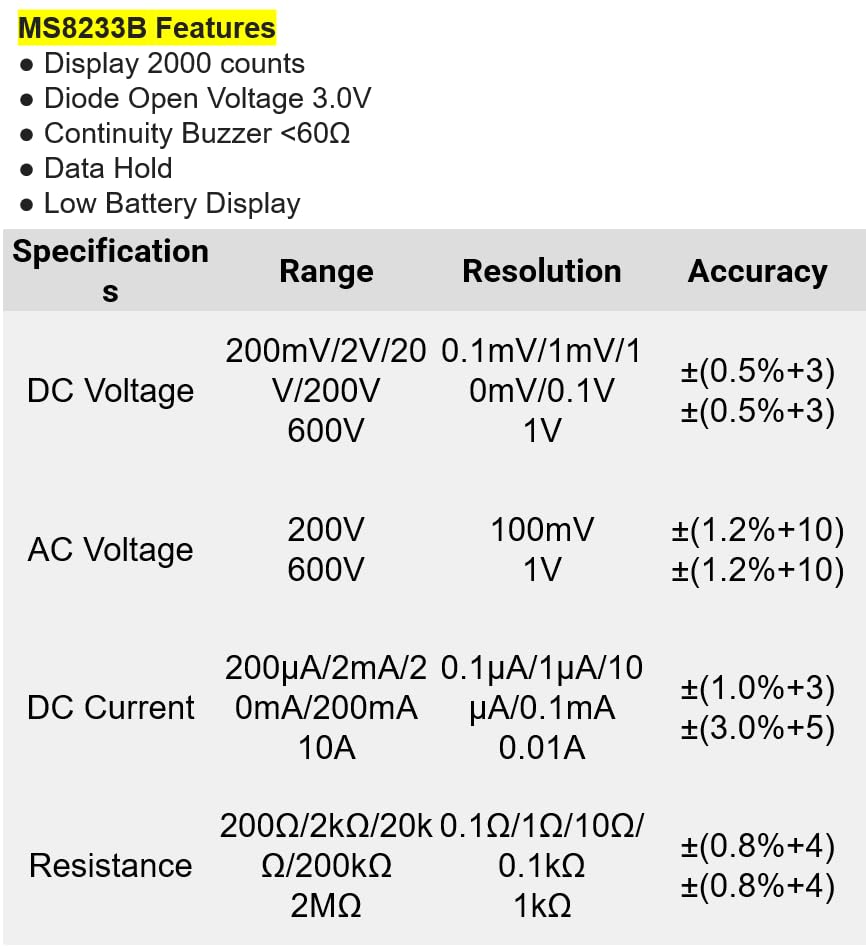
આકૃતિ 8.1: Detailed specifications for the Mastech MS8233B, including ranges, resolutions, and accuracies for various measurements.
| સ્પષ્ટીકરણ | મૂલ્ય |
|---|---|
| ડિસ્પ્લે | 2000 ગણતરીઓ |
| ડાયોડ ઓપન વોલ્યુમtage | 3.0 વી |
| સાતત્ય બુઝેર | <60Ω |
| ડેટા હોલ્ડ | હા |
| ઓછી બેટરી ડિસ્પ્લે | હા |
| ડીસી વોલ્યુમtage રેન્જ | 200mV, 2V, 20V, 200V, 600V |
| એસી વોલ્યુમtage રેન્જ | 200V, 600V |
| ડીસી વર્તમાન રેંજ | 200µA, 2mA, 20mA, 200mA, 10A |
| પ્રતિકાર શ્રેણી | 200Ω, 2kΩ, 20kΩ, 200kΩ, 2MΩ |
| સલામતી રેટિંગ | કેટ III 600 વી |
| પાવર સ્ત્રોત | 2 x LR44 Batteries (included) |
| ઉત્પાદન પરિમાણો | 20 x 15 x 25 સેમી |
| વસ્તુનું વજન | 1 કિલોગ્રામ |
| ઉત્પાદક | માસ્ટેક |
| આઇટમ મોડલ નંબર | YQ-MS8233B |
| મૂળ દેશ | તાઈવાન |

આકૃતિ 8.2: A comparison table showing features across various Mastech digital multimeter models, including the MS8233B.
9. વોરંટી અને સપોર્ટ
For warranty information, technical support, or service inquiries, please refer to the documentation provided with your purchase or contact your retailer. Keep your purchase receipt as proof of purchase for any warranty claims.


