પરિચય
This manual provides comprehensive instructions for the installation, operation, and maintenance of your Powerbass PB-ZXN20MP Deckless Media Player. Please read this manual thoroughly before using the product to ensure proper operation and to prevent damage.
ઉત્પાદન ઓવરview
The Powerbass PB-ZXN20MP is a deckless media player designed for in-vehicle audio entertainment. It features multiple connectivity options including Bluetooth, USB, and Auxiliary input, along with an integrated FM radio tuner. The unit delivers 60 watts x 4 output for clear and powerful sound.
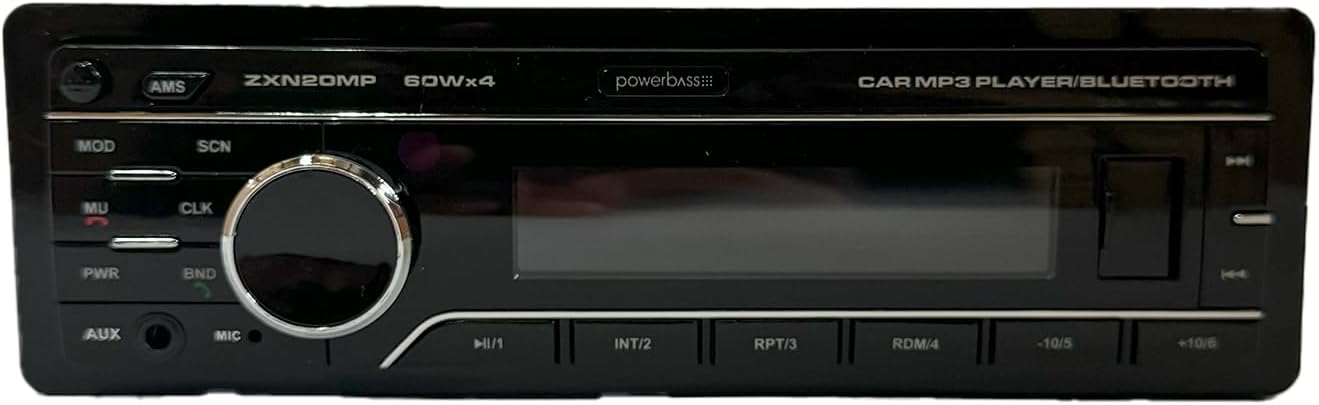
આકૃતિ 1: Front panel of the Powerbass PB-ZXN20MP media player. This image displays the main controls including the volume knob, display screen, and various function buttons for mode selection, track control, and radio tuning.
સેટઅપ અને ઇન્સ્ટોલેશન
1. વાયરિંગ જોડાણો
Before installation, ensure the vehicle's battery is disconnected to prevent electrical shorts. Refer to your vehicle's wiring diagram for specific connections.
- Yellow Wire (Constant 12V): Connect to a constant 12V power source. This maintains memory settings.
- Red Wire (Accessory 12V): Connect to a switched 12V power source (e.g., ignition switch).
- કાળો વાયર (જમીન): Connect securely to the vehicle's chassis.
- સ્પીકર વાયર: Connect to your vehicle's speakers. Ensure correct polarity (+/-) for each speaker. Typically, four pairs of wires are provided for front left, front right, rear left, and rear right speakers.
- એન્ટેના વાયર: Connect the vehicle's FM antenna to the player's antenna input.
2. એકમ માઉન્ટ કરવાનું
Install the media player into the vehicle's dashboard opening using the provided mounting sleeve and hardware. Ensure the unit is securely fastened and does not obstruct any vehicle controls.
૨.૧. પ્રારંભિક પાવર-ઓન
After all connections are made and the unit is mounted, reconnect the vehicle's battery. Press the પીડબ્લ્યુઆર button on the unit to power it on. The display should illuminate.
ઓપરેટિંગ સૂચનાઓ
1. ફ્રન્ટ પેનલ નિયંત્રણો
- PWR (Power/Mute): Press to turn the unit on/off. Short press to mute/unmute audio.
- MOD (Mode): Press to cycle through available audio sources: FM, Bluetooth, USB, AUX.
- SCN (Scan): In FM mode, press to scan and store radio stations.
- CLK (Clock): Press to display the clock. Press and hold to enter clock setting mode.
- BND (Band): In FM mode, press to switch between FM1, FM2, and FM3 bands.
- AMS (Automatic Memory Store): In FM mode, press and hold to automatically scan and store the strongest stations.
- વોલ્યુમ નોબ: Rotate to adjust the volume level. Press to access audio settings (Bass, Treble, Balance, Fader).
- |< (Previous Track/Rewind): Short press to skip to the previous track (USB/Bluetooth) or tune down radio stations (FM). Long press for fast rewind (USB).
- >> | (Next Track/Fast Forward): Short press to skip to the next track (USB/Bluetooth) or tune up radio stations (FM). Long press for fast forward (USB).
- > || (Play/Pause): Play or pause media playback (USB/Bluetooth).
- AUX ઇનપુટ: બાહ્ય ઑડિઓ ઉપકરણોને કનેક્ટ કરવા માટે 3.5mm જેક.
- યુએસબી પોર્ટ: USB સ્ટોરેજ ડિવાઇસને કનેક્ટ કરવા માટે.
- MIC: Built-in microphone for Bluetooth hands-free calling.
2. એફએમ રેડિયો ઓપરેશન
- દબાવો MOD until "FM" is displayed.
- દબાવો BND to select FM1, FM2, or FM3.
- નો ઉપયોગ કરો |< or >> | buttons to manually tune to stations.
- દબાવો SCN to automatically scan for stations.
- દબાવો અને પકડી રાખો એએમએસ to automatically store strong stations into presets.
3. બ્લૂટૂથ ઓપરેશન
- દબાવો MOD until "BT" or "Bluetooth" is displayed.
- તમારા મોબાઇલ ઉપકરણ પર, બ્લૂટૂથ સક્ષમ કરો અને ઉપલબ્ધ ઉપકરણો માટે શોધો.
- Select "PB-ZXN20MP" from the list. If prompted for a password, enter "0000".
- Once paired, you can stream audio from your device or make/receive calls.
- નો ઉપયોગ કરો > ||, |< અને >> | પ્લેબેકને નિયંત્રિત કરવા માટેના બટનો.
4. યુએસબી પ્લેબેક
- USB પોર્ટમાં USB સ્ટોરેજ ડિવાઇસ દાખલ કરો.
- The unit will automatically switch to USB mode and begin playback. If not, press MOD USB પસંદ કરવા માટે.
- નો ઉપયોગ કરો > ||, |< અને >> | પ્લેબેકને નિયંત્રિત કરવા માટેના બટનો.
5. AUX ઇનપુટ
- Connect an external audio device (e.g., MP3 player) to the 3.5mm AUX input jack using an audio cable.
- દબાવો MOD until "AUX" is displayed.
- કનેક્ટેડ બાહ્ય ઉપકરણથી પ્લેબેકને નિયંત્રિત કરો.
6. ઓડિયો સેટિંગ્સ
દબાવો વોલ્યુમ નોબ repeatedly to cycle through audio settings:
- બસ: બાસ સ્તરને સમાયોજિત કરો.
- TREB (ટ્રેબલ): ટ્રેબલ લેવલ એડજસ્ટ કરો.
- BAL (બેલેન્સ): ડાબે/જમણે સ્પીકર બેલેન્સ ગોઠવો.
- FAD (ફેડર): આગળ/પાછળના સ્પીકરના બેલેન્સને સમાયોજિત કરો.
- EQ (ઈક્વલાઈઝર): Select preset equalizer modes (e.g., POP, ROCK, CLASSIC).
ફેરવો વોલ્યુમ નોબ to change the value for the selected setting.
જાળવણી
૧. યુનિટની સફાઈ
Use a soft, dry cloth to wipe the front panel. Do not use abrasive cleaners or solvents, as they may damage the finish or display. For stubborn dirt, a slightly damp કાપડનો ઉપયોગ કરી શકાય છે, ત્યારબાદ સૂકું કપડું વાપરી શકાય છે.
2. Detachable Faceplate Care
The faceplate is detachable for security. When removing, handle it carefully to avoid scratching the display or damaging the connectors. Store the faceplate in a protective case or bag when not in use.
મુશ્કેલીનિવારણ
If you encounter issues with your media player, refer to the following table for common problems and solutions.
| સમસ્યા | સંભવિત કારણ | ઉકેલ |
|---|---|---|
| કોઈ શક્તિ નથી | Incorrect wiring; Blown fuse; Vehicle battery disconnected. | Check power and ground connections; Replace fuse if necessary; Reconnect battery. |
| કોઈ અવાજ નથી | Volume too low; Mute function active; Incorrect speaker wiring; Faulty speakers. | Increase volume; Press PWR button to unmute; Check speaker connections; Test with known good speakers. |
| બ્લૂટૂથ કનેક્ટ થઈ રહ્યું નથી | ડિવાઇસ પર બ્લૂટૂથ ચાલુ નથી; યુનિટ પેરિંગ મોડમાં નથી; હસ્તક્ષેપ. | Ensure Bluetooth is on and discoverable on your device; Select "BT" mode on the unit; Move closer to the unit; Restart both devices. |
| USB ઉપકરણ ઓળખાયું નથી | અસમર્થિત file format; USB device corrupted; USB device capacity too large. | ખાતરી કરો files are in supported formats (e.g., MP3); Try a different USB device; Format USB device (FAT32); Use a smaller capacity USB. |
| નબળું એફએમ સ્વાગત | એન્ટેના જોડાયેલ નથી; નબળું સિગ્નલ; દખલગીરી. | Check antenna connection; Try tuning to a stronger station; Avoid areas with high interference. |
વિશિષ્ટતાઓ
- મોડલ: PB-ZXN20MP
- પાવર આઉટપુટ: 60 વોટ્સ x 4 ચેનલો
- કનેક્ટિવિટી: બ્લૂટૂથ, USB, સહાયક ઇનપુટ
- રેડિયો ટ્યુનર: FM (18 Presets)
- પ્રદર્શન: ડિજિટલ એલસીડી
- વિશેષતાઓ: Detachable Faceplate, Remote Control, Built-in Microphone
- Supported Audio Formats (USB): MP3
- પાવર સપ્લાય: DC 12V (vehicle battery)
વોરંટી અને આધાર
વોરંટી માહિતી
This product is covered by a limited warranty. Please refer to the warranty card included with your purchase for specific terms, conditions, and duration. Keep your proof of purchase for warranty claims.
ગ્રાહક આધાર
For technical assistance, troubleshooting beyond this manual, or warranty inquiries, please contact the retailer where you purchased the product or refer to the contact information provided in your product packaging.


