1. પરિચય
ખરીદી બદલ આભારasing the SALA LM-003 DJ Laser Light Projector. This device is designed to create dynamic and vibrant laser light shows for various events and settings. To ensure safe and optimal performance, please read this instruction manual thoroughly before operating the device and retain it for future reference.
1.1 સલામતી ચેતવણીઓ
- લેસર રેડિયેશન: Avoid direct eye exposure to the laser beam. This product uses Class 3B lasers, which can cause eye injury if viewસીધા એડ.
- હાઉસિંગ ખોલશો નહીં. અંદર કોઈ ઉપયોગ કરી શકાય તેવા ભાગો નથી. બધી સર્વિસિંગ લાયક કર્મચારીઓને સોંપો.
- Ensure the device is placed on a stable surface or securely mounted to prevent accidental falls.
- ઉપકરણને પાણી, ભેજ અને અતિશય તાપમાનથી દૂર રાખો.
- ફક્ત પ્રદાન કરેલ પાવર એડેપ્ટરનો ઉપયોગ કરો.
2. પેકેજ સામગ્રી
બધી વસ્તુઓ હાજર છે અને સારી સ્થિતિમાં છે તેની ખાતરી કરવા માટે કૃપા કરીને પેકેજ તપાસો:
- SALA LM-003 DJ Laser Light Projector
- રીમોટ કંટ્રોલ
- પાવર એડેપ્ટર
- વપરાશકર્તા માર્ગદર્શિકા (આ દસ્તાવેજ)
3. ઉત્પાદન ઓવરview
The SALA LM-003 is a compact and versatile laser light projector featuring RGB full-color beams, 3D animation capabilities, DMX512 control, and sound activation. It is designed for ease of use with both a remote control and DMX connectivity.
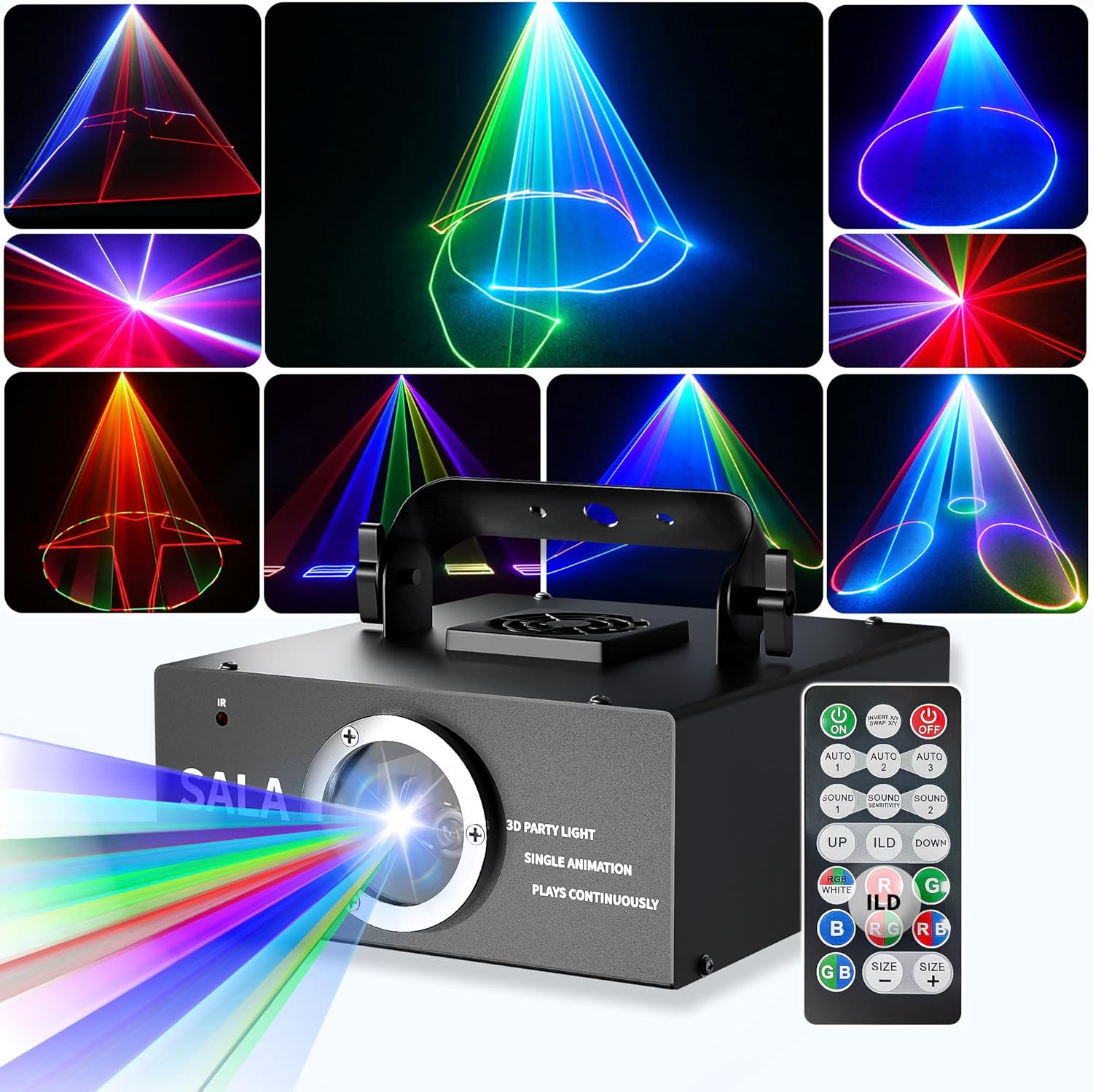
The SALA LM-003 DJ Laser Light Projector, showcasing its compact design, included remote control, and a variety of vibrant laser patterns it can produce.
3.1 ઉપકરણ લેઆઉટ

વિગતવાર view of the SALA LM-003 projector, displaying its physical dimensions and the layout of its control panel, including the DMX-IN/OUT ports, power switch, and display screen.
ફ્રન્ટ પેનલ:
- લેસર બાકોરું: Where the laser beams are emitted.
- રીમોટ રીસીવર: Sensor for the remote control signals.
રીઅર પેનલ:
- પાવર ઇનપુટ: Connects to the AC adapter.
- ચાલુ/બંધ સ્વિચ: ઉપકરણને ચાલુ અથવા બંધ કરે છે.
- નિયંત્રણ પેનલ: Features a digital display, MENU, UP, DOWN, and ENTER buttons for direct control.
- DMX-IN: For connecting to a DMX controller.
- DMX-આઉટ: For daisy-chaining multiple DMX devices.
3.2 રીમોટ કંટ્રોલ

An illustration showing the rear control panel of the SALA LM-003, including power input and DMX ports, alongside a diagram detailing the functions of each button on the remote control.
The remote control provides convenient access to various functions. It requires two AAA batteries (not included).
4. સેટઅપ
4.1 અનપેકિંગ અને પ્લેસમેન્ટ
- Carefully remove the laser light projector and all accessories from the packaging.
- Place the projector on a stable, flat surface or mount it securely using the integrated bracket. Ensure there is adequate ventilation around the unit.
- Position the projector so that the laser beams are directed away from people's eyes and reflective surfaces.
4.2 પાવર કનેક્શન
- Connect the provided power adapter to the Power Input port on the rear of the projector.
- Plug the power adapter into a suitable electrical outlet (AC 100-240V, 50/60Hz).
૧.૫ રિમોટ કંટ્રોલ બેટરી ઇન્સ્ટોલેશન
- રિમોટ કંટ્રોલની પાછળનો બેટરીનો ડબ્બો ખોલો.
- યોગ્ય ધ્રુવીયતા (+/-) સુનિશ્ચિત કરીને, બે AAA બેટરી દાખલ કરો.
- બેટરી કમ્પાર્ટમેન્ટ બંધ કરો.
5. ઓપરેશન
5.1 પાવર ચાલુ/બંધ
Flip the ON/OFF switch on the rear panel to the 'ON' position to power on the device. Flip it to 'OFF' to power off.
5.2 રીમોટ કંટ્રોલનો ઉપયોગ કરીને
Point the remote control towards the front of the laser light projector (where the remote receiver is located) for optimal signal reception.
- ચાલુ/બંધ: યુનિટને ચાલુ અથવા બંધ કરે છે.
- AUTO 1/2/3: Activates automatic playback modes with different animation styles.
- SOUND 1/2/3/4: Activates sound-activated modes, synchronizing patterns with music. Different modes may offer varying sensitivities or effects.
- ILD (Loop Playback): Press this button to loop the currently displayed animation. Press again to disable.
- ઉપર નીચે: Navigates through available patterns or animations.
- Color Buttons (R, G, B, RG, RB, GB, RGB, WHITE): Selects specific laser colors or combinations.
- SIZE +/-: Adjusts the size of the projected laser pattern (zoom in/out).

વિગતવાર view of the remote control for the SALA LM-003, illustrating its buttons for pattern selection, color control, sound activation, and the unique 'ILD' feature for looping animations. The remote requires two AAA batteries.
૬.૫ ડીએમએક્સ નિયંત્રણ
The LM-003 supports 32-channel DMX control for precise adjustments in movement, rotation, zoom, and speed. This feature is ideal for professional lighting setups.
- Connect a DMX cable from your DMX controller's output to the DMX-IN port on the LM-003.
- If daisy-chaining multiple DMX devices, connect from the LM-003's DMX-OUT to the next device's DMX-IN.
- Refer to your DMX controller's manual for specific programming instructions. The LM-003's DMX channel assignments can typically be found in the device's internal menu or a separate DMX chart (not provided in this general manual).

The SALA LM-003 laser light projector integrated into a DMX control system, demonstrating its capability for professional stage lighting and complex pattern generation in a dynamic environment.
૬.૨ ધ્વનિ-સક્રિયકૃત સ્થિતિ
In sound-activated mode, the laser patterns, colors, and beam effects synchronize with the rhythm of your music. This mode is most effective in environments with high decibel levels.
- Press one of the 'SOUND' buttons (SOUND 1-4) on the remote control to activate this mode.
- The projector will respond to ambient sound, creating dynamic visual effects.
5.5 Zoom In & Out Function
The 'SIZE +/-' buttons on the remote control allow you to instantly expand or shrink your laser patterns without repositioning the projector. This helps to perfectly fill any space.

This image illustrates the zoom in and out function of the SALA LM-003, showing how laser patterns can be adjusted in size to fit different spaces, from a focused beam to a wide projection.
૪.૨ શ્રેષ્ઠ પરિણામો માટે ટિપ્સ
For an enhanced visual experience, especially to amplify the visibility and intensity of the laser beams, use the projector in a smoky environment. Smoke or haze machines can make the laser beams appear more defined and volumetric.

A visual representation of the wide array of 3D animation and beam effects the SALA LM-003 can create, including figures, geometric shapes, and dynamic light tunnels.
6. જાળવણી
6.1 સફાઈ
- સફાઈ કરતા પહેલા ઉપકરણ બંધ અને અનપ્લગ થયેલ છે તેની ખાતરી કરો.
- Use a soft, dry cloth to wipe the exterior casing.
- For the laser aperture lens, use a soft, lint-free cloth specifically designed for optical surfaces. Do not use abrasive cleaners or solvents.
6.2 સંગ્રહ
- Store the projector in a cool, dry place, away from direct sunlight and extreme temperatures.
- If storing for an extended period, remove batteries from the remote control to prevent leakage.
7. મુશ્કેલીનિવારણ
| સમસ્યા | સંભવિત કારણ | ઉકેલ |
|---|---|---|
| કોઈ શક્તિ નથી | Power adapter not connected; Power outlet faulty; Device switch off. | Ensure power adapter is securely connected. Try a different power outlet. Flip the ON/OFF switch to 'ON'. |
| લેસર આઉટપુટ નથી | Device not powered on; Laser aperture blocked; Internal fault. | Check power connection. Ensure nothing is obstructing the laser aperture. If problem persists, contact support. |
| રીમોટ કંટ્રોલ કામ કરતું નથી | Batteries low or incorrectly inserted; Remote not pointed at receiver; Obstruction between remote and receiver. | Replace batteries and check polarity. Point remote directly at the front receiver. Remove any obstructions. |
| પેટર્ન બદલાતી નથી | Incorrect mode selected; DMX control active. | Ensure you are in an AUTO or SOUND mode. If DMX is connected, the DMX controller will override remote functions. Disconnect DMX or use DMX to change patterns. |
8. સ્પષ્ટીકરણો
| લક્ષણ | વિગત |
|---|---|
| બ્રાન્ડ | સાલા |
| મોડલ નંબર | LM-003 |
| રંગ | કાળો |
| સામગ્રી | એલ્યુમિનિયમ |
| આકાર | લંબચોરસ |
| પ્રકાશ સ્ત્રોત પ્રકાર | લાઇટ એમિટિંગ ડાયોડ |
| પાવર સ્ત્રોત | AC (alternating current) adapter |
| ભાગtage | 240 વોલ્ટ |
| વસ્તુનું વજન | 2.5 પાઉન્ડ |
| ઉત્પાદન પરિમાણો | ૧૧"લિ x ૪"પગ x ૧૩"કલો |
| બીમ એંગલ | 2 ડિગ્રી |
| માઉન્ટિંગ પ્રકાર | ટેબલ માઉન્ટ |
| બેટરી જરૂરી છે | No (for main unit) |
| સમાવાયેલ ઘટકો | બલ્બ શામેલ છે |
9. વોરંટી અને સપોર્ટ
For warranty information or technical support, please refer to the documentation provided at the time of purchase or contact SALA customer service through the retailer where the product was acquired. Please have your model number (LM-003) and purchase date ready when contacting support.


