સ્વાગત છે
Thank you for choosing the BYTECH BICONIC True Wireless Earbuds. This manual provides essential information on how to set up, operate, maintain, and troubleshoot your new earbuds. Please read this manual thoroughly before use to ensure optimal performance and longevity of your device.
મહત્વપૂર્ણ સલામતી સૂચનાઓ
- ઇયરબડ્સ અથવા ચાર્જિંગ કેસને અતિશય તાપમાન, ભેજ અથવા પ્રવાહીના સંપર્કમાં ન લાવો.
- ઉપકરણને પડવાનું, અથડાવાનું અથવા ડિસએસેમ્બલ કરવાનું ટાળો.
- Do not use abrasive cleaners or harsh chemicals to clean the earbuds or case.
- શ્રવણશક્તિને નુકસાન થતું અટકાવવા માટે મધ્યમ અવાજના સ્તરે સાંભળો. લાંબા સમય સુધી મોટા અવાજોના સંપર્કમાં રહેવાથી શ્રવણશક્તિમાં કાયમી ઘટાડો થઈ શકે છે.
- બાળકો અને પાલતુ પ્રાણીઓની પહોંચથી દૂર રાખો.
- Dispose of the device responsibly according to local regulations. Do not dispose of with household waste.
શું સમાવાયેલ છે
બધી વસ્તુઓ હાજર છે તેની ખાતરી કરવા માટે કૃપા કરીને પેકેજની સામગ્રી તપાસો:
- BYTECH BICONIC True Wireless Earbuds (Left and Right)
- ચાર્જિંગ કેસ
- ચાર્જિંગ કેબલ
- વપરાશકર્તા માર્ગદર્શિકા
ઉત્પાદન ઓવરview
Familiarize yourself with the components of your BYTECH BICONIC True Wireless Earbuds.

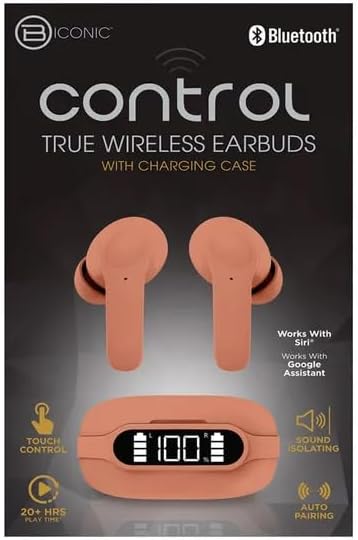
શરૂઆત કરવી
ઇયરબડ્સ અને કેસ ચાર્જ કરી રહ્યાં છીએ
The BYTECH BICONIC earbuds come with a rechargeable battery in both the earbuds and the charging case. Ensure both are fully charged before first use.
- Place the earbuds into the charging case, ensuring they are correctly seated in their respective slots (L for left, R for right).
- Connect the provided charging cable to the charging port on the case and the other end to a USB power source (e.g., computer USB port, wall adapter).
- The digital display on the charging case will show the battery level. Allow sufficient time for a full charge.
- એકવાર સંપૂર્ણ ચાર્જ થઈ ગયા પછી, ચાર્જિંગ કેબલને ડિસ્કનેક્ટ કરો.
બ્લૂટૂથ જોડી
Follow these steps to pair your earbuds with your Bluetooth-enabled device:
- ખાતરી કરો કે ઇયરબડ્સ ચાર્જ થયેલા છે અને ચાર્જિંગ કેસની અંદર છે.
- Open the charging case. The earbuds will automatically enter pairing mode, and an indicator light on the earbuds will flash.
- તમારા ઉપકરણ (સ્માર્ટફોન, ટેબ્લેટ, વગેરે) પર, બ્લૂટૂથ સેટિંગ્સ પર જાઓ અને બ્લૂટૂથ ચાલુ કરો.
- માટે શોધો available devices. You should see "BYTECH BICONIC" or a similar name appear in the list.
- Select "BYTECH BICONIC" to connect. Once connected, a voice prompt will confirm the successful pairing, and the indicator lights on the earbuds will stop flashing.
- The earbuds will automatically reconnect to the last paired device when taken out of the case, provided Bluetooth is enabled on the device.
ઓપરેટિંગ સૂચનાઓ
નિયંત્રણોને ટચ કરો
The BYTECH BICONIC earbuds feature intuitive touch controls for easy management of your audio and calls.
| ક્રિયા | કાર્ય |
|---|---|
| સિંગલ ટેપ (ડાબે/જમણા ઇયરબડ) | સંગીત ચલાવો/થોભાવો, ક Answerલનો જવાબ આપો/સમાપ્ત કરો |
| બે વાર ટેપ કરો (જમણું ઇયરબડ) | નેક્સ્ટ ટ્રૅક |
| બે વાર ટેપ કરો (ડાબું ઇયરબડ) | પાછલો ટ્રેક |
| ટ્રિપલ ટેપ (ડાબે/જમણે ઇયરબડ) | Activate Voice Assistant (Siri/Google Assistant) |
| લાંબો સમય દબાવો (ડાબો/જમણો ઇયરબડ) | કૉલ નકારો |
પાવરિંગ ચાલુ અને બંધ
- પાવર ચાલુ: જ્યારે ચાર્જિંગ કેસમાંથી કાઢી નાખવામાં આવે ત્યારે ઇયરબડ ઑટોમૅટિક રીતે ચાલુ થશે.
- પાવર બંધ: ઇયરબડ્સને પાછા ચાર્જિંગ કેસમાં મૂકો અને ઢાંકણ બંધ કરો. તે આપમેળે બંધ થઈ જશે અને ચાર્જ થવાનું શરૂ કરશે.
જાળવણી અને સંભાળ
Proper care will extend the life of your BYTECH BICONIC True Wireless Earbuds.
- સફાઈ: Use a soft, dry, lint-free cloth to clean the earbuds and charging case. Do not use liquids or aerosol cleaners.
- સંગ્રહ: જ્યારે ઉપયોગમાં ન હોય, ત્યારે ઇયરબડ્સને સુરક્ષિત રાખવા અને ચાર્જ રાખવા માટે હંમેશા તેમના ચાર્જિંગ કેસમાં રાખો.
- આત્યંતિક શરતો ટાળો: Do not expose the device to extreme heat, cold, or direct sunlight.
- પાણી પ્રતિકાર: These earbuds are not waterproof. Avoid contact with water or excessive moisture.
મુશ્કેલીનિવારણ
If you encounter any issues with your earbuds, refer to the following common solutions:
| સમસ્યા | ઉકેલ |
|---|---|
| ઇયરબડ્સ જોડી રહ્યાં નથી | ખાતરી કરો કે ઇયરબડ ચાર્જ થયેલ છે. તમારા ડિવાઇસ પર બ્લૂટૂથ બંધ કરીને ચાલુ કરો. ડિવાઇસને બ્લૂટૂથ સેટિંગ્સમાં ભૂલી જાઓ અને ફરીથી જોડી બનાવો. |
| માત્ર એક ઇયરબડ કામ કરે છે | બંને ઇયરબડને પાછા ચાર્જિંગ કેસમાં મૂકો, ઢાંકણ બંધ કરો, થોડીવાર રાહ જુઓ, પછી તેમને ફરીથી બહાર કાઢો. ખાતરી કરો કે બંને ચાર્જ થઈ ગયા છે. |
| કોઈ અવાજ નથી | Check volume levels on both your device and the earbuds. Ensure earbuds are properly connected. Try playing different audio. |
| ચાર્જિંગ કેસ ચાર્જિંગ નથી | Ensure the charging cable is securely connected to both the case and the power source. Try a different USB port or power adapter. |
ટેકનિકલ વિશિષ્ટતાઓ
Detailed specifications for your BYTECH BICONIC True Wireless Earbuds:
| લક્ષણ | વિગત |
|---|---|
| મોડલ નંબર | BC-AU-BE-144-TN |
| કનેક્ટિવિટી ટેકનોલોજી | વાયરલેસ (બ્લુટુથ) |
| ફોર્મ ફેક્ટર | In-Ear (Intraurales) |
| રંગ | કાફે |
| ખાસ લક્ષણો | Rechargeable Battery, Touch Control, Sound Isolating, Auto Pairing |
| સમાવાયેલ ઘટકો | કેબલ |
| Estimated Play Time | 20+ Hours (with charging case) |
વોરંટી માહિતી અને ગ્રાહક સપોર્ટ
BYTECH products are designed and manufactured to the highest quality standards. For information regarding warranty coverage, please refer to the warranty card included with your purchase or visit the official BYTECH webસાઇટ
If you require further assistance or have questions not covered in this manual, please contact BYTECH customer support through their official channels. Please have your model number (BC-AU-BE-144-TN) and purchase details ready when contacting support.


