1. પરિચય
This manual provides essential information for the safe and efficient operation of your LEESKY 4000 Watt Pure Sine Wave Inverter. This device converts 12V DC battery power into 110V/120V AC household power, suitable for a wide range of applications including RVs, boats, off-grid solar systems, and emergency power backup. Please read this manual thoroughly before installation and use.
2. સલામતી માહિતી
Adhering to safety guidelines is crucial when operating power inverters. Failure to do so may result in personal injury or damage to equipment.
- વેન્ટિલેશન: Ensure the inverter is installed in a well-ventilated area to prevent overheating. Do not block ventilation openings.
- કેબલ કદ: Use appropriate gauge cables (4 AWG or thicker for this model) to connect the inverter to the battery. Undersized cables can lead to overheating and power loss.
- ધ્રુવીયતા: Always connect the positive (+) terminal of the battery to the positive (+) terminal of the inverter, and the negative (-) terminal of the battery to the negative (-) terminal of the inverter. Reverse polarity can cause severe damage.
- ગ્રાઉન્ડિંગ: Properly ground the inverter chassis to a reliable earth ground or vehicle chassis.
- ઓવરલોડિંગ: Do not exceed the inverter's continuous power rating of 4000W. While it supports a 7000W surge for 2 seconds, sustained overload can trigger protection mechanisms or damage the unit.
- પાણી અને ભેજ: Keep the inverter away from water, rain, snow, or excessive moisture.
- બાળકો: Keep the inverter out of reach of children.
- પ્રમાણિત ઘટકો: This inverter features ETL-listed transformers, UL458-certified fuses, and FCC-approved anti-interference technology for enhanced safety.

Image: The inverter is designed with 8 advanced safety protections including reverse polarity, high temperature, overload, high input voltage, low input voltage, short circuit, output low voltage, and isolated input/output design.
3. ઉત્પાદન ઓવરview
The LEESKY HS-4000KAR is a robust 4000W pure sine wave inverter designed for reliable power conversion. It delivers clean, stable AC power suitable for sensitive electronics.
મુખ્ય લક્ષણો:
- હાઇ પાવર આઉટપુટ: Provides 4000W continuous power and a 7000W surge peak power for up to 2 seconds, capable of handling inductive loads like air conditioners and power tools.
- શુદ્ધ સાઇન વેવ આઉટપુટ: Ensures stable and clean power, ideal for sensitive electronics, medical equipment, and appliances.
- એડજસ્ટેબલ ઇનપુટ વોલ્યુમtage: Features customizable input voltage settings to optimize compatibility with various battery types, including lithium batteries, and to protect battery health.
- એલસીડી ડિસ્પ્લે: A clear LCD screen provides real-time information on battery status, input/output voltage, load watts, and protection codes. It includes an automatic screen rest function to save energy.
- રીમોટ કંટ્રોલ: A 30ft RJ10 remote controller allows for convenient remote on/off operation and battery monitoring.
- યુએસબી ચાર્જિંગ પોર્ટ્સ: Equipped with PD36W USB-C and 3.6A USB-A ports for charging smartphones, tablets, and other mobile devices.
- બહુવિધ આઉટપુટ વિકલ્પો: Includes 4 AC outlets and a 40A hardwire terminal for connecting high-power devices directly.
- ઉન્નત સુરક્ષા સુરક્ષા: Incorporates 8 advanced safety features: short circuit, input over/under-voltage, overload, over-temperature, reverse polarity, and low-output voltagઇ રક્ષણ.
- ટકાઉ બાંધકામ: Housed in a robust aluminum alloy case for excellent heat dissipation and impact resistance.

Image: The LEESKY 4000W Pure Sine Wave Inverter shown with its LCD display, battery cables, and remote control.

Image: The inverter's capability to handle high-power devices with its 7000W surge peak power is illustrated with examples like a chainsaw and an air conditioner.
બૉક્સમાં શું છે:
- 1 x LEESKY 4000W Pure Sine Wave Inverter
- 1 x 30ft Remote Controller
- ૧ x વપરાશકર્તા માર્ગદર્શિકા (આ દસ્તાવેજ)
- 4 pairs of Battery Cables

Image: A visual representation of the package contents, including the inverter, remote control, and various cables.
4. સેટઅપ અને ઇન્સ્ટોલેશન
Proper installation is critical for the safe and efficient operation of your inverter.
4.1 Choosing an Installation Location:
- Install the inverter in a dry, cool, and well-ventilated area.
- Avoid direct sunlight, heat sources, and moisture.
- Ensure sufficient clearance around the inverter for airflow.
4.2 Battery Connection:
- કોઈપણ કનેક્શન બનાવતા પહેલા ખાતરી કરો કે ઇન્વર્ટર બંધ છે.
- Connect the included battery cables to the inverter's DC input terminals. Ensure correct polarity: red cable to positive (+), black cable to negative (-).
- Connect the other ends of the battery cables to your 12V battery. Again, ensure correct polarity. Use 4 AWG or thicker cables for optimal performance and safety.
- Secure all connections tightly to prevent loose contacts, which can cause overheating.
- Connect the inverter's grounding terminal to a reliable earth ground or vehicle chassis.

Image: The inverter's compatibility with various battery types (GEL, SLA, LI, AGM, LifePo4, USER, FLD) is highlighted, along with a table detailing adjustable low voltage shutdown settings for different battery chemistries.
4.3 Remote Control Connection:
Plug the RJ10 cable from the remote controller into the designated RJ10 port on the inverter. The remote allows for convenient power control and monitoring from a distance.
4.4 AC Output Connections:
- Plug your AC appliances into the 4 standard AC outlets on the inverter.
- For high-power devices requiring a direct connection, use the 40A hardwire terminal. Consult a qualified electrician for hardwire installations.
- Utilize the PD36W USB-C and 3.6A USB-A ports for charging compatible USB devices.
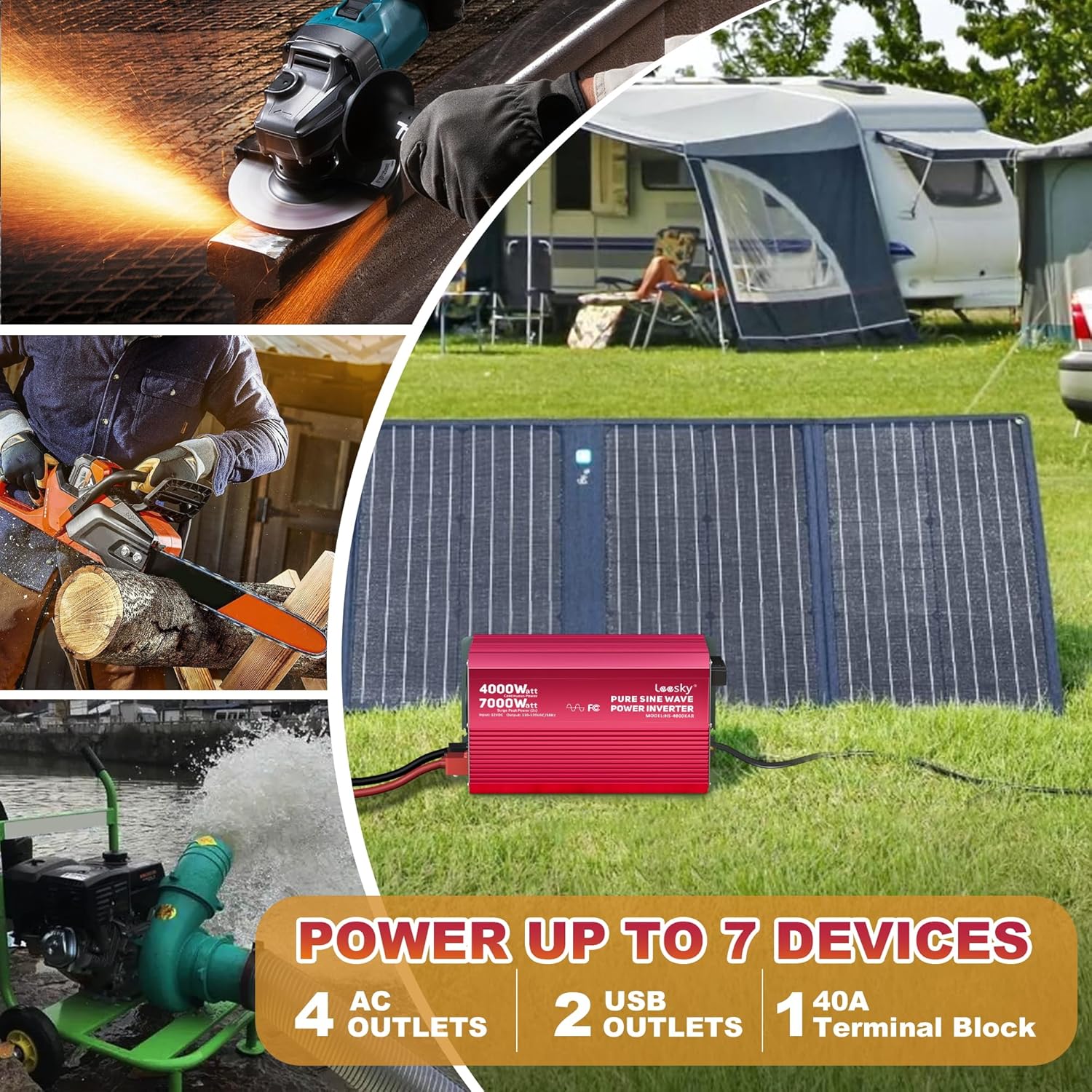
Image: The inverter is shown in an outdoor setting, connected to a solar panel, demonstrating its ability to power up to 7 devices simultaneously through its 4 AC outlets, 2 USB outlets, and 1 40A terminal block.
5. ઓપરેટિંગ સૂચનાઓ
5.1 પાવર ચાલુ/બંધ:
Press the power button on the inverter or the remote control to turn the unit on or off. The LCD screen will illuminate upon startup.
5.2 LCD Display Functions:
The LCD screen provides real-time operational data:
- બેટરી સ્થિતિ: Indicates the current charge level of the connected battery.
- ઇનપુટ વોલ્યુમtage: ડીસી વોલ્યુમ દર્શાવે છેtage બેટરીમાંથી.
- આઉટપુટ વોલ્યુમtage: Shows the AC output voltage (110V/120V).
- Load Watts: Indicates the current power consumption of connected AC devices.
- સંરક્ષણ કોડ્સ: Displays specific codes if a fault or protection event occurs. Refer to the troubleshooting section for code interpretations.
The screen features an automatic rest function, dimming or turning off after one minute of inactivity to conserve energy and prolong screen life.
5.3 Adjustable Input Voltage:
The inverter allows for customization of the low voltage shutdown threshold, particularly useful for different battery types (e.g., Lithium, Lead-Acid). Refer to the detailed instructions in the included user manual for specific steps on how to adjust these settings to match your battery system's requirements.
5.4 Using AC Outlets and USB Ports:
Once the inverter is on, plug your devices into the available AC outlets or USB ports. Ensure the total power draw does not exceed the inverter's continuous rating.
6. જાળવણી
નિયમિત જાળવણી તમારા ઇન્વર્ટરના લાંબા સમય સુધી ઉપયોગ અને શ્રેષ્ઠ કામગીરીને સુનિશ્ચિત કરવામાં મદદ કરે છે.
- સફાઈ: Periodically clean the exterior of the inverter with a dry, soft cloth. Ensure ventilation openings are free from dust and debris.
- જોડાણો: Regularly check all electrical connections (battery cables, AC outlets, grounding) to ensure they are secure and free from corrosion.
- સંગ્રહ: જો ઇન્વર્ટરને લાંબા સમય સુધી સ્ટોર કરી રહ્યા હોવ, તો તેને બેટરીથી ડિસ્કનેક્ટ કરો અને તેને ઠંડી, સૂકી જગ્યાએ સ્ટોર કરો.
7. મુશ્કેલીનિવારણ
This section addresses common issues you might encounter with your inverter.
| સમસ્યા | સંભવિત કારણ | ઉકેલ |
|---|---|---|
| Inverter does not turn on | Loose battery connections; Low battery voltage; Blown fuse | Check and tighten battery connections; Charge or replace battery; Check and replace internal fuses (consult support if unsure). |
| AC આઉટપુટ નથી | Overload protection activated; Over-temperature protection activated; Low input voltage protection; Short circuit on output | Reduce load; Allow inverter to cool down; Charge battery; Disconnect all AC loads and restart. |
| LCD displays a protection code | Specific fault detected (e.g., OVP for over-voltage, LVP for low-voltage, OTP for over-temperature, OLP for overload) | Refer to the detailed code list in the full user manual. Address the underlying cause (e.g., reduce load, check battery voltage, ensure ventilation). |
| રીમોટ કંટ્રોલ કામ કરતું નથી | Loose RJ10 cable connection; Damaged cable | Check and secure the RJ10 cable connection; Replace the RJ10 cable if damaged. |
If you encounter issues not covered here or require further assistance, please contact LEESKY customer support.
8. સ્પષ્ટીકરણો
| લક્ષણ | સ્પષ્ટીકરણ |
|---|---|
| મોડેલનું નામ | HS-4000KAR |
| સતત વાટtage | 4000 વોટ |
| Surge Peak Power | 7000 watts (for 2 seconds) |
| ઇનપુટ વોલ્યુમtage | 12V ડીસી |
| આઉટપુટ વોલ્યુમtage | 110V - 120V AC |
| આઉટપુટ વેવફોર્મ | શુદ્ધ સાઇન વેવ |
| ઉત્પાદન પરિમાણો | 14.3 x 8 x 6.8 ઇંચ |
| વસ્તુનું વજન | 15.4 પાઉન્ડ |
| પાવર સ્ત્રોત | Solar and Battery Powered |
| ભલામણ કરેલ ઉપયોગો | Home, Car, Power Outage, Vehicles, Truck, Outdoors, Boat, RV, Trip, Off-Grid Solar |
| ઉત્પાદક | LEESKY |
9. વોરંટી અને સપોર્ટ
Your LEESKY 4000 Watt Pure Sine Wave Inverter is backed by a comprehensive 18-મહિનાની વોરંટી, ઉત્પાદનની ગુણવત્તા અને કામગીરી અંગે માનસિક શાંતિ સુનિશ્ચિત કરવી.
The product is also covered by AIG product liability insurance, providing an additional layer of protection.
For any questions, technical assistance, or warranty claims, LEESKY offers 24/7 real-person customer support. Please refer to the contact information provided with your product or visit the official LEESKY webઆધાર વિગતો માટે સાઇટ.


