1. પરિચય
ખરીદી બદલ આભારasing the LONPOO Portable CD Player Boombox, model ZXG-608B. This device offers versatile audio playback options including CD, Bluetooth 5.3, FM radio, USB, and AUX input, along with a microphone port for added functionality. Its compact design and rechargeable battery make it suitable for various environments.
This manual provides essential information for safe operation, setup, and maintenance of your boombox. Please read it thoroughly before use and retain it for future reference.

Image 1.1: The LONPOO ZXG-608B Portable CD Boombox highlighting its multiple playback options: Bluetooth, CD, FM Radio, USB, MIC Port, and AUX-IN.
2. સલામતી માહિતી
- પાવર સ્ત્રોત: Use only the provided AC power cable or the internal rechargeable battery. Ensure the voltage ઉપકરણની જરૂરિયાતો સાથે મેળ ખાય છે.
- પાણી અને ભેજ: Do not expose the device to rain, moisture, or immerse it in water. Avoid placing objects filled with liquids, such as vases, on the device.
- ઉષ્મા: Keep the device away from heat sources such as radiators, heat registers, stoves, or other heat-producing appliances.
- વેન્ટિલેશન: યોગ્ય વેન્ટિલેશનની ખાતરી કરો. કોઈપણ વેન્ટિલેશન છિદ્રોને અવરોધિત કરશો નહીં.
- સફાઈ: Unplug the device from the power outlet before cleaning. Use a dry, soft cloth. Do not use liquid cleaners or aerosol cleaners.
- સર્વિસિંગ: આ ઉત્પાદનની જાતે સેવા કરવાનો પ્રયાસ કરશો નહીં. લાયક સેવા કર્મચારીઓને તમામ સેવાઓનો સંદર્ભ આપો.
- સીડી હેન્ડલિંગ: Handle CDs by their edges. Avoid touching the data side. Keep CDs clean and free from scratches.
- બેટરી સલામતી: Do not disassemble, crush, or expose the built-in battery to extreme temperatures. Dispose of batteries according to local regulations.
3. પેકેજ સામગ્રી
ખાતરી કરો કે બધી વસ્તુઓ પેકેજમાં હાજર છે:
- 1x LONPOO Portable CD Player Boombox (Model ZXG-608B)
- 1x AC પાવર કેબલ
- 1x Remote Control (બેટરીઓ શામેલ નથી)
- 1x User Manual (This document)

Image 3.1: Contents of the package, including the boombox, remote control, AC power cable, and user manual. The image also shows the product dimensions: 20 cm (7.8 inches) height, 23 cm (9 inches) width, and 15 cm (5.9 inches) depth, with a weight of 4.4 lbs.
4. ઉત્પાદન ઓવરview
Familiarize yourself with the main components and controls of your boombox.
4.1 ફ્રન્ટ પેનલ નિયંત્રણો અને પ્રદર્શન

છબી 4.1: આગળ view of the boombox and its remote control. The front panel features a large LCD display, STANDBY button, MODE button, previous/next track buttons, a large volume knob, EQ button, and USB port.
- એલસીડી ડિસ્પ્લે: Shows track number, time, mode, and other status indicators.
- સ્ટેન્ડબાય બટન: યુનિટને ચાલુ અથવા બંધ કરે છે.
- મોડ બટન: Switches between CD, Bluetooth, FM Radio, USB, and AUX modes.
- Previous/Next Buttons (|<>|): ટ્રેક/સ્ટેશન નેવિગેટ કરે છે.
- Play/Pause/Scan Button (▶/SCAN): મીડિયા ચલાવે છે/થોભાવે છે અથવા FM રેડિયો સ્ટેશન સ્કેન કરે છે.
- STOP બટન (■): પ્લેબેક બંધ કરે છે.
- વોલ્યુમ નોબ: ઑડિઓ આઉટપુટ સ્તરને સમાયોજિત કરે છે.
- EQ બટન: Cycles through equalizer presets (Flat, Rock, Pop, Classic, Jazz).
- યુએસબી પોર્ટ: For playing digital audio fileયુએસબી ફ્લેશ ડ્રાઇવમાંથી.
- હેડફોન જેક: ખાનગી સાંભળવા માટે.
4.2 રીઅર પેનલ કનેક્શન્સ
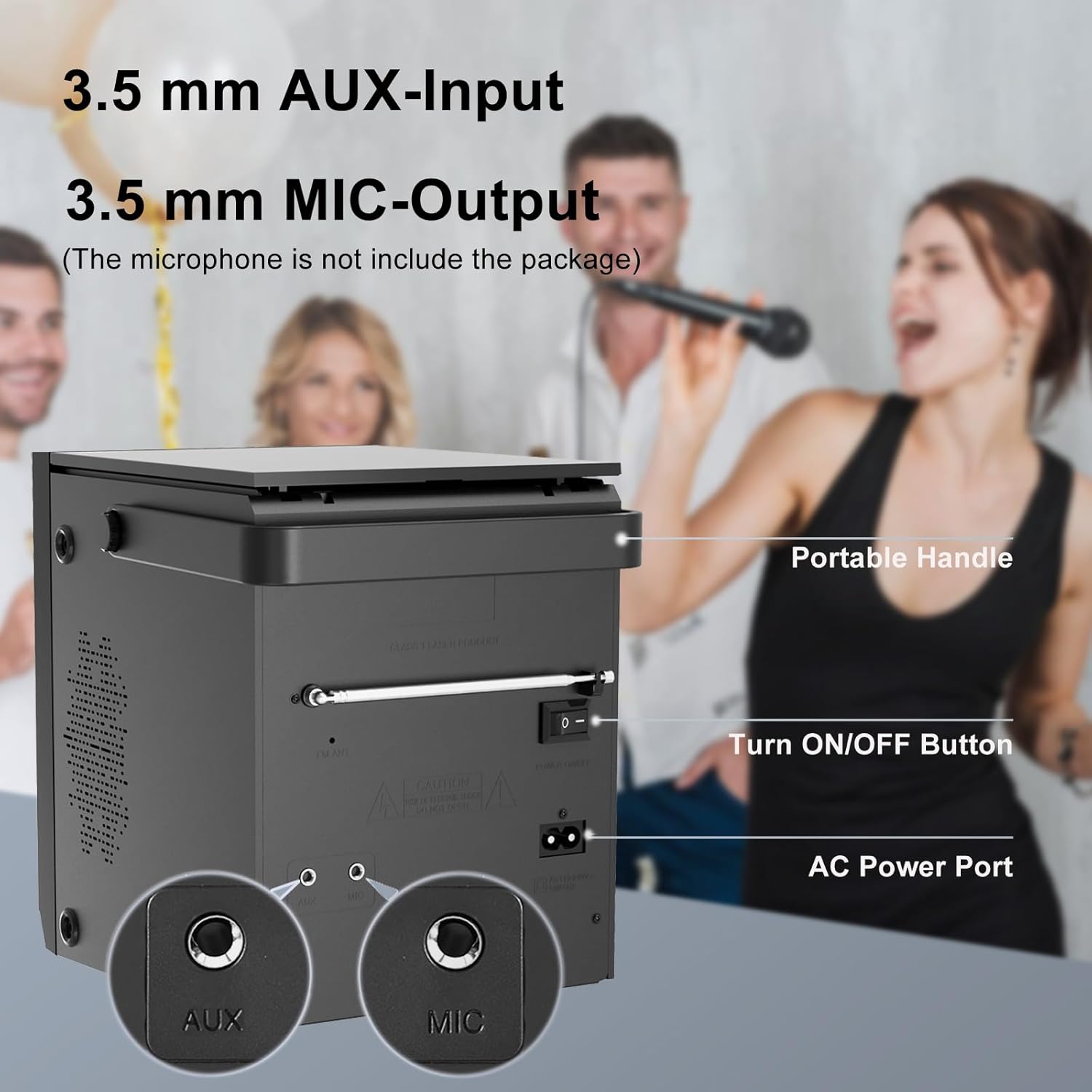
Image 4.2: Rear panel of the boombox, detailing the 3.5 mm AUX-Input, 3.5 mm MIC-Output, the main ON/OFF button, and the AC Power Port. A portable handle is also visible at the top.
- AUX ઇનપુટ (3.5mm): બાહ્ય ઑડિઓ ઉપકરણોને કનેક્ટ કરો.
- MIC Output (3.5mm): Connect a microphone for karaoke or voice input.
- ચાલુ/બંધ બટન: યુનિટ માટે મુખ્ય પાવર સ્વીચ.
- એસી પાવર પોર્ટ: Connect the AC power cable for power and charging.
- એફએમ એન્ટેના: Extend for better FM radio reception.
4.3 Top-Loading CD Compartment

Image 4.3: The top-loading CD compartment shown open with a CD inside. Icons illustrate playback options: Play in order, Single cycle, Repeat all, and Random play.
The CD compartment is located on the top of the unit. Gently lift the lid to access it.
4.4 રીમોટ કંટ્રોલ
The included remote control allows for convenient operation from a distance. (Batteries not included. Requires 2x AAA batteries, typically.)
5. સેટઅપ
5.1 પાવર કનેક્શન
- એસી પાવર: Connect the supplied AC power cable to the AC Power Port on the rear of the boombox and then to a standard wall outlet.
- રિચાર્જેબલ બેટરી: The boombox has a built-in 2000 mAh rechargeable battery, providing over 5 hours of continuous use at medium volume. The battery charges automatically when connected to AC power.

Image 5.1: The boombox powered by its internal rechargeable battery, capable of providing approximately 5 hours of playback.
5.2 પ્રારંભિક પાવર ચાલુ
- Ensure the main ON/OFF switch on the rear panel is in the "ON" position.
- દબાવો સ્ટેન્ડબાય button on the front panel or the remote control to turn on the unit.
- The LCD display will illuminate.
6. ઓપરેટિંગ સૂચનાઓ
6.1 સીડી પ્લેબેક
- દબાવો મોડ button until "CD" mode is selected on the display.
- Open the CD compartment lid on top of the unit.
- Place a CD with the label side facing up. Gently close the lid.
- The boombox will read the CD, and playback should start automatically. If not, press the ▶/SCAN બટન
- નો ઉપયોગ કરો |<>| ટ્રેક છોડવા માટે બટનો.
- દબાવો ▶/SCAN પ્લેબેકને થોભાવવા/ફરી શરૂ કરવા માટેનું બટન.
- દબાવો ■ રોકો પ્લેબેક બંધ કરવા માટે બટન.
- દબાવો પુનરાવર્તન કરો button on the remote control to cycle through repeat modes (Single, All, Random).
6.2 બ્લૂટૂથ મોડ
નોંધ: This device supports Bluetooth connection for audio input from external devices but does not support Bluetooth earphones.
- દબાવો મોડ button until "BT" or "Bluetooth" is displayed. The unit will enter pairing mode, indicated by a flashing Bluetooth icon or "PAIR".
- તમારા બ્લૂટૂથ-સક્ષમ ઉપકરણ (દા.ત., સ્માર્ટફોન, ટેબ્લેટ) પર, બ્લૂટૂથ સક્ષમ કરો અને ઉપલબ્ધ ઉપકરણો શોધો.
- Select "LONPOO ZXG-608B" (or similar name) from the list.
- Once paired, the boombox will emit a confirmation sound, and the Bluetooth indicator will stop flashing.
- You can now play audio from your connected device through the boombox.

Image 6.1: Illustrates the process of pairing a smartphone with the boombox via Bluetooth for wireless audio streaming.
6.3 એફએમ રેડિયો
- Extend the FM antenna on the rear panel for optimal reception.
- દબાવો મોડ button until "FM" mode is selected.
- દબાવો અને પકડી રાખો ▶/SCAN ઉપલબ્ધ FM સ્ટેશનોને આપમેળે સ્કેન કરવા અને સાચવવા માટે બટન.
- નો ઉપયોગ કરો |<>| સાચવેલા સ્ટેશનો વચ્ચે નેવિગેટ કરવા માટે બટનો.
૬.૪ યુએસબી પ્લેબેક
- ફ્રન્ટ પેનલ પરના USB પોર્ટમાં USB ફ્લેશ ડ્રાઇવ દાખલ કરો.
- દબાવો મોડ button until "USB" mode is selected.
- આ યુનિટ આપમેળે સુસંગત ઑડિઓ શોધી કાઢશે અને વગાડવાનું શરૂ કરશે. files (દા.ત., MP3).
- નો ઉપયોગ કરો |<>| ટ્રેક છોડવા માટે બટનો.
- દબાવો ▶/SCAN પ્લેબેકને થોભાવવા/ફરી શરૂ કરવા માટેનું બટન.
- દબાવો ■ રોકો પ્લેબેક બંધ કરવા માટે બટન.
6.5 AUX ઇનપુટ
- Connect an external audio device (e.g., MP3 player, smartphone) to the AUX Input port on the rear panel using a 3.5mm audio cable (not included).
- દબાવો મોડ "AUX" મોડ પસંદ ન થાય ત્યાં સુધી બટન દબાવો.
- Control playback and volume from your connected external device.

Image 6.2: Demonstrates connecting external devices like a smartphone via AUX input and using the USB port for playback.
6.6 માઇક્રોફોન ઇનપુટ
- Connect a microphone (not included) to the MIC Output port on the rear panel.
- Adjust the volume using the main volume knob. The microphone input will mix with the currently playing audio source.

Image 6.3: Shows the boombox being used with a microphone, illustrating its karaoke function.
૬.૮ ઇક્વેલાઇઝર (EQ) સેટિંગ્સ
દબાવો EQ button on the front panel or remote control to cycle through preset equalizer modes:
- ફ્લેટ
- રોક
- પૉપ
- ઉત્તમ
- જાઝ

Image 6.4: Highlights the 20W stereo sound output and lists the available 3 repeat modes (Single, All, Random) and 5 EQ modes (Flat, Rock, Pop, Classic, Jazz).
7. જાળવણી
- સફાઈ: યુનિટના બાહ્ય ભાગને નરમ, સૂકા કપડાથી સાફ કરો. ઘર્ષક ક્લીનર્સ અથવા સોલવન્ટનો ઉપયોગ કરશો નહીં.
- સીડી લેન્સ કેર: જો સીડી પ્લેબેક સમસ્યાઓ આવે, તો વ્યાપારી રીતે ઉપલબ્ધ સીડી લેન્સ ક્લીનર ડિસ્કનો ઉપયોગ કરો.
- બેટરી દીર્ધાયુષ્ય: To prolong battery life, avoid fully discharging the battery frequently. Charge the unit regularly, even if not in use for extended periods.
- સંગ્રહ: When storing the unit for a long time, ensure it is powered off and disconnected from the AC supply. Store in a cool, dry place.
8. મુશ્કેલીનિવારણ
| સમસ્યા | સંભવિત કારણ | ઉકેલ |
|---|---|---|
| કોઈ શક્તિ નથી | AC cable not connected; Main power switch off; Battery depleted. | Check AC connection; Ensure rear ON/OFF switch is ON; Charge the battery. |
| CD not playing / "NO DISC" error | CD inserted incorrectly; CD is dirty or scratched; CD lens is dirty; Incompatible CD format. | Reinsert CD label side up; Clean CD; Use a CD lens cleaner; Ensure CD is audio CD format. |
| બ્લૂટૂથ જોડી રહ્યું નથી | Boombox not in BT mode; Device too far; Bluetooth already connected to another device. | Select BT mode; Move device closer; Disconnect from other devices and try again. |
| નબળું એફએમ રેડિયો રિસેપ્શન | એન્ટેના વિસ્તૃત નથી; નબળું સિગ્નલ. | Fully extend the FM antenna; Reposition the unit for better signal. |
| USB પ્લેબેક સમસ્યાઓ | USB ડ્રાઇવ યોગ્ય રીતે દાખલ કરેલ નથી; અસંગત file format; USB drive corrupted. | USB ડ્રાઇવ ફરીથી દાખલ કરો; ખાતરી કરો files are MP3 or compatible; Try a different USB drive. |
| No sound from AUX | AUX cable not connected; Incorrect mode selected; Volume too low on external device. | Check AUX cable connection; Select AUX mode; Increase volume on external device. |
9. સ્પષ્ટીકરણો
- મોડલ: ZXG-608B
- બ્રાન્ડ: લોનપૂ
- ઉત્પાદનના પરિમાણો (L x W x H): 4.72 x 7.09 x 5.91 ઇંચ (12 x 18 x 15 સેમી)
- વસ્તુનું વજન: 5.63 પાઉન્ડ (2.55 કિગ્રા)
- સ્પીકર આઉટપુટ: 20W RMS (10W x 2)
- કનેક્ટિવિટી: Bluetooth 5.3, USB, AUX Input (3.5mm), MIC Port (3.5mm)
- પાવર સ્ત્રોત: AC Power (Corded Electric) / Built-in Rechargeable Battery
- બેટરી ક્ષમતા: 2000 એમએએચ
- Playback Time (Battery): >5 hours (at medium volume)
- સપોર્ટેડ મીડિયા: Audio CD, CD-R/RW, USB (MP3)
- રેડિયો ટ્યુનર: FM
- EQ મોડ્સ: ફ્લેટ, રોક, પોપ, ક્લાસિક, જાઝ
- સમાવિષ્ટ એસેસરીઝ: AC Power Cable, Remote Control, User Manual
10. વોરંટી અને સપોર્ટ
LONPOO products are designed for reliability and performance. For warranty information, please refer to the warranty card included with your purchase or contact LONPOO customer support.
If you encounter any issues or have questions regarding your LONPOO Portable CD Player Boombox, please contact our customer support team for assistance. Contact details can typically be found on the official LONPOO webસાઇટ પર અથવા ઉત્પાદન પેકેજિંગ પર.


