1. મહત્વપૂર્ણ સુરક્ષા
વિદ્યુત ઉપકરણોનો ઉપયોગ કરતી વખતે, આગ, ઇલેક્ટ્રિક આંચકો અને વ્યક્તિઓને ઇજા થવાનું જોખમ ઘટાડવા માટે હંમેશા મૂળભૂત સલામતી સાવચેતીઓનું પાલન કરવું જોઈએ. ઉપકરણ ચલાવતા પહેલા બધી સૂચનાઓ કાળજીપૂર્વક વાંચો.
- ગરમ સપાટીને સ્પર્શ કરશો નહીં. હેન્ડલ્સ અથવા નોબ્સનો ઉપયોગ કરો.
- ઇલેક્ટ્રિક શોક સામે રક્ષણ મેળવવા માટે, કોર્ડ, પ્લગ અથવા ઉપકરણને પાણી કે અન્ય પ્રવાહીમાં બોળશો નહીં.
- જ્યારે બાળકો દ્વારા અથવા તેની નજીકના કોઈપણ ઉપકરણનો ઉપયોગ કરવામાં આવે ત્યારે નજીકની દેખરેખ જરૂરી છે.
- જ્યારે ઉપયોગમાં ન હોય અને સફાઈ કરતા પહેલા આઉટલેટમાંથી અનપ્લગ કરો. ભાગો મૂકતા અથવા ઉતારતા પહેલા ઠંડુ થવા દો.
- ક્ષતિગ્રસ્ત કોર્ડ અથવા પ્લગ સાથે અથવા ઉપકરણમાં ખામી સર્જાયા પછી અથવા કોઈપણ રીતે નુકસાન થયા પછી કોઈપણ ઉપકરણને ચલાવશો નહીં.
- ઉપકરણ ઉત્પાદક દ્વારા ભલામણ ન કરાયેલ સહાયક જોડાણોનો ઉપયોગ ઇજાઓનું કારણ બની શકે છે.
- બહારનો ઉપયોગ કરશો નહીં.
- કોર્ડને ટેબલ અથવા કાઉન્ટરની કિનારે લટકવા ન દો, અથવા ગરમ સપાટીને સ્પર્શશો નહીં.
- ગરમ ગેસ અથવા ઇલેક્ટ્રિક બર્નર પર અથવા તેની નજીક અથવા ગરમ પકાવવાની નાની ભઠ્ઠીમાં ન મૂકો.
- ગરમ તેલ અથવા અન્ય ગરમ પ્રવાહી ધરાવતાં ઉપકરણને ખસેડતી વખતે અત્યંત સાવધાની રાખવી જરૂરી છે.
- હંમેશા પહેલા ઉપકરણ સાથે પ્લગ જોડો, પછી કોર્ડને દિવાલના આઉટલેટમાં પ્લગ કરો. ડિસ્કનેક્ટ કરવા માટે, કોઈપણ નિયંત્રણને 'બંધ' કરો, પછી દિવાલના આઉટલેટમાંથી પ્લગ દૂર કરો.
- ઇચ્છિત ઉપયોગ સિવાય અન્ય માટે ઉપકરણનો ઉપયોગ કરશો નહીં.
2. ઉત્પાદન ઓવરview
The Cello Smart Digital Air Fryer is designed for healthier cooking with rapid air technology. Familiarize yourself with its components:
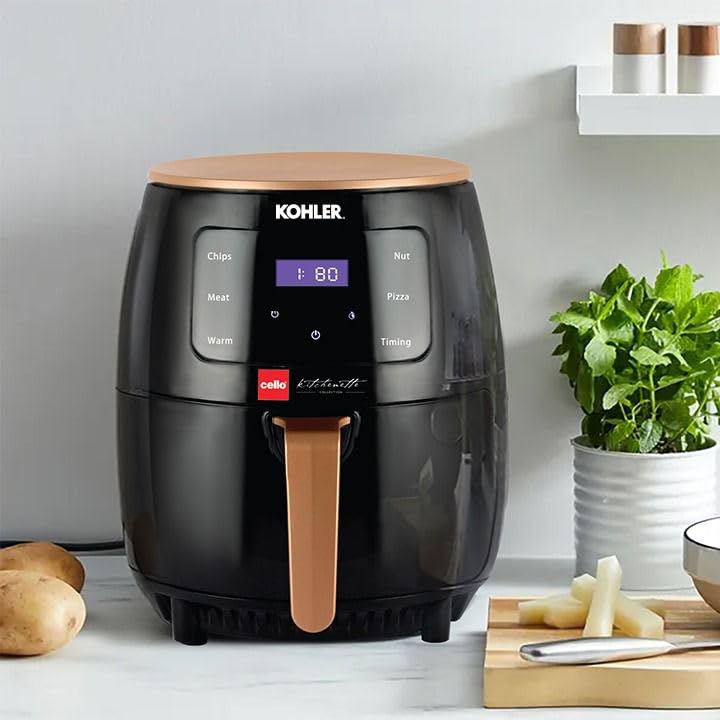
The image displays the Cello Smart Digital Air Fryer, a black appliance with a rose gold top and handle. The front features a digital touch panel with pre-set cooking options like 'Chips', 'Meat', 'Warm', 'Nut', 'Pizza', and 'Timing', along with a digital display showing time and temperature. The air fryer is shown on a kitchen counter next to potatoes and herbs.
- ડિજિટલ ટચ પેનલ: For setting time, temperature, and selecting pre-set cooking modes.
- એર ઇનલેટ: યુનિટની ટોચ પર સ્થિત છે.
- એર આઉટલેટ: યુનિટના પાછળના ભાગમાં સ્થિત છે.
- ફ્રાઈંગ બાસ્કેટ: Removable basket for holding food.
- બાસ્કેટ હેન્ડલ: ફ્રાઈંગ બાસ્કેટને સુરક્ષિત રીતે દૂર કરવા અને દાખલ કરવા માટે.
3. પ્રથમ ઉપયોગ પહેલા
- ઉપકરણમાંથી તમામ પેકેજિંગ સામગ્રી, સ્ટીકરો અને લેબલ્સ દૂર કરો.
- Clean the frying basket and pan thoroughly with hot water, some dishwashing liquid, and a non-abrasive sponge.
- ઉપકરણની અંદર અને બહાર ભેજવાળા કપડાથી સાફ કરો.
- Ensure the appliance is placed on a stable, level, heat-resistant surface, away from walls or other appliances to allow proper air circulation.
4. સેટઅપ
- એર ફ્રાયરને સ્થિર, ગરમી-પ્રતિરોધક સપાટી પર મૂકો.
- Ensure there is sufficient space around the air fryer for proper ventilation (at least 10 cm on all sides).
- Insert the frying basket into the pan, then slide the pan back into the air fryer until it clicks into place.
- Plug the power cord into a grounded wall outlet. The air fryer will emit a beep and the display will light up briefly.
5. ઓપરેટિંગ સૂચનાઓ
પાવરિંગ ચાલુ/બંધ
- To turn on, press the power icon (🏻) on the digital touch panel. The display will show default settings.
- To turn off, press and hold the power icon (🏻) until the display turns off.
Setting Time and Temperature Manually
- With the air fryer powered on, press the temperature icon (°C) to adjust the temperature. Use the + અને - ઇચ્છિત તાપમાન સેટ કરવા માટે બટનો.
- Press the timer icon (⏱) to adjust the cooking time. Use the + અને - બટનો ઇચ્છિત સમય સુયોજિત કરવા માટે.
- પાવર આઇકોન દબાવો (🏻) again to start the cooking process.
Using Pre-set Functions
The air fryer comes with several pre-set cooking modes for common foods:
- ચિપ્સ Optimized settings for French fries.
- માંસ: વિવિધ માંસ વાનગીઓ માટે યોગ્ય.
- ગરમ: રાંધ્યા પછી ખોરાક ગરમ રાખવા માટે.
- અખરોટ: For roasting nuts.
- પિઝા: Ideal for cooking pizzas.
- સમય: Allows for custom time settings.
To use a pre-set function:
- Press the desired pre-set icon on the touch panel. The display will show the default time and temperature for that function.
- You can adjust the time and temperature manually after selecting a pre-set, if needed.
- પાવર આઇકોન દબાવો (🏻) રસોઈ શરૂ કરવા માટે.
General Cooking Process
- Place ingredients into the frying basket. Do not overfill.
- ફ્રાઈંગ બાસ્કેટને એર ફ્રાયરમાં પાછું સ્લાઈડ કરો.
- Set the desired time and temperature, or select a pre-set function.
- Press the start button. The air fryer will begin heating.
- Some foods may require shaking the basket halfway through the cooking time for even results. Pull out the basket by the handle, shake, and reinsert. The air fryer will resume cooking automatically.
- When the cooking time is complete, the air fryer will beep. Carefully pull out the basket and empty the food.
6. રસોઈ ટિપ્સ
- નાના ઘટકોને સામાન્ય રીતે મોટા ઘટકો કરતાં થોડો ઓછો રસોઈ સમયની જરૂર પડે છે.
- વધુ કડક પરિણામ માટે તાજા બટાકામાં થોડું તેલ ઉમેરી શકાય છે.
- ઓવનમાં રાંધી શકાય તેવા નાસ્તાને એર ફ્રાયરમાં પણ રાંધી શકાય છે.
- Use pre-made dough for quick and easy filled snacks.
- For best results, shake the basket halfway through cooking for items like fries, nuggets, or chicken wings.
7. સફાઈ અને જાળવણી
દરેક ઉપયોગ પછી ઉપકરણને સાફ કરો.
- Unplug the air fryer and allow it to cool down completely before cleaning.
- ઉપકરણની બહારના ભાગને ભેજવાળા કપડાથી સાફ કરો.
- Clean the pan and basket with hot water, dishwashing liquid, and a non-abrasive sponge. For stubborn residue, soak the pan and basket in hot water for about 10 minutes.
- ઉપકરણની અંદરના ભાગને ગરમ પાણી અને બિન-ઘર્ષક સ્પોન્જથી સાફ કરો.
- કોઈપણ ખોરાકના અવશેષોને દૂર કરવા માટે સફાઈ બ્રશ વડે હીટિંગ એલિમેન્ટને સાફ કરો.
- Do not use abrasive cleaning materials or harsh detergents.
8. મુશ્કેલીનિવારણ
| સમસ્યા | સંભવિત કારણ | ઉકેલ |
|---|---|---|
| એર ફ્રાયર કામ કરતું નથી. | ઉપકરણ પ્લગ ઇન નથી. | મુખ્ય પ્લગને ગ્રાઉન્ડેડ વોલ સોકેટમાં પ્લગ કરો. |
| ખોરાક સમાન રીતે રાંધવામાં આવતો નથી. | ટોપલીમાં ખૂબ ખોરાક; ખોરાક હલાવ્યો નથી. | ખોરાકનું પ્રમાણ ઓછું કરો; રસોઈના અડધા રસ્તે ટોપલી હલાવો. |
| ઉપકરણમાંથી સફેદ ધુમાડો નીકળે છે. | Fat residues from previous use; basket not cleaned properly. | દરેક ઉપયોગ પછી ટોપલી અને તપેલીને સારી રીતે સાફ કરો. |
| તાજા ફ્રાઈસ ક્રિસ્પી હોતા નથી. | Not enough oil used; potatoes not dried properly. | Add a little more oil; ensure potatoes are dry before adding oil. |
9. સ્પષ્ટીકરણો
| લક્ષણ | વિગત |
|---|---|
| બ્રાન્ડ | સેલો |
| મોડેલનું નામ | CelloSmartDigital |
| ક્ષમતા | 4.5 લિટર |
| આઉટપુટ વોટtage | 1400 વોટ્સ |
| નિયંત્રણ પદ્ધતિ | સ્પર્શ |
| ખાસ લક્ષણ | તાપમાન નિયંત્રણ |
| ઉત્પાદન પરિમાણો | ૪૦.૩ડી x ૩૧.૫વોટ x ૩૦.૭એચ સેન્ટીમીટર |
| રંગ | કાળો |
| સામગ્રી | પ્લાસ્ટિક |
| વસ્તુનું વજન | ૮૨.૫ કિલોગ્રામ (૮૨૫૦૦ ગ્રામ) |
| સમાવાયેલ ઘટકો | Smart Airfryer 4.5 Liter |
10. વોરંટી અને સપોર્ટ
For any product-related queries, complaints, or warranty information, please contact Cello customer support:
- સંપર્ક વ્યક્તિ: Customer care executive
- સંપર્ક નંબર: 7400007370
- ઈમેલ આઈડી: customercare@celloworld.com
- કોર્પોરેટ ઓફિસ સરનામું: Cello World Pvt Ltd, B’ Wing, Cello House, Corporate Avenue, Sonawala Road, Sonawala Industry Estate, Goregaon (E), Mumbai 400063
વોરંટી દાવાઓ માટે ખરીદીના પુરાવા તરીકે કૃપા કરીને તમારી ખરીદી રસીદ જાળવી રાખો.


