1. પરિચય
Ensure the security of your home or business with the HiLook DVR-216G-M1 Recorder. This device allows you to store all images captured by your security cameras, providing greater control and continuous monitoring of your spaces. With advanced features, it is perfect for ensuring maximum protection and peace of mind.
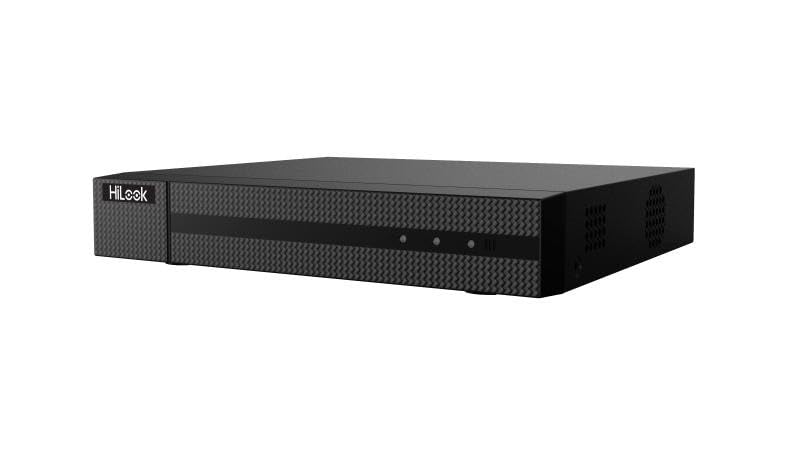
આકૃતિ 1: ફ્રન્ટ view of the HiLook Hikvision DVR-216G-M1 Digital Video Recorder, a black rectangular device with a textured front panel and the 'HiLook' logo on the left side.
2. મુખ્ય લક્ષણો
- Intelligent Classification: Based on deep learning, Motion Detection 2.0 classifies human and vehicle targets, reducing false alarms.
- Advanced Video Compression: Supports H.265 Pro+/H.265 Pro/H.265, saving bandwidth and storage.
- બહુમુખી વિડિઓ ઇનપુટ્સ: Compatible with HDTVI, AHD, CVI, CVBS, and IP camera signals.
- Audio via Coaxial Cable: Clear and efficient audio transmission over coaxial cables.
- IP Camera Support: Up to 18 IP camera input channels, with resolution up to 5 MP.
- Encoding Capability: Supports up to 1080p Lite at 15 frames per second (fps).
- સિગ્નલ રેન્જ: Maximum of 1200 meters for 720p HDTVI signal.
3. પેકેજ સામગ્રી
કૃપા કરીને નીચેની વસ્તુઓ માટે પેકેજ કાળજીપૂર્વક તપાસો:
- 1 x HiLook Hikvision DVR-216G-M1 DVR Unit
- ૧ x વપરાશકર્તા માર્ગદર્શિકા (આ દસ્તાવેજ)
- 1 x પાવર એડેપ્ટર
- 1 x Installation Kit (including screws and necessary tools)
- 1 x ઇથરનેટ કેબલ
4. સેટઅપ માર્ગદર્શિકા
4.1 પ્રારંભિક સેટઅપ
- Unpack the DVR: Carefully remove the DVR and all accessories from the packaging.
- પાવર કનેક્ટ કરો: Connect the provided power adapter to the DVR's power input and then plug it into a suitable power outlet.
- Connect to Monitor: Use an HDMI or VGA cable (not included) to connect the DVR to a monitor for initial setup and viewing
- નેટવર્કથી કનેક્ટ કરો: Connect the provided Ethernet cable from the DVR's LAN port to your router or network switch.
- પાવર ચાલુ: The DVR will typically power on automatically once connected to power. Follow the on-screen prompts for initial configuration, including setting up an administrator password and network settings.
4.2 Connecting Cameras
The DVR-216G-M1 supports various camera types. Connect your analog (HDTVI, AHD, CVI, CVBS) cameras to the BNC video input ports on the rear panel. For IP cameras, ensure they are on the same network as the DVR and add them through the DVR's network camera management interface.
5. ઓપરેશન
5.1 મૂળભૂત કામગીરી
Once the DVR is set up and cameras are connected, you can view live feeds, record footage, and play back recorded events. Navigate the DVR's menu using a connected mouse (not included) to access various functions such as live view, recording schedules, playback, and system settings.
5.2 Motion Detection Configuration
The DVR features advanced motion detection. To configure, access the 'Event' or 'Alarm' settings in the DVR menu. You can define motion detection areas, sensitivity levels, and set up actions such as recording, notification, or alarm output when motion is detected. The deep learning-based Motion Detection 2.0 helps in accurately classifying human and vehicle targets, reducing false alarms.
6. જાળવણી
- નિયમિત સફાઈ: DVR ને ધૂળથી મુક્ત રાખો. સફાઈ માટે નરમ, સૂકા કપડાનો ઉપયોગ કરો. પ્રવાહી ક્લીનર્સનો ઉપયોગ કરશો નહીં.
- ફર્મવેર અપડેટ્સ: સમયાંતરે HiLook ના અધિકારીને તપાસો webશ્રેષ્ઠ કામગીરી અને નવી સુવિધાઓની ઍક્સેસ સુનિશ્ચિત કરવા માટે ફર્મવેર અપડેટ્સ માટેની સાઇટ.
- ડેટા બેકઅપ: Regularly back up important recorded footagડેટા નુકશાન અટકાવવા માટે બાહ્ય સ્ટોરેજ ઉપકરણ અથવા ક્લાઉડ સેવા પર e.
- વેન્ટિલેશન: Ensure the DVR is placed in a well-ventilated area to prevent overheating. Do not block ventilation openings.
૧૩. મુશ્કેલીનિવારણ અને વારંવાર પૂછાતા પ્રશ્નો
વારંવાર પૂછાતા પ્રશ્નો
- Q1: How many cameras does the DVR-216G-M1 support?
- A1: The DVR-216G-M1 supports up to 16 analog cameras and 2 IP cameras (expandable up to 18 IP cameras).
- Q2: What is the maximum recording resolution?
- A2: The DVR-216G-M1 supports resolution up to 5 MP, providing high-quality images.
- Q3: Does the DVR-216G-M1 have motion detection?
- A3: Yes, it features deep learning-based Motion Detection 2.0 technology, which classifies humans and vehicles, reducing false alarms.
- Q4: Is installation easy?
- A4: Yes, the DVR-216G-M1 is easy to install and comes with a detailed installation kit, including necessary screws and tools.
- Q5: How does video storage work?
- A5: The DVR-216G-M1 supports local and cloud storage, ensuring you have continuous access to recordings.
- Q6: Which network protocols are compatible with the network interface?
- A6: The network interface supports TCP/IP, PPPoE, DHCP, HiLookVision, DNS, DDNS, NTP, SADP, SMTP, UPnP, and HTTPS.
8. ટેકનિકલ વિશિષ્ટતાઓ
| લક્ષણ | સ્પષ્ટીકરણ |
|---|---|
| મોડલ | DVR-216G-M1 |
| બ્રાન્ડ | હાઇલુક |
| ઉત્પાદક | હિકવિઝન |
| ચેનલોની સંખ્યા | 16 (Analog) + 2 (IP, expandable to 18 IP) |
| વિડિઓ ઇનપુટ્સ | HDTVI, AHD, CVI, CVBS, IP |
| વિડિઓ કમ્પ્રેશન | H.265 Pro+/H.265 Pro/H.265 |
| ઓડિયો ઇનપુટ | Via coaxial cable |
| Encoding Capability | Up to 1080p Lite @ 15 fps |
| વિડિઓ કેપ્ચર રિઝોલ્યુશન | 2592x1944 (5 MP max for IP cameras) |
| Signal Range (HDTVI) | Max 1200 m for 720p HDTVI signal |
| ખાસ લક્ષણો | Motion Detection 2.0 (Deep Learning-based) |
| કનેક્ટિવિટી ટેકનોલોજી | વાયર્ડ |
| રંગ | કાળો |
| પાવર સ્ત્રોત પ્રકાર | એસી/ડીસી |
| પેકેજ પરિમાણો | 40.5 x 28.1 x 8 સેમી |
| વજન | 1.46 કિલોગ્રામ |
| ASIN | B0DM6FJCH9 |
9. વોરંટી અને સપોર્ટ
Specific warranty terms and conditions are not provided in the product details. For detailed warranty information, technical support, or service inquiries, please refer to the official HiLook or Hikvision website or contact their customer support directly. Keep your purchase receipt as proof of purchase for any warranty claims.


