પરિચય
The HMD Pulse Pro is an advanced unlocked smartphone designed for global use, featuring a powerful 50 MP dual rear camera and an equally impressive 50 MP front camera. It runs on Android 14, offers extended battery life, and boasts a repair-at-home design for user convenience. This manual provides essential information for setting up, operating, maintaining, and troubleshooting your device.
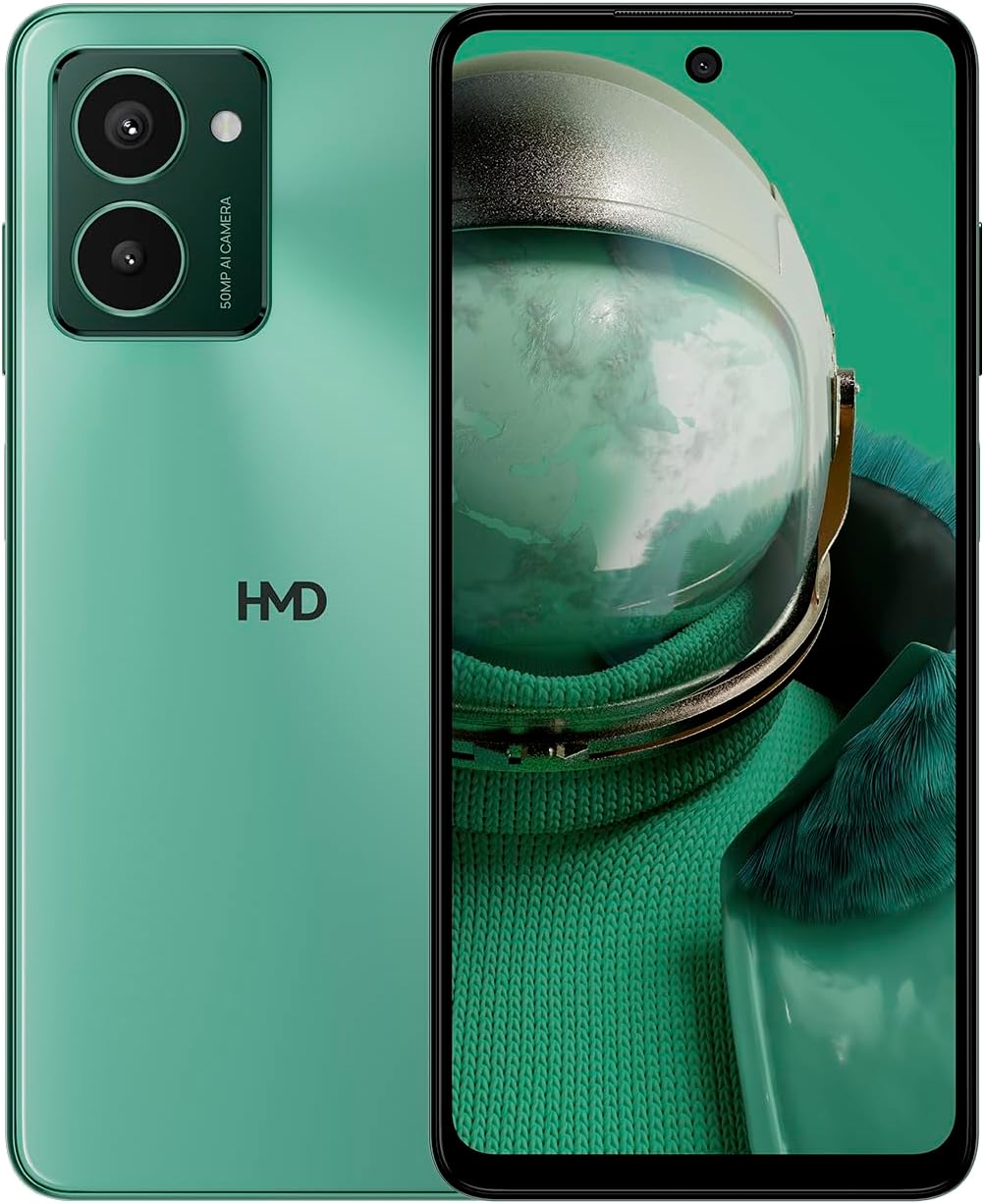
The HMD Pulse Pro smartphone in Glacier Green, showcasing its sleek design and dual camera system on the rear, alongside its vibrant display.
મુખ્ય લક્ષણો:
- Striking design with refined lines and a cutting-edge aesthetic.
- Equipped with 50 MP rear and 50 MP front cameras for balanced and high-quality photography.
- Innovative selfie gesture function for easier and more dynamic self-portraits.
- Extended battery life providing up to 59 hours of usage on a single charge.
- International version, unlocked for compatibility with various carriers worldwide.
બૉક્સમાં શું છે
Upon unboxing your HMD Pulse Pro, please ensure all the following items are present:
- એચએમડી પલ્સ પ્રો સ્માર્ટફોન
- યુએસબી કેબલ
- સિમ ટ્રે ઇજેક્ટર ટૂલ
- Quick Start Guide (may be separate or integrated)
સેટઅપ
૪.૩. પ્રારંભિક ચાર્જિંગ
Before first use, it is recommended to fully charge your HMD Pulse Pro. Connect the provided USB cable to the phone's charging port and the other end to a compatible USB power adapter (not always included) or a computer USB port. The device supports fast charging.
2. સિમ કાર્ડ અને માઇક્રોએસડી કાર્ડ દાખલ કરવું
The HMD Pulse Pro supports dual SIM cards and expandable memory via a microSD card.
- તમારા ફોનની બાજુમાં સિમ ટ્રે શોધો.
- ટ્રેની બાજુના નાના છિદ્રમાં સિમ ટ્રે ઇજેક્ટર ટૂલ દાખલ કરો અને ટ્રે બહાર ન આવે ત્યાં સુધી હળવેથી દબાણ કરો.
- Place your Nano-SIM cards into the designated slots. Ensure the gold contacts are facing down.
- If using a microSD card for additional storage, place it into its dedicated slot on the tray.
- ટ્રેને ફોનમાં કાળજીપૂર્વક પાછી ધકેલી દો જ્યાં સુધી તે જગ્યાએ ન આવે.
3. પાવર ચાલુ અને પ્રારંભિક ગોઠવણી
Press and hold the Power button until the HMD logo appears. Follow the on-screen instructions to complete the initial setup, including language selection, Wi-Fi connection, Google account setup, and security settings.
ઓપરેટિંગ સૂચનાઓ
મૂળભૂત નેવિગેશન
- ટચસ્ક્રીન: Navigate by tapping, swiping, pinching, and spreading on the 6.65-inch display.
- પાવર બટન: Press to wake/sleep the screen. Press and hold to power off or restart.
- વોલ્યુમ બટનો: મીડિયા વોલ્યુમ, કોલ વોલ્યુમ અને નોટિફિકેશન વોલ્યુમ એડજસ્ટ કરો.
કેમેરા વપરાશ
The HMD Pulse Pro features a 50 MP dual rear camera and a 50 MP front camera, enhanced with AI capabilities.

A user demonstrating the innovative selfie gesture feature of the HMD Pulse Pro, allowing for hands-free photo capture.

એક ક્લોઝ-અપ view of the HMD Pulse Pro's 50 MP front-facing camera, highlighting its AI-powered capabilities for enhanced selfies.
- કેમેરા લોન્ચ કરી રહ્યા છીએ: Tap the Camera app icon or use a quick gesture (if enabled in settings).
- ફોટા લેવા: Tap the shutter button. Use pinch-to-zoom for optical or digital zoom.
- Selfie Gestures: Utilize pre-defined hand gestures to trigger the front camera shutter without touching the screen. Refer to the in-app camera settings for available gestures.
- સ્થિતિઓ: Switch between various modes like Portrait, Night, Panorama, and Video.
બેટરી મેનેજમેન્ટ
The HMD Pulse Pro is equipped with a 5000 mAh battery, offering up to 59 hours of usage.

Two HMD Pulse Pro smartphones standing upright, with text emphasizing the impressive battery life of up to 59 hours.
- ચાર્જિંગ: Use the provided USB cable. A full charge takes approximately 2.5 hours.
- બેટરી સેવર: Enable Battery Saver mode in Settings > Battery to extend usage time.
- Optimizing Usage: Reduce screen brightness, disable unused connectivity (Bluetooth, Wi-Fi, GPS), and close background apps to conserve battery.
જાળવણી
તમારા ઉપકરણની સફાઈ
To keep your HMD Pulse Pro in optimal condition:
- સ્ક્રીન અને શરીર સાફ કરવા માટે નરમ, લિન્ટ-ફ્રી કાપડનો ઉપયોગ કરો.
- કઠોર રસાયણો, ઘર્ષક ક્લીનર્સ અથવા એરોસોલ સ્પ્રેનો ઉપયોગ કરવાનું ટાળો.
- The device is water resistant; however, avoid submerging it in water.
સૉફ્ટવેર અપડેટ્સ
તમારા ઉપકરણમાં નવીનતમ સુવિધાઓ, સુરક્ષા પેચ અને પ્રદર્શન સુધારણા છે તેની ખાતરી કરવા માટે નિયમિતપણે સોફ્ટવેર અપડેટ્સ તપાસો અને ઇન્સ્ટોલ કરો. સેટિંગ્સ > સિસ્ટમ > સિસ્ટમ અપડેટ પર જાઓ.
સંગ્રહ વ્યવસ્થાપન
With 256 GB of internal storage, you have ample space. However, regularly manage your files and apps to maintain performance. You can also expand storage using a microSD card.
મુશ્કેલીનિવારણ
This section addresses common issues you might encounter with your HMD Pulse Pro.
| સમસ્યા | શક્ય ઉકેલ |
|---|---|
| ડિવાઇસ ચાલુ થશે નહીં | Ensure the battery is charged. Connect to a charger for at least 30 minutes. Try holding the Power button for 10-15 seconds. |
| એપ્લિકેશનો ક્રેશ થઈ રહી છે અથવા સ્થિર થઈ રહી છે | Clear the app's cache (Settings > Apps > [App Name] > Storage > Clear cache). Restart the phone. Update the app or the phone's software. |
| નબળી બેટરી જીવન | Check background app usage (Settings > Battery). Reduce screen brightness. Disable unused connectivity features (Wi-Fi, Bluetooth, GPS, NFC). Enable Battery Saver mode. |
| Cannot connect to Wi-Fi/Bluetooth | Toggle Wi-Fi/Bluetooth off and on. Restart your phone and the router/device. Forget the network/device and reconnect. |
| સિમ કાર્ડ મળ્યું નથી | Ensure the SIM card is correctly inserted in the tray. Restart the phone. Check with your carrier for network issues. |
ફેક્ટરી રીસેટ
જો સતત સમસ્યાઓ આવતી રહે, તો ફેક્ટરી રીસેટ જરૂરી બની શકે છે. ચેતવણી: આ તમારા ફોન પરનો બધો ડેટા ભૂંસી નાખશે. આગળ વધતા પહેલા મહત્વપૂર્ણ ડેટાનો બેકઅપ લો.
- સેટિંગ્સ > સિસ્ટમ > રીસેટ વિકલ્પો પર જાઓ.
- "બધો ડેટા ભૂંસી નાખો (ફેક્ટરી રીસેટ)" પસંદ કરો.
- તમારા નિર્ણયની પુષ્ટિ કરો અને જો પૂછવામાં આવે તો તમારો PIN/પેટર્ન/પાસવર્ડ દાખલ કરો.
- ફોન રીસ્ટાર્ટ થશે અને રીસેટ પ્રક્રિયા શરૂ થશે.
વિશિષ્ટતાઓ
Detailed technical specifications for the HMD Pulse Pro smartphone:

The HMD Pulse Pro highlighting its stylish and cutting-edge design, dual SIM support, and 6.56" HD+ HID display with a 90Hz refresh rate. Note: While the image mentions 8GB/128GB, this specific model features 8GB RAM and 256GB internal storage.
| લક્ષણ | વિગત |
|---|---|
| મોડેલનું નામ | Pulse Pro (TA-1606) |
| ઓપરેટિંગ સિસ્ટમ | એન્ડ્રોઇડ 14 |
| ડિસ્પ્લે માપ | 6.65 ઇંચ |
| ઠરાવ | 720 x 1612 |
| તાજું દર | 90 હર્ટ્ઝ |
| રેમ મેમરી | 8 જીબી |
| સંગ્રહ ક્ષમતા | 256 GB (Expandable) |
| રીઅર કેમેરા | 50 MP Dual Camera |
| ફ્રન્ટ કેમેરા | 50 MP |
| બેટરી ક્ષમતા | 5000 એમએએચ |
| ચાર્જિંગ સમય | આશરે. 2.5 કલાક |
| CPU ઝડપ | 1.6 GHz |
| કનેક્ટિવિટી | બ્લૂટૂથ, વાઇ-ફાઇ, યુએસબી, એનએફસી |
| ખાસ લક્ષણો | Fast Charging Support, Dual SIM, Expandable Memory, Built-In GPS, Water Resistant |
| પરિમાણો | 6.43 x 2.95 x 0.34 ઇંચ |
| વસ્તુનું વજન | ૬.૭ ઔંસ (૧૮૮.૮ ગ્રામ) |
| ઓડિયો જેક | 3.5 મીમી |
| રંગ | Glacier Green |
વોરંટી અને આધાર
ઉત્પાદક વોરંટી
Your HMD Pulse Pro smartphone is covered by a manufacturer's warranty against defects in materials and workmanship. The specific terms and duration of the warranty may vary by region. Please refer to the warranty card included with your product or visit the official HMD webવિગતવાર વોરંટી માહિતી માટે સાઇટ.
ગ્રાહક આધાર
For technical assistance, troubleshooting beyond this manual, or warranty claims, please contact HMD customer support. You can typically find contact information (phone numbers, email, support portals) on the official HMD webસાઇટ પર અથવા તમારા ઉપકરણની સેટિંગ્સના સપોર્ટ વિભાગ દ્વારા.
ઑનલાઇન સંસાધનો: For the latest FAQs, software downloads, and support articles, visit the official HMD support page. (Specific URL not provided in input, so a generic statement is used).


