1. પરિચય
Thank you for choosing the Lubluelu SL60 Pro Robot Vacuum Cleaner and Mop. This manual provides essential information for the safe operation, maintenance, and troubleshooting of your device. Please read it thoroughly before use and retain it for future reference.
2. મહત્વપૂર્ણ સલામતી સૂચનાઓ
To reduce the risk of injury or damage, read these safety instructions carefully and keep them accessible during product use.
- આ ઉપકરણનો ઉપયોગ 8 વર્ષ અને તેથી વધુ ઉંમરના બાળકો અને ઓછી શારીરિક, સંવેદનાત્મક અથવા માનસિક ક્ષમતાઓ અથવા અનુભવ અને જ્ઞાનનો અભાવ ધરાવતી વ્યક્તિઓ દ્વારા કરી શકાય છે જો તેઓને ઉપકરણના સલામત રીતે ઉપયોગ કરવા અંગે દેખરેખ અથવા સૂચના આપવામાં આવી હોય અને તેમાં સામેલ જોખમોને સમજતા હોય. .
- બાળકો એ ઉપકરણ સાથે રમતા નથી તેની ખાતરી કરવા માટે તેમની દેખરેખ રાખવી જોઈએ.
- દેખરેખ વિના બાળકો દ્વારા સફાઈ અને વપરાશકર્તા જાળવણી કરવામાં આવશે નહીં.
- ઉત્પાદક દ્વારા પૂરા પાડવામાં આવેલ પાવર એડેપ્ટરનો જ ઉપયોગ કરો.
- Do not use the appliance in areas with open flames or fragile objects.
- Ensure the robot is turned off and unplugged before cleaning or performing maintenance.
- રોબોટ કે ચાર્જિંગ બેઝને પાણીમાં બોળશો નહીં.
- વાળ, ઢીલા કપડાં, આંગળીઓ અને શરીરના તમામ ભાગોને ખુલ્લા અને હલનચલનથી દૂર રાખો.
3. પેકેજ સામગ્રી
Verify that all components are present and in good condition upon unpacking. If any items are missing or damaged, please contact customer support.
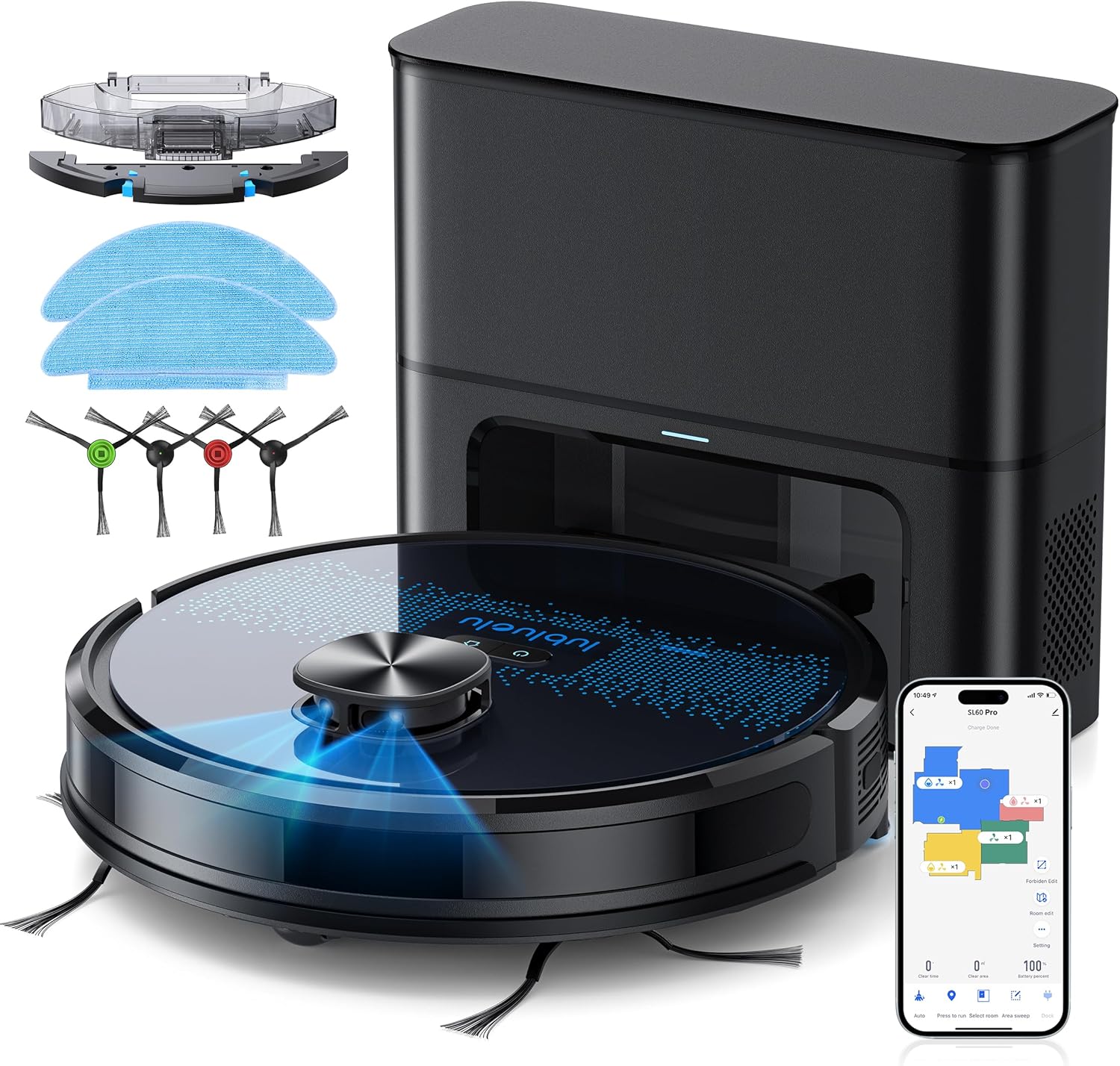
- Lubluelu SL60D Robot Vacuum Cleaner
- D3 Self-Emptying Station
- Extra Dust Bag (2.5L capacity)
- Mop Pad (2 pieces)
- સફાઈ સાધન
- સાઇડ બ્રશ (2 જોડી)
- વધારાનું HEPA ફિલ્ટર
- વપરાશકર્તા માર્ગદર્શિકા
4. ઉત્પાદન ઓવરview
The Lubluelu SL60 Pro is an advanced robot vacuum and mop designed for efficient home cleaning. It features LIDAR navigation, 4000Pa suction power, a 2.5L self-emptying dust station, and smart app control.
4.1 મુખ્ય લક્ષણો
- LIDAR Navigation: Equipped with 8-meter laser range and SLAM algorithm for accurate mapping and efficient route planning.
- સ્વ-ખાલી કરવાનું સ્ટેશન: Automatically empties the robot's dustbin into a 2.5L disposable bag, requiring manual emptying only every 60 days.
- 4000Pa સક્શન પાવર: Powerful brushless motor with three adjustable suction levels for effective cleaning on various surfaces, including carpets.
- ૩-ઇન-૧ સફાઈ: Sweeps, vacuums, and mops simultaneously with electronic water control and Y-shaped mopping patterns.
- મલ્ટી-ફ્લોર મેપિંગ: Stores up to 5 maps for multi-level homes, allowing for customized cleaning plans.
- કસ્ટમાઇઝ કરી શકાય તેવી સફાઈ: Set no-go zones, virtual walls, spot cleaning, edge cleaning, and scheduled cleaning via the app.
- સ્વચાલિત રિચાર્જિંગ: Returns to the charging base when battery is low (below 15%) and resumes cleaning from where it left off once charged to 80%.
- ઓછા અવાજની કામગીરી: આશરે 55dB પર કાર્ય કરે છે.

5. સેટઅપ
૨.૫ રોબોટ ચાર્જ કરવો
Before first use, fully charge the robot. Place the self-emptying station against a wall with at least 0.5 meters of clear space on either side and 1.5 meters in front. Ensure the power cable is securely connected.

૪.૨ સાઇડ બ્રશ ઇન્સ્ટોલ કરવા
Attach the side brushes by pressing them onto the square posts at the bottom of the robot until they click into place.
5.3 Installing the Dust Bin/Water Tank
The robot comes with a combined dust bin and water tank. Fill the water tank with clean water (do not use cleaning solutions that may clog the system). Attach the mop pad to the bottom of the tank. Insert the assembly into the robot until it locks.
૫.૪ Wi-Fi અને એપ્લિકેશન સાથે કનેક્ટ થવું
To unlock all smart features, connect your robot to the Lubluelu app (Smartlife app). Ensure your Wi-Fi network is 2.4GHz.
- Download the 'Smartlife' app from your mobile app store.
- તમારા ખાતામાં નોંધણી કરો અથવા લ logગ ઇન કરો.
- Press and hold the power button on the robot for 3-5 seconds until the Wi-Fi indicator light blinks rapidly.
- In the app, tap 'Add Device' and select 'Robot Vacuum (Wi-Fi)' under 'Small Home Appliances'.
- Follow the in-app instructions to connect the robot to your 2.4GHz Wi-Fi network.
6. ઓપરેશન
૫.૧ સફાઈ શરૂ કરવી/થોભાવવી
- પ્રારંભ: Press the power button on the robot or tap 'Start' in the app.
- વિરામ: Press the power button again or tap 'Pause' in the app.
- બેઝ પર પાછા ફરો: Press the home button on the robot or tap 'Recharge' in the app.
6.2 સફાઈ મોડ્સ
The robot offers various cleaning modes accessible via the Smartlife app:
- સ્વતઃ સફાઈ: The robot intelligently maps and cleans your home using its LIDAR navigation.
- સ્પોટ સફાઈ: રોબોટને ચોક્કસ નાના વિસ્તારને સઘન રીતે સાફ કરવા માટે નિર્દેશિત કરે છે.
- ઝોન સફાઈ: રોબોટ સાફ કરી શકે તે માટે નકશા પર ચોક્કસ વિસ્તારો વ્યાખ્યાયિત કરો.
- ધારની સફાઈ: આ રોબોટ દિવાલો અને ફર્નિચરની કિનારીઓ સાફ કરે છે.
- સુનિશ્ચિત સફાઈ: રોબોટ આપમેળે સાફ થાય તે માટે ચોક્કસ સમય સેટ કરો.

૫.૩ મોપિંગ ફંક્શનનો ઉપયોગ કરવો
Ensure the water tank is filled and the mop pad is attached. The app allows you to adjust water flow levels for different floor types.
6.4 Managing Maps and No-Go Zones
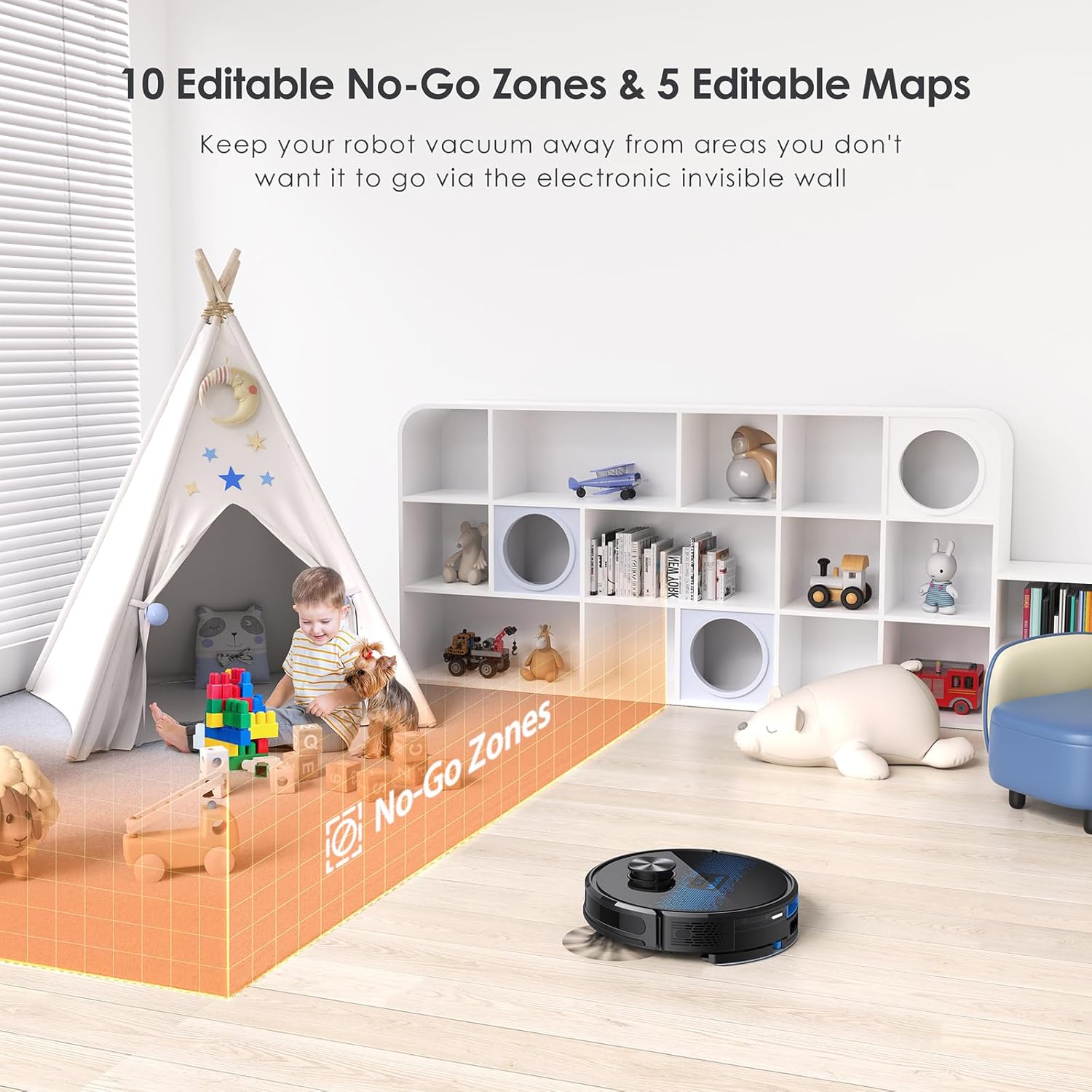
The SL60 Pro can store up to 5 different maps, useful for multi-level homes. You can also define up to 10 no-go zones or virtual walls to restrict the robot from certain areas.
6.5 અવાજ નિયંત્રણ
The robot is compatible with Amazon Alexa and Google Assistant. Follow the instructions in the Smartlife app to link your device for voice commands.
7. જાળવણી
નિયમિત જાળવણી શ્રેષ્ઠ કામગીરી સુનિશ્ચિત કરે છે અને તમારા રોબોટ વેક્યુમનું આયુષ્ય લંબાવે છે.
૪.૧ ડસ્ટબિન ખાલી કરવી
The self-emptying station automatically handles dust collection. The 2.5L dust bag in the station should be replaced approximately every 60 days, depending on usage.

૬.૨ મુખ્ય બ્રશ સાફ કરવું
Periodically remove the main brush and clean it using the provided cleaning tool to remove tangled hair and debris.
૭.૩ સાઇડ બ્રશની સફાઈ
Check side brushes for wear and tear. Remove any tangled hair or debris. Replace if damaged.
7.4 ફિલ્ટરની સફાઈ
Tap the filter to remove loose dirt. Rinse the filter with water if necessary, ensuring it is completely dry before reinstallation.
૭.૪ પાણીની ટાંકી અને મોપ પેડની સફાઈ
After each mopping session, empty any remaining water from the tank and clean the mop pad. The mop pad can be hand-washed or machine-washed.
૬.૪ સેન્સર અને ચાર્જિંગ સંપર્કોની સફાઈ
Wipe all sensors and charging contacts on both the robot and the charging station with a clean, dry cloth to ensure proper function.
8. મુશ્કેલીનિવારણ
If you encounter issues with your Lubluelu SL60 Pro, refer to the following common problems and solutions:
| સમસ્યા | સંભવિત કારણ | ઉકેલ |
|---|---|---|
| રોબોટ ચાલુ થતો નથી. | બેટરી ઓછી હોય અથવા પાવર સ્વીચ બંધ હોય. | Ensure the power switch is on and charge the robot. |
| રોબોટ Wi-Fi થી કનેક્ટ થઈ શકતો નથી. | Incorrect Wi-Fi band (not 2.4GHz), wrong password, or router too far. | Ensure 2.4GHz Wi-Fi, verify password, move robot closer to router, or reset Wi-Fi on robot. |
| રોબોટ વારંવાર અટવાઈ જાય છે. | Obstacles, tangled cables, or uneven surfaces. | Clear the cleaning area of obstacles, cables, and small items. Use no-go zones for problematic areas. |
| નબળી સફાઈ કામગીરી. | Full dustbin, dirty brushes/filter, or low suction setting. | Empty dustbin, clean brushes and filter, increase suction power via the app. |
| મોપિંગ ફંક્શન કામ કરતું નથી. | Empty water tank, dry mop pad, or clogged water nozzle. | Fill water tank, moisten mop pad, clean water nozzle. |
For further assistance, please contact Lubluelu customer support.
9. સ્પષ્ટીકરણો
| લક્ષણ | વિગત |
|---|---|
| બ્રાન્ડ | લુબ્લુલુ |
| મોડેલનું નામ | SL60 પ્રો |
| રંગ | વાદળી કાળો |
| ઉત્પાદન પરિમાણો (રોબોટ) | 32 x 32 x 10 સેમી |
| વસ્તુનું વજન | 4.4 કિલોગ્રામ |
| સક્શન પાવર | 4000 Pa સુધી |
| ડસ્ટ બેગ ક્ષમતા (સ્ટેશન) | 2.5 લિટર |
| પાણીની ટાંકીની ક્ષમતા | 250 મિલીલીટર |
| ભાગtage | 14.4 વોલ્ટ |
| અવાજ સ્તર | ૩૦ ડેસિબલ્સ |
| રનટાઇમ | 2 કલાક 30 મિનિટ સુધી |
| નેવિગેશન પ્રકાર | લિડર |
| સુસંગત ઉપકરણો | Smartphone (Wi-Fi 2.4GHz), Amazon Alexa, Google Assistant |
| ખાસ લક્ષણો | LIDAR Navigation, Smart Mapping, Obstacle Avoidance, Edge Cleaning, Wet/Dry Mopping, App Control, No-Go Zones, Continuous Breakpoint Cleaning, Multi-Stage Mapping |
10. વોરંટી અને સપોર્ટ
Lubluelu is committed to customer satisfaction. For any issues with your robot vacuum, please contact our customer service team. We provide lifetime technical support.
- વોરંટી: ચોક્કસ વોરંટી વિગતો માટે કૃપા કરીને તમારા ખરીદી દસ્તાવેજોનો સંદર્ભ લો.
- સપોર્ટનો સંપર્ક કરો: For technical assistance or service inquiries, please email us or visit our official webસાઇટ