1. પરિચય
This manual provides essential instructions for the safe operation, setup, and maintenance of your BEZGAR RC Airplane Model LH-X72SPRO. Please read this manual thoroughly before operating the aircraft to ensure proper function and to prevent damage or injury. This remote-controlled aircraft features a 6-axis gyroscope for stable flight, 360-degree flip capabilities, and colorful LED navigation lights.

Image 1.1: BEZGAR RC Airplane Model LH-X72SPRO and accessories.
2. સલામતી માહિતી
- Always operate the RC airplane in open areas, away from people, animals, and obstacles.
- Do not fly near power lines, roads, or bodies of water.
- દરેક ઉડાન પહેલાં ખાતરી કરો કે બધી બેટરીઓ સંપૂર્ણપણે ચાર્જ થઈ ગઈ છે.
- 14 વર્ષથી ઓછી ઉંમરના વપરાશકર્તાઓ માટે પુખ્ત વયના લોકોની દેખરેખની ભલામણ કરવામાં આવે છે.
- જ્યારે તેઓ ફરતા હોય ત્યારે પ્રોપેલર્સને સ્પર્શ કરશો નહીં.
- In case of emergency, press the emergency stop button on the remote control.
3. બોક્સમાં શું છે
સેટઅપ શરૂ કરતા પહેલા ખાતરી કરો કે બધા ઘટકો હાજર છે:
- RC Plane *1
- Gesture Remote Control *1
- Standard Remote Control *1
- 3.7V 500mAh Battery *2
- ચાર્જિંગ કેબલ *1
- Fan Blade (Spare Propellers) *4
- સ્ક્રુડ્રાઈવર *1
- વપરાશકર્તા માર્ગદર્શિકા *1
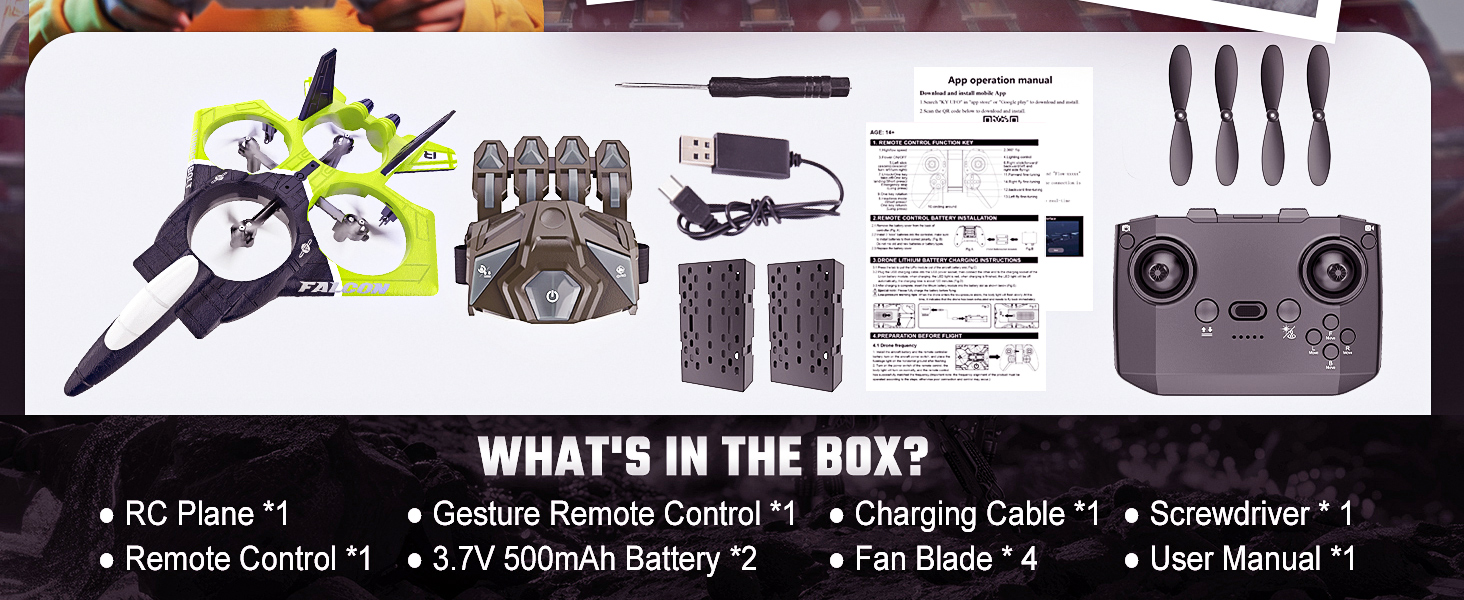
Image 3.1: Package contents of the BEZGAR RC Airplane.
4. સેટઅપ
૫.૧ બેટરી ઇન્સ્ટોલેશન અને ચાર્જિંગ
- એરક્રાફ્ટ બેટરી: Insert the provided 3.7V 500mAh Lithium Ion battery into the battery compartment of the RC airplane. Ensure it is securely connected.
- કંટ્રોલર બેટરી: Install 3 AAA batteries (not included) into the standard remote control. The gesture remote control has a built-in rechargeable battery.
- ચાર્જિંગ: Use the included USB charging cable to charge the aircraft's battery and the gesture remote control's battery. Connect the cable to a USB power source (e.g., computer, USB wall adapter). The indicator light will show charging status.

Image 4.1: Modular battery installation for the RC airplane.
4.2 Propeller Installation/Replacement
If propellers need replacement, use the included screwdriver to carefully remove the old propellers. Match the new propellers to the correct motor arms (indicated by markings on the propellers and arms) and secure them with the screws.
૫.૩ કંટ્રોલર પેરિંગ
- Turn on the RC airplane by pressing the power switch. The LED lights will flash.
- Turn on your preferred remote control (standard or gesture).
- For the standard remote, push the left joystick up then down. For the gesture remote, long press the frequency pairing button. The remote will beep, and the aircraft's lights will become solid, indicating successful pairing.
4.4 ગાયરોસ્કોપ કેલિબ્રેશન
After pairing, place the aircraft on a flat, horizontal surface. On the gesture remote, long press the gyroscope calibration button. The aircraft's lights will flash and then become solid, indicating successful calibration. This ensures stable flight.
5. ઓપરેટિંગ સૂચનાઓ
5.1 Basic Flight Controls (Standard Remote)
- ટેક-ઓફ/લેન્ડિંગ: Press the one-key take-off/landing button.
- ઊંચાઈ હોલ્ડ: The aircraft features automatic altitude hold, maintaining a consistent height after take-off.
- ચડવું/ઉતરવું: Use the left joystick to control vertical movement.
- આગળ/પાછળ: Use the right joystick to move the aircraft forward or backward.
- ડાબે/જમણે વળો: Use the left joystick to rotate the aircraft left or right.
- ડાબે/જમણે ઉડાન ભરો: Use the right joystick to move the aircraft sideways (strafe) left or right.

Image 5.1: Aircraft demonstrating stable hovering with altitude hold.
5.2 Gesture Control (Wearable Remote)
The gesture remote control allows for intuitive flight maneuvers using hand movements.
Video 5.2: Instructional video on how to use the gesture control features.
- One-click Take-off: Press the designated button on the gesture remote to initiate take-off.
- Maneuver Up/Down: Tilt your hand up or down to control the aircraft's altitude.
- Maneuver Left/Right: Tilt your hand left or right to control the aircraft's horizontal movement.
- પરિભ્રમણ: Rotate your wrist to make the aircraft turn.

Image 5.3: Demonstrating gesture control for the RC airplane.
5.3 360° Flip and Aerial Stunts
To perform a 360-degree flip, press the dedicated flip button on the remote control and then push the right joystick in the desired direction (forward, backward, left, or right). The aircraft will execute a flip in that direction.

Image 5.4: RC airplanes performing 360-degree flips.
5.4 ઝડપ વિકલ્પો
The aircraft offers 3 speed options to adapt to different flying environments and skill levels. Use the speed button on the remote control to cycle through low, medium, and high speeds.
5.5 હેડલેસ મોડ
In Headless Mode, the aircraft's orientation is relative to the pilot, regardless of the aircraft's actual front direction. This simplifies control, especially for beginners. Activate Headless Mode using the dedicated button on the remote.
5.6 ઓછી બેટરીની ચેતવણી
The aircraft is equipped with a low battery warning system. When the battery is low, the LED lights on the aircraft will flash, signaling that it's time to land and recharge.
6. જાળવણી
- સફાઈ: Use a soft, dry cloth to clean the aircraft. Avoid water or harsh chemicals.
- સંગ્રહ: Store the aircraft and accessories in a cool, dry place, away from direct sunlight and extreme temperatures. Remove batteries from the remote control if storing for extended periods.
- પ્રોપેલર કેર: Regularly check propellers for damage. Replace any bent or broken propellers immediately to ensure stable flight.
7. મુશ્કેલીનિવારણ
| સમસ્યા | સંભવિત કારણ | ઉકેલ |
|---|---|---|
| Aircraft does not respond to remote. | Not paired; low battery; out of range. | Re-pair the remote and aircraft. Charge batteries. Ensure aircraft is within 2.4GHz range. |
| Aircraft flies erratically or drifts. | Gyroscope not calibrated; damaged propeller. | Perform gyroscope calibration on a flat surface. Check and replace damaged propellers. |
| ટૂંકી ફ્લાઇટ સમય. | Battery not fully charged; old battery. | Ensure battery is fully charged. Consider replacing old batteries. |
| LED lights flashing. | ઓછી બેટરી ચેતવણી. | Land the aircraft and recharge the battery. |
8. સ્પષ્ટીકરણો
| લક્ષણ | વિગત |
|---|---|
| મોડલ નંબર | LH-X72SPRO |
| ઉત્પાદન પરિમાણો | 13 x 9 x 3 ઇંચ |
| વસ્તુનું વજન | 1.08 પાઉન્ડ |
| નિયંત્રણ આવર્તન | 2.4GHz |
| ગાયરોસ્કોપ | 6-અક્ષ |
| બેટરીનો પ્રકાર | 3.7V 500mAh Lithium Ion (2 included) |
| ફ્લાઇટ સમય | પ્રતિ બૅટરી 14 મિનિટ સુધી |
| ભલામણ કરેલ ઉંમર | 8 વર્ષ અને તેથી વધુ |
9. વોરંટી અને સપોર્ટ
For warranty information or technical support, please refer to the contact details provided on the product packaging or visit the official BEZGAR webસાઇટ. ખરીદીના પુરાવા તરીકે તમારી ખરીદી રસીદ રાખો.


