પરિચય
The TONOR Gaming Mic TCX3+ is designed to enhance your gaming and streaming experience, particularly for Xbox users. This microphone offers superior sound quality, customizable RGB lighting, and convenient controls for an immersive audio environment. Please read this manual carefully to ensure proper setup and operation.
બૉક્સમાં શું છે
- માઇક્રોફોન x1
- Boom arm stand x1
- USB-A to Type-C charging cable x1
- 3.5mm to 3.5mm audio cable x1
સેટઅપ
Follow these steps to set up your TONOR Gaming Mic TCX3+:
- બૂમ આર્મ જોડો: Securely attach the included boom arm stand to your desk. The microphone adapter comes with both 3/8-inch and 5/8-inch threaded adapters for compatibility.
- માઇક્રોફોન માઉન્ટ કરો: Attach the TCX3+ microphone to the boom arm.
- Connect to Xbox Controller: Use the provided 3.5mm audio connection cable to seamlessly connect the microphone to your Xbox controller. No additional splitters or power supply are needed.
- પાવર ચાલુ: Long press the knob on the microphone to power it on.
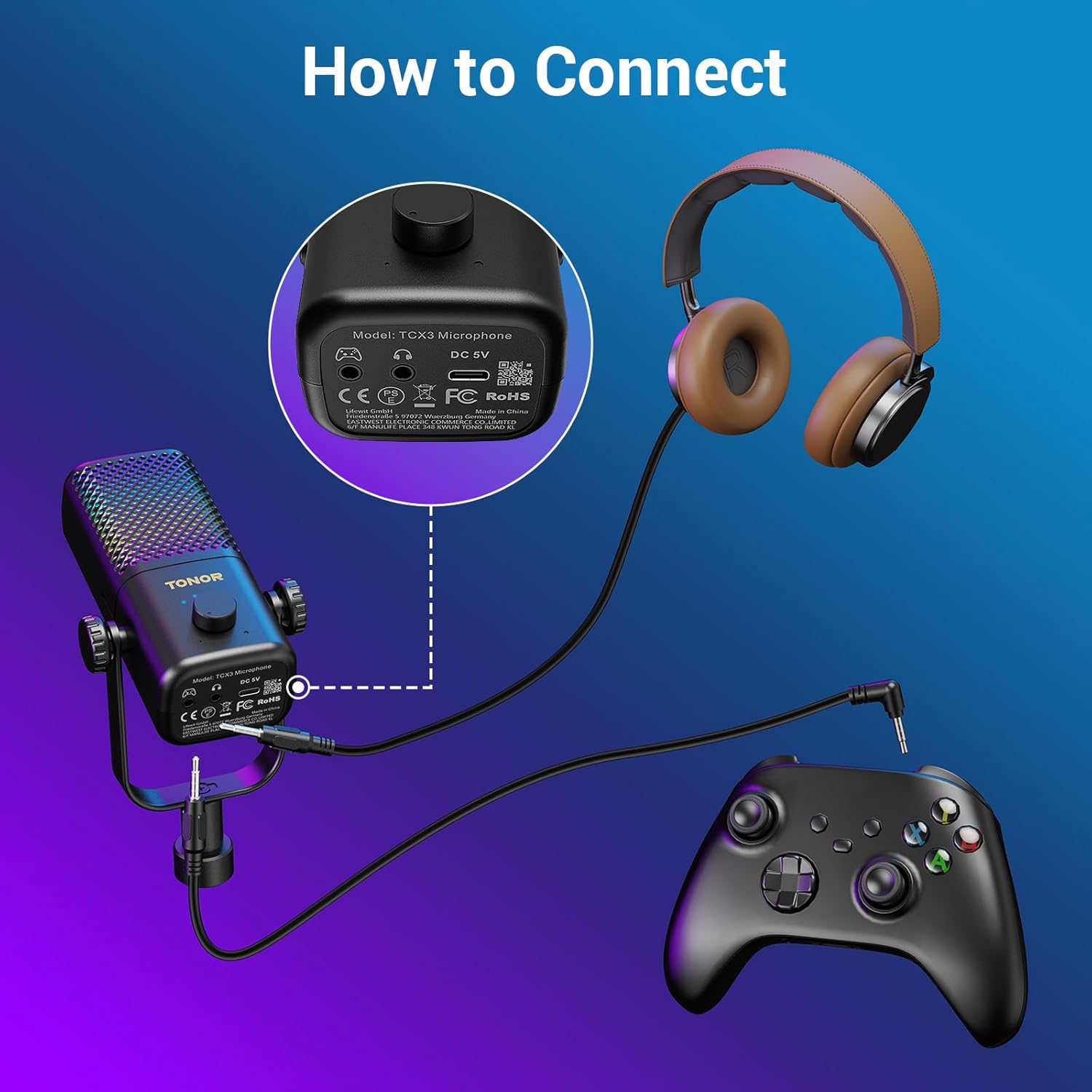
Figure 1: Connecting the TCX3+ microphone to an Xbox controller.
નોંધ: This microphone is not compatible with PC, phone, PS4/5, or Nintendo Switch.

આકૃતિ 2: સુસંગતતા સમાપ્તview for the TCX3+ microphone.
ઓપરેટિંગ સૂચનાઓ
પાવર ચાલુ/બંધ
- To power on the microphone, long press the main knob.
- To power off the microphone, long press the main knob again.
Volume/Gain Control
- Rotate the main knob to adjust the communication volume to your desired level.
મ્યૂટ ફંક્શન
- Tap the top button of the microphone to instantly mute or unmute.

Figure 3: Volume and Mute controls on the TCX3+ microphone.
RGB લાઇટિંગ ઇફેક્ટ્સ
Customize your gaming space with three dynamic RGB modes:
- To activate RGB modes, long press the mute button.
- To switch between modes, lightly press the mute button again.
- You can also turn off the lights for a pure auditory environment.

Figure 4: RGB Light Control options.
મોનીટરીંગ કાર્ય
- To disable the monitoring function, long press the knob.

Figure 5: Multi-functional control for gain and monitoring.
બેટરી જીવન અને ચાર્જિંગ
The TCX3+ microphone is equipped with a long-lasting lithium battery:
- Up to 30 hours of use in non-light mode.
- Up to 10 hours of use in color light mode.
- Quick-charge for just 5 minutes provides an additional hour of gameplay.
મહત્વપૂર્ણ નોંધ: The microphone cannot be used while charging.
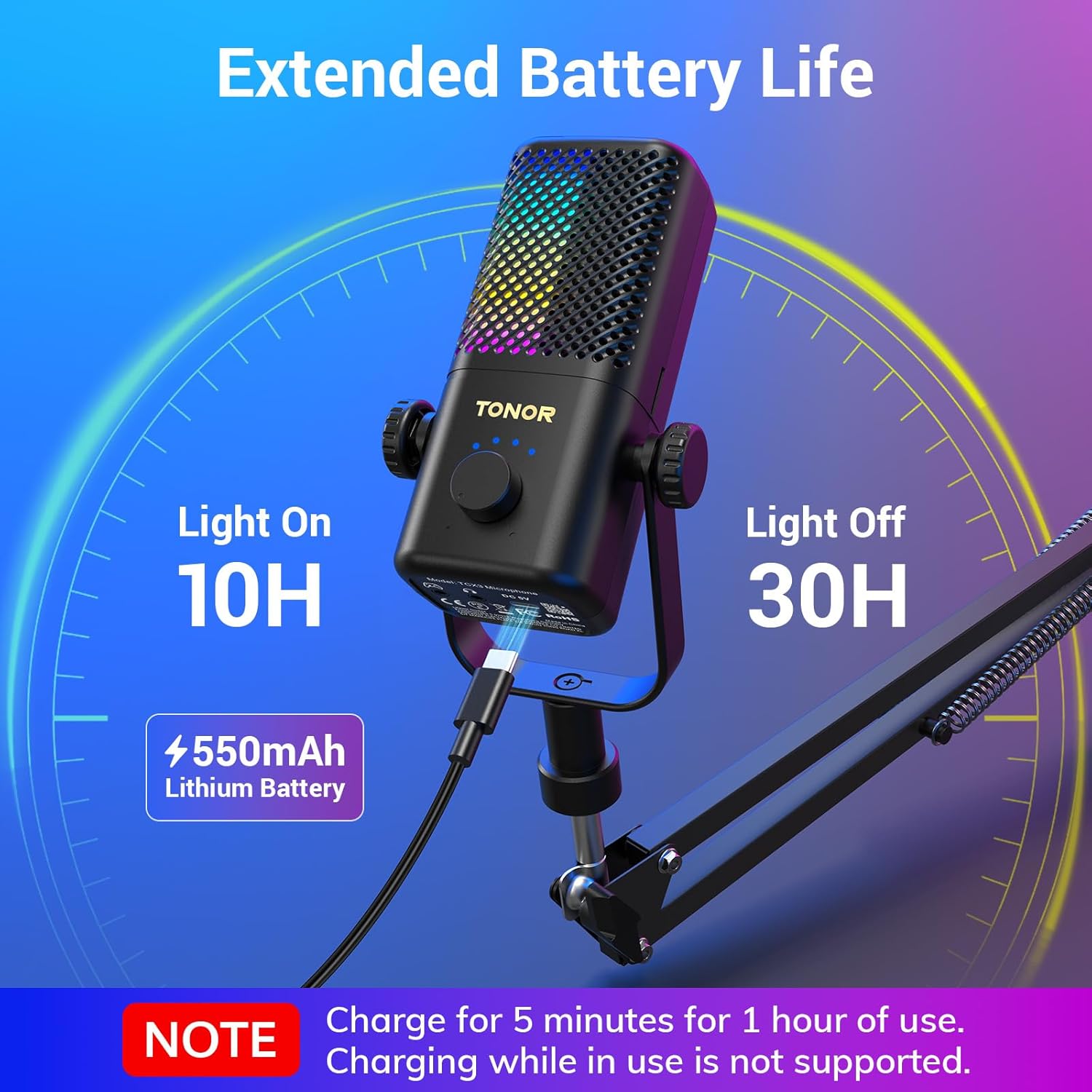
Figure 6: Battery life and quick charging features.
વિશિષ્ટતાઓ
| લક્ષણ | વિગત |
|---|---|
| માઇક્રોફોન ફોર્મ ફેક્ટર | ગુસનેક |
| આઇટમના પરિમાણો (L x W x H) | 16.14 x 5.67 x 5.04 ઇંચ |
| પાવર સ્ત્રોત | DC |
| બેટરીની સંખ્યા | 1 લિથિયમ આયન બેટરી જરૂરી છે (સમાવેલ) |
| સામગ્રી | એક્રેલોનિટ્રાઇલ બ્યુટાડીન સ્ટાયરીન, એલોય સ્ટીલ |
| સિગ્નલ ટુ-અવાજ ગુણોત્તર | 40 ડીબી |
| ચેનલોની સંખ્યા | 1 |
| વસ્તુનું વજન | 2.76 પાઉન્ડ |
| મોડેલનું નામ | TCX3+ |
| કનેક્ટિવિટી ટેકનોલોજી | સહાયક |
| કનેક્ટર પ્રકાર | 3.5 મીમી જેક |
| ખાસ લક્ષણ | Stand, Volume control, Mute, RGB |
| સુસંગત ઉપકરણો | Gamepad (Xbox Controller) |
જાળવણી
To ensure the longevity and optimal performance of your TONOR Gaming Mic TCX3+, follow these maintenance guidelines:
- સફાઈ: Use a soft, dry cloth to clean the microphone and boom arm. Avoid using harsh chemicals or abrasive materials.
- સંગ્રહ: જ્યારે ઉપયોગમાં ન હોય, ત્યારે માઇક્રોફોનને સીધા સૂર્યપ્રકાશ અને અતિશય તાપમાનથી દૂર ઠંડી, સૂકી જગ્યાએ સંગ્રહિત કરો.
- કેબલ કેર: Handle cables gently to prevent damage. Avoid sharp bends or kinks.
મુશ્કેલીનિવારણ
If you encounter any issues with your TONOR Gaming Mic TCX3+, refer to the following common problems and solutions:
- કોઈ અવાજ નથી: Ensure the 3.5mm audio cable is securely connected to both the microphone and the Xbox controller. Check the volume settings on your Xbox and the microphone's gain knob.
- વિકૃત ઑડિઓ: Reduce the microphone's gain level. Ensure you are not too close to the microphone. Check for any interference from other electronic devices.
- RGB લાઈટ્સ કામ કરતી નથી: Ensure the microphone is powered on. Long press the mute button to activate RGB modes, then lightly press to cycle through them.
- માઇક્રોફોન ચાર્જ થઈ રહ્યો નથી: Ensure the USB-A to Type-C cable is properly connected to the microphone and a power source. Remember, the mic cannot be used while charging.
- સુસંગતતા મુદ્દાઓ: Confirm that you are using the microphone with a compatible Xbox controller. The microphone is not compatible with PC, phone, PS4/5, or Nintendo Switch.
વોરંટી અને આધાર
TONOR products come with a standard warranty. For specific warranty details, repair requests, or after-sales service, please refer to the warranty card included in your product packaging or visit the official TONOR webસાઇટ. ખરીદીના પુરાવા તરીકે તમારી ખરીદી રસીદ રાખો.
સત્તાવાર ઉત્પાદન વિડિઓ
Video 1: TONOR Gaming Mic Compatible. This video demonstrates the features and compatibility of the TONOR Gaming Mic TCX3+.


