1. પરિચય અને ઓવરview
The Lockly Vision Elite Video Smart Lock is an advanced security solution designed for modern homes. This smart deadbolt combines a high-definition camera, a secure keypad, and multiple access methods to provide unparalleled convenience and protection for your front door. With features like real-time monitoring, two-way audio, and a unique PIN Genie keypad, you can manage your home's access from anywhere, ensuring peace of mind without monthly fees.
This manual provides comprehensive instructions for the installation, operation, and maintenance of your Lockly Vision Elite Smart Lock.
2. ઉત્પાદન સુવિધાઓ
- Smart Door Lock with Camera: Capture clear footage day or night with the Vision Elite HD camera. Receive real-time notifications on your smartphone via the Lockly Home app, keeping you informed about visitors at your door.
- 2-Way Audio & Fingerprint Sensor: Greet visitors from anywhere with 2-way talk. Unlock your video door lock in just 0.5 seconds using the biometric fingerprint sensor, storing up to 99 fingerprints for privacy and improved accuracy.
- PIN Genie Keypad: Access your lock quickly with the patented PIN Genie keypad, designed to prevent PIN theft through reshuffling technology. Store up to 49 unique access codes for enhanced security.
- Solar Charging & Offline Access: Keep your keyless entry door lock running smoothly with continuous solar charging. Generate Offline Access Codes for entry without internet and easily share one-time codes with guests from anywhere.
- Real-Time Monitoring & Support: Monitor and control your front door smart lock via the Lockly Home app, with no monthly fees. Enjoy a 5-year mechanical warranty and easy DIY installation with step-by-step guidance.
3. પેકેજ સામગ્રી
ઇન્સ્ટોલેશન શરૂ કરતા પહેલા ખાતરી કરો કે બધા ઘટકો હાજર છે:
- Lockly Vision Elite Smart Lock (Exterior Assembly with Camera and Keypad)
- આંતરિક વિધાનસભા
- Deadbolt Assembly
- Strike Plate and Reinforcement Screws
- માઉન્ટિંગ પ્લેટ
- 2 Rechargeable Lithium Polymer Batteries (one pre-installed, one spare)
- ચાર્જિંગ કેબલ
- Physical Keys (2)
- Installation Hardware (screws, bolts)
- ઝડપી પ્રારંભ માર્ગદર્શિકા

Figure 3.1: Lockly Vision Elite Smart Lock and accompanying Wi-Fi hub.
4. સેટઅપ અને ઇન્સ્ટોલેશન
The Lockly Vision Elite Smart Lock is designed for easy DIY installation. Before you begin, ensure your door is compatible with the lock's dimensions. A Phillips head screwdriver is typically the only tool required.
૪.૧ દરવાજાની સુસંગતતા તપાસ
Before installation, measure your door's thickness and backset to ensure compatibility. The Lockly Vision Elite fits standard door preparations.
- Door Thickness: 1⅜" – 2" (35mm – 50mm)
- Backset: 2⅜" or 2¾" (60mm or 70mm)
- Cross Bore: 2⅛" (54mm)
- Edge Bore: 1" (25mm)

Figure 4.1: Door compatibility measurements.
૩.૨ સ્થાપન પગલાં (ઉપરview)
- તમારા હાલના ડેડબોલ્ટને દૂર કરો.
- Install the new deadbolt assembly.
- Install the exterior assembly, ensuring the cable passes through the door.
- આંતરિક માઉન્ટિંગ પ્લેટ ઇન્સ્ટોલ કરો.
- Connect the cable and install the interior assembly.
- Insert the fully charged battery pack.
- Perform the door handing process (calibration).
- Download the Lockly Home app and pair your lock.
For detailed, step-by-step visual instructions, please refer to the official Lockly installation manual or video guides available on the Lockly support webસાઇટ
5. ઓપરેટિંગ સૂચનાઓ
5.1 Unlocking Your Door
- ફિંગરપ્રિન્ટ ઍક્સેસ: Place your registered finger on the biometric fingerprint sensor located on the side of the lock. The lock will unlock in approximately 0.5 seconds.
- PIN Genie Keypad: Touch the screen to activate the keypad. The numbers will shuffle randomly. Enter your 6-8 digit access code by pressing the numbers displayed within the circles. Press the Lockly button (bottom right) to confirm.
- સ્માર્ટફોન એપ્લિકેશન: Open the Lockly Home app, select your lock, and tap the unlock icon.
- ભૌતિક ચાવી: Lift the cover at the bottom of the exterior assembly to reveal the keyhole. Insert your physical key and turn to unlock.
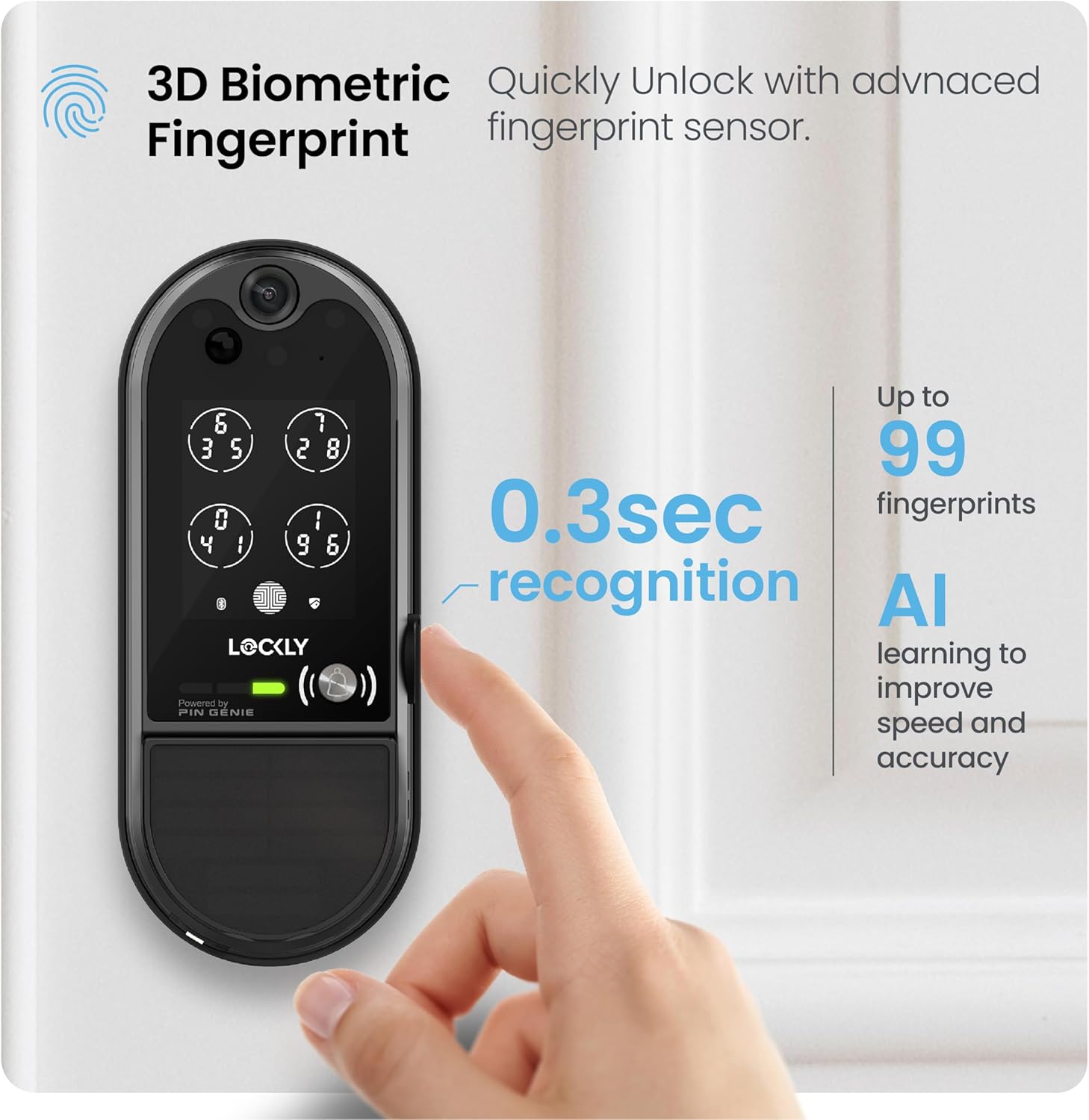
Figure 5.1: Unlocking with the 3D Biometric Fingerprint sensor.

Figure 5.2: Using the patented PIN Genie Keypad.
5.2 Locking Your Door
- સ્વત લોક: The lock can be configured to automatically lock after a set period (5-300 seconds) once closed.
- Manual Lock (Exterior): Press the Lockly button on the keypad.
- Manual Lock (Interior): Turn the thumb-turn on the interior assembly.
- સ્માર્ટફોન એપ્લિકેશન: Open the Lockly Home app, select your lock, and tap the lock icon.
૬.૨. એપ્લિકેશન નિયંત્રણ અને કનેક્ટિવિટી
The Lockly Home app provides full control and monitoring capabilities for your smart lock. It connects via Wi-Fi through the included Wi-Fi hub.
6.1 Key App Features
- Remote Lock/Unlock: Control your door from anywhere in the world.
- રીઅલ-ટાઇમ સૂચનાઓ: Receive alerts for door activity, motion detection, and low battery.
- ઍક્સેસ ઇતિહાસ: View a log of who entered and when.
- કોડ મેનેજમેન્ટ: Create, modify, and delete access codes (One-Time, Recurring, Permanent).
- Offline Access Codes (OAC): Generate codes that work even without internet connectivity.
- દ્વિ-માર્ગી ઓડિયો: Communicate with visitors at your door directly through the app.
- જીવંત View: Access the camera feed to see who is at your door.
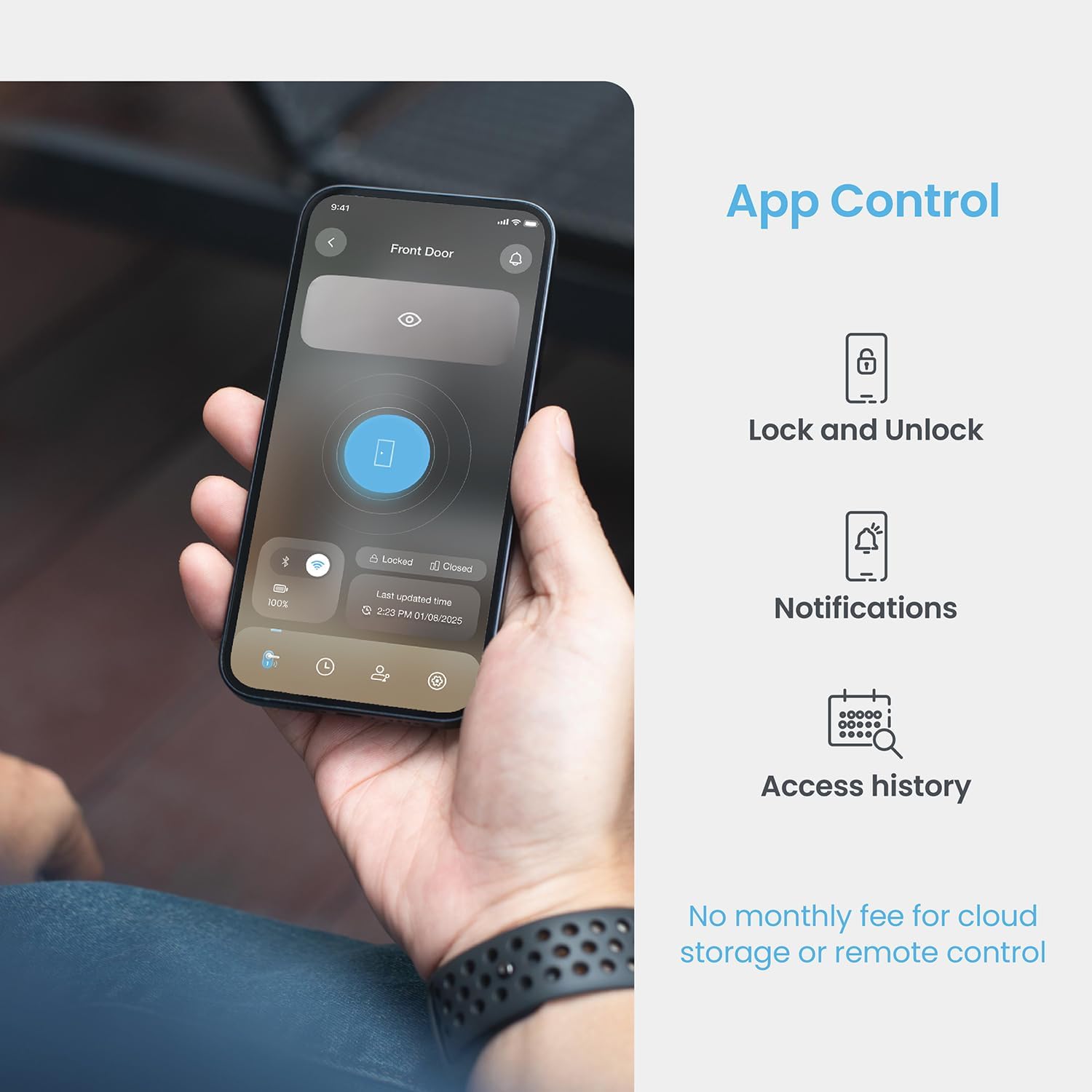
Figure 6.1: Lockly Home App for remote control.

Figure 6.2: Two-way audio communication via the app.
૭.૩ વૉઇસ કંટ્રોલ ઇન્ટિગ્રેશન
The Lockly Vision Elite is compatible with popular voice assistants, allowing for convenient voice commands to lock or unlock your door (with proper security settings).
- એલેક્સા સાથે કામ કરે છે
- Google Assistant સાથે કામ કરે છે

Figure 6.3: Voice control integration.
7. સુરક્ષા સુવિધાઓ
The Lockly Vision Elite is built with multiple layers of security to protect your home.
- PIN Genie Keypad: The patented keypad dynamically shuffles the numbers after each use, making it impossible for onlookers to guess your code by observing finger placement.
- 3D Biometric Fingerprint Sensor: Provides quick and secure access, recognizing up to 99 unique fingerprints.
- HD Camera with Motion Detection: Records clear video footage and sends real-time alerts when motion is detected at your door. Features day and night vision.
- દ્વિ-માર્ગી ઓડિયો: Allows you to speak with visitors remotely, deterring unwanted guests.
- Physical Key Backup: In case of power loss or technical issues, traditional keys provide reliable backup access.

Figure 7.1: Motion detection and Day/Night HD Camera.
8. પાવર મેનેજમેન્ટ
Your Lockly Vision Elite Smart Lock is designed for long-lasting power and convenience.
- સૌર ચાર્જિંગ: An integrated solar panel on the exterior assembly provides continuous charging, extending battery life significantly.
- રિચાર્જ કરવા યોગ્ય બેટરીઓ: The lock uses Lithium Polymer batteries (included). Up to 13 months of battery life can be expected under normal usage conditions. Two batteries are included for convenience, allowing one to be charged while the other is in use.
- 9V Battery Backup: In the event of a completely drained battery, a 9V battery can be temporarily connected to the contacts at the bottom of the exterior assembly to provide emergency power for access.

Figure 8.1: Solar charging and battery features.
9. જાળવણી
- સફાઈ: સોફ્ટનો ઉપયોગ કરો, ડીamp cloth to clean the exterior and keypad. Avoid abrasive cleaners or solvents that could damage the finish or electronics.
- બેટરી ચાર્જિંગ: Periodically check the battery level via the Lockly Home app. If the solar panel is not providing sufficient charge (e.g., during prolonged cloudy periods), remove the battery pack and charge it using the provided USB cable.
- ફર્મવેર અપડેટ્સ: Ensure your lock's firmware is up to date through the Lockly Home app to benefit from the latest features and security enhancements.
10. મુશ્કેલીનિવારણ
| સમસ્યા | સંભવિત કારણ | ઉકેલ |
|---|---|---|
| Lock not responding / No power. | ડ્રેઇન કરેલ બેટરી. | Charge the battery pack. Use a 9V battery for emergency power. |
| ફિંગરપ્રિન્ટ ઓળખાઈ નથી. | Improper finger placement, dirty sensor, unregistered fingerprint. | Ensure finger covers the entire sensor. Clean the sensor. Re-register fingerprint if needed. |
| Keypad not lighting up. | Battery issue, sensor not activated. | Tap the screen to activate. Check battery level. |
| Cannot connect to Wi-Fi / App issues. | Wi-Fi hub not powered, out of range, network issues. | Ensure Wi-Fi hub is powered and within range. Restart router/hub. Check app for updates. |
| Door does not lock/unlock smoothly. | Misalignment, weak battery, obstruction. | Check door alignment and strike plate. Ensure battery is charged. Remove any obstructions. |
If you encounter persistent issues, please refer to the support section or contact Lockly customer service.
11. સ્પષ્ટીકરણો
| લક્ષણ | વિગત |
|---|---|
| બ્રાન્ડ | લોકલી |
| મોડેલનું નામ | લોકલી વિઝન એલીટ |
| રંગ | મેટ બ્લેક |
| સામગ્રી | ઝીંક |
| આઇટમના પરિમાણો (L x W x H) | 9.2 x 9.4 x 4.3 ઇંચ |
| વસ્તુનું વજન | 7.11 પાઉન્ડ |
| ઇન્ડોર/આઉટડોર વપરાશ | Indoor (for the lock unit itself, camera faces outdoor) |
| નિયંત્રણ પદ્ધતિ | App, Keypad, Fingerprint, Physical Key, Voice |
| કનેક્ટિવિટી ટેકનોલોજી | Wireless (Wi-Fi via hub) |
| બેટરી જરૂરી છે | Yes, 1 Lithium Polymer (included) |
| ખાસ લક્ષણો | Auto-Lock, Fingerprint, Night Vision Camera, PIN Genie® Keypad, Video doorbell, Solar Charging |
| યુપીસી | 810055605989 |
12. વોરંટી અને સપોર્ટ
Lockly stands behind the quality of its products.
- યાંત્રિક વોરંટી: Your Lockly Vision Elite Smart Lock comes with a 5-year mechanical warranty.
- ટેકનિકલ સપોર્ટ: Lockly offers reliable and helpful 24/7 customer support via online chat, phone, and email.
For warranty claims or technical assistance, please visit the official Lockly webસાઇટ પર જાઓ અથવા તેમની સપોર્ટ ટીમનો સીધો સંપર્ક કરો.


