પરિચય
The AFEXOA Astronaut Sunrise Alarm Clock is a versatile 4-in-1 device designed to enhance sleep and wake-up routines. It combines a digital alarm clock, a white noise sound machine, a Bluetooth speaker, and a bedside night light. This manual provides detailed instructions for setup, operation, and maintenance to ensure optimal use of your device.
પેકેજ સામગ્રી
- Astronaut Sunrise Alarm Clock Unit
- રીમોટ કંટ્રોલ
- USB-C ચાર્જિંગ કેબલ
- વપરાશકર્તા માર્ગદર્શિકા
ઉત્પાદન ઓવરview
The Astronaut Sunrise Alarm Clock features a unique design with an astronaut figure and a detachable light-up helmet. The base contains the digital display and control buttons, while the remote offers convenient wireless operation.
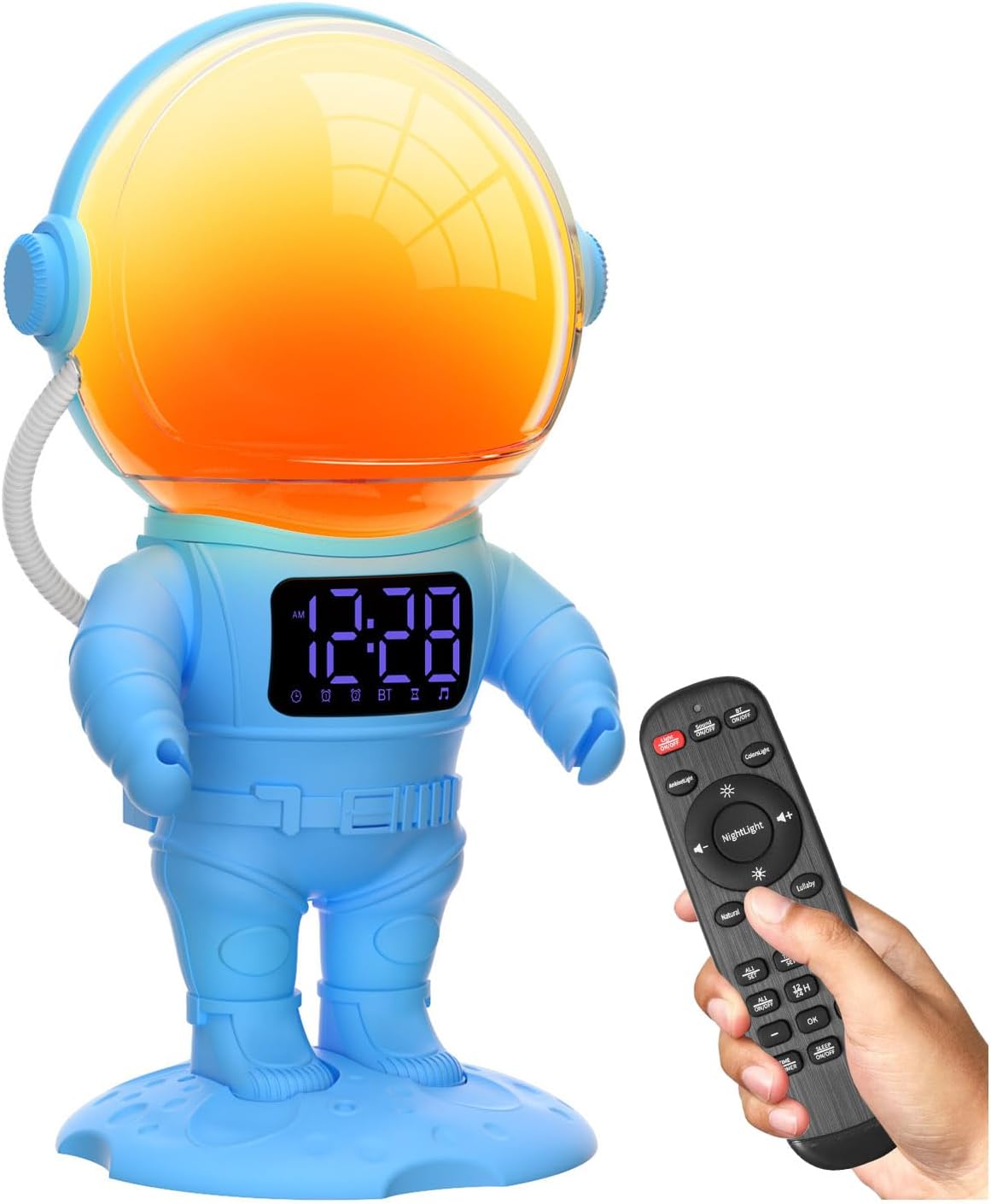
સેટઅપ
પાવરિંગ ચાલુ
- Connect the provided USB-C cable to the charging port on the back of the astronaut's base and plug the other end into a compatible USB power adapter (not included).
- The device includes a pre-installed CR2032 battery for time backup in case of power loss.
સમય સુયોજિત કરી રહ્યા છીએ
- Press and hold the 'Time Set' button on the device or remote.
- Use the '+' or '-' buttons to adjust the hour. Press 'Time Set' again to confirm.
- Use the '+' or '-' buttons to adjust the minutes. Press 'Time Set' again to confirm.
- Select 12-hour or 24-hour format using the '+' or '-' buttons. Press 'Time Set' to finalize.
ઓપરેટિંગ સૂચનાઓ
Dual Digital Alarm Clocks
The alarm clock features two independent alarms (Alarm 1 and Alarm 2) with sunrise simulation and customizable sounds.
- Setting Alarm Time: Press and hold the 'Alarm 1' or 'Alarm 2' button. Use '+' or '-' to set the hour and minutes. Press the alarm button again to confirm each step.
- સૂર્યોદય અનુકરણ: The analog light will gradually turn on from 1% brightness to 100% over a period of 10-120 minutes before the set alarm time. This feature is designed for a gentle wake-up experience.
- અલાર્મ અવાજો: Choose from 7 soothing wake-up sounds. Use the music note button to cycle through options.
- સ્નૂઝ ફંક્શન: When the alarm sounds, tap the astronaut's helmet or press the 'Snooze' button on the remote for a 9-minute snooze.


સફેદ અવાજ સાઉન્ડ મશીન
The device offers 30 non-looping soothing sounds to aid sleep and relaxation.
- અવાજો પસંદ કરી રહ્યા છીએ: Press the 'Sound' button to cycle through 30 different sounds, including white noise, fans, rain, ocean, and lullabies.
- વોલ્યુમ નિયંત્રણ: Adjust the volume with 16 precise levels using the 'Volume +' or 'Volume -' buttons.
- સ્લીપ ટાઇમર: Set an automatic shut-off timer for 15, 30, 45, 60, or 90 minutes. The sound and light will gradually dim and turn off.

Dimmable Nightlights
Enjoy 22 dimmable night light options for various moods and uses.
- રંગ પસંદગી: Tap the astronaut's helmet or use the 'Light' button on the remote to cycle through 8 solid colors and 14 RGB lighting effects, including music rhythm effects.
- બ્રાઇટનેસ એડજસ્ટમેન્ટ: Adjust the brightness from 0-20 levels using the 'Brightness +' or 'Brightness -' buttons.
- Detachable Light: The astronaut's helmet can be detached from the base and used as a portable night light.

બ્લૂટૂથ સ્પીકર
Connect your device via Bluetooth to play your favorite audio.
- જોડી બનાવવું: Activate Bluetooth on your smartphone or other audio device. Select 'BL60' from the list of available devices to pair.
- પ્લેબેક: Once paired, audio from your device will play through the Astronaut Sunrise Alarm Clock's speaker. Use your device or the remote to control playback and volume.
રીમોટ કંટ્રોલ
સમાવિષ્ટ રિમોટ કંટ્રોલ દૂરથી બધા કાર્યોની અનુકૂળ ઍક્સેસ પ્રદાન કરે છે.
- પાવર બટન: ઉપકરણ ચાલુ/બંધ કરે છે.
- પ્રકાશ નિયંત્રણ: Adjusts light color and brightness.
- ધ્વનિ નિયંત્રણ: Cycles through soothing sounds and adjusts volume.
- એલાર્મ સેટિંગ્સ: Accesses and modifies alarm times and settings.
- સ્નૂઝ કરો: Activates the snooze function.
જાળવણી
- Clean the device with a soft, dry cloth. Avoid using abrasive cleaners or solvents.
- To replace the CR2032 backup battery, open the battery compartment on the base, insert a new battery with the correct polarity, and close the compartment securely.
મુશ્કેલીનિવારણ
- ઉપકરણ ચાલુ નથી: Ensure the USB-C cable is securely connected and the power adapter is working.
- એલાર્મ વાગતો નથી: Verify that the alarm is enabled and the volume is not set to zero.
- બ્લૂટૂથ પેરિંગ સમસ્યાઓ: Ensure the device is in pairing mode and within range of your audio device. Try restarting both devices.
- રીમોટ કંટ્રોલ કામ કરતું નથી: Check the remote's battery. Ensure there are no obstructions between the remote and the alarm clock.
વિશિષ્ટતાઓ
| બ્રાન્ડ | AFEXOA |
| મોડલ નંબર | BL60 |
| ઉત્પાદન પરિમાણો | ૨.૩૬"પગ x ૪.૦૬"પગ |
| વસ્તુનું વજન | 1.06 પાઉન્ડ |
| પાવર સ્ત્રોત | કોર્ડેડ ઇલેક્ટ્રિક |
| બેકઅપ બેટરી | ૧ CR2032 (શામેલ) |
| ડિસ્પ્લે પ્રકાર | ડિજિટલ |
| સામગ્રી | એક્રેલોનિટ્રિલ બુટાડીએન સ્ટાયરેન |
વોરંટી અને આધાર
This product comes with a standard manufacturer's warranty. For specific warranty details, technical support, or customer service inquiries, please refer to the contact information provided on the product packaging or the official AFEXOA webસાઇટ
સત્તાવાર ઉત્પાદન વિડિઓઝ
Sunrise Alarm Clock for Kids Gift Idea
This video from YunLin-Direct showcases the AFEXOA Astronaut Sunrise Alarm Clock as a gift idea for children, highlighting its features and appeal.
જાગો પ્રકાશ સૂર્યોદય એલાર્મ ઘડિયાળ
Amazon Shopping with Elena presents a video demonstrating the wake-up light functionality of the AFEXOA Sunrise Alarm Clock, showing how it simulates natural sunrise.
Watch this before purchasing!
વિગતવાર પુનઃview by Fernandez Family Reviews, offering insights into the AFEXOA Astronaut Sunrise Alarm Clock's features and performance.
Wow Space Lovers this is for You!
MrzNez provides a video review of the AFEXOA Astronaut Sunrise Alarm Clock, highlighting its appeal to space enthusiasts and its various functions.
The coolest alarm clock I have ever seen!
Sara Little shares a video review of the AFEXOA Astronaut Sunrise Alarm Clock, expressing enthusiasm for its unique design and features.


