1. પરિચય
This manual provides essential information for the safe and efficient operation of your Smart Tech 24-inch HD Smart TV (Model 24HW01V). Please read it thoroughly before using the television and retain it for future reference.
The Smart Tech 24-inch (60 cm) TV is a compact and connected television designed for various spaces such as bedrooms, kitchens, or small living areas. Featuring the WebOS system, it offers easy access to popular streaming services like Netflix, YouTube, and Prime Video, combined with optimized picture and sound quality.

છબી 1.1: આગળ view of the Smart Tech 24-inch HD Smart TV.
2. સલામતી માહિતી
સલામત કામગીરી સુનિશ્ચિત કરવા અને નુકસાન અટકાવવા માટે, નીચેની સાવચેતીઓનું પાલન કરો:
- પાવર સપ્લાય: ટીવીને ફક્ત ઉલ્લેખિત વોલ્યુમની અંદર AC પાવર સ્ત્રોત સાથે કનેક્ટ કરોtage શ્રેણી.
- વેન્ટિલેશન: ટીવીની આસપાસ પૂરતું વેન્ટિલેશન સુનિશ્ચિત કરો. વેન્ટિલેશનના છિદ્રોને અવરોધશો નહીં.
- પાણી અને ભેજ: Do not expose the TV to rain, moisture, or excessive humidity.
- ગરમીના સ્ત્રોતો: Keep the TV away from heat sources such as radiators, heat registers, stoves, or other heat-producing appliances.
- સફાઈ: સફાઈ કરતા પહેલા ટીવીને અનપ્લગ કરો. નરમ, સૂકા કપડાનો ઉપયોગ કરો. પ્રવાહી અથવા એરોસોલ ક્લીનર્સનો ઉપયોગ કરશો નહીં.
- પ્લેસમેન્ટ: ટીવીને પડવાથી બચાવવા માટે તેને સ્થિર, સમતલ સપાટી પર મૂકો.
- સર્વિસિંગ: આ ઉત્પાદનની જાતે સેવા કરવાનો પ્રયાસ કરશો નહીં. લાયક સેવા કર્મચારીઓને તમામ સેવાઓનો સંદર્ભ આપો.
3. પેકેજ સામગ્રી
ખાતરી કરો કે બધી વસ્તુઓ પેકેજિંગમાં હાજર છે:
- Smart Tech 24-inch HD Smart TV
- રીમોટ કંટ્રોલ
- પાવર કેબલ
- ટીવી સ્ટેન્ડ (2 ટુકડાઓ)
- ટીવી સ્ટેન્ડ માટે સ્ક્રૂ
- વપરાશકર્તા માર્ગદર્શિકા (આ દસ્તાવેજ)
- ઝડપી પ્રારંભ માર્ગદર્શિકા
4. Physical Features and Connections
4.1. પરિમાણો
The Smart Tech 24HW01V TV has the following approximate dimensions:
- પહોળાઈ: 53.48 સે.મી
- ઊંચાઈ (સ્ટેન્ડ સાથે): 35.39 સે.મી
- ઊંડાઈ (સ્ટેન્ડ સાથે): 21.0 સે.મી
- સ્ક્રીન કર્ણ: 24 ઇંચ (60 સે.મી.)

Image 4.1: TV dimensions (width, height, depth, and screen diagonal).
4.2. કનેક્ટર્સ
The TV is equipped with various ports for connecting external devices:
- સીઆઈ સ્લોટ: For Common Interface modules (e.g., for pay-TV).
- USB x 2: મીડિયા ચલાવવા માટે USB સ્ટોરેજ ડિવાઇસને કનેક્ટ કરવા માટે.
- DVB-T2: Antenna input for terrestrial digital television.
- DVB-S2: Satellite input for digital satellite television.
- HDMI x 3: High-Definition Multimedia Interface for connecting devices like Blu-ray players, game consoles, or set-top boxes. One port supports ARC (Audio Return Channel).
- ઇયરફોન: 3.5mm audio output for headphones.
- મિની AV IN: For connecting older analog devices using an adapter (adapter not always included).
- ઓપ્ટિકલ: Digital audio output for connecting to soundbars or home theater systems.
- RJ45 (ઇથરનેટ): વાયર્ડ નેટવર્ક કનેક્શન માટે.

છબી 4.2: પાછળ view of the TV showing available connectors.
5. સેટઅપ
5.1. ટીવી સ્ટેન્ડ જોડવું
- સ્ક્રીનને નુકસાન ન થાય તે માટે ટીવીનો ચહેરો નરમ, સ્વચ્છ સપાટી પર કાળજીપૂર્વક નીચે રાખો.
- ટીવીના તળિયે અનુરૂપ સ્લોટ્સ સાથે સ્ટેન્ડના ટુકડાઓને સંરેખિત કરો.
- આપેલા સ્ક્રૂનો ઉપયોગ કરીને સ્ટેન્ડના ટુકડાઓને સુરક્ષિત કરો. ખાતરી કરો કે તે મજબૂત રીતે કડક થયા છે.
5.2. પાવર અને ઉપકરણોને જોડવું
- પાવર કેબલને ટીવીના પાવર ઇનપુટ સાથે અને પછી દિવાલના આઉટલેટ સાથે જોડો.
- Connect your antenna or satellite cable to the DVB-T2 or DVB-S2 input.
- For external devices (e.g., game console, Blu-ray player), connect an HDMI cable from the device to one of the HDMI ports on the TV.
- For a wired internet connection, connect an Ethernet cable to the RJ45 port.
5.3. પ્રારંભિક સેટઅપ વિઝાર્ડ
પહેલી વાર પાવર-ઓન થવા પર, ટીવી તમને પ્રારંભિક સેટઅપ પ્રક્રિયામાં માર્ગદર્શન આપશે:
- ભાષા પસંદગી: તમારી પસંદીદા ભાષા પસંદ કરો.
- નેટવર્ક કનેક્શન: Select your Wi-Fi network and enter the password, or confirm the wired connection.
- ચેનલ સ્કેન: ટીવી ઉપલબ્ધ ડિજિટલ ચેનલો માટે સ્કેન કરશે.
- સમય ઝોન અને તારીખ: Set the correct time zone and date.
- WebOS Account: You may be prompted to create or log in to a WebOS account to access all Smart TV features.
6. ઓપરેટિંગ સૂચનાઓ
6.1. રીમોટ કંટ્રોલ
The included remote control provides access to all TV functions. It features dedicated buttons for popular streaming services.

Image 6.1: Remote control with one-click access buttons for Netflix and Prime Video.
- પાવર બટન: ટીવી ચાલુ કે બંધ કરે છે.
- નંબર બટનો: સીધી ચેનલ પસંદગી માટે.
- વોલ્યુમ અપ/ડાઉન: વોલ્યુમ સ્તરને સમાયોજિત કરે છે.
- ચેનલ ઉપર/નીચે: ટીવી ચેનલો બદલે છે.
- Navigation Buttons (Arrow Keys, OK): મેનુઓ નેવિગેટ કરો અને વિકલ્પો પસંદ કરો.
- પાછળ/બહાર નીકળો: પાછલી સ્ક્રીન પર પાછા ફરે છે અથવા મેનૂમાંથી બહાર નીકળે છે.
- હોમ બટન: ઍક્સેસ કરે છે Webઓએસ સ્માર્ટ ટીવી હોમ સ્ક્રીન.
- નેટફ્લિક્સ/પ્રાઈમ વિડીયો બટન્સ: Direct access to these streaming applications.
6.2. સ્માર્ટ ટીવી સુવિધાઓ (WebOS Hub)
Your Smart Tech TV is powered by WebOS Hub, offering a user-friendly interface and access to a wide range of applications and features.

છબી 6.2: ઓવરview of key Smart TV features.
- WebOS Hub: Navigate through a customizable launcher bar to quickly access apps, live TV, and connected devices.
- Streaming Applications: Enjoy pre-installed apps like Netflix, YouTube, and Prime Video. Additional apps can be downloaded from the Webઓએસ કન્ટેન્ટ સ્ટોર.
- વાયરલેસ કનેક્ટિવિટી: Built-in Wi-Fi and Bluetooth allow for easy internet access and connection to wireless accessories.
- AirPlay Support: Share content wirelessly from your Apple devices (iPhone, iPad, Mac) directly to your TV screen.
- LG ThinQ Compatibility: Integrate your TV into your smart home ecosystem for enhanced control and automation.
- HDR10 સપોર્ટ: Experience enhanced contrast and color with HDR10 compatible content.
- ટ્રિપલ ટ્યુનર: Supports DVB-T2 (terrestrial), DVB-S2 (satellite), and DVB-C (cable) for versatile reception options.
7. જાળવણી
7.1. ટીવી સાફ કરવું
- સફાઈ કરતા પહેલા હંમેશા ટીવીને પાવર આઉટલેટમાંથી અનપ્લગ કરો.
- સ્ક્રીન અને કેબિનેટને હળવા હાથે સાફ કરવા માટે નરમ, સૂકા, લિન્ટ-ફ્રી કાપડનો ઉપયોગ કરો.
- હઠીલા ગુણ માટે, થોડું ડીampen the cloth with water or a specialized screen cleaner (ensure it's safe for TV screens). Do not spray liquid directly onto the screen.
- ઘર્ષક ક્લીનર્સ, મીણ અથવા દ્રાવકનો ઉપયોગ કરવાનું ટાળો.
7.2. સોફ્ટવેર અપડેટ્સ
The TV may receive software updates to improve performance and add new features. It is recommended to enable automatic updates or check for updates periodically through the TV's settings menu.
8. મુશ્કેલીનિવારણ
જો તમને તમારા ટીવીમાં સમસ્યાઓ આવે, તો નીચેના સામાન્ય ઉકેલોનો સંદર્ભ લો:
| સમસ્યા | સંભવિત કારણ | ઉકેલ |
|---|---|---|
| કોઈ શક્તિ નથી | Power cable disconnected; power outlet issue | પાવર કેબલ કનેક્શન તપાસો; કોઈ અલગ આઉટલેટ અજમાવી જુઓ. |
| કોઈ ચિત્ર નથી, પણ અવાજ છે. | Incorrect input source; backlight issue | Press the "Source" button on the remote to select the correct input. |
| અવાજ નથી, પણ ચિત્ર હાજર છે. | Volume muted or too low; external audio system issue | અવાજ વધારો; મ્યૂટ સ્થિતિ તપાસો; બાહ્ય ઑડિઓ કનેક્શન ચકાસો. |
| Wi-Fi થી કનેક્ટ કરી શકાતું નથી | ખોટો પાસવર્ડ; રાઉટરમાં સમસ્યા; ટીવી રાઉટરથી ખૂબ દૂર છે | પાસવર્ડ ફરીથી દાખલ કરો; રાઉટર ફરી શરૂ કરો; ટીવી નજીક ખસેડો અથવા વાયર્ડ કનેક્શનનો ઉપયોગ કરો. |
| રીમોટ કંટ્રોલ કામ કરતું નથી | Dead batteries; obstruction; remote not paired | બેટરી બદલો; અવરોધો દૂર કરો; જો જરૂરી હોય તો રિમોટ ફરીથી જોડો. |
જો આ ઉકેલો અજમાવ્યા પછી પણ સમસ્યા ચાલુ રહે, તો કૃપા કરીને ગ્રાહક સપોર્ટનો સંપર્ક કરો.
9. સ્પષ્ટીકરણો
| લક્ષણ | વિગત |
|---|---|
| બ્રાન્ડ | સ્માર્ટ ટેક |
| મોડલ નંબર | 24HW01V |
| સ્ક્રીન માપ | 24 ઇંચ (60 સે.મી.) |
| ડિસ્પ્લે ટેકનોલોજી | એલઇડી |
| ઠરાવ | 720 પી (1366 x 768) |
| તાજું દર | 60 હર્ટ્ઝ |
| ઓપરેટિંગ સિસ્ટમ | WebOS |
| સપોર્ટેડ ઈન્ટરનેટ સેવાઓ | નેટફ્લિક્સ, પ્રાઇમ વિડીયો, યુટ્યુબ |
| કનેક્ટિવિટી ટેકનોલોજી | ઇથરનેટ, HDMI, USB, Wi-Fi |
| HDMI પોર્ટ્સ | 3 |
| યુએસબી પોર્ટ્સ | 2 |
| ખાસ લક્ષણો | Integrated Speaker, HDR10, Triple Tuner, AirPlay, LG ThinQ |
| ઉર્જા કાર્યક્ષમતા વર્ગ | E |
| ઉત્પાદનના પરિમાણો (LxWxH) | 21P x 53l x 35H cm (Depth x Width x Height) |
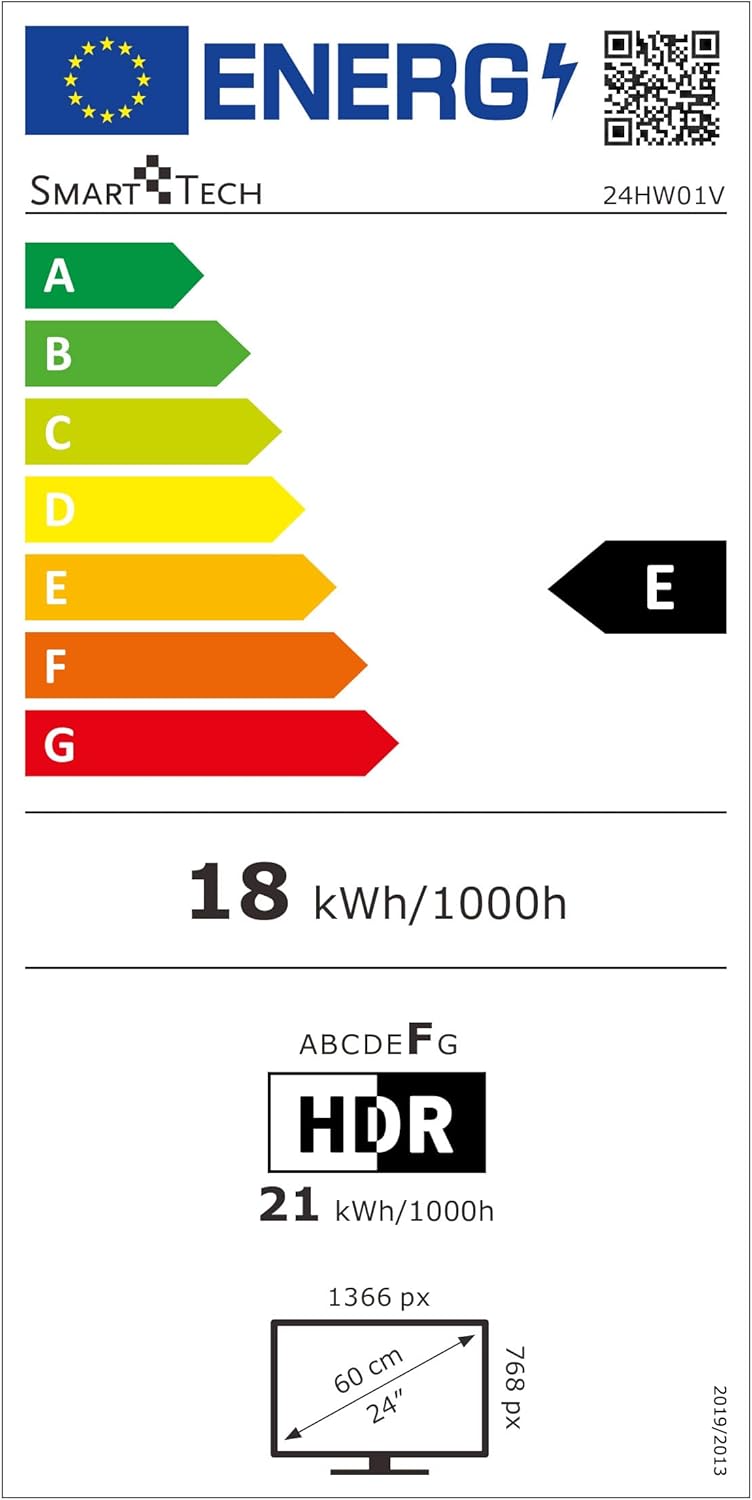
Image 9.1: EU Energy Label for Model 24HW01V. For more details, visit eprel.ec.europa.eu/qr/2124911.
10. વોરંટી અને સપોર્ટ
Smart Tech products are designed for durability and performance. This product comes with a standard manufacturer's warranty. Please refer to the warranty card included in your package for specific terms and conditions.
સ્પેર પાર્ટ્સની ઉપલબ્ધતા: Spare parts for this model are guaranteed to be available for up to 11 years from the date of purchase.
For technical support, troubleshooting assistance, or warranty claims, please contact Smart Tech customer service through their official webસાઇટ અથવા તમારા ઉત્પાદન દસ્તાવેજોમાં આપેલી સંપર્ક માહિતી.


