1. પરિચય
ખરીદી બદલ આભારasing the COLSUR K8-WHITE Portable Bluetooth CD Player. This device is designed to provide versatile audio entertainment, combining CD playback with modern features like Bluetooth connectivity, FM radio, and a multi-level table lamp. Please read this manual thoroughly before use to ensure proper operation and to maximize your enjoyment of the product.
2. સલામતી માહિતી
- ઉપકરણને વરસાદ, ભેજ અથવા અતિશય તાપમાનના સંપર્કમાં ન લાવો.
- ઉપકરણને ગરમીના સ્ત્રોતોની નજીક અથવા સીધા સૂર્યપ્રકાશમાં રાખવાનું ટાળો.
- ઉપકરણને ડિસએસેમ્બલ કરશો નહીં અથવા તેને જાતે રિપેર કરવાનો પ્રયાસ કરશો નહીં. બધી સર્વિસિંગ લાયક કર્મચારીઓને સોંપો.
- ઉપકરણને મજબૂત ચુંબકીય ક્ષેત્રોથી દૂર રાખો.
- Use only the provided Type-C charging cable and a compatible power adapter (not included) for charging.
- ઉપકરણ ચલાવતી વખતે યોગ્ય વેન્ટિલેશનની ખાતરી કરો.
3. પેકેજ સામગ્રી
કૃપા કરીને નીચેની વસ્તુઓ માટે પેકેજ તપાસો:
- COLSUR K8-WHITE Portable Bluetooth CD Player
- ટાઇપ-સી ચાર્જિંગ કેબલ
- વપરાશકર્તા માર્ગદર્શિકા
- Wall Mount Kit (if applicable)
- ટેબલ સ્ટેન્ડ (જો લાગુ પડે તો)
4. ઉત્પાદન ઓવરview
The COLSUR K8-WHITE is a versatile audio device designed for various listening experiences. It features a compact design suitable for tabletop placement or wall mounting.
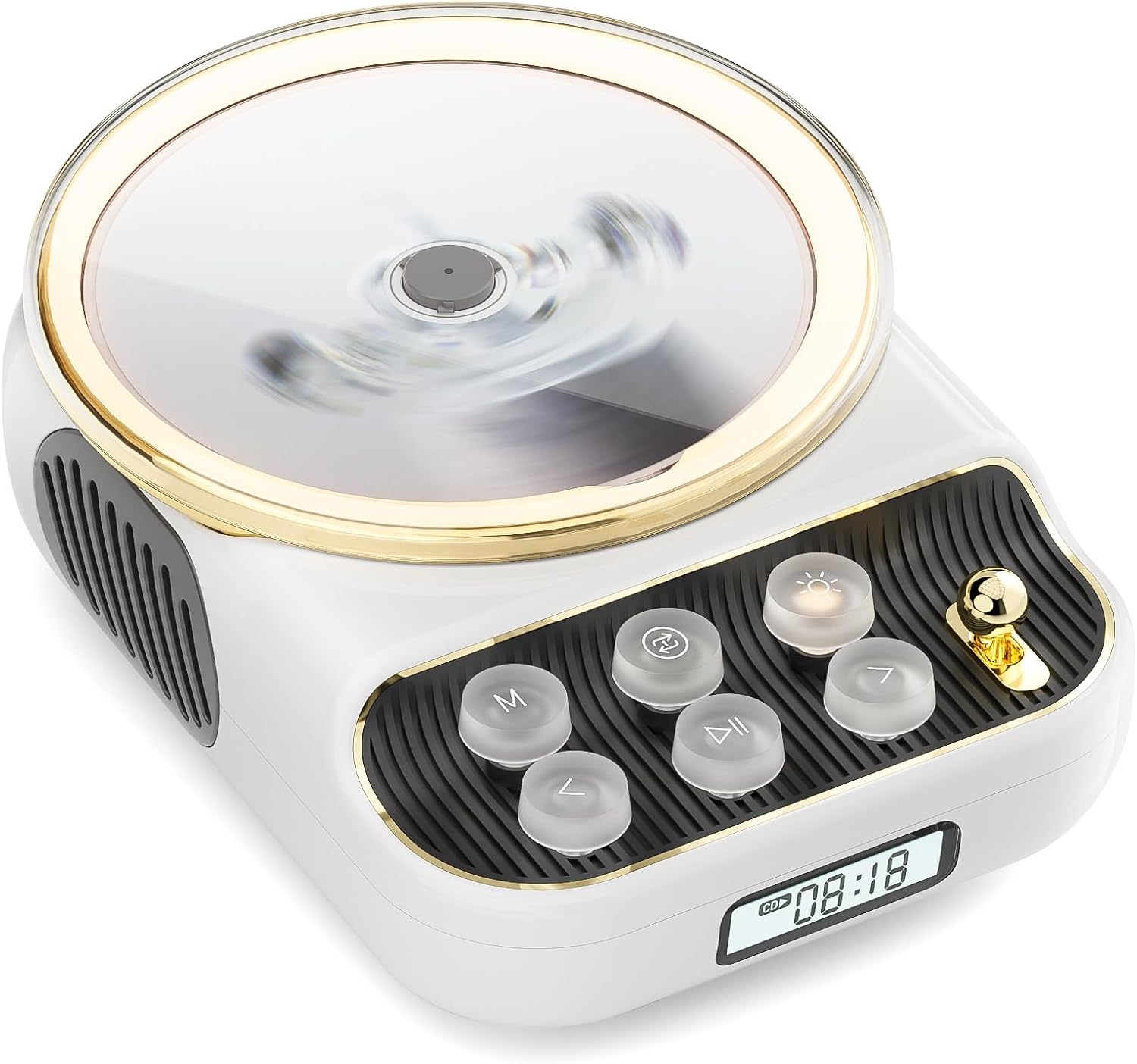
આગળ view of the COLSUR K8-WHITE Portable Bluetooth CD Player, showcasing its circular CD compartment, control buttons, and digital display.

This image illustrates the multifunctionality of the COLSUR K8-WHITE, highlighting its capabilities for CD playback, Bluetooth mode, FM radio, TF card speaker, 3.5mm audio jack, and night light function.
નિયંત્રણ લેઆઉટ

A detailed diagram showing the various buttons, ports, and features of the COLSUR K8-WHITE CD Player, including the CD cover, function buttons, display, Type-C charging port, TF card interface, and speaker.
- સીડી કમ્પાર્ટમેન્ટ: ઓડિયો સીડી દાખલ કરવા માટે.
- પ્રદર્શન: Shows current mode, track number, time, or FM frequency.
- કાર્ય બટનો: (M) Mode, (Loop) Repeat, (Light) Light/Bluetooth Transmit, (Play/Pause), (Previous/Volume Down), (Next/Volume Up).
- વોલ્યુમ નોબ: ઓડિયો વોલ્યુમ ગોઠવે છે.
- ટાઇપ-સી ચાર્જિંગ પોર્ટ: પાવર ઇનપુટ અને આંતરિક બેટરી ચાર્જ કરવા માટે.
- TF કાર્ડ ઈન્ટરફેસ: For playing music from a TF card.
- 3.5mm ઓડિયો આઉટપુટ: હેડફોન અથવા બાહ્ય સ્પીકર્સને કનેક્ટ કરવા માટે.
5. સેટઅપ
5.1 ઉપકરણને ચાર્જ કરવું
The device has a built-in 4000mAh rechargeable Lithium-ion battery. Before first use, fully charge the device.
- Connect the provided Type-C charging cable to the Type-C port on the device.
- Connect the other end of the cable to a compatible USB power adapter (5V/2A recommended, not included).
- The charging indicator on the display will show charging status. It will turn off or change color when fully charged.
5.2 પાવરિંગ ચાલુ/બંધ
To power on the device, press and hold the Power button (often integrated with Play/Pause or a dedicated button, refer to the control layout diagram). To power off, press and hold the Power button again.
૩.૧ પ્લેસમેન્ટ વિકલ્પો
The COLSUR K8-WHITE can be used as a tabletop device or mounted on a wall.
- ટેબલટોપનો ઉપયોગ: Place the device on a stable, flat surface. Ensure the non-slip feet are securely positioned.
- વોલ માઉન્ટિંગ: Use the provided wall mount kit (if included) to securely attach the device to a wall. Follow the instructions provided with the wall mount kit for safe installation.
6. ઓપરેટિંગ સૂચનાઓ
6.1 સીડી પ્લેબેક

The image shows the COLSUR K8-WHITE CD Player on a wooden table, playing a CD, and a separate image illustrating its use as a Bluetooth speaker connected to a smartphone.
The player supports CD, CD-R, CD-RW, MP3, and WMA formats.
- સીડી કમ્પાર્ટમેન્ટ કવર ખોલો.
- Carefully place a CD onto the spindle, ensuring it is seated correctly.
- સીડી કમ્પાર્ટમેન્ટ કવર બંધ કરો.
- દબાવો M (મોડ) button repeatedly until "CD" mode is displayed.
- દબાવો ચલાવો/થોભો પ્લેબેક શરૂ કરવા માટે બટન.
- નો ઉપયોગ કરો પાછલું/વોલ્યુમ ડાઉન અને આગળ / વોલ્યુમ અપ ટ્રેક છોડવા માટે બટનો.
- ની મદદથી વોલ્યુમને સમાયોજિત કરો વોલ્યુમ નોબ.
- દબાવો લૂપ button to cycle through repeat modes (e.g., repeat one, repeat all, random).
6.2 બ્લૂટૂથ રીસીવર મોડ
Connect your smartphone, tablet, or other Bluetooth-enabled devices to stream audio wirelessly. The device features Bluetooth version 5.3 for stable connection.
- દબાવો M (મોડ) button repeatedly until "BT" (Bluetooth) mode is displayed. The device will enter pairing mode, indicated by a flashing Bluetooth icon or specific sound.
- On your external device, enable Bluetooth and search for available devices.
- Select "COLSUR K8-WHITE" (or similar name) from the list to pair.
- Once paired, you can play music from your external device, and the audio will output through the CD player's speakers.
6.3 FM રેડિયો મોડ

The COLSUR K8-WHITE CD Player is shown on a desk, with its display showing an FM radio frequency, indicating its radio function.
Enjoy your favorite radio stations with the built-in FM tuner (frequency range: 76 MHz to 108 MHz).
- દબાવો M (મોડ) button repeatedly until "FM" mode is displayed.
- દબાવો અને પકડી રાખો ચલાવો/થોભો button to initiate an automatic scan for FM stations. The device will save found stations.
- નો ઉપયોગ કરો પાછલું/વોલ્યુમ ડાઉન અને આગળ / વોલ્યુમ અપ સાચવેલા સ્ટેશનો દ્વારા નેવિગેટ કરવા માટે બટનો.
- ની મદદથી વોલ્યુમને સમાયોજિત કરો વોલ્યુમ નોબ.
૫.૨ TF કાર્ડ પ્લેબેક
સંગીત ચલાવો files directly from a TF (MicroSD) card.
- Insert a TF card (with MP3/WMA files) into the TF card slot.
- દબાવો M (મોડ) button repeatedly until "TF" mode is displayed. The device should automatically start playing music from the card.
- નો ઉપયોગ કરો પાછલું/વોલ્યુમ ડાઉન અને આગળ / વોલ્યુમ અપ ટ્રેક છોડવા માટે બટનો.
- ની મદદથી વોલ્યુમને સમાયોજિત કરો વોલ્યુમ નોબ.
6.5 AUX ઇનપુટ
Connect external audio devices (e.g., MP3 players, older phones) via the 3.5mm AUX jack.
- Connect one end of a 3.5mm audio cable (not included) to the AUX port on the CD player.
- બીજા છેડાને તમારા બાહ્ય ઉપકરણના ઓડિયો આઉટપુટ સાથે કનેક્ટ કરો.
- દબાવો M (મોડ) button repeatedly until "AUX" mode is displayed.
- Control playback from your external device. Adjust volume using the વોલ્યુમ નોબ સીડી પ્લેયર પર.
6.6 હેડફોન આઉટપુટ
For private listening, connect headphones to the 3.5mm audio output jack.
- Plug your headphones into the 3.5mm audio output jack.
- The internal speakers will automatically mute.
- ની મદદથી વોલ્યુમને સમાયોજિત કરો વોલ્યુમ નોબ.
6.7 ટેબલ એલamp Function and Bluetooth Transmission

The COLSUR K8-WHITE CD Player is shown on a bedside table, emitting a soft glow, functioning as a night light while a person sleeps in the background.
The device includes a table lamp with three brightness levels and a Bluetooth transmission mode.
- Short Press the Light Button:
- First press: Activates a warm light (low brightness).
- Second press: Activates a flashing light (medium brightness).
- Third press: Turns off the light. The lights will cycle through these states.
- Long Press the Light Button: Activates the device's Bluetooth transmission mode. In this mode, the CD player can transmit audio to wireless headphones or other Bluetooth speakers.
7. જાળવણી
- સફાઈ: ઉપકરણના બાહ્ય ભાગને સાફ કરવા માટે નરમ, સૂકા કપડાનો ઉપયોગ કરો. પ્રવાહી ક્લીનર્સ અથવા ઘર્ષક સામગ્રીનો ઉપયોગ કરશો નહીં.
- સીડી કેર: Handle CDs by their edges. Clean CDs with a soft, lint-free cloth, wiping from the center outwards.
- સંગ્રહ: જ્યારે લાંબા સમય સુધી ઉપયોગમાં ન હોય, ત્યારે ઉપકરણને ઠંડી, સૂકી જગ્યાએ સંગ્રહિત કરો.
8. મુશ્કેલીનિવારણ
| સમસ્યા | સંભવિત કારણ | ઉકેલ |
|---|---|---|
| ઉપકરણ પાવર ચાલુ કરતું નથી. | બેટરી ખતમ થઈ ગઈ છે. | Connect the device to a power source using the Type-C cable and charge it. |
| સ્પીકર્સમાંથી કોઈ અવાજ નથી. | Volume is too low or muted. Headphones are connected. Incorrect mode selected. | Increase volume. Disconnect headphones. Ensure correct mode (CD, BT, FM, TF, AUX) is selected. |
| સીડી વાગતી નથી કે છોડતી નથી. | CD is dirty, scratched, or inserted incorrectly. CD format not supported. | Clean the CD. Ensure the CD is inserted correctly. Try a different CD. Verify CD format compatibility. |
| બ્લૂટૂથ જોડી નિષ્ફળ. | Device is not in pairing mode. External device Bluetooth is off or out of range. | Ensure the CD player is in Bluetooth mode and flashing. Move external device closer. Restart both devices. |
| એફએમ રેડિયો રિસેપ્શન નબળું છે. | નબળો સંકેત. હસ્તક્ષેપ. | Reposition the device. Extend any external antenna if available. Try scanning again. |
9. સ્પષ્ટીકરણો
- બ્રાન્ડ: કોલસુર
- મોડલ: K8-WHITE
- રંગ: સફેદ
- કનેક્ટિવિટી ટેકનોલોજી: Bluetooth 5.3, AUX (3.5mm jack), Type-C (charging)
- Supported Media Formats: Audio CD, CD-R, CD-RW, MP3, WMA (from CD or TF card)
- એફએમ રેડિયો આવર્તન: ૨૬.૯૬૫ મેગાહર્ટ્ઝ - ૨૭.૪૦૫ મેગાહર્ટ્ઝ
- બેટરી: 4000mAh Lithium-ion (Rechargeable)
- ખાસ લક્ષણો: Built-in speaker, Table lamp with 3 brightness levels, TF card slot, Headphone output
- સુસંગત ઉપકરણો: Headphones, Bluetooth speakers, Amplifiers, Bluetooth audio receivers
10. વોરંટી અને સપોર્ટ
For warranty information or technical support, please refer to the documentation included with your purchase or contact the retailer/manufacturer directly. Keep your proof of purchase for warranty claims.


