1. પરિચય
Welcome to the Smart Tech 43FW01V Full HD Smart TV user manual. This guide will help you set up, operate, and maintain your new television. The Smart Tech 43FW01V offers a 43-inch Full HD (1920 x 1080) display, powered by WebOS for a fluid and intuitive smart TV experience. Enjoy pre-installed applications like Netflix, YouTube, and Prime Video, along with immersive Dolby Audio sound.

Figure 1: Smart Tech 43FW01V Full HD Smart TV
This television is designed to integrate seamlessly into your living space, providing high-quality entertainment with advanced connectivity options.
2. બોક્સમાં શું છે
Before you begin, please check the contents of your package. The following items should be included:
- Smart Tech 43FW01V Full HD Smart TV
- પાવર કેબલ
- રીમોટ કંટ્રોલ
- ટીવી સ્ટેન્ડ (2 ટુકડા) અને સ્ક્રૂ
- વપરાશકર્તા માર્ગદર્શિકા (આ દસ્તાવેજ)
3. સેટઅપ
3.1. ટીવી સ્ટેન્ડ જોડવું
- સ્ક્રેચમુદ્દે ટાળવા માટે ટીવી સ્ક્રીનને નરમ, સ્વચ્છ સપાટી પર કાળજીપૂર્વક નીચે મૂકો.
- ટીવીના તળિયે અનુરૂપ સ્લોટ્સ સાથે સ્ટેન્ડના ટુકડાઓને સંરેખિત કરો.
- આપેલા સ્ક્રૂનો ઉપયોગ કરીને સ્ટેન્ડને સુરક્ષિત કરો. ખાતરી કરો કે તે મજબૂત રીતે કડક છે.
3.2. કનેક્ટિંગ પાવર
Plug the power cable into the TV's power input, then plug the other end into a wall outlet. Ensure the power outlet is easily accessible.
3.3. બાહ્ય ઉપકરણોને કનેક્ટ કરવું
Your Smart Tech TV offers comprehensive connectivity. Refer to the image below for port locations.

Figure 2: Rear Panel Connectors
- HDMI પોર્ટ્સ (x3): બ્લુ-રે પ્લેયર્સ, ગેમ કન્સોલ અથવા સેટ-ટોપ બોક્સ કનેક્ટ કરો.
- USB પોર્ટ (x2): Connect USB drives for media playback or software updates.
- ઇથરનેટ (RJ45): વાયર્ડ ઇન્ટરનેટ કનેક્શન માટે.
- ઓપ્ટિકલ ઓડિયો આઉટપુટ: Connect to a soundbar or home theater system for digital audio.
- AV ઇનપુટ: સંયુક્ત વિડિઓ અને સ્ટીરિયો ઑડિઓનો ઉપયોગ કરતા જૂના ઉપકરણો માટે.
- Antenna/Cable Input (DVB-T2/DVB-S2): Connect your antenna or satellite dish.
- સીઆઈ સ્લોટ: For Conditional Access Modules (CAMs) to decrypt pay-TV channels.
- ઇઅરફોન જેક: હેડફોનોને કનેક્ટ કરવા માટે.
3.4. પ્રારંભિક પાવર ઓન અને નેટવર્ક સેટઅપ
After connecting power, press the power button on the remote control or the TV. The TV will guide you through the initial setup process, including language selection, channel scanning, and network configuration (Wi-Fi or Ethernet). Follow the on-screen prompts to complete the setup.
૫. ટીવી ચલાવવું
4.1. દૂરસ્થ નિયંત્રણ કાર્યો
The remote control provides full control over your Smart Tech TV. Familiarize yourself with its buttons for easy navigation.
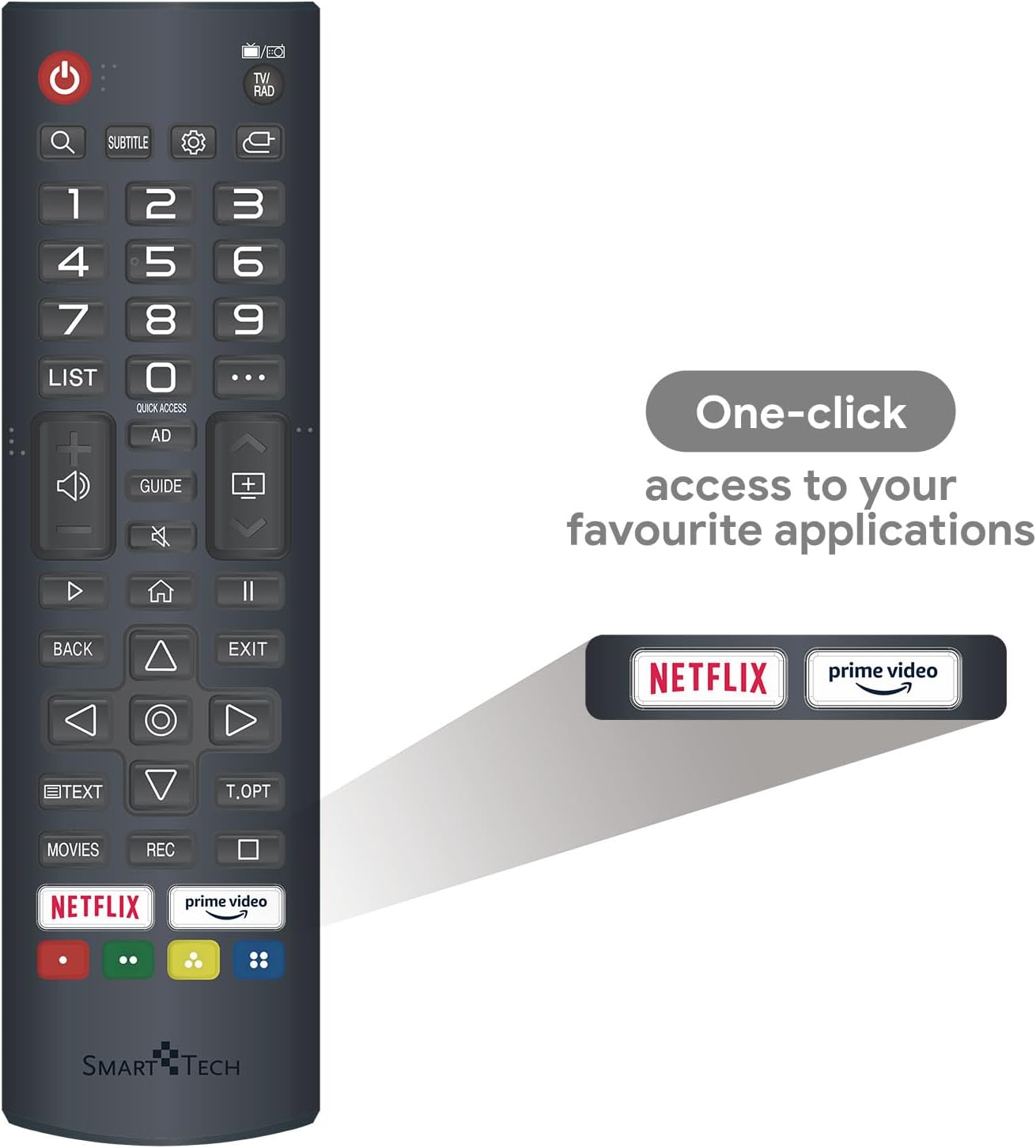
આકૃતિ 3: રિમોટ કંટ્રોલ લેઆઉટ
- પાવર બટન: ટીવી ચાલુ કે બંધ કરે છે.
- નંબર બટનો (0-9): સીધા ચેનલો પસંદ કરો.
- વોલ્યુમ અપ/ડાઉન: વોલ્યુમ સ્તરને સમાયોજિત કરે છે.
- ચેનલ ઉપર/નીચે: ટીવી ચેનલો બદલે છે.
- નેવિગેશન પેડ (ઉપર/નીચે/ડાબે/જમણે/ઓકે): મેનુઓ નેવિગેટ કરે છે અને વિકલ્પો પસંદ કરે છે.
- પાછળ/બહાર નીકળો: Returns to the previous screen or exits the current menu.
- હોમ બટન: ઍક્સેસ કરે છે Webઓએસ સ્માર્ટ ટીવી હોમ સ્ક્રીન.
- ઝડપી ઍક્સેસ બટનો: Dedicated buttons for Netflix and Prime Video for instant access.
4.2. સ્માર્ટ ટીવી સુવિધાઓ (WebOS)
Your Smart Tech TV runs on WebOS, providing a user-friendly interface for accessing various smart features and applications.
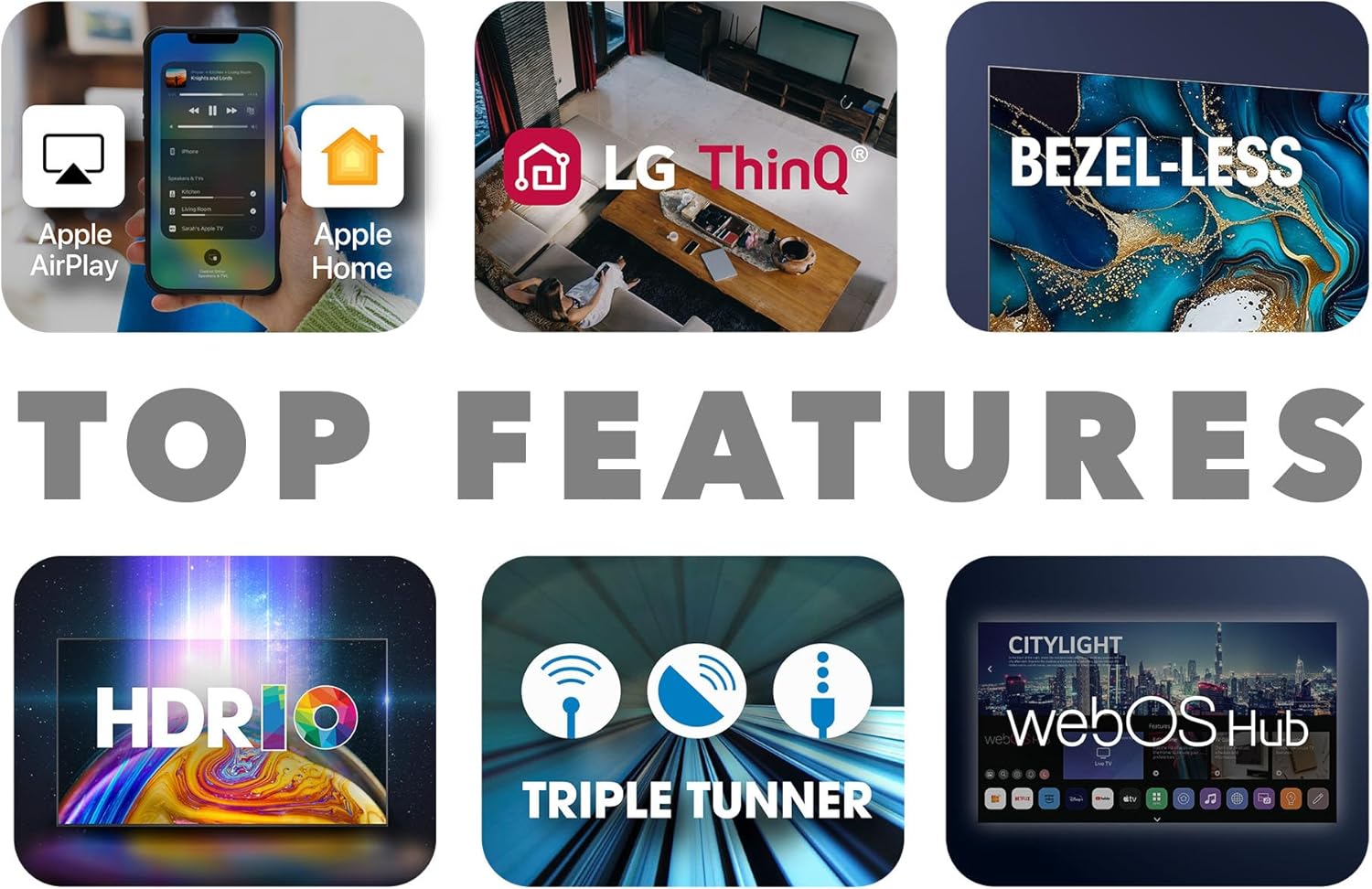
Figure 4: Key Smart TV Features
- હોમ ડેશબોર્ડ: Press the Home button on your remote to access the launcher bar, which displays your favorite apps, inputs, and settings.
- પ્રી-ઇન્સ્ટોલ કરેલ એપ્સ: Directly access Netflix, YouTube, and Prime Video.
- એપ સ્ટોર: Download additional applications from the WebOS Content Store.
- Chromecast બિલ્ટ-ઇન: Wirelessly cast content from your compatible smartphone, tablet, or computer to the TV.
- LG ThinQ / Apple AirPlay / Apple Home: Integrate your TV into your smart home ecosystem for enhanced control and content sharing.
4.3. ઇનપુટ પસંદગી
To switch between connected devices (e.g., HDMI 1, USB, TV tuner), press the 'Input' or 'Source' button on your remote control. A menu will appear, allowing you to select the desired input.
5. જાળવણી
Proper maintenance ensures the longevity and optimal performance of your Smart Tech TV.
- સ્ક્રીનની સફાઈ: Use a soft, lint-free cloth specifically designed for electronics. Do not use abrasive cleaners or sprays directly on the screen. Lightly dampજો જરૂરી હોય તો પાણીથી કપડાને ભીંજવો.
- કેબિનેટની સફાઈ: ટીવી કેબિનેટને નરમ, સૂકા કપડાથી સાફ કરો.
- વેન્ટિલેશન: ઓવરહિટીંગ અટકાવવા માટે ખાતરી કરો કે ટીવીની પાછળના વેન્ટિલેશન ઓપનિંગ્સ બ્લોક ન હોય.
- સૉફ્ટવેર અપડેટ્સ: Periodically check for software updates via the TV's settings menu to ensure you have the latest features and bug fixes.
- જ્યારે ઉપયોગમાં ન હોય ત્યારે પાવર બંધ કરો: લાંબા સમય સુધી નિષ્ક્રિયતા માટે, ટીવીને પાવર આઉટલેટમાંથી અનપ્લગ કરવાની ભલામણ કરવામાં આવે છે.
6. મુશ્કેલીનિવારણ
If you encounter any issues with your TV, refer to the following common problems and solutions:
| સમસ્યા | સંભવિત કારણ | ઉકેલ |
|---|---|---|
| નો પાવર | પાવર કેબલ ડિસ્કનેક્ટ થયો; પાવર આઉટલેટમાં સમસ્યા. | પાવર કેબલ ટીવી અને વોલ આઉટલેટ સાથે સુરક્ષિત રીતે જોડાયેલ છે કે નહીં તે તપાસો. કોઈ અલગ આઉટલેટ અજમાવી જુઓ. |
| કોઈ ચિત્ર નથી, પણ અવાજ હાજર છે | Incorrect input source; Loose HDMI cable. | સાચો સ્ત્રોત પસંદ કરવા માટે રિમોટ પર 'ઇનપુટ' બટન દબાવો. HDMI કેબલ કનેક્શન તપાસો. |
| અવાજ નથી, પણ ચિત્ર હાજર છે. | Volume muted or too low; External audio system issue. | Unmute the TV or increase volume. Check audio settings and external audio connections. |
| રીમોટ કંટ્રોલ કામ કરતું નથી | બેટરી બંધ થઈ ગઈ; રિમોટ અને ટીવી વચ્ચે અવરોધ. | Replace batteries. Ensure no objects are blocking the remote's signal to the TV's IR receiver. |
| Wi-Fi થી કનેક્ટ થઈ શકતું નથી | Incorrect password; Router issue; Signal interference. | Wi-Fi પાસવર્ડ બે વાર તપાસો. તમારા રાઉટરને ફરીથી શરૂ કરો. ટીવીને રાઉટરની નજીક ખસેડો અથવા દખલગીરી ઓછી કરો. |
જો આ ઉકેલો અજમાવ્યા પછી પણ સમસ્યા ચાલુ રહે, તો કૃપા કરીને ગ્રાહક સપોર્ટનો સંપર્ક કરો.
7. સ્પષ્ટીકરણો
Detailed technical specifications for the Smart Tech 43FW01V TV:
| લક્ષણ | સ્પષ્ટીકરણ |
|---|---|
| બ્રાન્ડ | સ્માર્ટ ટેક |
| મોડલ નંબર | 43FW01V |
| સ્ક્રીન માપ | 43 ઇંચ (108 સે.મી.) |
| ડિસ્પ્લે ટેકનોલોજી | એલઇડી |
| ઠરાવ | પૂર્ણ એચડી (1920 x 1080p) |
| તાજું દર | 60 હર્ટ્ઝ |
| ઓપરેટિંગ સિસ્ટમ | WebOS |
| ઓડિયો | Dolby Audio, 2 x 8W Speakers |
| કનેક્ટિવિટી | 3 x HDMI, 2 x USB, Ethernet, Bluetooth, Optical Audio Out |
| ખાસ લક્ષણો | Chromecast Built-in, Pre-installed Apps (Netflix, YouTube, Prime Video) |
| રંગ | કાળો |
| ઉત્પાદન પરિમાણો (W x H x D) | ૧૦૬.૯ સેમી x ૨૧ સેમી x ૬૩.૬ સેમી (સ્ટેન્ડ સાથે) |
| ઉર્જા કાર્યક્ષમતા વર્ગ | E |


Figure 6: TV Dimensions
8. વોરંટી અને સપોર્ટ
Your Smart Tech 43FW01V TV comes with a manufacturer's warranty to ensure your peace of mind.
- ઉત્પાદકની વોરંટી: 2 years for parts and labor.
- સ્પેર પાર્ટ્સની ઉપલબ્ધતા: ખરીદીની તારીખથી 11 વર્ષ સુધી સ્પેરપાર્ટ્સ ઉપલબ્ધ છે.
For technical support, warranty claims, or any other inquiries, please contact Smart Tech customer service. Refer to the contact information provided on the product packaging or the official Smart Tech webસાઇટ


