1. ઉત્પાદન ઓવરview
The Ninkear MBOX 11 Mini PC is a compact and powerful computing solution designed for various applications, from office work and home entertainment to light gaming and educational use. Featuring an Intel N150 processor, 16GB DDR4 RAM, and a 512GB M.2 SSD, it offers efficient performance in a small form factor. Its dual 4K display support and multiple connectivity options make it a versatile choice for modern computing needs.
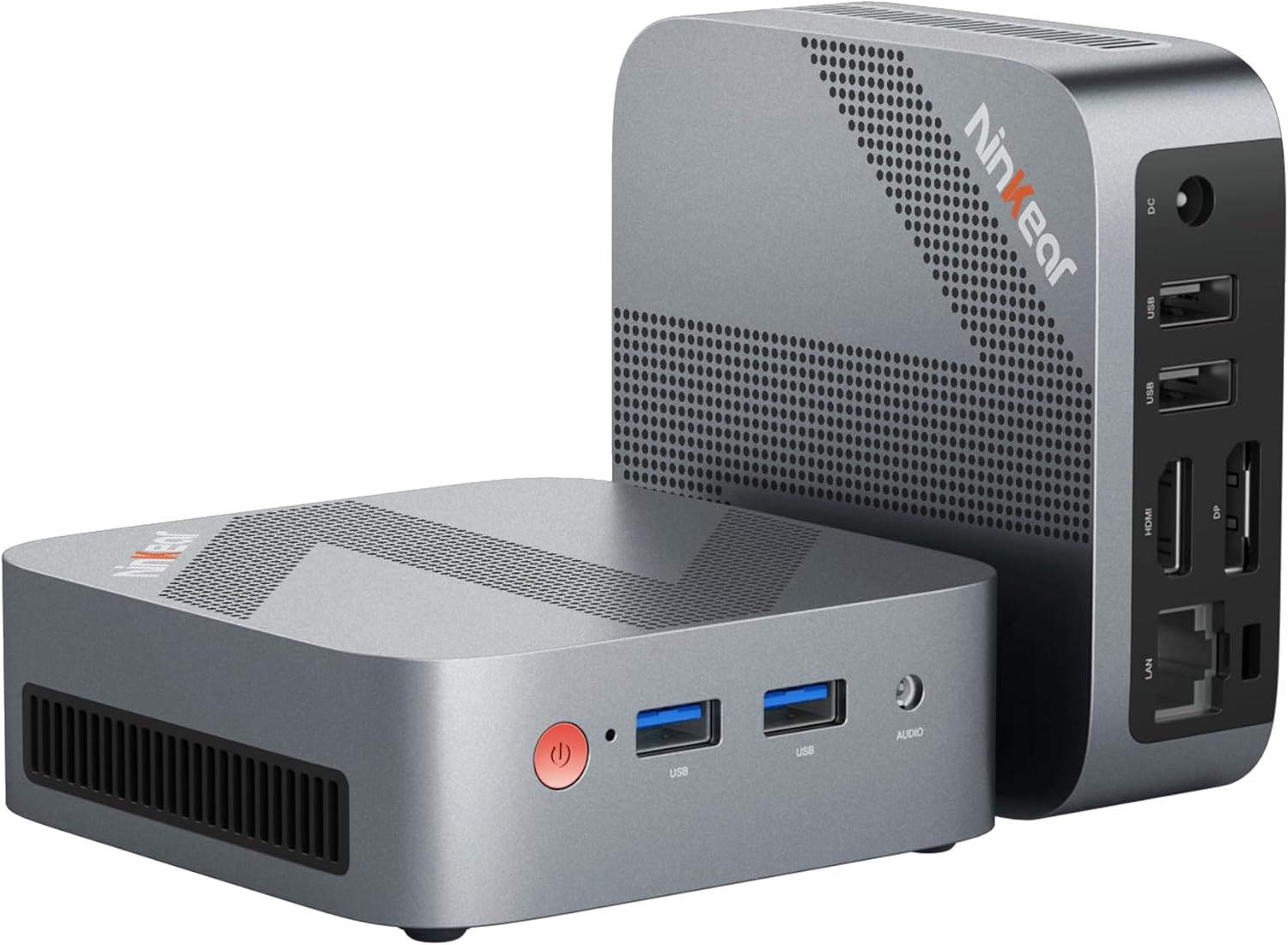
Figure 1: The Ninkear MBOX 11 Mini PC, showcasing its compact design and available ports on the front and rear. The device is small enough to fit in the palm of a hand, emphasizing its portability.
2. શું શામેલ છે
Upon unboxing your Ninkear MBOX 11 Mini PC, please verify that all the following components are present:
- Ninkear MBOX 11 Mini PC
- વપરાશકર્તા માર્ગદર્શિકા
- પાવર એડેપ્ટર અને કેબલ
- HDMI કેબલ
- Fixed Bracket (for VESA mounting)

Figure 2: All items included in the Ninkear MBOX 11 Mini PC package. This visual guide helps users confirm they have received all necessary accessories for setup.
3. સેટઅપ માર્ગદર્શિકા
Follow these steps to set up your Ninkear MBOX 11 Mini PC for the first time:
- પાવરથી કનેક્ટ કરો: Plug the power adapter into the DC-in port on the back of the Mini PC, then connect it to a power outlet.
- ડિસ્પ્લે સાથે કનેક્ટ કરો: Use the provided HDMI cable to connect the Mini PC to your monitor or TV. The Mini PC also supports DisplayPort (DP) for dual display setups.
- પેરિફેરલ્સ કનેક્ટ કરો: Plug in your USB keyboard and mouse into the available USB 3.0 ports on the front or USB 2.0 ports on the back.
- નેટવર્ક કનેક્શન (વૈકલ્પિક): For a wired internet connection, connect an Ethernet cable from your router to the RJ45 LAN port on the back of the Mini PC. Alternatively, you can use the built-in Wi-Fi 5 for wireless connectivity.
- પાવર ચાલુ: Press the power button located on the front of the Mini PC. The device will boot up, and you will see the Ninkear logo followed by the Windows 11 setup screen.
- પ્રારંભિક વિન્ડોઝ સેટઅપ: Follow the on-screen prompts to complete the Windows 11 setup, including language selection, network configuration, and user account creation.

આકૃતિ 3: વિગતવાર view of the Mini PC's multi-interface design, highlighting the front USB 3.0 ports, audio jack, and rear LAN, HDMI, DP, USB 2.0, and DC-in ports. This image assists users in correctly connecting their peripherals and displays.
4. ઓપરેટિંગ સૂચનાઓ
The Ninkear MBOX 11 Mini PC comes pre-installed with Windows 11, offering a familiar and intuitive user experience. Its powerful specifications ensure smooth operation for a variety of tasks.
૩.૨. કામગીરી અને મલ્ટીટાસ્કિંગ
Equipped with an Intel N150 processor and 16GB DDR4 RAM, the Mini PC handles multiple applications simultaneously with ease. The 512GB M.2 SSD ensures fast boot times and quick loading of files and programs. This configuration is ideal for:
- Office Productivity: Seamlessly run word processors, spreadsheets, and presentation software.
- Web બ્રાઉઝિંગ: Enjoy smooth browsing even with numerous tabs open.
- ઘર મનોરંજન: Stream 4K content from various platforms without lag.
- Light Gaming: Capable of running less demanding games.

Figure 4: The Ninkear MBOX 11 Mini PC in various usage scenarios, demonstrating its versatility for online classes, video games, design, online meetings, home theater, stock trading, and general light work.
4.2. Dual Display Support
The Mini PC supports 4K@60Hz dual-screen display via its HDMI 2.0 and DisplayPort (DP) outputs. This allows for an expanded workspace, enhancing productivity for tasks requiring multiple screens.

Figure 5: A user utilizing the Mini PC's dual 4K display capability, showcasing its utility for multitasking and professional applications like video conferencing and graphic design.
5. જાળવણી
To ensure the longevity and optimal performance of your Ninkear MBOX 11 Mini PC, consider the following maintenance tips:
- તેને સ્વચ્છ રાખો: Regularly clean the exterior of the Mini PC with a soft, dry cloth. Ensure ventilation holes are free from dust and obstructions to maintain proper airflow.
- સૉફ્ટવેર અપડેટ્સ: Keep your Windows 11 operating system and drivers updated to ensure security, stability, and performance improvements.
- શ્રેષ્ઠ પ્લેસમેન્ટ: Place the Mini PC in a well-ventilated area, away from direct sunlight or heat sources, to prevent overheating. The device features an efficient cooling system designed for low noise and strong heat dissipation.
- ડેટા બેકઅપ: ડેટા ગુમાવવાથી બચવા માટે નિયમિતપણે મહત્વપૂર્ણ ડેટાનો બાહ્ય ડ્રાઇવ અથવા ક્લાઉડ સ્ટોરેજમાં બેકઅપ લો.

આકૃતિ 6: એક આંતરિક view highlighting the advanced cooling system of the Mini PC, which includes a copper tube, aluminum heat sink, and a high-speed fan to ensure efficient and quiet operation.
6. મુશ્કેલીનિવારણ
If you encounter issues with your Ninkear MBOX 11 Mini PC, refer to the following common troubleshooting steps:
- કોઈ ડિસ્પ્લે નથી:
- Ensure the HDMI/DP cable is securely connected to both the Mini PC and the monitor.
- ખાતરી કરો કે મોનિટર ચાલુ છે અને સાચા ઇનપુટ સ્ત્રોત પર સેટ છે.
- Try a different HDMI/DP cable or monitor if available.
- કોઈ શક્તિ નથી:
- Check if the power adapter is firmly connected to the Mini PC and the power outlet.
- એક અલગ પાવર આઉટલેટ અજમાવો.
- ધીમી કામગીરી:
- બેકગ્રાઉન્ડમાં ચાલતી બિનજરૂરી એપ્લિકેશનો બંધ કરો.
- ખાતરી કરો કે વિન્ડોઝ અને ડ્રાઇવરો અપ ટુ ડેટ છે.
- Check for sufficient free space on the SSD.
- Run a virus scan to rule out malware.
- પેરિફેરલ મળ્યું નથી:
- પેરિફેરલને બીજા USB પોર્ટ સાથે કનેક્ટ કરવાનો પ્રયાસ કરો.
- Restart the Mini PC.
- Ensure the peripheral's drivers are installed and up to date.
For persistent issues not covered here, please refer to the Warranty and Support section.
7. સ્પષ્ટીકરણો
Detailed technical specifications for the Ninkear MBOX 11 Mini PC:
| લક્ષણ | સ્પષ્ટીકરણ |
|---|---|
| બ્રાન્ડ | નિંકિયર |
| મોડેલનું નામ | MBOX 11 |
| ઓપરેટિંગ સિસ્ટમ | W11 OS |
| પ્રોસેસર | Intel CPU N150 (up to 3.6GHz, 4C/4T) |
| રેમ | 16 GB DDR4 |
| સંગ્રહ | 512 GB M.2 SSD (Supports M.2 NVMe PCIe3.0 SSDs or M.2 SATA SSDs up to 2 TB) |
| ગ્રાફિક્સ કોપ્રોસેસર | ઇન્ટેલ UHD ગ્રાફિક્સ |
| મહત્તમ સ્ક્રીન રીઝોલ્યુશન | ૭૬૮૦x૪૩૨૦ પિક્સેલ્સ (૮કે) |
| કનેક્ટિવિટી | HDMI 2.0, DisplayPort (DP), USB 3.0, USB 2.0, RJ45 (Gigabit Ethernet), WiFi 5, Bluetooth 5 |
| વસ્તુનું વજન | ૦.૩૭ પાઉન્ડ (આશરે ૧૬૮ ગ્રામ) |
| પરિમાણો | ૪૩.૫ x ૨૦.૫ x ૪૩ ઇંચ (આશરે ૧૧૦.૫ x ૫૨ x ૧૦૯ સે.મી.) |
8. વોરંટી અને સપોર્ટ
Ninkear is committed to providing quality products and excellent customer service. Your MBOX 11 Mini PC comes with a manufacturer's warranty.
8.1. વોરંટી માહિતી
If you purchase the product and experience a failure due to product defects within 1 year of purchase, Ninkear will do its best to help you solve the problem. Please retain your proof of purchase for warranty claims.
8.2. ગ્રાહક આધાર
For further assistance, technical support, or warranty inquiries, please visit the official Ninkear Store on Amazon or contact their customer service directly. You can find more information and contact details at the Ninkear Store.


