
પરિચય
Welcome to the Parsonver SR2 Smart Watch user manual. This guide provides detailed instructions on how to set up, operate, maintain, and troubleshoot your new smart watch. Please read this manual thoroughly to ensure optimal performance and longevity of your device.

Image: The Parsonver SR2 Smart Watch, showcasing its display with time, date, steps, and heart rate, alongside a smaller inset of its GPS tracking feature.
1. સેટઅપ
1.1 પેકેજ સામગ્રી
શરૂ કરતા પહેલા, કૃપા કરીને ખાતરી કરો કે તમારા પેકેજમાં બધી વસ્તુઓ હાજર છે:
- પાર્સનવર SR2 સ્માર્ટ વોચ
- ચાર્જિંગ કેબલ
- વપરાશકર્તા માર્ગદર્શિકા (આ દસ્તાવેજ)

Image: An illustration showing the Parsonver SR2 Smart Watch, its magnetic charging cable, and the included user manual.
1.2 ઉપકરણને ચાર્જ કરવું
Upon first use, fully charge your smart watch. Connect the magnetic charging cable to the charging contacts on the back of the watch and plug the USB end into a power adapter (not included) or a computer's USB port. A full charge typically takes approximately 2 hours.
Image: The Parsonver SR2 Smart Watch connected to its magnetic charging cable, displaying a 100% charge indicator.
૨.૨ એપ ઇન્સ્ટોલેશન અને પેરિંગ
To unlock the full functionality of your Parsonver SR2 Smart Watch, download and install the companion application on your smartphone.
- Scan the QR code in the manual or search for the 'Parsonver' app in your phone's app store (Google Play Store for Android, Apple App Store for iPhone).
- Install the application and create an account or log in.
- ખાતરી કરો કે તમારા સ્માર્ટફોન પર બ્લૂટૂથ સક્ષમ છે.
- Open the Parsonver app, navigate to the device section, and follow the on-screen instructions to pair your SR2 Smart Watch.
- Grant all necessary permissions requested by the app for full functionality, including notifications and location services.
૪. તમારી સ્માર્ટ ઘડિયાળનું સંચાલન
૨.૧ મૂળભૂત નેવિગેશન
The Parsonver SR2 Smart Watch features a responsive touchscreen and dual physical buttons for intuitive control.
- ટચસ્ક્રીન: મેનુ અને સુવિધાઓમાં નેવિગેટ કરવા માટે ડાબે/જમણે, ઉપર/નીચે સ્વાઇપ કરો. પસંદ કરવા માટે ટેપ કરો.
- ઉપરનું બટન: Typically used to return to the home screen or wake the device.
- લોઅર બટન: Customizable. Can be set to quickly access workout modes or frequently used applications via the companion app.

Image: A close-up of the Parsonver SR2 Smart Watch highlighting its dual button design and a menu showing 'Exercise', 'Walking', and 'Treadmill' options.
૪.૧ બ્લૂટૂથ કૉલિંગ અને સ્માર્ટ સૂચનાઓ
The SR2 Smart Watch supports Bluetooth 5.3 for stable connectivity, allowing you to answer and make calls directly from your wrist and receive smart notifications.
- કોલનો જવાબ આપવો/કરવો: Once paired, incoming calls will display on your watch. You can answer or reject them. Use the integrated microphone and speaker for conversations.
- સ્માર્ટ સૂચનાઓ: Receive alerts for calls, SMS, and various social media applications directly on your watch. Ensure app permissions are granted for notifications.
- Quick Call Replies: (Android only) Respond instantly to calls with pre-set messages.

Image: A person interacting with the Parsonver SR2 Smart Watch, showing a call screen with a dial pad and contact list, along with icons for various social media notifications.
2.3 Sports Modes & Built-in GPS
Track your fitness activities with over 100 sports modes and accurate built-in GPS.
- 100+ સ્પોર્ટ્સ મોડ્સ: Select your activity from a wide range of sports to get precise tracking of duration, distance, calories burned, and heart rate zones.
- બિલ્ટ-ઇન GPS: Accurately record your workout routes without needing your phone. View detailed maps and statistics in the companion app after your activity.
- સ્માર્ટ શોધ: The watch can automatically recognize when you are running, walking, or using a treadmill.

Image: A person running outdoors, with the Parsonver SR2 Smart Watch displaying a GPS-tracked route on its screen and a smartphone app showing detailed workout data including distance and time.
2.4 24-Hour Health Monitoring
Monitor your health metrics continuously with the SR2 Smart Watch.
- હાર્ટ રેટ મોનિટરિંગ: Tracks your heart rate throughout the day. Set custom alerts for high or low readings.
- સ્લીપ મોનિટરિંગ: Analyzes your sleep patterns (deep sleep, light sleep, REM, awake time, sporadic naps) to provide insights into your sleep quality.
- બ્લડ ઓક્સિજન (SpO2) મોનિટરિંગ: Measures your blood oxygen levels, providing clear trends and real-time tracking.
- સ્ટ્રેસ મોનિટરિંગ: Understand your emotional fluctuations through data-driven body-mind analysis.
- Women's Health Companion: Provides data-driven cycle management features.

Image: A person sleeping, wearing the Parsonver SR2 Smart Watch, with graphics illustrating sleep monitoring, heart rate monitoring, stress monitoring, and blood oxygen monitoring features.
2.5 Watch Faces & DIY
Personalize your watch with a variety of watch faces or create your own.
- 100+ ઘડિયાળના ચહેરા: Choose from a wide selection of pre-installed watch faces to match your style.
- DIY ઘડિયાળના ચહેરા: Use the companion app to upload your own photos and customize your watch face.

Image: The Parsonver SR2 Smart Watch displaying a custom watch face with a photo, surrounded by various other watch face designs and a smartphone screen showing the watch face synchronization interface.
2.6 વધારાની સુવિધાઓ
The SR2 Smart Watch offers a range of other useful functions:
- વિશ્વ ઘડિયાળ
- બ્રાઇટનેસ એડજસ્ટમેન્ટ
- એલાર્મ
- કેલ્ક્યુલેટર
- ટાઈમર
- મારો ફોન શોધો
- Lift-to-wake
- સ્ટોપવોચ
- સંગીત નિયંત્રણ
- Remote Camera Trigger
- શ્વાસ લેવાની કસરતો
- Reminders (Handwashing, Medication, Event, Drinking, Standing)

Image: The Parsonver SR2 Smart Watch screen surrounded by icons representing various features like weather, music, camera control, alarm, and more.
3. જાળવણી
3.1 Waterproof Rating (IP68)
The Parsonver SR2 Smart Watch is rated IP68 waterproof, meaning it is rigorously tested to withstand splashes, hand washing, face washing, and intense sweat. It is suitable for daily use and light water exposure.
Note: Avoid using the watch while showering, in saunas, or swimming, as hot water, steam, or prolonged submersion can compromise the seal and cause damage.

Image: A man kayaking on a river, wearing the Parsonver SR2 Smart Watch, illustrating its IP68 waterproof capability against splashes.
3.2 સફાઈ અને સંભાળ
- તમારી ઘડિયાળ અને પટ્ટાને નિયમિતપણે સોફ્ટ, ડી. થી સાફ કરો.amp કાપડ
- કઠોર રસાયણો, ઘર્ષક ક્લીનર્સ અથવા દ્રાવકનો ઉપયોગ કરવાનું ટાળો.
- કાટ લાગવાથી બચવા માટે ચાર્જ કરતા પહેલા ખાતરી કરો કે ચાર્જિંગ કોન્ટેક્ટ સ્વચ્છ અને સૂકા છે.
3.3 બેટરી કેર
- Charge the watch regularly, avoiding complete discharge for extended periods.
- ઉપયોગમાં ન હોય ત્યારે ઘડિયાળને ઠંડી, સૂકી જગ્યાએ રાખો.
- Typical battery life is 5-7 days with normal use, and up to 40 days in standby mode. Actual battery life may vary based on usage.
4. મુશ્કેલીનિવારણ
If you encounter issues with your Parsonver SR2 Smart Watch, please refer to the following common solutions:
| અંક | શક્ય ઉકેલ |
|---|---|
| ચાલુ ન થતા જુઓ | ખાતરી કરો કે ઘડિયાળ સંપૂર્ણપણે ચાર્જ થયેલ છે. તેને ઓછામાં ઓછા 30 મિનિટ માટે ચાર્જર સાથે કનેક્ટ કરો. |
| ફોન સાથે જોડી બનાવી શકાતી નથી | Ensure Bluetooth is enabled on your phone. Restart both the watch and phone. Make sure the watch is within Bluetooth range. Check app permissions. |
| સૂચનાઓ પ્રાપ્ત થઈ નથી | Verify that notification permissions are granted in the Parsonver app and your phone's settings. Ensure the app is running in the background. |
| અચોક્કસ આરોગ્ય ડેટા | ખાતરી કરો કે ઘડિયાળ તમારા કાંડા પર ચુસ્તપણે પહેરેલી છે, ખૂબ ચુસ્ત કે ખૂબ ઢીલી નહીં. ઘડિયાળની પાછળના સેન્સરને સાફ કરો. માપન દરમિયાન વધુ પડતી હલનચલન ટાળો. |
| જીપીએસ ટ્રેકિંગ કરતું નથી | ખાતરી કરો કે તમે સ્વચ્છ હવાવાળા ખુલ્લા આઉટડોર વિસ્તારમાં છો view of the sky. Wait for the watch to acquire a GPS signal before starting your activity. |
| ટૂંકી બેટરી જીવન | Reduce screen brightness, disable 'Lift-to-wake' if not needed, limit continuous heart rate monitoring, and close unused apps on the watch. |
જો સમસ્યા ચાલુ રહે, તો કૃપા કરીને વધુ સહાયતા માટે ગ્રાહક સમર્થનનો સંપર્ક કરો.
5. સ્પષ્ટીકરણો
| લક્ષણ | વિગત |
|---|---|
| મોડલ નંબર | SR2 |
| ઉત્પાદન પરિમાણો | 9.84 x 1.69 x 0.46 ઇંચ |
| વસ્તુનું વજન | ૬.૭ ઔંસ (૧૮૮.૮ ગ્રામ) |
| સ્ક્રીન માપ | ૫૪.૬ ઇંચ (સ્ટેન્ડિંગ સ્ક્રીન ડિસ્પ્લે સાઈઝ) |
| દૃશ્યમાન સ્ક્રીન કર્ણ | ૪૩" / ૧૦૮ સે.મી. |
| મેમરી સ્ટોરેજ ક્ષમતા | 256 એમબી |
| વાયરલેસ કોમ્યુનિકેશન | બ્લૂટૂથ 5.3 |
| માનવ ઇન્ટરફેસ ઇનપુટ | ટચસ્ક્રીન |
| આંતરરાષ્ટ્રીય સુરક્ષા રેટિંગ | IP68 |
| બેટરી | 1 C બેટરી જરૂરી (શામેલ) |
| ઉત્પાદક | પાર્સનવર |
| પ્રથમ ઉપલબ્ધ તારીખ | 12 ઓક્ટોબર, 2025 |
6. વોરંટી અને સપોર્ટ
૧.૨ પ્રોડક્ટની વોરંટી
Parsonver products are designed and manufactured to the highest quality standards. This product is covered by a limited warranty against defects in materials and workmanship. Please refer to the warranty card included in your package or contact Parsonver customer support for specific warranty terms and conditions.
6.2 ગ્રાહક સપોર્ટ
For any questions, technical assistance, or support needs, please contact Parsonver customer service. Our support team is available 24/7 to assist you.
- Supportનલાઇન સપોર્ટ: Visit the official Parsonver website or contact us through the companion app for online assistance.
- ઇમેઇલ સપોર્ટ: Refer to your warranty card or product packaging for email contact information.
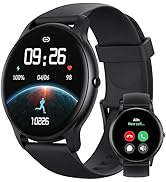
Image: An icon representing 24/7 online customer support, featuring a headset and chat bubbles.


