1. પરિચય
This manual provides detailed instructions for the installation, operation, and maintenance of your ATOTOZONE S8G1104MS-S01 10.1-inch Android Car Stereo. This unit features a QLED floating display, an Android operating system, and extensive connectivity options including 4G LTE, Wi-Fi, Dual Bluetooth, Wireless CarPlay, and Android Auto. Please read this manual thoroughly before use to ensure proper functionality and safety.

The ATOTOZONE S8G1104MS-S01 car stereo features a large 10.1-inch QLED floating display and comes with a 720P backup camera for enhanced safety.
2. પેકેજ સામગ્રી
ખાતરી કરો કે નીચે સૂચિબદ્ધ બધી વસ્તુઓ તમારા પેકેજમાં શામેલ છે:
- એન્ડ્રોઇડ હેડ યુનિટ
- Backup Camera (AC-HD01LR)
- બાહ્ય માઇક્રોફોન
- પાવર કેબલ
- આરસીએ કનેક્ટર
- 4G એન્ટેના
- યુએસબી કેબલ
- ડીઆઈએન પોકેટ
- DIN Sleeve 1
- DIN Sleeve 2
- માઉન્ટ કરવાનું કૌંસ
- માઉન્ટિંગ સ્ક્રૂ
- ઑનલાઇન સંસાધનો ઝડપી માર્ગદર્શિકા
- પ્રોડક્ટ કેર ઓનલાઈન સપોર્ટ માહિતી
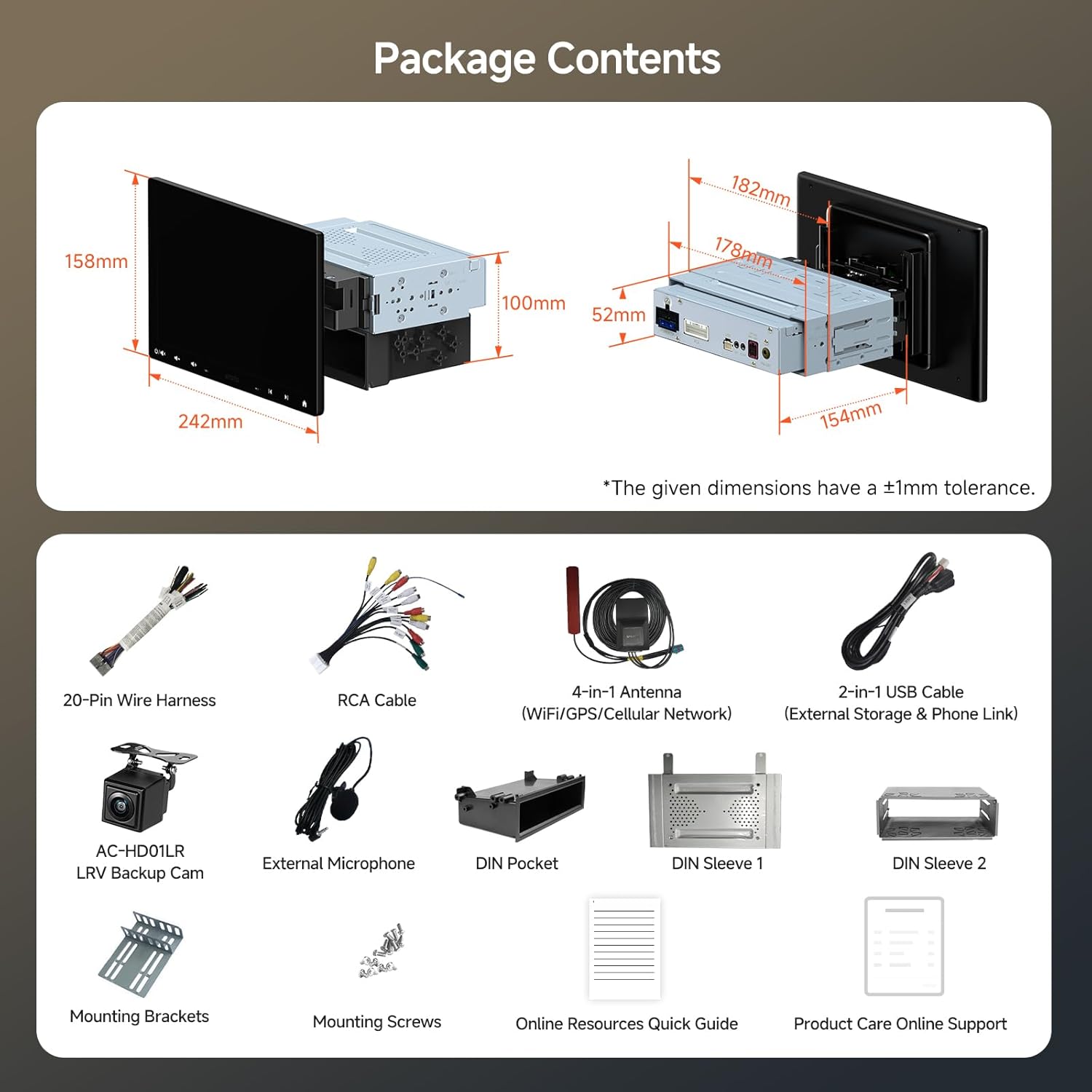
The package includes the Android head unit, backup camera, external microphone, power cable, RCA connector, 4G antenna, USB cable, DIN pocket, DIN sleeves, mounting brackets, and screws.
3. સેટઅપ અને ઇન્સ્ટોલેશન
3.1 ભૌતિક સ્થાપન
The S8G1104MS-S01 is designed for both Single DIN and Double DIN openings. Ensure your vehicle's dashboard can accommodate the unit and its floating screen.

The unit is compatible with both standard Single DIN and Double DIN dashboard openings. Remove pre-installed DIN Sleeve 1 and DIN Sleeve 2 from the car stereo if present before installation.
3.1.1 Floating Screen Adjustment (FlexView પ્રો)
The 10.1-inch QLED screen features a FlexView Pro design, allowing for 9-way adjustments to achieve an optimal viewing angle. Adjustments include vertical, horizontal, front, swivel, and tilt movements. Perform these adjustments during installation and secure the screen firmly before driving.

ફ્લેક્સView Pro design allows for 9-way adjustment of the screen, including vertical, horizontal, front, swivel, and tilt movements, ensuring optimal viewing angles in various vehicle dashboards.
3.1.2 Checking for Obstructions
Before finalizing installation, ensure the floating screen does not obstruct essential vehicle controls such as A/C knobs, hazard lights, or air vents. Adjust the screen position as needed.

Always check for potential obstructions to vehicle controls or vents when positioning the floating screen.
3.2 વાયરિંગ કનેક્શન્સ
Carefully connect the provided wiring harness to your vehicle's electrical system. Refer to the wiring diagram for correct connections of power, speakers, and accessories.

This diagram illustrates the connections for the 20-pin power harness, RCA outputs, USB, microphone, GPS/4G antenna, and FM antenna, crucial for proper installation.
મુખ્ય જોડાણો:
- Power (15A): Connect to vehicle's power supply.
- આરસીએ: For audio output to external amplifiers અથવા subwoofers.
- યુએસબી: For data transfer, media playback, and smartphone connection.
- MIC: External microphone input for clear hands-free calls.
- GPS/4G/Wi-Fi Antenna: Connect the 4-in-1 antenna for navigation and network access.
- FM-ANT: તમારા વાહનના રેડિયો એન્ટેનાને કનેક્ટ કરો.
- Steering Wheel Audio Control: Connect if your vehicle supports analog steering wheel controls.
- Backup Camera Input: Connect the included AC-HD01LR backup camera.
4. ઓપરેટિંગ સૂચનાઓ
૪.૧ એન્ડ્રોઇડ સિસ્ટમ ઓવરview
The S8G1104MS-S01 operates on an Android Q system, powered by a 12nm octa-core chip with 4GB RAM and 32GB internal storage. This configuration ensures responsive performance for navigation, media playback, and various applications.

The S8 Gen3 MS offers modern features including a FlexView Pro mount, 12nm Octa-Core CPU, custom apps, 4GB RAM + 32GB storage, and cellular network support.
4.2 કનેક્ટિવિટી
4.2.1 4G LTE & Wi-Fi
The unit supports 4G LTE cellular networks and dual-band Wi-Fi, allowing for continuous internet access. This enables streaming, online navigation, and app downloads directly on the head unit, even when wireless CarPlay or Android Auto is active.

Unlike some systems, the S8 Gen3 MS maintains 4G LTE connectivity even when wireless CarPlay or Android Auto is in use, providing uninterrupted online services.
4.2.2 Dual Bluetooth
The S8G1104MS-S01 features two independent Bluetooth modules:
- BT1: Handles hands-free calls, music streaming, and voice commands. It also supports a Smart Lock feature, automatically locking/unlocking the screen based on your Bluetooth device's proximity.
- BT2: Connects to Bluetooth Low Energy (BLE) devices such as OBDII scanners (e.g., AC-4450) and enables Bluetooth tethering for internet access.

Dual Bluetooth modules provide dedicated connections for communication and accessory integration, enhancing control and privacy.
4.2.3 Wireless CarPlay & Android Auto / MirrorLink
Enjoy seamless integration with your smartphone via wireless Apple CarPlay and Android Auto. The unit also supports MirrorLink for displaying your phone's screen directly on the head unit.

Connect your smartphone wirelessly or via USB for Apple CarPlay, Android Auto, or MirrorLink, accessing navigation, music, and communication apps.
4.3 ઓડિયો ફીચર્સ
The S8G1104MS-S01 delivers high-fidelity audio with advanced processing capabilities:
- Digital Sound Processor (DSP): Optimizes audio output for a rich sound experience.
- ૧૩-બેન્ડ ઇક્વેલાઇઝર (EQ): Allows precise customization of audio frequencies to match your preferences and vehicle acoustics.
- Speed Compensated Volume Control (SCVC): Automatically adjusts the volume based on your vehicle's speed, ensuring consistent audio levels without manual intervention.
- Max 4x45W / 4x24W RMS Ampજીવંત: પૂરી પાડે છે ampસ્પષ્ટ અને ગતિશીલ અવાજ માટે le પાવર.
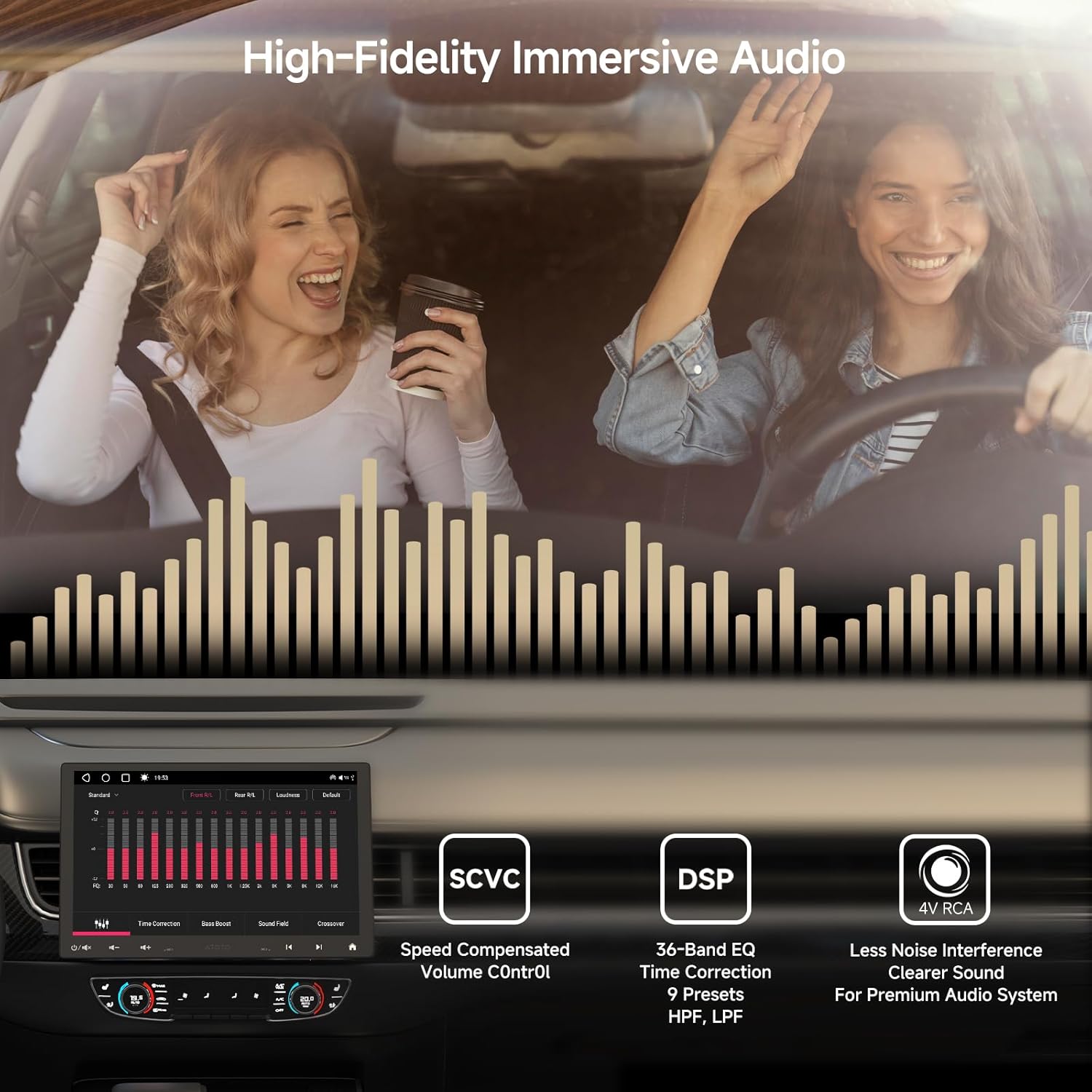
Experience high-fidelity audio with the built-in Digital Sound Processor (DSP), 36-band equalizer, and Speed Compensated Volume Control (SCVC) for dynamic sound adjustment based on vehicle speed.
4.4 કેમેરા સિસ્ટમ
The unit includes a backup camera and supports additional camera inputs for comprehensive vehicle monitoring.
- Included Backup Camera (AC-HD01LR): Provides a 720P live rear view while driving, enhancing safety during reversing and lane changes.
- Optional Dual Recording Cameras: Supports 1080P front and cabin recording cameras (AC-FCR04W, sold separately) with features like manual video locking and night vision.
- OmniGuard Technology: Enables live view from connected cameras for increased situational awareness.

The system supports multiple camera inputs, including the included AC-HD01LR 720P backup camera. Optional front and cabin recording cameras (AC-FCR04W) can be integrated for comprehensive vehicle monitoring.
4.5 Smart Features & Apps
The S8G1104MS-S01 integrates several smart applications for an enhanced driving experience:
- DriveChat GenAI Assistant: Offers voice interaction and suggestions, leveraging generative AI for a smarter co-pilot experience.
- TrackHU GPS Tracker: Displays real-time GPS location and routes, with flexible refresh rates and geofence alerts.
- એપ્લિકેશન્સ શોધો: An integrated app store to discover and install additional applications optimized for connected driving.

Utilize integrated GenAI applications like DriveChat for voice interaction and suggestions, TrackHU for real-time GPS tracking, and FindApps for additional app downloads.
4.6 Dual App Display
The unit supports displaying two applications simultaneously on the screen, allowing for multitasking without switching between apps. For exampલે, તમે કરી શકો છો view navigation on one side and media playback on the other.

The dual app display feature allows for simultaneous viewing of two applications, such as navigation and media, without interruption.
4.7 Backseat Entertainment
The S8G1104MS-S01 can be expanded to provide backseat entertainment. With optional USB to HDMI (AC-HAV68) or USB to CVBS RCA (AC-HAV48) adapters, you can connect external monitors to display content from the head unit.

Transform your backseat into an entertainment hub by connecting external displays using optional USB to HDMI or USB to CVBS RCA adapters.
5. જાળવણી
To ensure the longevity and optimal performance of your ATOTOZONE S8G1104MS-S01 car stereo, follow these maintenance guidelines:
- સ્ક્રીન સફાઈ: Use a soft, lint-free cloth to gently wipe the screen. Avoid abrasive cleaners or solvents that may damage the display.
- સૉફ્ટવેર અપડેટ્સ: Regularly check for and install available software updates to benefit from new features, performance improvements, and bug fixes. Updates are typically provided over-the-air (FOTA).
- પર્યાવરણીય પરિસ્થિતિઓ: યુનિટને અતિશય તાપમાન, લાંબા સમય સુધી સીધો સૂર્યપ્રકાશ અથવા વધુ પડતા ભેજના સંપર્કમાં આવવાનું ટાળો.
- કેબલ જોડાણો: સમયાંતરે બધા વાયરિંગ કનેક્શન્સ તપાસો જેથી ખાતરી થાય કે તે સુરક્ષિત છે અને નુકસાનથી મુક્ત છે.
6. મુશ્કેલીનિવારણ
If you encounter issues with your S8G1104MS-S01, refer to the following common troubleshooting tips:
- યુનિટ ચાલુ થતું નથી: Check all power connections, including the 15A fuse. Ensure the ignition wire is correctly connected.
- કોઈ અવાજ નથી: Verify speaker connections and ensure the volume is not muted. Check audio settings and equalizer configurations. If using external amplifiers, confirm their power and connections.
- GPS સિગ્નલ નુકશાન: ખાતરી કરો કે GPS એન્ટેના યોગ્ય રીતે ઇન્સ્ટોલ કરેલું છે અને તેમાં સ્પષ્ટ છે view of the sky. Check antenna cable connections.
- બ્લૂટૂથ કનેક્શન સમસ્યાઓ: Ensure Bluetooth is enabled on both the head unit and your device. Try unpairing and re-pairing the devices.
- વાયરલેસ કારપ્લે/એન્ડ્રોઇડ ઓટો કનેક્ટ થઈ રહ્યું નથી: Ensure Wi-Fi and Bluetooth are enabled. Check for any conflicting network settings. Try restarting both the head unit and your smartphone.
- Backup Camera Image Issues: Verify the camera connection. If the image is mirrored incorrectly, check the camera settings within the head unit's interface for a flip/mirror option.
- ધીમી કામગીરી/ઠંડું: Close unnecessary background applications. Perform a system restart. If issues persist, consider a factory reset (note: this will erase all user data).
- Screen Protector Undersized: The included screen protectors may not cover the entire display. This is a known characteristic and does not affect functionality.
For more detailed troubleshooting or persistent issues, please contact ATOTOZONE customer support.
7. સ્પષ્ટીકરણો
| લક્ષણ | સ્પષ્ટીકરણ |
|---|---|
| ડિસ્પ્લે માપ | 10.1 ઇંચ |
| ડિસ્પ્લે પ્રકાર | QLED |
| ઠરાવ | 1280x800 |
| ઓપરેટિંગ સિસ્ટમ | એન્ડ્રોઇડ ક્યૂ |
| પ્રોસેસર | 12nm Octa-Core Chip |
| રેમ | 4GB |
| આંતરિક સંગ્રહ | 32GB |
| કનેક્ટિવિટી | 4G LTE, Wi-Fi, Dual Bluetooth, USB |
| વાયરલેસ એકીકરણ | Wireless CarPlay, Android Auto, MirrorLink |
| ઓડિયો આઉટપુટ પાવર | Max 4x45W / 4x24W RMS |
| સમકક્ષ | 36-Band EQ with DSP |
| બેકઅપ કેમેરા | Included 720P (AC-HD01LR) |
| વસ્તુનું વજન | 7.7 પાઉન્ડ |
| પેકેજ પરિમાણો | 10.83 x 8.66 x 8.07 ઇંચ |
8. વોરંટી અને સપોર્ટ
ATOTOZONE provides comprehensive support for your S8G1104MS-S01 car stereo:
- વોરંટી કવરેજ: A 12-month warranty is provided from the date of purchase. An additional 6 months of coverage can be obtained by contacting the after-sales team within 30 days of purchase.
- વેચાણ પછી આધાર: Our dedicated after-sales team is available to assist you with any inquiries or issues. Contact information is provided in the box and through the online manual.
- Online Manual & Resources: A quick guide to online resources is included in the package. Scan the QR code on the product box to access the eproductcare platform for further assistance.
- નિયમિત અપડેટ્સ: Continuous software updates are provided to ensure your device evolves with new features and improved stability.

Information on warranty, support, online resources, and software updates is provided to ensure a positive user experience.


