પરિચય
Welcome to the GameSir X3 Pro Mobile Gaming Controller user manual. This guide provides essential instructions for setting up, operating, and maintaining your device, ensuring an optimal mobile gaming experience. Please read this manual thoroughly before use.
પેકેજ સામગ્રી
- GameSir X3 Pro Mobile Gaming Controller
- યુએસબી-સી કેબલ
- Interchangeable ABXY Buttons
- Interchangeable Stick Caps
- Interchangeable D-pad
- કેસ વહન
- વપરાશકર્તા દસ્તાવેજીકરણ

This image shows all items included in the GameSir X3 Pro package: the controller, a USB-C cable, interchangeable components, a carrying case, and documentation.
સેટઅપ
ઉપકરણ સુસંગતતા
The GameSir X3 Pro is compatible with iPhone 16/15 series and Android devices. It supports mobile phones with lengths ranging from 110mm to 180mm (4.33in to 7.09in).
તમારો ફોન જોડી રહ્યા છીએ
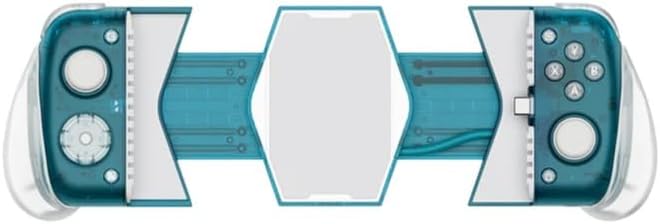
- Gently extend the left and right sides of the controller to create space for your mobile device.
- Carefully align your phone's USB-C port with the controller's built-in Type-C connector.
- Insert your phone into the controller, ensuring a secure and stable connection. The controller will automatically power on.

This image shows the GameSir X3 Pro controller with a mobile phone securely mounted, ready for gaming. The phone's screen is visible, centered within the controller's frame.

સ્પષ્ટ મોરચો view of the GameSir X3 Pro controller, showcasing its buttons, joysticks, and the central phone-holding mechanism without a phone inserted.
કુલર ઓપરેશન
The GameSir X3 Pro features an integrated cooler designed to prevent your mobile device from overheating during extended gaming sessions. The cooler activates automatically when the controller is connected and powered. Ensure the cooler vents are not obstructed for optimal performance.

પાછળનો view of the GameSir X3 Pro controller, prominently featuring the integrated cooling fan located in the center, designed to dissipate heat from the mobile device.
This image displays the bottom of the GameSir X3 Pro, revealing the USB-C charging port and additional vents for the cooling system.
Detachable and Replaceable Components
The GameSir X3 Pro allows for personalization with its detachable ABXY buttons, stick caps, D-pad, and grips. To replace components, gently pull them off and snap the desired replacements into place. Ensure they are securely fastened before use.

An illustration of the GameSir X3 Pro controller with its customizable parts, such as the ABXY buttons, stick caps, and D-pad, shown detached from the main unit.
ઓપરેટિંગ સૂચનાઓ
ઉપર નિયંત્રણોview
The GameSir X3 Pro features high-precision controls for an enhanced gaming experience:
- GameSir Hall Effect Sticks: Provide precise, drift-free control and extended lifespan.
- Micro Switch Triggers and Buttons: Offer tactile feedback and rapid response times, similar to e-sports level peripherals.
- Shoulder Buttons (LB, RB) and Triggers (LT, RT): Ergonomically placed for comfortable and quick access during gameplay.
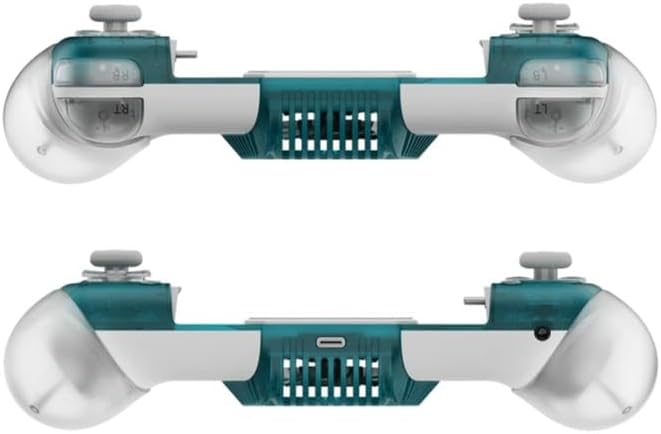
આ છબી એક સાઇડ પ્રો પૂરી પાડે છેfile of the GameSir X3 Pro, highlighting the ergonomic grips, shoulder buttons (LB, RB), and triggers (LT, RT) on the top edge.
6-અક્ષ ગાયરોસ્કોપ
The built-in 6-axis Gyroscope enables motion control in supported games, offering an immersive and intuitive way to interact with your games. Ensure the game you are playing supports gyroscope input.
સોફ્ટવેર કસ્ટમાઇઝેશન (ગેમસિર એપ)
For advanced customization, download the official GameSir App from your device's app store. The app allows you to:
- Remap buttons and adjust joystick sensitivity.
- Update controller firmware.
- Access game profiles and community settings.
- Personalize other controller preferences.
જાળવણી
Proper maintenance ensures the longevity and performance of your GameSir X3 Pro controller:
- સફાઈ: Use a soft, dry cloth to wipe down the controller. Avoid abrasive cleaners or solvents.
- સંગ્રહ: Store the controller in its protective carrying case when not in use to prevent dust accumulation and physical damage.
- પર્યાવરણ: ઉપકરણને અતિશય તાપમાન, સીધો સૂર્યપ્રકાશ અથવા ઉચ્ચ ભેજ માટે ખુલ્લા કરવાનું ટાળો.
- Connectivity Port: Keep the USB-C connector clean and free of debris to ensure a reliable connection.
મુશ્કેલીનિવારણ
If you encounter issues with your GameSir X3 Pro, refer to the following common solutions:
- કંટ્રોલર કનેક્ટ થઈ રહ્યું નથી:
- Ensure your mobile phone is securely seated in the controller and the Type-C connector is fully inserted.
- Verify that your phone's USB-C port is clean and free of obstructions.
- Check if your phone's operating system is up to date.
- Cooler Not Functioning:
- Confirm the controller is properly connected to your phone and receiving power.
- Ensure the cooler vents on the back and bottom of the controller are not blocked.
- Input Lag or Unresponsiveness:
- Restart your mobile phone and reconnect the controller.
- Close any unnecessary background applications on your phone to free up resources.
- Update the controller's firmware via the GameSir App.
- Buttons/Sticks Not Responding:
- ખાતરી કરો કે બટનો અથવા લાકડીઓની આસપાસ કોઈ કચરો જમા ન થાય.
- Calibrate the controller using the GameSir App if available.
વિશિષ્ટતાઓ
| લક્ષણ | વિગત |
|---|---|
| કનેક્ટિવિટી | Built-in Type-C |
| સુસંગત મોડલ્સ | iPhone 16/15 series and Android |
| સુસંગત ઉપકરણ લંબાઈ | 110-180mm / 4.33-7.09in |
| Sticks Technology | GameSir Hall Effect |
| ટ્રિગર્સ | માઇક્રો સ્વિચ |
| 6-અક્ષ ગાયરોસ્કોપ | હા |
| કસ્ટમાઇઝેશન સોફ્ટવેર | ગેમસર એપ |
| Integrated Cooler | હા |
| અલગ પાડી શકાય તેવા ઘટકો | ABXY Buttons, Stick Caps, D-pad, Grips |
| ઉત્પાદન પરિમાણો | 20.8 x 9.4 x 5.7 સેમી |
| ઉત્પાદન વજન | 435 ગ્રામ |
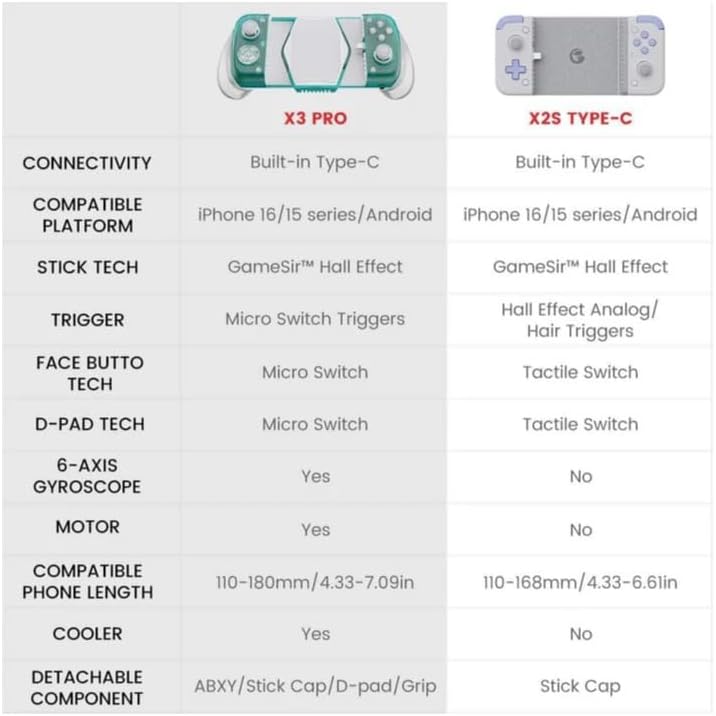
A detailed table comparing the specifications and features of the GameSir X3 Pro and GameSir X2S Type-C controllers, including connectivity, compatible platforms, stick tech, triggers, and other functionalities.
વોરંટી અને આધાર
For detailed warranty information, technical support, and frequently asked questions, please visit the official GameSir website or contact GameSir customer service. Retain your proof of purchase for warranty claims.


