1. પરિચય
This manual provides comprehensive instructions for the installation, operation, maintenance, and troubleshooting of the ADVANTECH AIMB-286F-00A1E Mini-ITX Motherboard. This industrial-grade motherboard is designed for reliable performance in various computing environments, featuring an LGA1151 socket compatible with Celeron, Core i3/i5/i7, and Pentium processors, and supporting up to 32 GB of DDR4 RAM.
Please read this manual thoroughly before beginning installation to ensure proper setup and to prevent damage to the components.
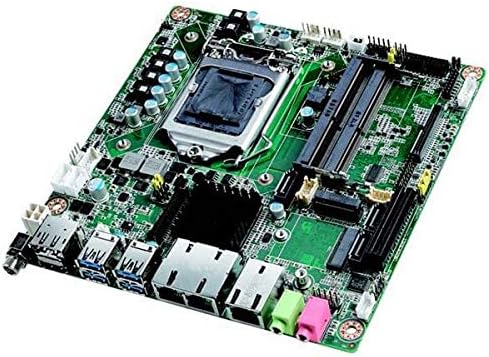
આકૃતિ 1: ઓવરview of the ADVANTECH AIMB-286F-00A1E Mini-ITX Motherboard. This image displays the compact green circuit board with various components including the CPU socket, RAM slots, I/O ports (USB, Ethernet, audio), and expansion slots.
2. સેટઅપ અને ઇન્સ્ટોલેશન
2.1. સુરક્ષા સાવચેતીઓ
- કોઈપણ ઘટકો ઇન્સ્ટોલ કરતા પહેલા અથવા દૂર કરતા પહેલા હંમેશા સિસ્ટમમાંથી પાવર ડિસ્કનેક્ટ કરો.
- Wear an anti-static wrist strap or frequently touch a grounded metal object to discharge static electricity, which can damage sensitive electronic components.
- Handle the motherboard by its edges to avoid touching components or circuits.
- Ensure proper ventilation in the system chassis to prevent overheating.
2.2. જરૂરી સાધનો
- ફિલિપ્સ હેડ સ્ક્રુડ્રાઈવર
- એન્ટિ-સ્ટેટિક કાંડાનો પટ્ટો (ભલામણ કરેલ)
- Thermal paste (for CPU cooler installation)
2.3. સ્થાપન પગલાં
- અનપેકીંગ: Carefully remove the motherboard from its packaging. Inspect for any visible damage.
- CPU ઇન્સ્ટોલેશન:
- Locate the LGA1151 CPU socket. Lift the load lever and open the metal retention frame.
- Align the CPU with the socket, ensuring the gold triangle on the CPU matches the triangle on the socket. Gently place the CPU into the socket without forcing it.
- Close the metal retention frame and secure it with the load lever.
- Apply a thin, even layer of thermal paste to the top of the CPU.
- Install the CPU cooler according to its manufacturer's instructions, ensuring it makes firm contact with the CPU.
- રેમ ઇન્સ્ટોલેશન:
- Locate the DDR4 DIMM slots. Open the retention clips at both ends of the slot.
- DDR4 મેમરી મોડ્યુલ પરના નોચને DIMM સ્લોટમાં રહેલી કી સાથે સંરેખિત કરો.
- Insert the module firmly into the slot until the retention clips snap into place.
- મધરબોર્ડ માઉન્ટિંગ:
- Install the I/O shield into the rear opening of your Mini-ITX case.
- Align the motherboard with the standoffs inside the case.
- Secure the motherboard to the standoffs using screws. Do not overtighten.
- કનેક્ટિંગ પાવર સપ્લાય:
- Connect the 24-pin ATX power connector from your power supply unit (PSU) to the corresponding header on the motherboard.
- Connect the 4-pin or 8-pin CPU power connector (EPS12V) to the appropriate header near the CPU socket.
- કનેક્ટિંગ પેરિફેરલ્સ:
- તમારા સ્ટોરેજ ડિવાઇસ (HDD/SSD) માંથી SATA ડેટા કેબલ્સને મધરબોર્ડ પરના SATA પોર્ટ સાથે કનેક્ટ કરો.
- Connect front panel headers (Power SW, Reset SW, HDD LED, Power LED, USB, Audio) to their respective pins on the motherboard. Refer to the motherboard's silkscreen labels for correct orientation.
- Install any necessary expansion cards (e.g., PCIe cards) into the available slots and secure them.
- પ્રારંભિક બુટ-અપ:
- Connect a monitor to one of the motherboard's video outputs (DP or HDMI).
- Connect a keyboard and mouse.
- Power on the system. The system should display the BIOS/UEFI screen.
3. ઓપરેટિંગ સૂચનાઓ
૪.૧. BIOS/UEFI સેટઅપ
Upon initial boot or by pressing the designated key (usually DEL or F2) during startup, you can access the BIOS/UEFI setup utility. This utility allows you to configure system settings such as boot order, date/time, CPU settings, memory settings, and integrated peripheral options.
- બુટ ક્રમ: Configure the sequence in which the system attempts to boot from storage devices (e.g., USB drive, SSD, HDD).
- સિસ્ટમ માહિતી: View details about the installed CPU, memory, and BIOS version.
- અદ્યતન સેટિંગ્સ: Adjust CPU virtualization, power management, and other advanced features.
- સાચવો અને બહાર નીકળો: Always save changes before exiting the BIOS/UEFI setup.
3.2. ડ્રાઇવર ઇન્સ્ટોલેશન
After installing your operating system, it is crucial to install the latest drivers for the motherboard's components to ensure optimal performance and stability. Drivers typically include:
- Chipset drivers
- Graphics drivers (for integrated graphics)
- LAN (Ethernet) drivers
- ઑડિઓ ડ્રાઇવરો
- યુએસબી ડ્રાઇવરો
Drivers can usually be found on the ADVANTECH official website under the support section for the AIMB-286F-00A1E model.
4. જાળવણી
4.1. સફાઈ પ્રક્રિયાઓ
Regular cleaning helps maintain the motherboard's performance and extends its lifespan. Ensure the system is powered off and unplugged before cleaning.
- Use compressed air to remove dust from the CPU cooler, RAM slots, and other components. Hold the can upright to prevent propellant discharge.
- Gently wipe the surface of the motherboard with a soft, lint-free cloth. Avoid using liquid cleaners directly on components.
- Periodically check fan blades for dust buildup and clean as necessary.
4.2. Firmware Updates (BIOS/UEFI)
ADVANTECH may release BIOS/UEFI updates to improve system stability, add new features, or fix bugs. Always follow the manufacturer's instructions carefully when updating firmware, as an improper update can render the motherboard inoperable.
- Download the correct BIOS/UEFI file for your specific motherboard model from the ADVANTECH support webસાઇટ
- Typically, updates are performed via a USB flash drive or a utility within the BIOS/UEFI itself.
- Do not interrupt the update process (e.g., power loss) as this can permanently damage the BIOS chip.
5. મુશ્કેલીનિવારણ
This section provides solutions to common issues you might encounter with your motherboard.
| સમસ્યા | સંભવિત કારણ | ઉકેલ |
|---|---|---|
| No Power / System Does Not Turn On | ઢીલા પાવર કનેક્શન, ખામીયુક્ત PSU, ખોટી ફ્રન્ટ પેનલ વાયરિંગ. | Check 24-pin and CPU power connectors. Verify front panel power switch connection. Test PSU with another system if possible. |
| મોનિટર પર કોઈ ડિસ્પ્લે નથી | Incorrect video cable connection, faulty RAM, CPU not seated correctly, no integrated graphics driver. | Ensure monitor cable is securely connected. Reseat RAM modules. Reseat CPU. Try a different video output port. |
| System Boots but No POST Beep Codes | Missing or faulty speaker, critical hardware failure (CPU, RAM). | Ensure system speaker is connected. Reseat CPU and RAM. Test with one RAM stick at a time. |
| Operating System Not Loading | ખોટો બુટ ક્રમ, દૂષિત ઓપરેટિંગ સિસ્ટમ, ખામીયુક્ત સ્ટોરેજ ડ્રાઇવ. | Check BIOS/UEFI boot order. Reinstall OS if necessary. Test storage drive. |
If you encounter issues not listed here or if the suggested solutions do not resolve your problem, please refer to the support section or contact ADVANTECH technical support.
6. સ્પષ્ટીકરણો
Detailed technical specifications for the AIMB-286F-00A1E Motherboard:
- ઉત્પાદન શ્રેણી: Industrialદ્યોગિક મધરબોર્ડ
- ફોર્મ ફેક્ટર: મીની-ITX
- પ્રોસેસર પ્રકાર: Supports Intel Celeron, Core i3/i5/i7, Pentium (LGA1151 socket)
- Maximum RAM Capacity: 32 જીબી
- મેમરી પ્રકાર: DDR4
- ન્યૂનતમ ઓપરેટિંગ તાપમાન: 0°C (32°F)
- મહત્તમ સંચાલન તાપમાન: +60°C (140°F)
- વિડિઓ આઉટપુટ: DisplayPort (DP), HDMI
- વિસ્તરણ સ્લોટ્સ: PCIe
- ઈથરનેટ: 3 ગીગાબીટ ઈથરનેટ પોર્ટ
- વસ્તુનું વજન: આશરે 9.99 પાઉન્ડ
- ઉત્પાદક: એડવાન્ટેક
- ASIN: B0F5LVKGM7
- પ્રથમ ઉપલબ્ધ તારીખ: 15 જાન્યુઆરી, 2021
7. વોરંટી અને સપોર્ટ
7.1. વોરંટી માહિતી
Warranty terms and conditions for the ADVANTECH AIMB-286F-00A1E Motherboard are provided by the manufacturer, ADVANTECH. Please refer to the warranty card included with your product or visit the official ADVANTECH website for detailed warranty policy information.
7.2. ટેકનિકલ સપોર્ટ
For technical assistance, troubleshooting beyond this manual, or inquiries regarding product functionality, please contact ADVANTECH technical support. Support contact information can typically be found on the ADVANTECH official webસાઇટ:
Visit ADVANTECH Support Webસાઇટ
When contacting support, please have your product model (AIMB-286F-00A1E) and ASIN (B0F5LVKGM7) ready.


