1. પરિચય
The ATOTOZONE CB6 CarPlay AI Box is a versatile device designed to enhance your in-car infotainment experience. It converts your vehicle's existing wired CarPlay or Android Auto system into a wireless one, and adds a full Android 13 operating system to your car stereo. This manual provides detailed instructions for setup, operation, and troubleshooting to ensure optimal use of your CB6 device.
2. પેકેજ સામગ્રી
કૃપા કરીને ચકાસો કે બધી વસ્તુઓ પેકેજમાં હાજર છે:
- ATOTOZONE CB6 AI Box
- USB-C થી USB-C કેબલ
- USB-C થી USB-A કેબલ
- USB A to Y-Cable (for specific car models)
- સિમ બહાર કાઢો સાધન
- ઝડપી માર્ગદર્શિકા
- Product Care Online Support Pamphlet

Image: ATOTOZONE CB6 device, USB cables (USB-C to USB-C, USB-C to USB-A, USB A to Y-Cable), SIM eject tool, and user documentation.
3. સેટઅપ સૂચનાઓ
૫.૨. ભૌતિક જોડાણ
- Identify the wired CarPlay or Android Auto USB port in your vehicle.
- Select the appropriate USB cable (USB-C to USB-C or USB-C to USB-A) based on your vehicle's port type. For certain Nissan (2016-2020), Isuzu, Camry, 2023 Toyota Crown, 2023 Lexus NX, and Volkswagen Desay SV models, the included USB A to Y-Cable may be required for stable power supply.
- Connect one end of the selected USB cable to the ATOTOZONE CB6 device and the other end to your vehicle's USB port.

Image: Illustration of connecting the CB6 to a car's USB port using USB-C to USB-C, USB-C to USB-A, and a Y-shaped cable for specific vehicle models.
3.2. Initial Pairing for Wireless CarPlay/Android Auto
- Once the CB6 device is connected and powered on, enable Bluetooth and Wi-Fi on your smartphone.
- On your car's display, navigate to the CB6 interface.
- Connect your smartphone to the CB6's Bluetooth. The Wi-Fi connection will typically establish automatically after Bluetooth pairing.
- Launch Wireless CarPlay or Wireless Android Auto from the CB6 interface on your car's screen.

Image: Visual representation of how the CB6 converts a wired CarPlay/Android Auto connection to a wireless one.
Video: Demonstration of connecting the CB6 device and establishing a wireless CarPlay connection.
4. ઓપરેટિંગ સૂચનાઓ
4.1. Android 13 System Access
The CB6 adds an external Android 13 operating system to your car stereo. You can access various applications directly from the car's screen.
- એપ્લિકેશન ઇન્સ્ટોલેશન: Download common applications from Google Play Store or the pre-installed FindApps app store.
- સ્પ્લિટ સ્ક્રીન કાર્યક્ષમતા: The system supports split-screen operation, allowing you to use two applications simultaneously (e.g., navigation and media playback).
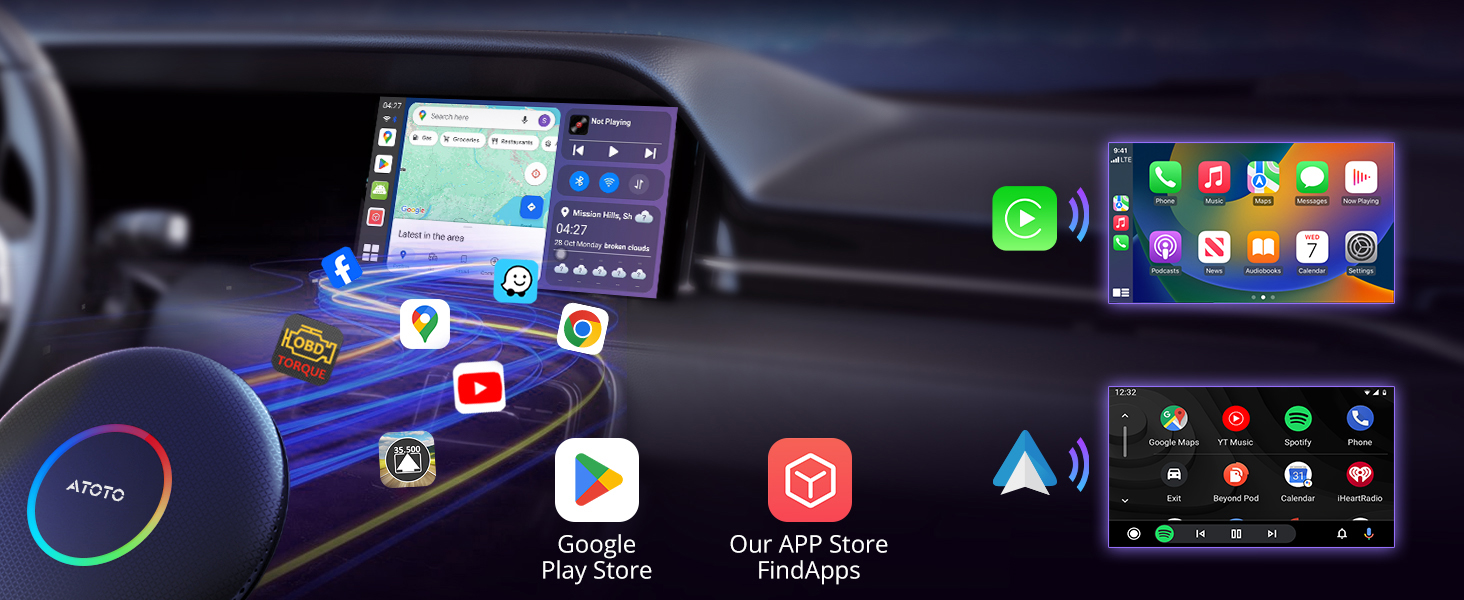
Image: The Android system interface on a car display, showcasing available applications.

Image: A car stereo screen displaying the split-screen feature, with a video on one side and a navigation map on the other.
4.2. AI DriveChat Voice Assistant
The CB6 features AI DriveChat, a ChatGPT-powered voice assistant. This allows for AI conversations and the ability to switch to specialized chatbots for various needs, enhancing your in-car experience.

Image: The DriveChat AI assistant interface, demonstrating its conversational capabilities and various chatbot options.
વિડિઓ: વિગતવાર વર્ણનview of the CB6 CarPlay AI Box, highlighting its features including the DriveChat AI assistant.
4.3. TrackHU GPS Tracking App
Utilize the pre-installed TrackHU app for real-time GPS tracking of your vehicle. It offers detailed reports, online/offline status, and instant geofencing alerts, with position updates every 5 seconds.
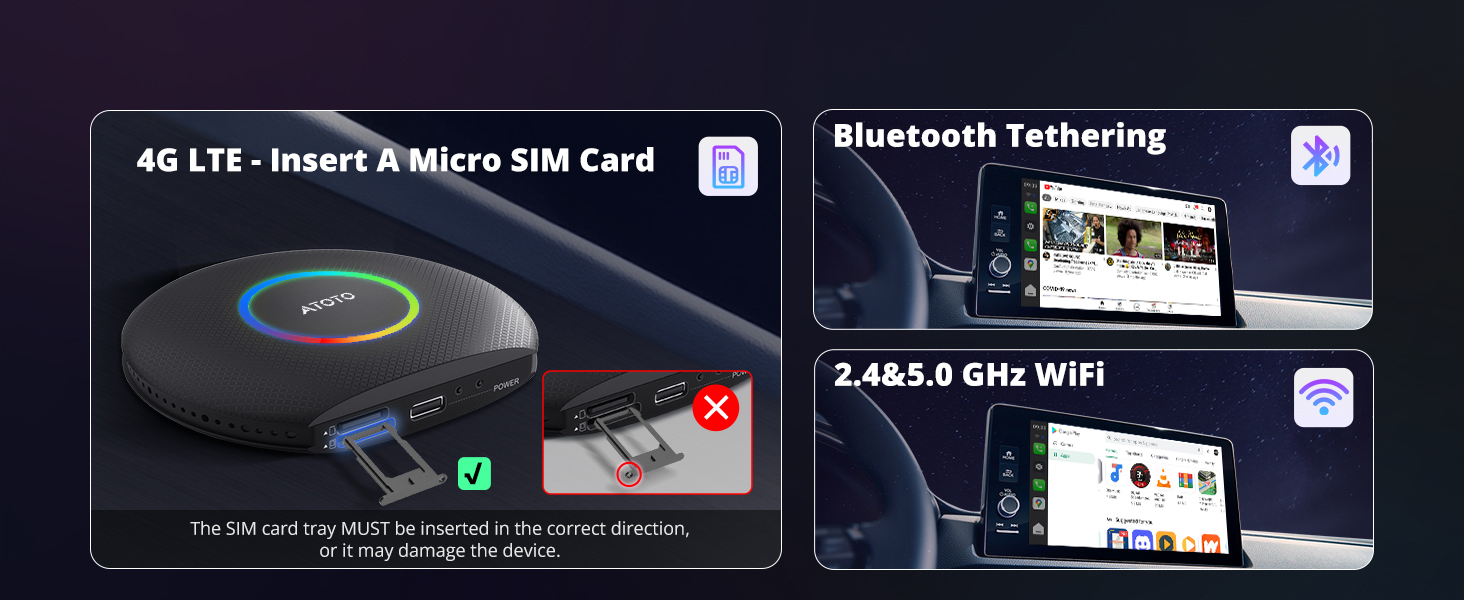
Image: The TrackHU GPS tracking application, demonstrating its real-time tracking, geofence, alerts, and route playback features.
4.4. Internet Access Options
The CB6 offers multiple ways to access the internet:
- Built-in 4G LTE: Insert a Micro SIM card (recommended IoT SIM) into the device for fast and reliable connectivity. Ensure the SIM card tray is inserted correctly to avoid damage.
- બ્લૂટૂથ ટિથરિંગ: Connect to your smartphone's internet via Bluetooth tethering.
- Wi-Fi: Connect to available 2.4 & 5.0 GHz Wi-Fi networks. Note: Wi-Fi is NOT supported for internet access when wireless CarPlay or Android Auto is actively in use. In this scenario, use 4G LTE or Bluetooth tethering.

Image: Instructions for inserting a Micro SIM card for 4G LTE, and visual representations of Bluetooth tethering and Wi-Fi connectivity.
4.5. Customizable LED Light Colors
Personalize the LED light colors on your CB6 device to match your vehicle's interior or your mood. Access the LED settings through the device's interface.

Image: The LED color setting interface, allowing users to select colors and modes (daytime, night, auto) for the CB6 device's ambient lighting.
5. સુસંગતતા
The ATOTOZONE CB6 is designed for wide compatibility:
- Car Stereos: Compatible with factory-installed and aftermarket car stereos that have wired CarPlay or wired Android Auto.
- સ્માર્ટફોન: Compatible with iPhone 5 or newer (iOS 9.0+) and Android 11+ phones. Also useful for Google/Samsung phones with Android 10.0+ and Galaxy S8/S8+/Note 8 with Android 9.0+.
આની સાથે સુસંગત નથી:
- BMW models and most Subaru models.
- Car stereos that only support wireless CarPlay or only wireless Android Auto.
For head units that only support wireless CarPlay + wired Android Auto, the system needs to be switched to the Android Auto channel.

Image: Compatibility chart for phones (iPhone and Android) and car stereos (wired CarPlay/Android Auto support).
6. સ્પષ્ટીકરણો
| ઉત્પાદન પરિમાણો | 3.67 x 3.25 x 0.65 ઇંચ |
| વસ્તુનું વજન | 8.1 ઔંસ |
| ઓપરેટિંગ સિસ્ટમ | એન્ડ્રોઇડ 13 |
| રેમ | 4GB |
| સ્ટોરેજ (ROM) | 64GB |
| કનેક્ટિવિટી | 4G LTE, Wi-Fi (2.4 & 5.0 GHz), Dual Bluetooth |
| કનેક્ટર પ્રકાર | Micro USB (USB-C port on device) |
| ખાસ લક્ષણો | AI DriveChat (ChatGPT-powered), TrackHU GPS Tracker, OTA Updates, Split Screen |
7. જાળવણી
7.1. Over-The-Air (OTA) Updates
The CB6 device supports Over-The-Air (OTA) updates to continuously add new features, improve system stability, and optimize performance. It is recommended to download new versions as soon as they are detected.
- To check for updates, navigate to the 'System Update' section in the device settings.
- Ensure the device is not powered off during the update process to prevent potential boot errors.

Image: The system update screen, indicating current version and options to check for new updates.
8. મુશ્કેલીનિવારણ
If you encounter issues with your ATOTOZONE CB6, consider the following:
- પાવર/કનેક્શન નથી: Ensure the USB cable is securely connected to both the CB6 and the vehicle's USB port. If using the Y-cable, ensure both USB-A ends are connected.
- Wireless CarPlay/Android Auto Not Connecting: Verify that Bluetooth and Wi-Fi are enabled on your smartphone and correctly paired with the CB6. Restart both the CB6 and your phone if necessary.
- ઇન્ટરનેટ ઍક્સેસ નથી: Check your 4G LTE SIM card insertion and activation, or verify your Bluetooth tethering/Wi-Fi connection settings. Remember that Wi-Fi internet access is not available during active wireless CarPlay/Android Auto use.
- એપ્લિકેશન પ્રદર્શન સમસ્યાઓ: Ensure the device has a stable internet connection. Check for available OTA updates to improve system performance.
- સુસંગતતા તપાસ: Refer to Section 5 to confirm your vehicle and smartphone are compatible with the CB6 device.
9. વોરંટી અને સપોર્ટ
The ATOTOZONE CB6 comes with a 12-month warranty, with an additional 6 months provided. For any issues or inquiries, online self-service support is available. Product care experts will respond to your concerns within 24 hours.


