1. પરિચય
Thank you for choosing the Phomemo M832 Bluetooth Inkless Portable Printer. This device offers convenient, high-quality thermal printing without the need for ink cartridges, making it ideal for various applications from business to personal use. Its compact design and wireless connectivity ensure ease of use anywhere.

Image 1.1: The Phomemo M832 portable printer, shown with thermal paper and its dedicated carrying case.
મુખ્ય લક્ષણો:
- શાહી વગરનું થર્મલ પ્રિન્ટિંગ: Eliminates the need for ink or toner, reducing operational costs and mess.
- વાયરલેસ કનેક્ટિવિટી: Bluetooth for seamless connection with smartphones and tablets.
- મલ્ટી-સાઇઝ પેપર સપોર્ટ: Compatible with 8.5'' x 11'' (A4), 4.33'', 3.14'', and 2.08'' wide thermal paper.
- પોર્ટેબલ ડિઝાઇન: Compact and lightweight, with a built-in rechargeable battery for on-the-go use.
- Dedicated Carrying Case: Provides protection and easy transport for the printer.

છબી ૨.૧: એક ઓવરview highlighting the Phomemo M832's key features, including portability, Bluetooth connectivity, 300dpi resolution, support for multiple devices, and compatibility with five different paper sizes.
2. સેટઅપ માર્ગદર્શિકા
2.1 પેકેજ સામગ્રી
Before you begin, please ensure all items are present:
- Phomemo M832 Portable Printer
- યુએસબી ચાર્જિંગ કેબલ
- Thermal Paper Roll (starter)
- કેસ વહન
- વપરાશકર્તા માર્ગદર્શિકા (આ દસ્તાવેજ)
૩.૧ પ્રિન્ટર ચાર્જ કરવું
Connect the printer to a power source using the provided USB cable. The indicator light will show charging status. A full charge is recommended before first use.
૩.૩ થર્મલ પેપર લોડ કરી રહ્યું છે
- Gently open the printer's top cover.
- Insert the thermal paper roll with the printing side facing up. Ensure the roll is aligned correctly within the paper compartment.
- Close the top cover firmly until it clicks into place. A small amount of paper should protrude from the output slot.
2.4 App Download and Bluetooth Connection
To print wirelessly from your mobile device, follow these steps:
- એપ ડાઉનલોડ કરો: માટે શોધો and download the official 'Phomemo' app from your device's app store (iOS App Store or Android Google Play Store). No registration is required.
- પાવર ઓન પ્રિન્ટર: Press and hold the power button on the M832 printer until the indicator light illuminates.
- બ્લૂટૂથ સક્ષમ કરો: ખાતરી કરો કે તમારા સ્માર્ટફોન અથવા ટેબ્લેટ પર બ્લૂટૂથ સક્ષમ છે.
- એપ્લિકેશનમાં કનેક્ટ કરો: Open the 'Phomemo' app. Tap the 'Printer' icon (or similar connection symbol) within the app to search for available devices. Select 'M832' from the list to establish a Bluetooth connection.

Image 2.1: The Phomemo M832 printer demonstrating its versatile connectivity options, including Bluetooth for mobile devices (iOS, Android, Tablets) and USB for computers (Mac OS, Windows, Chromebook, Linux).
2.5 USB Connection for Laptops/PCs
For printing from a laptop or PC, connect the printer using the USB cable. Drivers may be required and can typically be found on the official Phomemo webસાઇટ
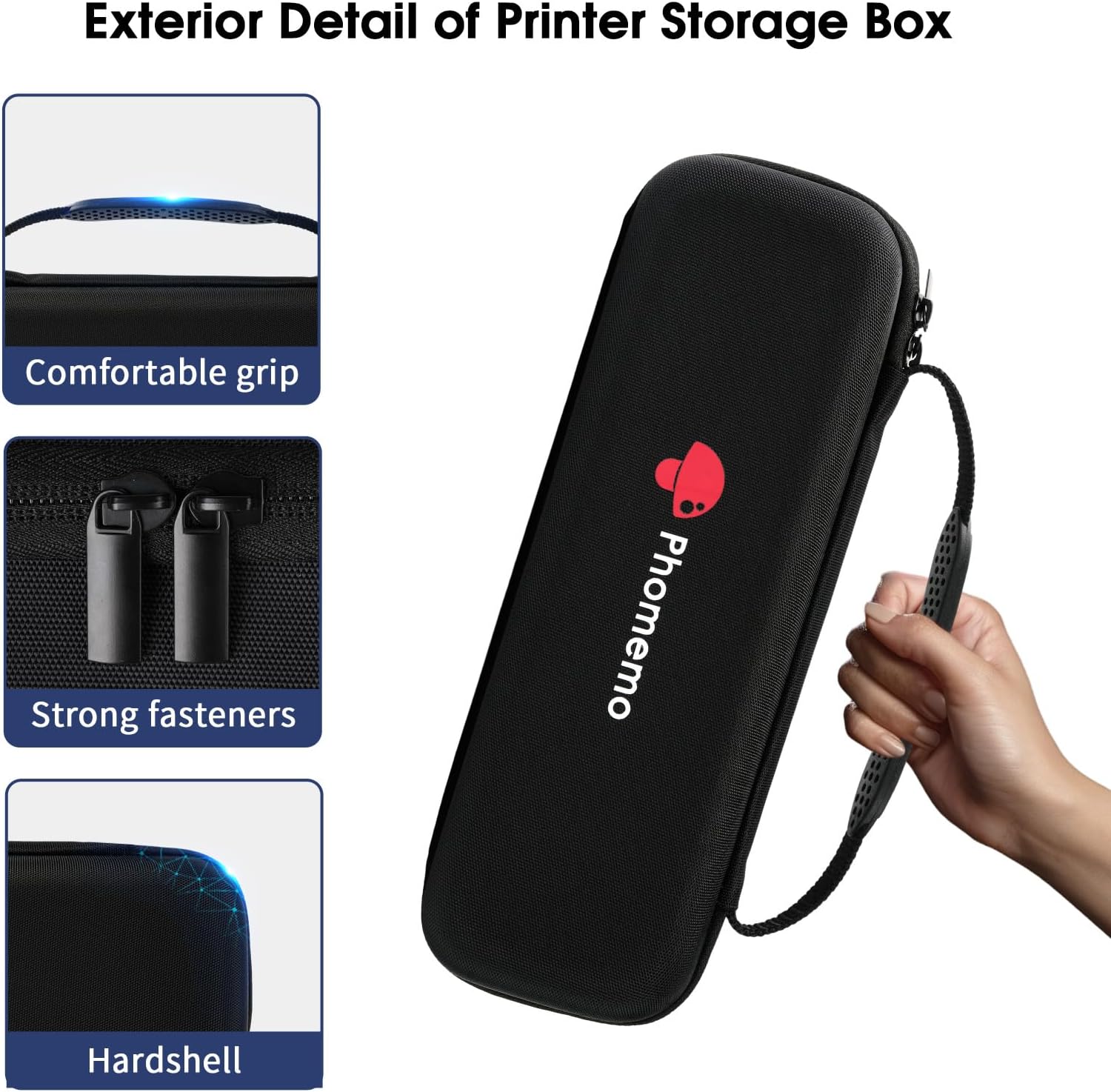
Image 2.2: The Phomemo M832 printer in use, showing both USB connection for laptops and Bluetooth connection for mobile devices, highlighting its adaptability for various printing scenarios.
3. ઓપરેટિંગ સૂચનાઓ
3.1 Basic Printing from the App
- Ensure your M832 printer is connected via Bluetooth to the Phomemo app.
- Within the app, select the document or image you wish to print.
- Choose the appropriate paper size and any other print settings (e.g., density, rotation).
- છાપવાનું શરૂ કરવા માટે 'છાપો' બટનને ટેપ કરો.

Image 3.1: The Phomemo M832 printer in operation, dispensing a printed document that includes various charts and textual information.

છબી ૫.૨: બીજું view of the Phomemo M832 printer producing a document, showcasing its ability to print detailed infographic elements and text.
3.2 Supported Paper Types and Sizes
The Phomemo M832 printer is designed for use with Phomemo thermal paper. It supports various widths to accommodate different printing needs:
- 8.5'' x 11'' (A4)
- 4.33'' wide
- 3.14'' wide
- 2.08'' wide
Always use high-quality thermal paper to ensure optimal print results and to prolong the life of your printer.
4. જાળવણી
૫.૧ પ્રિન્ટ હેડ સાફ કરવું
To maintain print quality, periodically clean the print head. Ensure the printer is turned off and cooled down before cleaning.
- પ્રિન્ટર કવર ખોલો.
- પ્રિન્ટ હેડને કપાસના સ્વેબથી હળવા હાથે સાફ કરો.ampઆઇસોપ્રોપીલ આલ્કોહોલ સાથે સમાપ્ત.
- કવર બંધ કરીને ફરીથી ઉપયોગ શરૂ કરતા પહેલા પ્રિન્ટ હેડને સંપૂર્ણપણે સુકાવા દો.
4.2 બેટરી કેર
- વારંવાર બેટરી સંપૂર્ણપણે ડિસ્ચાર્જ કરવાનું ટાળો.
- બેટરીની તંદુરસ્તી જાળવવા માટે, ઉપયોગમાં ન હોય તો પણ, પ્રિન્ટરને નિયમિતપણે ચાર્જ કરો.
- લાંબા સમય સુધી ઉપયોગમાં ન હોય ત્યારે પ્રિન્ટરને ઠંડી, સૂકી જગ્યાએ સંગ્રહિત કરો.
4.3 Printer and Case Storage
Store the printer and its carrying case in a clean, dry environment away from direct sunlight and extreme temperatures. The included carrying case is designed to protect your printer during travel and storage.
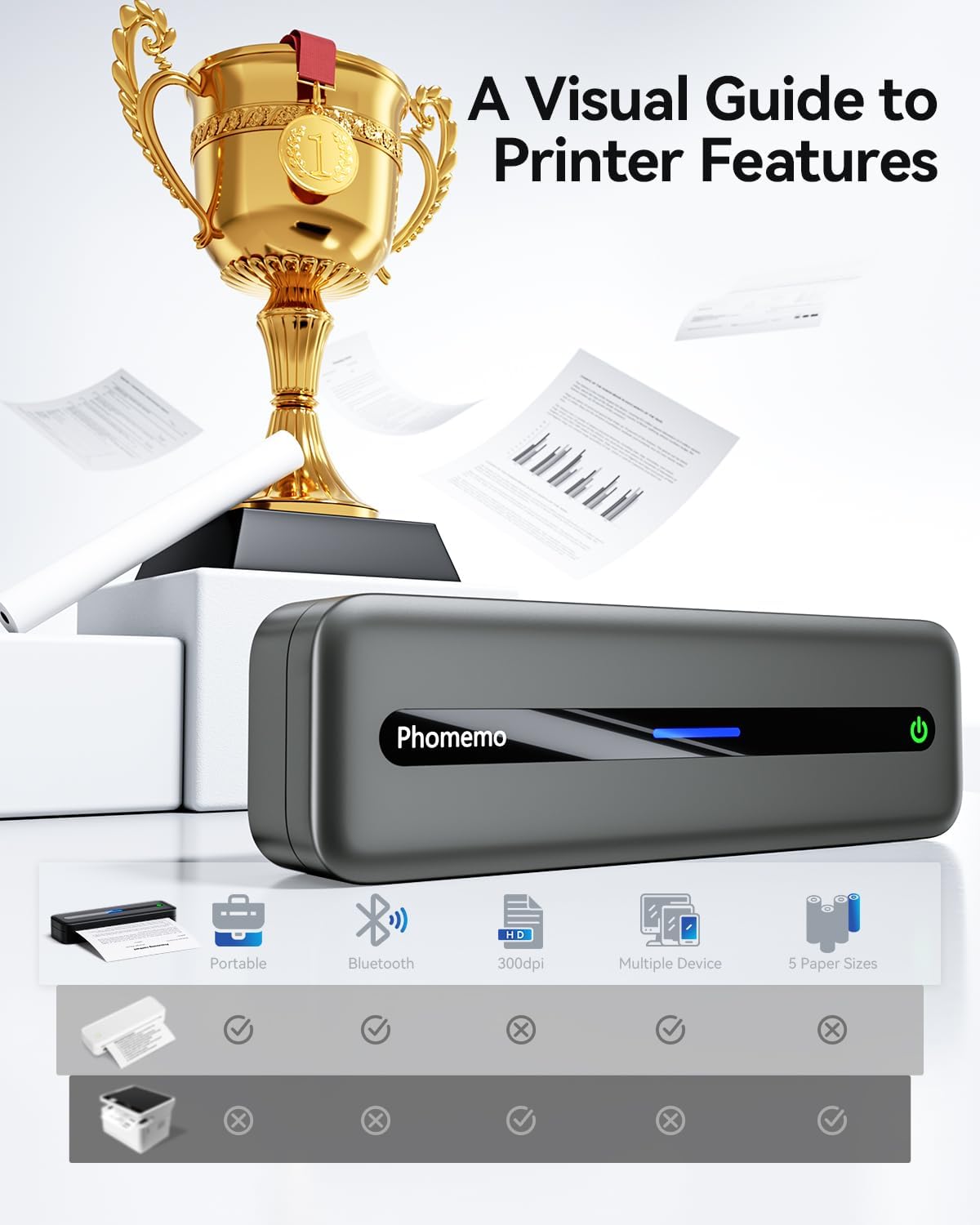
Image 4.1: The protective carrying case for the Phomemo M832 printer, designed for secure transport and storage.

Image 4.2: Close-up details of the Phomemo M832 carrying case, highlighting its comfortable grip, durable fasteners, and hardshell construction for enhanced protection.

Image 4.3: The Phomemo M832 carrying case with its dimensions (270mm/10.63in length, 90mm/3.54in width), emphasizing its portable size and integrated hand strap.
5. મુશ્કેલીનિવારણ
૬.૧ પ્રિન્ટર ચાલુ નથી થઈ રહ્યું
- Ensure the printer is fully charged. Connect it to a power source and wait for the charging indicator.
- પાવર બટનને થોડી સેકંડ માટે દબાવી રાખો.
૭.૨ બ્લૂટૂથ દ્વારા કનેક્ટ કરવામાં અસમર્થ
- ખાતરી કરો કે તમારા મોબાઇલ ઉપકરણ પર બ્લૂટૂથ સક્ષમ છે.
- Ensure the printer is powered on and within range.
- પ્રિન્ટર અને તમારા મોબાઇલ ઉપકરણ બંનેને ફરીથી શરૂ કરો.
- Forget the device in your phone's Bluetooth settings and try pairing again through the Phomemo app.
5.3 Poor Print Quality or Blank Pages
- Check if the thermal paper is loaded correctly with the printing side facing up.
- Ensure you are using genuine Phomemo thermal paper.
- જાળવણી વિભાગમાં વર્ણવ્યા મુજબ પ્રિન્ટ હેડ સાફ કરો.
- Adjust print density settings within the Phomemo app.
૬.૧ પ્રિન્ટર જવાબ આપી રહ્યું નથી
- Perform a soft reset by turning the printer off and then on again.
- If unresponsive, allow the battery to fully discharge and then recharge it.
6. સ્પષ્ટીકરણો
| મોડલ | M832 |
| પ્રિન્ટીંગ ટેકનોલોજી | થર્મલ પ્રિન્ટિંગ (ઇંકલેસ) |
| કનેક્ટિવિટી | બ્લૂટૂથ, યુએસબી |
| આધારભૂત કાગળ માપો | 8.5'' x 11'' (A4), 4.33'', 3.14'', 2.08'' wide |
| બેટરી | Built-in Rechargeable (2600 mAh) |
| ASIN | B0F8R1Q37Y |
| તારીખ પ્રથમ ઉપલબ્ધ | 5 ફેબ્રુઆરી, 2025 |
7. વોરંટી અને સપોર્ટ
The Phomemo M832 printer comes with a standard manufacturer's warranty. For detailed warranty information, product support, or technical assistance, please visit the official Phomemo website or contact their customer service directly. Please have your product model (M832) and ASIN (B0F8R1Q37Y) ready when contacting support.


