પરિચય
Thank you for choosing EZVALO Under Cabinet Lighting. This manual provides detailed instructions for the installation, operation, and maintenance of your new motion sensor lights. Please read this manual thoroughly before use and retain it for future reference.
બૉક્સમાં શું છે
- Under cabinet lighting (4 units)
- Adhesive metal plate (8 units)
- Type C Charging Cable (4 units)
- સૂચના માર્ગદર્શિકા (1 યુનિટ)

Image: The package contents including four light bars, charging cables, adhesive metal plates, and the instruction manual.
લક્ષણો
- Motion-Activated Light with Multiple Modes: Detects motion within 12 ft and a 120° field, automatically turning on and then switching off after 20 seconds of no movement. Features Night Mode (activates only in low-light), Day Mode (activates anytime motion is detected), and Always-On Mode for continuous light.
- Long-Lasting & Rechargeable: Built-in 3200mAh battery provides up to 13.5 hours of continuous lighting at maximum brightness or 16-49 days in motion-sensing mode (depending on usage frequency). Fully recharges in approximately 4.5 hours. Four Type-C cables are included.
- Three Adjustable Color Temperatures & Dimmable: Choose from Warm White (3000K), Natural White (4500K), and Cool White (6500K). Brightness is adjustable from 10% to 100%.
- Easy Installation & Multi-Use: Features super-strong built-in magnets for instant installation on metal surfaces. Includes adhesive iron plates for mounting on non-metal surfaces. Ideal for kitchens, cabinets, closets, counters, stairs, hallways, pantries, basements, and shelves.
સેટઅપ અને ઇન્સ્ટોલેશન
- સપાટી તૈયાર કરો: ખાતરી કરો કે ઇન્સ્ટોલેશન સપાટી સ્વચ્છ, સૂકી અને સુંવાળી હોય.
- Attach Metal Plates (for non-metal surfaces): If installing on a non-metal surface (e.g., wood, glass, ceramic tile), peel off the protective film from the adhesive metal plate. Stick the metal plate firmly to the desired location. For each light, use two metal plates aligned with the magnetic areas on the back of the light.
- લાઇટ માઉન્ટ કરો: The EZVALO light bars have built-in magnets. Simply attach the light bar directly to a metal surface or onto the previously installed adhesive metal plates. The magnetic attachment allows for easy removal for charging.

Image: Visual guide for magnetic installation using adhesive metal plates.
ઇન્સ્ટોલેશન ટિપ્સ:
- Maintain a distance of more than 20 inches between multiple lights to avoid interference.
- Avoid placing lights facing each other.
- Do not install too close to the edge of a surface, as this may affect motion detection.

Image: Guidelines for optimal light placement and common installation errors to avoid.
ઓપરેટિંગ સૂચનાઓ
નિયંત્રણ પેનલ ઓવરview:
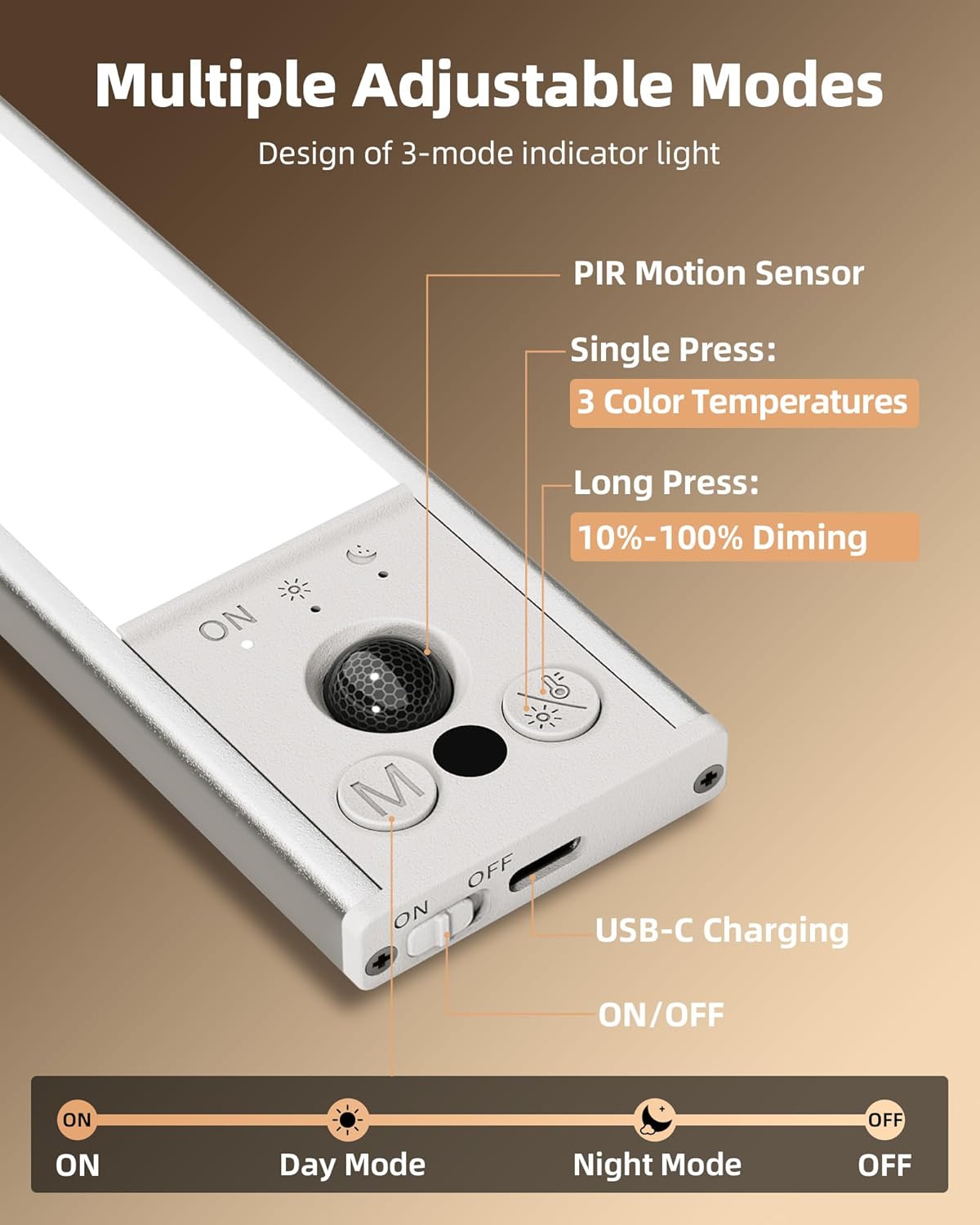
છબી: વિગતવાર view of the control panel showing the PIR motion sensor, mode button, and light adjustment button.
- ચાલુ/બંધ સ્વિચ: Located on the side of the light bar. Slide to 'ON' to activate, 'OFF' to power down completely.
- મોડ બટન (M): Single press to cycle through lighting modes: Always-On, Day Mode, Night Mode.
- Light Adjustment Button:
- સિંગલ પ્રેસ: Cycles through 3 color temperatures: Warm White (3000K), Natural White (4500K), Cool White (6500K).
- લાંબા પ્રેસ: Adjusts brightness from 10% to 100%. The light has a brightness memory function.
લાઇટિંગ મોડ્સ:
- હંમેશા-ઓન મોડ: Provides continuous illumination.
- દિવસ મોડ: Activates with motion detection at any time, regardless of ambient light.
- નાઇટ મોડ: Activates only in low-light environments when motion is detected.
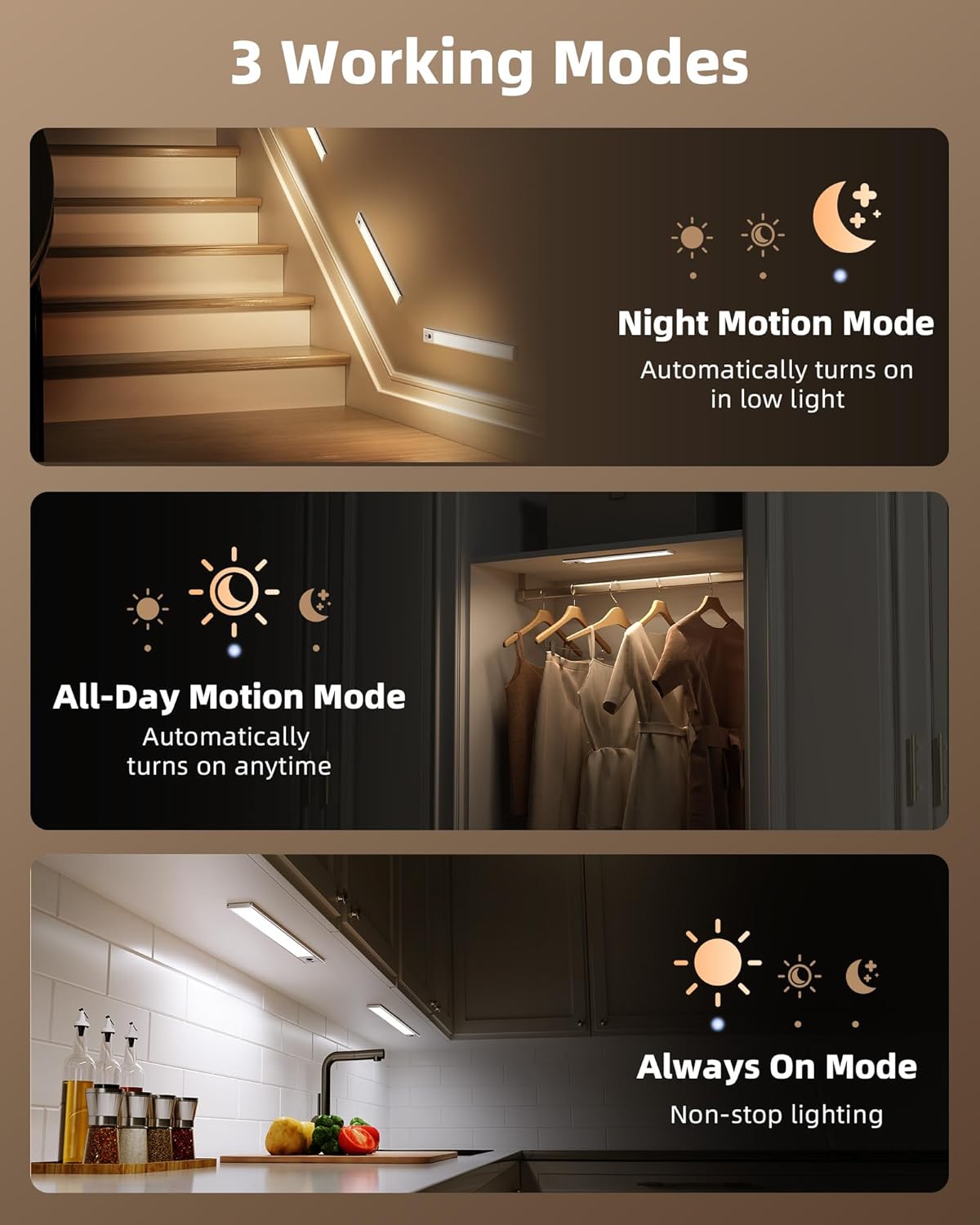
Image: Visual representation of the three operational modes for the EZVALO lights.
Color Temperature and Dimming:

છબી: દા.તamples of the three adjustable color temperatures and dimmable brightness settings.
ચાર્જિંગ
When the battery is low, the light indicator will turn red. Connect the included Type-C charging cable to the charging port on the side of the light bar and to a USB power source. The indicator light will turn green when fully charged.
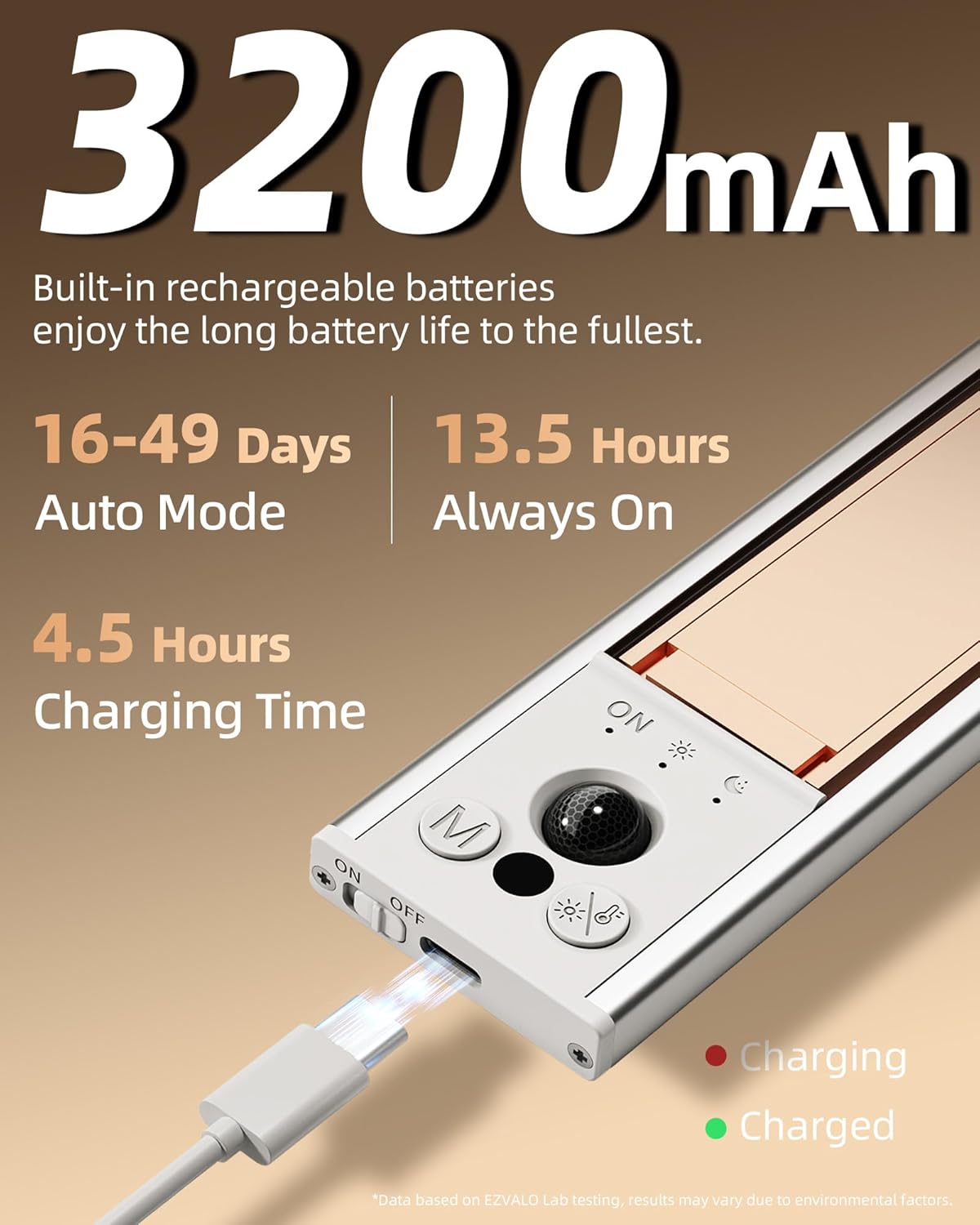
Image: Illustration of the charging process, highlighting the Type-C port and indicator lights.
જાળવણી
- સફાઈ: Wipe the light bar with a soft, dry cloth. Do not use abrasive cleaners or solvents.
- બેટરી સંભાળ: For optimal battery life, avoid fully depleting the battery frequently. Recharge when the indicator light turns red.
- સંગ્રહ: If storing the lights for an extended period, charge them fully and then turn them off using the side switch. Recharge every 3-6 months to maintain battery health.
મુશ્કેલીનિવારણ
- લાઇટ ચાલુ નથી:
- તપાસો કે ચાલુ/બંધ સ્વીચ 'ચાલુ' સ્થિતિમાં છે કે નહીં.
- ખાતરી કરો કે બેટરી ચાર્જ થઈ છે.
- Verify the selected mode (Day Mode, Night Mode, Always-On) is appropriate for the current environment.
- મોશન સેન્સર કામ કરતું નથી:
- Ensure the light is not in 'Always-On' mode.
- Check for obstructions blocking the PIR motion sensor.
- Confirm the ambient light conditions are suitable for 'Night Mode' if selected.
- Light falls off:
- Ensure the installation surface was clean and dry before applying adhesive metal plates.
- Press the adhesive plates firmly for at least 10 seconds during installation.
- If using on a metal surface, ensure the magnets are making full contact.
વિશિષ્ટતાઓ
| લક્ષણ | સ્પષ્ટીકરણ |
|---|---|
| બ્રાન્ડ | ઇઝવાલો |
| મોડલ નંબર | EZV-4PACK-UCL-3200 |
| કદ | 12 inches (12"L x 1.7"W x 0.53"H) |
| રંગ | સફેદ |
| સામગ્રી | એલ્યુમિનિયમ |
| પાવર સ્ત્રોત | બેટરી સંચાલિત (3200mAh રિચાર્જેબલ) |
| ખાસ લક્ષણો | Adjustable Color Temperature, Dimmable, Motion Sensor, Rechargeable, Wireless |
| નિયંત્રણ પદ્ધતિ | સ્પર્શ, ગતિ સેન્સર |
| પ્રકાશ સ્ત્રોત પ્રકાર | એલઇડી |
| રંગ તાપમાન | ૩૦૦૦K (ગરમ), ૪૫૦૦K (કુદરતી), ૭૦૦૦K (ઠંડી) |
| તેજ | 150 Lumens (10%-100% Dimmable) |
| મોશન સેન્સર રેન્જ | Up to 12 ft, 120° field |
| સ્વતઃ-બંધ સમય | 20 seconds (after no motion) |
| ચાર્જિંગ સમય | આશરે. 4.5 કલાક |
| Battery Life (Motion Sensing) | 16-49 days (depending on usage) |
| Battery Life (Always-On, Max Brightness) | 13.5 કલાક સુધી |
સત્તાવાર ઉત્પાદન વિડિઓ
Video: An official product video demonstrating the features and uses of the EZVALO Under Cabinet Lighting.
વોરંટી અને આધાર
This product comes with a Limited Warranty. For specific warranty details and support, please refer to the warranty information included in your product packaging or visit the official EZVALO webસાઇટ
વધુ સહાય માટે, તમે આની પણ મુલાકાત લઈ શકો છો EZVALO Store on Amazon.


