1. પરિચય
This manual provides essential information for the safe and efficient operation of your Smart Tech 24HA20V3CUK 24-inch HD Smart Android LED TV. Please read this manual thoroughly before using the product and retain it for future reference. This television combines a compact design with smart features, offering High Definition visuals and extensive connectivity options, including a 12-volt power input for versatile use.

This image shows the front of the Smart Tech 24-inch Android TV, highlighting its 24-inch screen size, Android TV operating system, HD Ready resolution, and support for services like Freeview and Netflix, along with Dolby Audio.
2. સલામતી માહિતી
2.1 સામાન્ય સલામતી સાવચેતીઓ
- આગ કે ઇલેક્ટ્રિક આંચકો ટાળવા માટે ટીવીને વરસાદ કે ભેજના સંપર્કમાં ન લાવો.
- ટીવી ખોલશો નહીં casing. બધી સેવા લાયક કર્મચારીઓને સોંપો.
- યોગ્ય વેન્ટિલેશનની ખાતરી કરો. વેન્ટિલેશનના છિદ્રોને અવરોધશો નહીં.
- પાવર કોર્ડને ચાલવા અથવા પિંચ થવાથી સુરક્ષિત કરો.
- વીજળી પડતાં વાવાઝોડાં દરમિયાન અથવા લાંબા સમય સુધી ટીવીનો ઉપયોગ ન થાય ત્યારે ટીવીને અનપ્લગ કરો.
2.2 પ્લેસમેન્ટ
- Place the TV on a stable, level surface to prevent it from falling.
- Avoid direct sunlight, heat sources, and extreme temperatures.
- Keep the TV away from strong magnetic fields.
2.3 સફાઈ
- સફાઈ કરતા પહેલા હંમેશા ટીવીને અનપ્લગ કરો.
- Use a soft, dry cloth to clean the screen and cabinet. Do not use liquid or aerosol cleaners.
3. પેકેજ સામગ્રી
ખાતરી કરો કે નીચે સૂચિબદ્ધ બધી વસ્તુઓ તમારા પેકેજમાં શામેલ છે:
- Smart Tech 24HA20V3CUK 24-inch HD Smart Android LED TV
- Remote Control (requires 2 AA batteries, not included)
- ટીવી સ્ટેન્ડ (બેઝ અને સ્ક્રૂ)
- Power Adapter (12-volt charger included)
- વપરાશકર્તા માર્ગદર્શિકા (આ દસ્તાવેજ)
4. સેટઅપ
4.1 અનપેકિંગ
પેકેજિંગમાંથી ટીવી અને બધી એસેસરીઝ કાળજીપૂર્વક દૂર કરો. ભવિષ્યના પરિવહન અથવા સંગ્રહ માટે પેકેજિંગ સામગ્રી રાખો.
૨.૧ સ્ટેન્ડ જોડવું
Place the TV face down on a soft, clean surface to prevent screen damage. Align the stand base with the mounting holes on the bottom of the TV. Secure the stand using the provided screws. Ensure the stand is firmly attached before placing the TV upright.
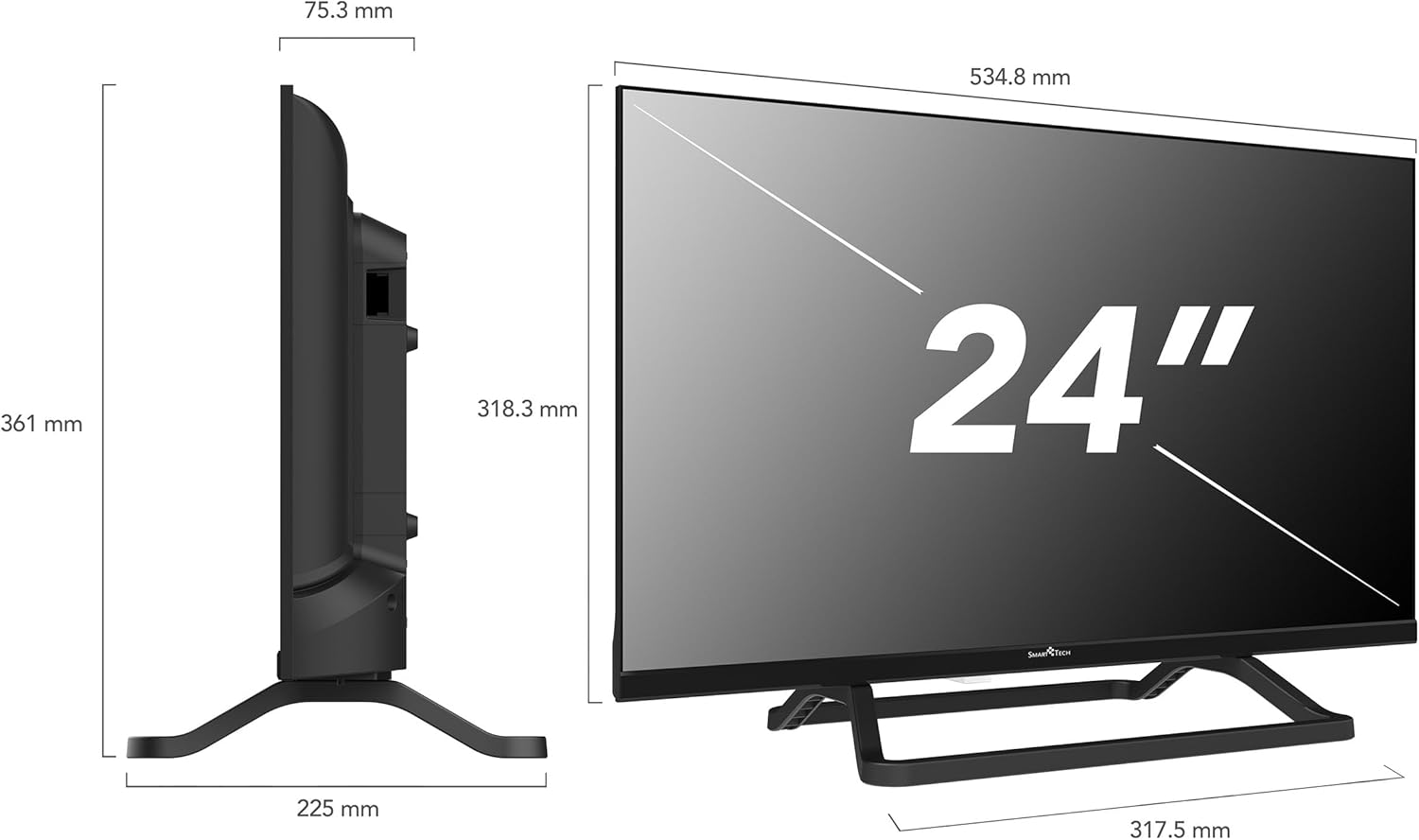
This technical diagram provides precise measurements of the Smart Tech 24-inch TV, including its overall height, width, and depth, as well as the screen dimensions. These details are useful for planning placement and installation.
4.3 કનેક્ટિંગ પાવર
Connect the provided 12-volt power adapter to the TV's DC input port and then to a suitable 12-volt power source. For home use, connect the adapter to a standard AC outlet using an appropriate AC-DC converter (if not integrated with the 12V charger). The 12-volt input makes this TV ideal for use in caravans, campers, and other mobile applications.
૫.૩ બાહ્ય ઉપકરણોને જોડવા
Your TV offers multiple connection options for external devices:
- HDMI પોર્ટ્સ (x3): બ્લુ-રે પ્લેયર્સ, ગેમ કન્સોલ, સેટ-ટોપ બોક્સ અથવા અન્ય HDMI-સક્ષમ ઉપકરણોને કનેક્ટ કરો.
- USB પોર્ટ (x2): મીડિયા પ્લેબેક અથવા સોફ્ટવેર અપડેટ્સ માટે USB સ્ટોરેજ ડિવાઇસને કનેક્ટ કરો.
- મીની AV ઇનપુટ: સંયુક્ત વિડિઓ અને સ્ટીરિયો ઑડિઓનો ઉપયોગ કરતા જૂના ઉપકરણો માટે.
- ઇઅરફોન જેક: ખાનગી સાંભળવા માટે હેડફોન કનેક્ટ કરો.
- ઓપ્ટિકલ ઓડિયો આઉટપુટ: બાહ્ય ઑડિઓ સિસ્ટમ્સ સાથે કનેક્ટ કરવા માટે.
- RJ45 (Ethernet) Port: વાયર્ડ ઇન્ટરનેટ કનેક્શન માટે.
- સીઆઈ સ્લોટ: પે-ટીવી ચેનલોને ડિક્રિપ્ટ કરવા માટે શરતી ઍક્સેસ મોડ્યુલ્સ (CAMs) માટે.
- DVB-T2/DVB-S2 Tuners: For terrestrial and satellite antenna connections.

આ છબી વિગતવાર પૂરી પાડે છે view of the rear panel of the Smart Tech TV, highlighting its comprehensive range of connectors. These include a CI Slot, two USB ports, DVB-T2 and DVB-S2 tuners, three HDMI inputs, an earphone jack, a Mini AV input, an Optical audio output, and an RJ45 Ethernet port for wired network connectivity.
૨.૫ પ્રારંભિક સેટઅપ વિઝાર્ડ
Upon first power-on, the TV will guide you through an initial setup process. This typically includes:
- ભાષા પસંદગી.
- નેટવર્ક કનેક્શન (Wi-Fi અથવા ઇથરનેટ).
- Google account sign-in (optional, for full Android TV features).
- Channel scanning (for terrestrial or satellite broadcasts).
- Time zone and date settings.
૫. ટીવી ચલાવવું
5.1 રીમોટ કંટ્રોલ
The remote control allows you to navigate the TV's functions. Insert 2 AA batteries into the remote control, ensuring correct polarity.

The remote control for the Smart Tech TV is shown, featuring a microphone button for 'Hey Google' voice control. It also includes dedicated one-click access buttons for popular streaming applications like Netflix, YouTube, Prime Video, and Freeview Play, simplifying navigation.
૪.૧ મૂળભૂત ટીવી કાર્યો
- શક્તિ: ટીવી ચાલુ કે બંધ કરવા માટે પાવર બટન દબાવો.
- વોલ્યુમ: વોલ્યુમ સમાયોજિત કરવા માટે VOL +/- બટનોનો ઉપયોગ કરો.
- ચેનલ: ચેનલો બદલવા માટે CH +/- બટનોનો ઉપયોગ કરો.
- ઇનપુટ: Press the INPUT button to select different input sources (HDMI, AV, Tuner).
- નેવિગેશન: Use the arrow keys and OK button to navigate menus.
5.3 Android TV Interface and Smart Features
Your TV runs on Android TV, providing access to a wide range of applications and services.

The Smart TV home screen is displayed, featuring a user-friendly interface with quick access to popular streaming applications such as Netflix, YouTube, Prime Video, and Disney+. A Google Play movie banner is also visible, indicating access to a wide range of digital content.
- હોમ સ્ક્રીન: Access your favorite apps, live TV, and recommended content.
- સ્ટ્રીમિંગ એપ્લિકેશન્સ: Pre-installed apps like Netflix, YouTube, and Prime Video are readily available. You can download more from the Google Play Store.
- Google સહાયક: Use the voice control button on your remote to search for content, control smart home devices, and get information.
- Chromecast બિલ્ટ-ઇન: Cast content from your smartphone, tablet, or computer directly to your TV.
- વાઇ-ફાઇ/ઇથરનેટ: ઇન્ટરનેટ ઍક્સેસ અને સ્માર્ટ સુવિધાઓ માટે તમારા હોમ નેટવર્ક સાથે કનેક્ટ થાઓ.

This image presents a collage illustrating the main features of the Smart Tech TV. These include a modern bezel-less design, a triple tuner for versatile signal reception, High Definition resolution, built-in Google Cast functionality, Dolby Audio for enhanced sound, and the Android operating system for smart TV capabilities.
6. જાળવણી
૪.૧ ટીવી સાફ કરવું
- સ્ક્રીન: નરમ, લિન્ટ-ફ્રી કાપડથી સ્ક્રીનને ધીમેથી સાફ કરો. હઠીલા નિશાનો માટે, સહેજ ડીampપાણી અથવા વિશિષ્ટ સ્ક્રીન ક્લીનરથી કપડાને મિક્સ કરો (સીધા સ્ક્રીન પર સ્પ્રે કરશો નહીં).
- કેબિનેટ: Use a soft, dry cloth to clean the TV cabinet. Avoid abrasive cleaners or solvents.
6.2 સોફ્ટવેર અપડેટ્સ
The TV may receive automatic software updates via the internet. Ensure your TV is connected to the internet to receive the latest features and security patches.
7. મુશ્કેલીનિવારણ
જો તમને તમારા ટીવીમાં સમસ્યાઓ આવે, તો નીચેની સામાન્ય સમસ્યાઓ અને ઉકેલોનો સંદર્ભ લો:
| સમસ્યા | સંભવિત કારણ / ઉકેલ |
|---|---|
| કોઈ શક્તિ નથી | Check if the power cord is securely connected. Ensure the power outlet or 12V source is active. |
| કોઈ ચિત્ર નથી, પણ અવાજ છે. | ઇનપુટ સ્રોત તપાસો. ખાતરી કરો કે બાહ્ય ઉપકરણો ચાલુ છે અને યોગ્ય રીતે જોડાયેલા છે. |
| અવાજ નથી, પણ ચિત્ર હાજર છે. | Check the volume level. Ensure Mute is not activated. Check audio settings and external audio connections. |
| રીમોટ કંટ્રોલ કામ કરતું નથી | બેટરી બદલો. ખાતરી કરો કે રિમોટ અને ટીવીના IR સેન્સર વચ્ચે કોઈ અવરોધો નથી. |
| Wi-Fi થી કનેક્ટ કરી શકાતું નથી | Ensure your Wi-Fi router is on and within range. Re-enter the Wi-Fi password. Try restarting the TV and router. |
| સ્માર્ટ ટીવી એપ્સ લોડ થઈ રહી નથી | Check your internet connection. Try clearing the app's cache or reinstalling the app. Ensure TV software is up to date. |
8. સ્પષ્ટીકરણો
| લક્ષણ | સ્પષ્ટીકરણ |
|---|---|
| બ્રાન્ડ | સ્માર્ટ ટેક |
| મોડલ નંબર | 24HA20V3CUK |
| સ્ક્રીન માપ | 24 ઇંચ (60 સે.મી.) |
| ડિસ્પ્લે ટેકનોલોજી | એલઇડી |
| ઠરાવ | HD (1366 x 768p) |
| તાજું દર | 60 હર્ટ્ઝ |
| ઓપરેટિંગ સિસ્ટમ | એન્ડ્રોઇડ |
| ખાસ લક્ષણો | Chromecast, Integrated Speaker, Flat Screen |
| કનેક્ટિવિટી ટેકનોલોજી | ઇથરનેટ, HDMI, USB, Wi-Fi |
| HDMI પોર્ટ્સ | 3 |
| યુએસબી પોર્ટ્સ | 2 |
| પાસા રેશિયો | 16:9 |
| રંગ | કાળો |
| પાવર સપ્લાય | 12 Volts (charger included) |
| ઉર્જા કાર્યક્ષમતા વર્ગ | E |
| પાવર વપરાશ (SDR) | 18.0 W / 18 kWh/1000h |
| ઉત્પાદક | Express Luck |
For detailed product information and energy label, please refer to the EPREL database: https://eprel.ec.europa.eu/qr/2066097

This image displays the energy label for the Smart Tech 24HA20V3CUK TV, indicating its energy efficiency class E and power consumption of 18 kWh per 1000 hours.
9. વોરંટી અને સપોર્ટ
Your Smart Tech TV comes with a standard manufacturer's warranty. Please refer to the warranty card included with your product for specific terms and conditions. For technical support or service inquiries, please contact your retailer or the manufacturer's customer service.
ઉત્પાદક: Express Luck
અનુપાલન સંપર્ક: Compliance Contact, LEGY UT 2, 2119 SZENTIMREKLOS, HUNGARY
ઈમેલ: info@expressluck.hu
Webસાઇટ: www.smarttech-tv.com


