1. પરિચય
This manual provides comprehensive instructions for the installation, operation, and maintenance of your CP PLUS CP-UVR-0801E1-IC2 8 Channel Full HD DVR. Please read this manual thoroughly before using the device to ensure proper and safe operation.
ઉત્પાદન ઓવરview
The CP PLUS CP-UVR-0801E1-IC2 is a high-performance 8-channel Full HD Digital Video Recorder designed for robust surveillance systems. It supports various camera inputs, including AHD, TVI, CVI, CVBS, and IP cameras, up to 2MP resolution, offering versatile compatibility for different security setups.
મુખ્ય લક્ષણો:
- 8 Channel Full HD DVR: Supports AHD, TVI, CVI, CVBS & IP camera inputs up to 2MP for hybrid compatibility.
- H.265+ વિડિઓ કમ્પ્રેશન: Saves storage and bandwidth while maintaining smooth video playback.
- Remote Monitoring Anywhere: લાઇવ ઍક્સેસ કરો view or playback remotely via CP Plus app and CMS software.
- Dual Video Output: HDMI and VGA outputs available for high-resolution display on monitors or TVs.
- સ્માર્ટ મોશન ડિટેક્શન: Enables efficient surveillance by recording only when activity is detected.
- Multi-Camera Support: Record and manage up to 8 cameras for complete coverage of your premises.
2. સલામતી માહિતી
Please observe the following safety precautions to prevent damage to the device and ensure personal safety:
- ખાતરી કરો કે પાવર સપ્લાય ઉલ્લેખિત વોલ્યુમ સાથે મેળ ખાય છેtage જરૂરિયાતો.
- Do not expose the DVR to water or moisture.
- Avoid placing the DVR in direct sunlight or near heat sources.
- વેન્ટિલેશનના પ્રારંભને અવરોધિત કરશો નહીં.
- ફક્ત ઉત્પાદક દ્વારા નિર્દિષ્ટ એક્સેસરીઝનો ઉપયોગ કરો.
- તમામ સેવાનો સંદર્ભ લાયક સેવા કર્મચારીઓને આપો.
3. પેકેજ સામગ્રી
ખાતરી કરો કે બધી વસ્તુઓ પેકેજમાં હાજર છે:
- DVR main unit
- પાવર એડેપ્ટર
- યુએસબી માઉસ
4. ઉત્પાદન ઓવરview
Familiarize yourself with the components and interfaces of the DVR.
ફ્રન્ટ અને સાઇડ View

છબી: આગળ અને બાજુ view of the CP PLUS CP-UVR-0801E1-IC2 DVR, showing its compact black casing and ventilation on the side.
રીઅર પેનલ ઇન્ટરફેસ
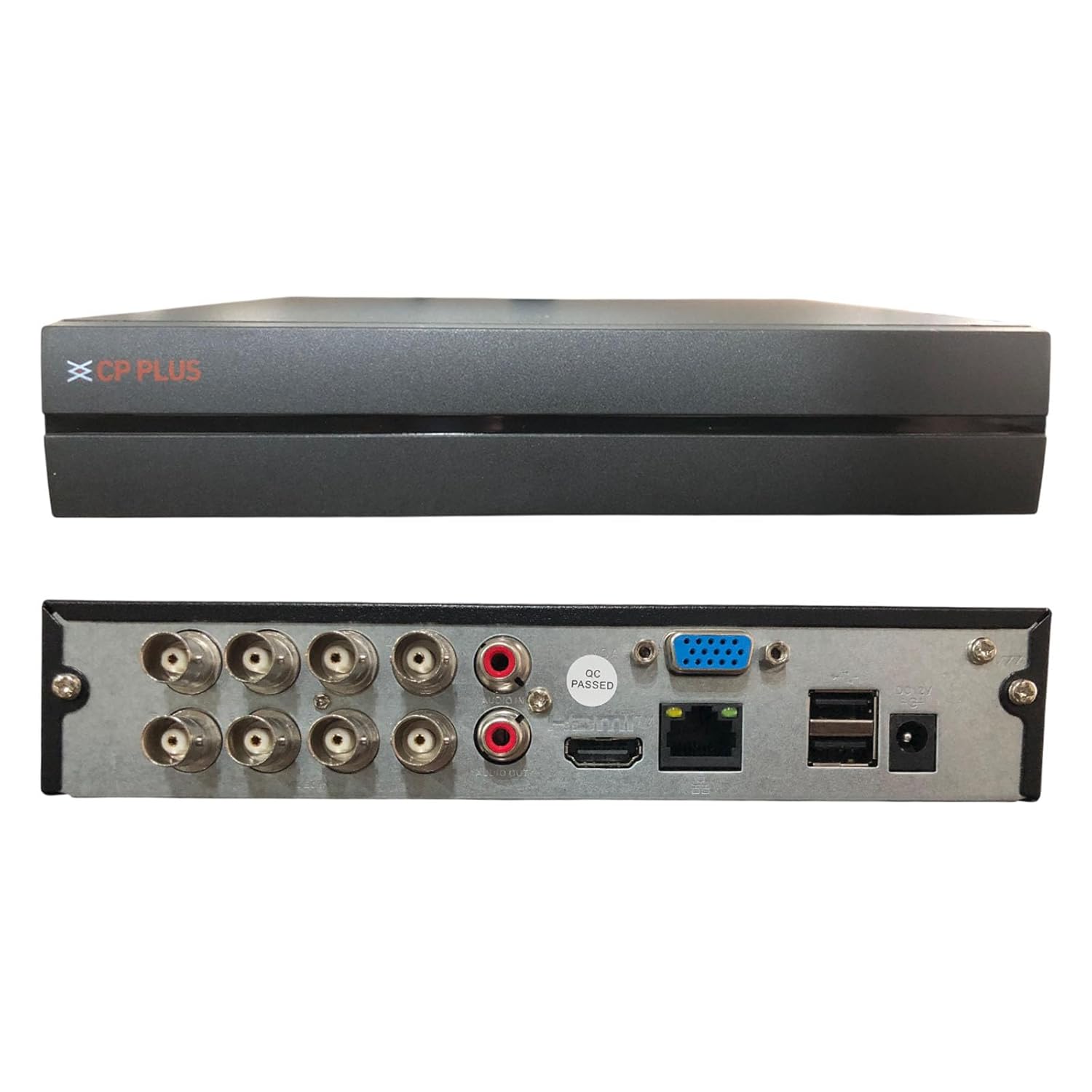
Image: Rear panel of the CP PLUS CP-UVR-0801E1-IC2 DVR, displaying various input/output ports including BNC connectors for cameras, RCA audio inputs/output, VGA, HDMI, Ethernet, USB ports, and power input.
- BNC વિડિઓ ઇનપુટ્સ: Connect up to 8 analog HD or CVBS cameras.
- Audio Inputs/Output (RCA): ઓડિયો રેકોર્ડિંગ અને પ્લેબેક માટે.
- વીજીએ આઉટપુટ: VGA મોનિટર સાથે કનેક્ટ કરો.
- HDMI આઉટપુટ: Connect to an HDMI monitor or TV for high-resolution display.
- ઇથરનેટ પોર્ટ (RJ45): For network connection and remote access.
- યુએસબી પોર્ટ્સ: For mouse connection, USB backup, or external storage.
- DC 12V પાવર ઇનપુટ: આપેલ પાવર એડેપ્ટરને કનેક્ટ કરો.
5. સેટઅપ અને ઇન્સ્ટોલેશન
તમારા DVR સિસ્ટમને સેટ કરવા માટે આ પગલાં અનુસરો:
- Hard Drive Installation (Optional): If a hard drive is not pre-installed, open the DVR casing, mount the HDD, and connect the SATA power and data cables. Secure the HDD with screws.
- કેમેરા કનેક્ટ કરો: Connect your analog HD or CVBS cameras to the BNC video input ports on the rear panel. For IP cameras, ensure they are on the same network as the DVR and add them through the DVR's network settings.
- કનેક્ટ ડિસ્પ્લે: Connect a monitor to either the VGA or HDMI output port.
- માઉસ કનેક્ટ કરો: Plug the USB mouse into one of the USB ports.
- નેટવર્ક કનેક્શન: Connect an Ethernet cable from the DVR's RJ45 port to your router or network switch for remote access capabilities.
- પાવર ચાલુ: Connect the provided power adapter to the DC 12V input port and then plug it into a power outlet. The DVR will power on automatically.
- પ્રારંભિક સેટઅપ વિઝાર્ડ: Upon first boot, the DVR will guide you through an initial setup wizard for language, date/time, network settings, and password creation.
6. ઓપરેટિંગ સૂચનાઓ
This section covers basic operation of your DVR.
જીવંત View
After booting, the DVR will display the live view બધા કનેક્ટેડ કેમેરા. તમે સિંગલ-કેમેરા વચ્ચે સ્વિચ કરી શકો છો view અને મલ્ટી-કેમેરા ગ્રીડ view using the on-screen controls or mouse right-click menu.
રેકોર્ડિંગ
- સતત રેકોર્ડિંગ: Configure channels for continuous recording via the Main Menu > Record > Schedule settings.
- ગતિ શોધ રેકોર્ડિંગ: Enable motion detection for specific channels in Main Menu > Alarm > Motion Detect. The DVR will record only when motion is detected, saving storage space.
- મેન્યુઅલ રેકોર્ડિંગ: Click the record icon on the live view interface to start/stop manual recording.
પ્લેબેક
ફરીview રેકોર્ડેડ footage:
- લાઇવ પર રાઇટ-ક્લિક કરો view screen and select "Playback" or navigate to Main Menu > Playback.
- Select the date and channels you wish to review.
- Use the timeline to navigate through recordings. Green segments typically indicate continuous recording, while red segments indicate motion-triggered events.
દૂરસ્થ મોનીટરીંગ
The DVR supports remote access via mobile devices and PC software:
- મોબાઇલ એપ્લિકેશન: Download the official CP Plus mobile application (e.g., "CP Plus gCMOB" or similar) from your device's app store. Add your DVR using its serial number or IP address.
- CMS Software: Install the CP Plus CMS (Central Monitoring Software) on your PC. This software allows for centralized management of multiple DVRs/NVRs.
- Ensure your DVR is connected to the internet and port forwarding is configured on your router if direct IP access is desired (P2P/Cloud access usually bypasses this).
7. જાળવણી
Regular maintenance ensures optimal performance and longevity of your DVR.
- સફાઈ: Gently wipe the exterior of the DVR with a soft, dry cloth. Do not use liquid cleaners or aerosols. Ensure ventilation openings are free from dust and debris.
- ફર્મવેર અપડેટ્સ: Periodically check the official CP PLUS website for firmware updates. Updating firmware can improve performance, add new features, and fix bugs. Follow the instructions provided with the firmware update carefully.
- હાર્ડ ડ્રાઈવ આરોગ્ય: Monitor the health of your hard drive through the DVR's system information. Consider replacing the HDD if errors or warnings appear.
- પાસવર્ડ સુરક્ષા: Regularly change your DVR's password to a strong, unique combination of characters.
8. મુશ્કેલીનિવારણ
આ વિભાગ તમને આવી શકે તેવી સામાન્ય સમસ્યાઓનું નિરાકરણ લાવે છે.
| સમસ્યા | સંભવિત કારણ | ઉકેલ |
|---|---|---|
| મોનિટર પર કોઈ વિડિઓ આઉટપુટ નથી. | Incorrect cable connection, wrong input selected on monitor, DVR not powered on. | Check HDMI/VGA cable connections. Ensure monitor is on correct input. Verify DVR power. Try a different monitor or cable. |
| કેમેરા દેખાતા નથી. | Loose BNC connection, camera power issue, incompatible camera type, faulty camera. | Check BNC connections. Ensure cameras are powered. Verify camera compatibility (AHD, TVI, CVI, CVBS, IP). Test with a known working camera. |
| DVR રિમોટલી ઍક્સેસ કરી શકાતું નથી. | Network configuration issues, incorrect app settings, firewall blocking. | Ensure DVR is connected to the internet. Verify network settings (IP address, gateway, DNS). Check app settings (serial number/IP). Consult your router manual for port forwarding if necessary. |
| કોઈ રેકોર્ડિંગ નથી. | No hard drive, hard drive not initialized, recording schedule not set, hard drive full. | Install/initialize HDD. Configure recording schedule. Check HDD status and free space. Format HDD if necessary (will erase data). |
If the problem persists, please contact CP PLUS technical support.
9. સ્પષ્ટીકરણો
Detailed technical specifications for the CP PLUS CP-UVR-0801E1-IC2 DVR:
| મોડલ નંબર | CP-UVR-0801E1-IC2 |
| ચેનલો | 8 ચેનલો |
| વિડિઓ કમ્પ્રેશન | એચ .265 + |
| Supported Camera Resolution | Up to 2MP (Analog HD, IP) |
| વિડિઓ ઇનપુટ્સ | 8 x BNC (AHD, TVI, CVI, CVBS & IP) |
| વિડિઓ આઉટપુટ | 1 x એચડીએમઆઈ, 1 એક્સ વીજીએ |
| Audio Inputs/Output | RCA (specific number not detailed, typically 1-4 inputs, 1 output) |
| નેટવર્ક ઇંટરફેસ | 1 x RJ45 Ethernet Port |
| યુએસબી ઈન્ટરફેસ | 2 x USB 2.0 પોર્ટ્સ |
| સંગ્રહ | Supports 1 SATA HDD (capacity not specified, typically up to 6TB or 8TB) |
| પાવર સપ્લાય | ડીસી 12 વી |
| ઉત્પાદનના પરિમાણો (LxWxH) | 25 x 23 x 4.5 સેન્ટિમીટર |
| વસ્તુનું વજન | ૧.૭ કિલો (૧ કિલો ૭૦૦ ગ્રામ) |
Note: Specifications are subject to change without prior notice. For the most up-to-date information, please refer to the official CP PLUS webસાઇટ
10. વોરંટી અને સપોર્ટ
વોરંટી માહિતી
For warranty terms and conditions, please refer to the warranty card included with your product or visit the official CP PLUS webસાઇટ. વોરંટી દાવાઓ માટે ખરીદીના પુરાવા તરીકે તમારી ખરીદી રસીદ રાખો.
ટેકનિકલ સપોર્ટ
If you require technical assistance or have questions regarding your CP PLUS DVR, please contact CP PLUS customer support:
- ઉત્પાદક: Aditya Infotech Limited, CP PLUS
- સંપર્ક નંબર: ૨૦૧૦ (પૂરા પાડવામાં આવેલા ડેટા મુજબ)
- Webસાઇટ: Visit the official CP PLUS webસપોર્ટ સંસાધનો, વારંવાર પૂછાતા પ્રશ્નો અને સંપર્ક ફોર્મ્સ માટેની સાઇટ.


